
3Plus Vibe Pro
3Plus Vibe Pro Smart Watch User Manual
Model: 3PL-VIBEPPRO-BK
1. Pengenalan
The 3Plus Vibe Pro Smart Watch is designed to assist you in monitoring your health and fitness activities. It features a large AMOLED touch screen display, comprehensive health tracking capabilities, and smart notifications. This manual provides instructions for setting up, operating, and maintaining your device.
Ciri-ciri Utama
- 1.78-inch Large AMOLED Touch Screen Display
- 21-Day Battery Life (typical usage)
- Pemantauan Kadar Jantung
- Blood Oxygen (SpO2) Tracking
- Penjejakan Tidur
- Built-in GPS for outdoor activities
- 5 Rintangan Air ATM
- Smart Notifications (calls, texts, calendar, app alerts)
- Pelbagai Mod Sukan
Apa yang ada dalam Kotak
- Jam Tangan Pintar 3Plus Vibe Pro
- Kabel Pengecasan
- Manual Pengguna
2. Persediaan
2.1 Mengecas Peranti
Before initial use, fully charge your 3Plus Vibe Pro Smart Watch. Connect the charging cable to the charging contacts on the back of the watch and to a USB power source. The watch display will indicate charging status.

Rajah 2.1: Depan view of the 3Plus Vibe Pro Watch display.
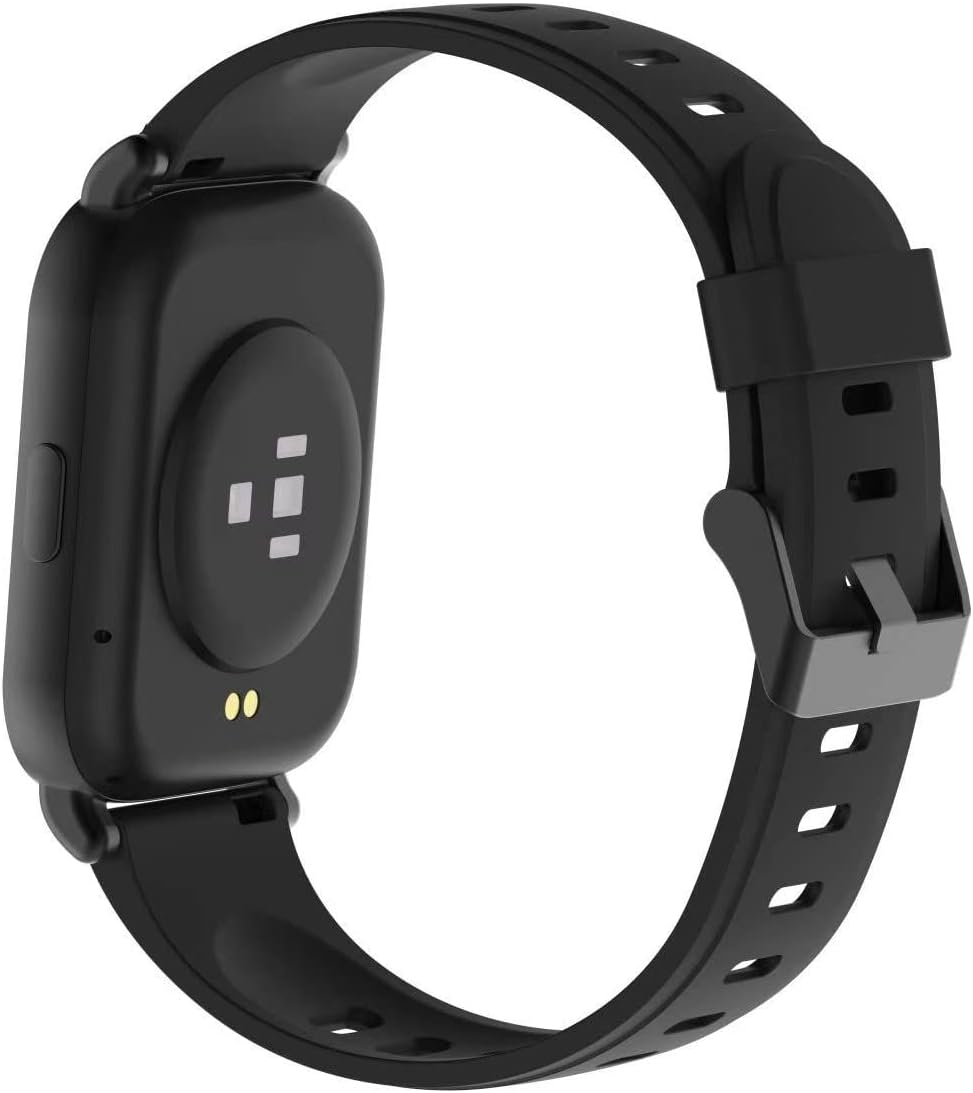
Rajah 2.2: Belakang view of the 3Plus Vibe Pro Watch with charging contacts and sensors.
2.2 Pemasangan Apl dan Berpasangan
- Download the 3Plus App: Cari untuk the "3Plus" app on your smartphone's app store (iOS or Android) and install it.
- Buat Akaun: Buka aplikasi dan ikut arahan pada skrin untuk membuat akaun pengguna baharu atau log masuk jika anda sudah mempunyainya.
- Pasangkan Jam Tangan Anda:
- Pastikan Bluetooth didayakan pada telefon pintar anda.
- Open the 3Plus app and navigate to the device pairing section.
- Select your 3Plus Vibe Pro from the list of available devices.
- Sahkan permintaan berpasangan pada kedua-dua jam tangan dan telefon pintar anda.
2.3 Customizing the Watch Face
You can customize the watch face directly on the device by swiping or through the 3Plus app. The app offers a wider selection of watch faces to personalize your device.

Figure 2.3: The 1.78" AMOLED display of the 3Plus Vibe Pro Watch.
3. Arahan Operasi
3.1 Navigasi Asas
- Skrin Sentuh: Leret ke kiri, kanan, atas atau bawah untuk menavigasi menu dan ciri. Ketik untuk memilih.
- Butang Sisi: Typically used to return to the home screen or activate specific functions.
3.2 Pengesanan Kesihatan dan Kecergasan
The 3Plus Vibe Pro tracks various health and fitness metrics automatically throughout the day. You can view detailed data on the watch or through the connected 3Plus app.
- Langkah, Kalori, Jarak: Automatically recorded.
- Kadar Jantung: Continuous monitoring. For accurate readings, ensure the watch is snug on your wrist.
- Oksigen Darah (SpO2): Track your oxygen levels. For best results, remain still during measurement.
- Penjejakan Tidur: Monitors deep sleep, light sleep, and awake times.
- GPS terbina dalam: Provides real-time route tracking during outdoor exercises.

Figure 3.1: Activity tracking screen on the 3Plus Vibe Pro Watch.

Figure 3.2: Blood oxygen and heart rate measurement screen.

Figure 3.3: Sleep data display on the 3Plus Vibe Pro Watch.
3.3 Mod Sukan
The watch includes multiple sports modes to track specific workouts. Select the appropriate mode before starting an activity for more accurate data collection.
Video 3.1: Official product video demonstrating various features including sports modes, GPS, and notifications. This video highlights the watch's capabilities for active lifestyles.
3.4 Pemberitahuan Pintar
Receive call, text, calendar, and smartphone app notifications directly on your watch when your phone is nearby and connected via Bluetooth. Quick replies and voice replies are available on Android devices only.

Figure 3.4: Notifications displayed on the 3Plus Vibe Pro Watch screen.
3.5 Tahan Air
The 3Plus Vibe Pro has a 5 ATM water resistance rating, making it suitable for swimming, showering, snorkeling, and exposure to rain. It is not recommended for high-speed water sports or diving.

Figure 3.5: The 3Plus Vibe Pro Watch demonstrating its water resistance.
4. Penyelenggaraan
4.1 Membersihkan Jam Tangan Anda
- Bersihkan jam tangan dan tali jam tangan anda secara berkala dengan kain lembutamp kain.
- Elakkan menggunakan bahan kimia yang keras atau bahan yang melelas, kerana ini boleh merosakkan peranti.
- Pastikan jam tangan benar-benar kering sebelum dicas.
4.2 Penjagaan Bateri
- To prolong battery life, avoid exposing the watch to extreme temperatures.
- Cas jam tangan sepenuhnya sebelum tempoh tidak aktif yang lama.
- While the watch boasts a long battery life, individual usage patterns and settings can affect actual duration.
4.3 Langkah Berjaga-jaga Rintangan Air
- Although rated 5 ATM, avoid pressing buttons underwater.
- Do not expose the watch to hot water, steam, or detergents, as this may compromise the water seal.
- If the watch gets wet, dry it thoroughly before charging or using the side button.
5. Penyelesaian masalah
5.1 Isu dan Penyelesaian Biasa
| Isu | Kemungkinan Punca / Penyelesaian |
|---|---|
| Jam tangan tidak dipasangkan dengan telefon |
|
| Inaccurate heart rate/blood oxygen readings |
|
| Hayat bateri pendek |
|
| Watch not responding / Screen blank |
|
| Alarm/Timer functionality issues |
|
If you encounter issues not listed here or if the suggested solutions do not resolve the problem, please contact 3Plus customer support.
6. Spesifikasi
| Ciri | Perincian |
|---|---|
| Nombor Model | 3PL-VIBEPPRO-BK |
| Saiz Paparan | 1.78 Inci AMOLED |
| Dimensi Produk | 0.39 x 10.63 x 1.57 inci |
| Berat Barang | 2.4 auns |
| Bateri | 1 CR5 battery (included), 280 mAh Lithium Ion |
| Sistem Operasi | Android, Apple iOS compatible |
| Ketersambungan | Bluetooth, GPS (True) |
| Tahan Air | 5 ATM |
| Kapasiti Penyimpanan Memori | 16 MB |
| Saiz Terpasang Memori RAM | 32 MB |
7. Waranti dan Sokongan
For warranty information and customer support, please refer to the documentation included with your purchase or visit the official 3Plus webtapak. Anda juga boleh melawat 3Plus Store on Amazon untuk sumber tambahan.
If you require technical assistance or have questions about your 3Plus Vibe Pro Smart Watch, please contact 3Plus customer service directly.
Ask a question about this manual
Ask about setup, troubleshooting, compatibility, parts, safety, or missing instructions. Manuals+ will review the question and use this page’s manual context to help answer it.