
1. Pengenalan
This manual provides detailed instructions for the proper use and maintenance of your Casio G-Shock G-5600UE-1 digital watch. Designed for durability and functionality, this timepiece features shock resistance, 200-meter water resistance, and Tough Solar power. Please read this manual thoroughly to ensure optimal performance and longevity of your watch.
2. Produk Lebihview
2.1 Ciri-ciri Utama
- Shock Resistant (G-SHOCK construction)
- Rintangan Air 200 Meter
- Tough Solar Power (solar charging system)
- LED Backlight with Afterglow
- World Time (supports multiple time zones)
- 1/100-Second Stopwatch
- Pemasa Undur
- Multi-function Alarms and Hourly Isyarat Masa
- Full Auto Calendar (pre-programmed until 2099)
- Format 12/24-Jam
- Flash Alert (flashes with buzzer for alarms, hourly time signal, countdown timer time-up alarm)
2.2 Komponen Jam Tangan
The Casio G-Shock G-5600UE-1 features a standard four-button configuration for navigation and function control.
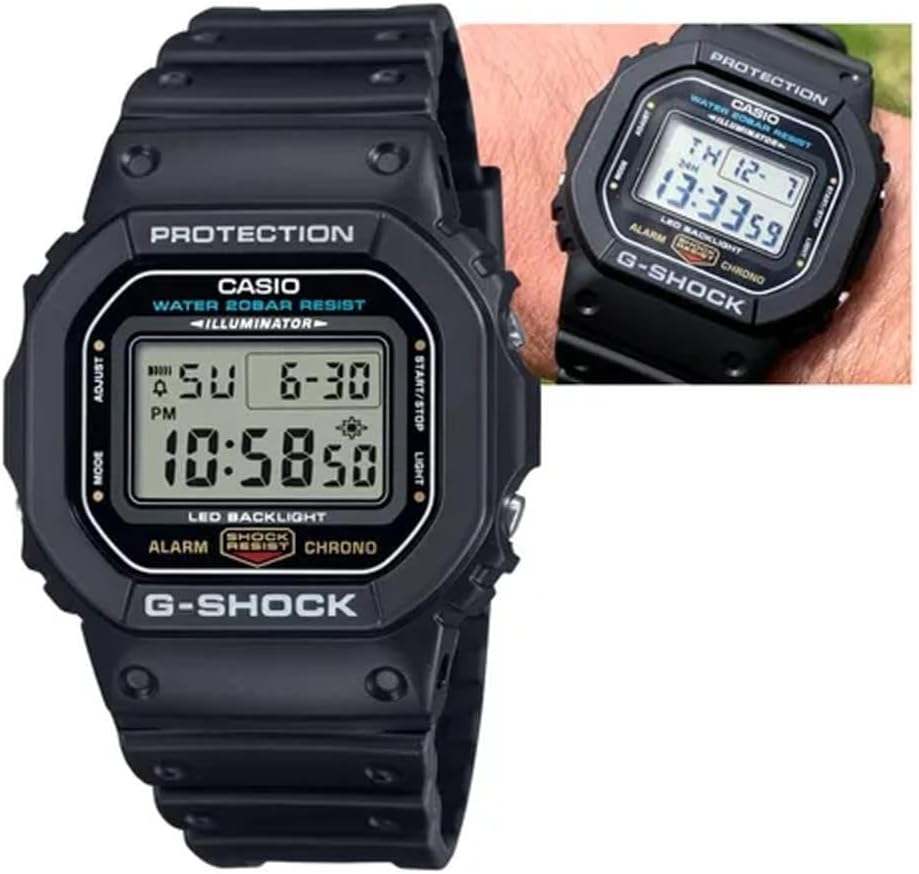
Rajah 1: Depan view of the Casio G-Shock G-5600UE-1 digital watch. The display shows time, date, and day. Buttons are located on the left (MODE, ADJUST) and right (START/STOP, LIGHT) sides of the case.
- Butang LARUT (Kiri Atas): Digunakan untuk masuk dan keluar dari mod tetapan, dan untuk mengesahkan tetapan.
- Butang MOD (Kiri Bawah): Used to cycle through the watch's various modes (Timekeeping, World Time, Alarm, Stopwatch, Countdown Timer).
- Butang CAHAYA (Kanan Atas): Activates the LED backlight. Also used to increase values during setting.
- START/STOP Button (Bottom Right): Used to start/stop stopwatch and countdown timer operations. Also used to decrease values during setting.
3. Persediaan
3.1 Initial Charging (Tough Solar)
Your watch is equipped with Tough Solar technology, which converts light into power. Before initial use, or if the watch display is blank, expose the watch face to bright light (e.g., sunlight or a bright window) for several hours to ensure it is sufficiently charged. Avoid prolonged exposure to extreme heat.
3.2 Setting the Home City and Time
- Dalam Mod Penjagaan Masa, tahan butang SESUAIKAN butang sehingga kod bandar mula berkelip. Ini menunjukkan mod tetapan.
- Gunakan CAHAYA dan MULA/BERHENTI butang untuk memilih kod Bandar Rumah yang anda inginkan.
- Tekan ke MODE butang untuk melihat tetapan lain: DST (Waktu Penjimatan Siang), format 12/24 jam, Saat, Jam, Minit, Tahun, Bulan, Hari.
- Untuk setiap tetapan, gunakan CAHAYA dan MULA/BERHENTI butang untuk melaraskan nilai.
- Setelah semua tetapan dikonfigurasikan, tekan butang SESUAIKAN butang untuk keluar dari mod tetapan.
4. Arahan Operasi
4.1 Mod Navigasi
Tekan ke MODE button to cycle through the watch's modes in the following order:Timekeeping Mode → World Time Mode → Alarm Mode → Stopwatch Mode → Countdown Timer Mode → Timekeeping Mode.
4.2 Mod Waktu Dunia
Dalam Mod Waktu Dunia, anda boleh view the current time in 48 cities (29 time zones) around the world.
- Tekan ke MULA/BERHENTI button to scroll through city codes.
- To toggle Daylight Saving Time (DST) for the currently displayed city, hold down the SESUAIKAN button for approximately two seconds.
4.3 Mod Penggera
The watch has multiple alarms and an hourlisyarat masa y.
- In Alarm Mode, use the MULA/BERHENTI button to select the desired alarm (AL1, AL2, AL3, AL4, AL5, SNZ for Snooze Alarm, or SIG for Hourly Time Signal).
- tahan SESUAIKAN butang sehingga waktu penggera mula berkelip.
- Gunakan CAHAYA dan MULA/BERHENTI buttons to set the hour and minute.
- Tekan ke SESUAIKAN butang untuk keluar dari mod tetapan.
- Tekan ke MULA/BERHENTI button to toggle the alarm or hourlIsyarat masa y HIDUP/MATI.
4.4 Mod Jam randik
Jam randik mengukur masa berlalu, masa perpecahan, dan dua penamat.
- In Stopwatch Mode, press the MULA/BERHENTI button to start and stop the measurement.
- Tekan ke SESUAIKAN butang untuk menetapkan semula jam randik kepada sifar.
4.5 Mod Pemasa Undur
The countdown timer can be set for a period of 1 minute to 24 hours.
- In Countdown Timer Mode, hold down the SESUAIKAN button until the current countdown start time flashes.
- Gunakan CAHAYA dan MULA/BERHENTI buttons to set the desired countdown start time.
- Tekan ke SESUAIKAN butang untuk keluar dari mod tetapan.
- Tekan ke MULA/BERHENTI button to start and stop the countdown.
- Apabila undur mencapai sifar, penggera akan berbunyi. Tekan sebarang butang untuk menghentikan penggera.
4.6 Lampu Belakang LED
Tekan ke CAHAYA butang untuk menerangi paparan dengan mudah viewing in low-light conditions. The backlight duration can typically be adjusted in the Timekeeping Mode settings.
5. Penyelenggaraan
5.1 Power Management (Tough Solar)
To ensure stable operation, expose the watch to light regularly. The watch has a power saving function that turns off the display when left in the dark for a certain period. The power indicator on the display shows the current charge level.
- Exposure to Light: Place the watch where it can receive direct sunlight or strong artificial light.
- Elakkan halangan: Ensure the watch face is not covered by clothing or other objects.
- Tahap Caj: Monitor the charge indicator. If it drops to a low level, expose the watch to light immediately.
5.2 Tahan Air
Your G-Shock G-5600UE-1 is water resistant to 200 meters (20 BAR). This means it is suitable for showering, swimming, and diving (excluding saturation diving).
- Do not operate buttons while the watch is submerged in water or wet.
- After exposure to saltwater, rinse the watch with fresh water and wipe it dry with a soft cloth.
- Elakkan daripada mendedahkan jam tangan kepada air panas atau wap, kerana ini boleh merosakkan pengedapnya.
5.3 Pembersihan
Wipe the watch and band with a soft, dry cloth to remove dirt and moisture. For stubborn dirt, use a soft brush with mild soap and water, then rinse thoroughly and dry. Avoid using chemical cleaners or solvents.
6. Penyelesaian masalah
- Paparan kosong atau malap: The watch may be low on charge. Expose it to bright light for several hours. Ensure the power saving function is not active (if in a dark environment).
- Masa tidak tepat: Re-check your Home City setting and DST setting. Perform a manual time adjustment as described in Section 3.2.
- Butang tidak bertindak balas: Ensure the watch is not in a mode that locks button operations. If submerged or wet, dry the watch thoroughly before attempting to operate buttons.
- Air di dalam jam tangan: If you notice condensation or water droplets inside the watch, stop using it immediately and contact Casio service for inspection.
7. Spesifikasi
| Nombor Model | G-5600UE-1 |
| Case Dimensions (L×W×H) | 48.9 × 42.8 × 13.4 mm |
| Berat badan | 52g |
| Case and Band Material | damar |
| Kristal | Kaca Mineral |
| Tahan Air | 200 Meter (20 BAR) |
| Sumber Kuasa | Solar Tough (Berkuasa Suria) |
| Jenis Bateri | 1 bateri Lithium Metal (termasuk) |
| Approx. Battery Life (without solar charge) | 2 years on CR2016 (Note: Tough Solar power system significantly extends operational life with regular light exposure.) |
| Ketepatan | ±15 saat sebulan |
| Lampu latar | Electro-luminescent backlight with Afterglow |
| Ciri Khas | Shock Resistant, World Time, 1/100-second Stopwatch, Countdown Timer, Multi-function Alarms, Hourly Time Signal, Full Auto Calendar, 12/24-hour format, Flash Alert |
8. Waranti dan Sokongan
Your Casio G-Shock G-5600UE-1 watch is covered by a manufacturer's warranty. For specific warranty terms, service, or technical support, please refer to the warranty card included with your purchase or visit the official Casio webtapak.
Sokongan Rasmi Casio: https://www.casio.com/us/support/