
Sovol SV04
Sovol SV04 3D Printer Instruction Manual
Model: SV04
1. Pengenalan
The Sovol SV04 is an advanced 3D printer featuring an Independent Dual Extruder (IDEX) system, designed for versatility and high-quality printing. It offers a large build volume of 300x300x400mm, enabling the creation of substantial models. Key features include automatic bed leveling for consistent first layers, a 32-bit TMC2209 silent mainboard for quiet operation, and a flexible magnetic print bed for easy print removal. This manual provides essential information for assembly, operation, and maintenance to ensure optimal performance of your SV04 3D printer.

Gambar 1: Lebihview of Sovol SV04 3D Printer key features.
2. Maklumat Keselamatan
Please read all safety instructions carefully before operating the Sovol SV04 3D Printer. Failure to follow these instructions may result in injury or damage to the printer.
- Keselamatan Elektrik: Ensure the printer is connected to a grounded power outlet. Do not operate with wet hands or in damp conditions. Disconnect power before performing any maintenance or assembly.
- Permukaan Panas: The print nozzle and heated bed reach high temperatures during operation. Avoid touching these components to prevent burns. Allow components to cool before handling.
- Bahagian bergerak: Keep hands, hair, and loose clothing away from moving parts during operation to prevent entanglement.
- Pengudaraan: Operate the printer in a well-ventilated area, especially when printing with materials that may emit fumes.
- Pengendalian Filamen: Use appropriate filament for your printer. Store filament in a dry environment to prevent moisture absorption.
- Kanak-kanak dan Haiwan Kesayangan: Keep the printer out of reach of children and pets. Adult supervision is required if children are present.
3. Kandungan Pakej
Verify that all components are present in the package before proceeding with assembly.
- Sovol SV04 3D Printer (partially assembled)
- Independent Dual Extruders (pre-installed)
- Flexible Magnetic Print Bed
- Skrin Sentuh LCD 4.3 inci
- Filament Spool Holders
- Kabel Kuasa
- Kabel USB
- SD Card (includes test models and software)
- Tool Kit (wrenches, screwdrivers, pliers, nozzle cleaning needle, etc.)
- Sample Filamen
- Manual Pengguna (dokumen ini)
4. Perhimpunan
The Sovol SV04 features a modular design for quick and straightforward assembly. Most major components are pre-assembled.
- Membongkar: Keluarkan semua komponen dari pembungkusan dengan berhati-hati. Periksa sebarang kerosakan semasa transit.
- Base and Gantry Assembly: Attach the gantry frame to the printer base using the provided screws. Ensure all connections are secure.
- Extruder Installation: The independent dual extruders are typically pre-installed. Verify they are securely mounted on the X-axis.
- Filament Spool Holders: Mount the filament spool holders onto the top bar of the gantry.
- Sambungan Pendawaian: Connect all cables according to the included wiring diagram. Pay close attention to the extruder, limit switch, and motor connections.
- Flexible Print Bed: Place the flexible magnetic print bed onto the heated bed platform.
5. Persediaan Awal
Before your first print, perform the following initial setup steps.
5.1. Kemas Kini Perisian Tegar
It is highly recommended to download and install the latest firmware for the SV04 from the official Sovol website. This ensures you have the most up-to-date features and bug fixes.
5.2. Automatic Bed Leveling
The SV04 is equipped with an automatic bed leveling sensor to ensure optimal nozzle-to-bed distance across the entire print surface.
- Navigate to the 'Leveling' menu on the LCD touchscreen.
- Select 'Auto Level' to initiate the automatic bed leveling process. The sensor will probe multiple points on the print bed.
- After auto-leveling, perform a Z-offset calibration if necessary to fine-tune the first layer adhesion.

Figure 2: Automatic bed leveling in progress.
5.3. Extruder Calibration
For optimal dual-color or dual-material printing, ensure both extruders are properly calibrated for alignment and extrusion.
- Refer to the included SD card for calibration models and detailed instructions on adjusting X and Y offsets for the second extruder.
- Adjust E-steps for each extruder to ensure accurate filament extrusion.
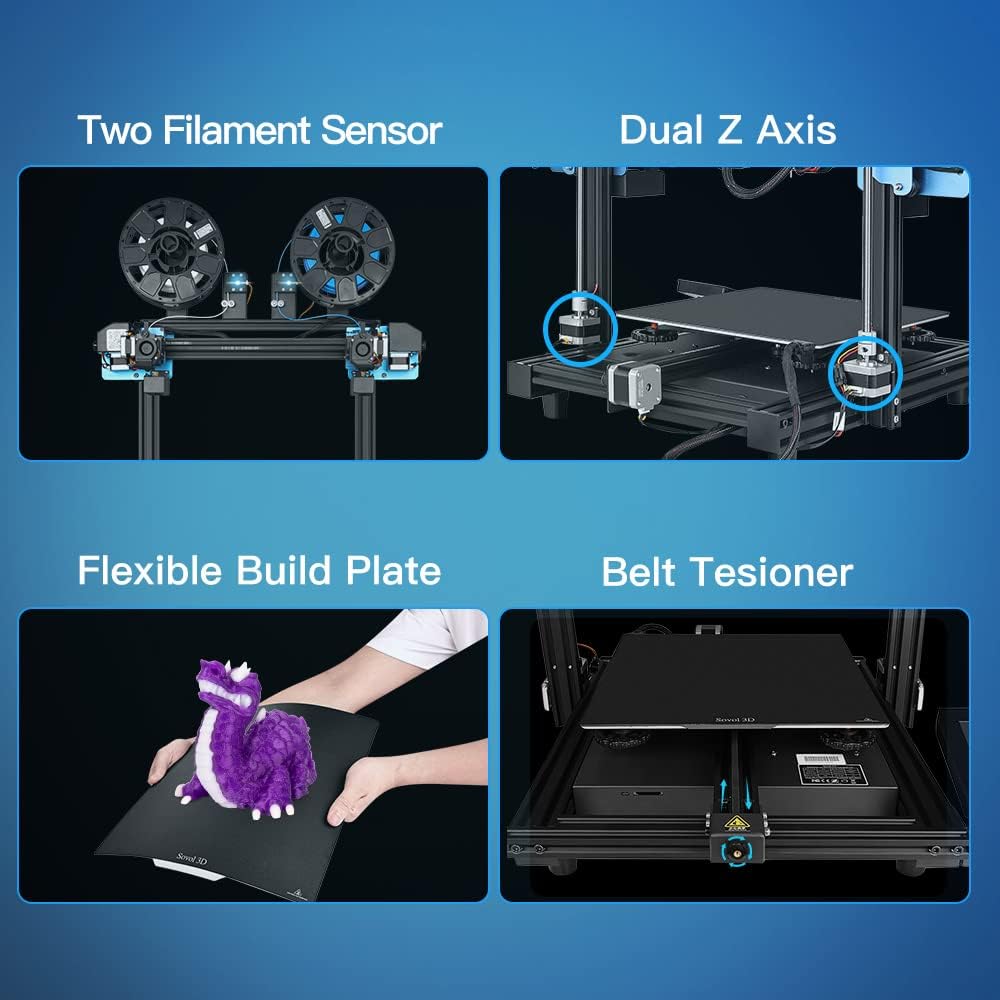
Figure 3: Key components including filament sensors and dual Z-axis.
6. Arahan Operasi
This section covers basic operation, including filament loading and utilizing the various printing modes.
6.1. Pemuatan Filamen
The SV04 supports a wide range of filaments, including PLA, ABS, PETG, TPU, PC, PA, Wood, ASA, and PVA.
- Letakkan gelendong filamen pada pemegang gelendong.
- Feed the filament through the filament sensor and into the extruder's input hole.
- Heat the nozzle to the appropriate temperature for your filament type.
- Manually push the filament until it extrudes smoothly from the nozzle.

Figure 4: Filament loading for dual extruders.
6.2. Printing Modes
The independent dual extruders allow for four distinct printing modes:
- Mod Tunggal: Uses one extruder to print a single model.
- Mod Dwi: Prints a single model using two different colors or materials.
- Mod Cermin: Prints two mirrored copies of a model simultaneously.
- Mod Pendua: Prints two identical copies of a model simultaneously.

Figure 5: The four different printing modes.
6.3. Using the LCD Touchscreen
The 4.3-inch LCD touchscreen provides an intuitive interface for controlling the printer.
- Navigate through menus using touch gestures.
- Access print files daripada kad SD.
- Monitor print progress, temperature, and other parameters.
- Adjust settings such as print speed, fan speed, and filament change options.

Figure 6: The 4.3-inch LCD touchscreen interface.
6.4. Resume Printing Function
The SV04 features a resume printing function, allowing you to continue a print from the last layer after a power outage atau gangguan.

Figure 7: Resume printing capability.
7. Penyelenggaraan
Regular maintenance ensures the longevity and consistent performance of your 3D printer.
- Pembersihan Katil Cetak: Clean the flexible magnetic print bed with isopropyl alcohol after each print to ensure good adhesion for subsequent prints.
- Penyelenggaraan muncung: Periodically check nozzles for clogs. Use the provided cleaning needle to clear any blockages. Replace worn-out nozzles as needed.
- Ketegangan Tali Pinggang: Inspect the X, Y, and Z axis belts for proper tension. Adjust the belt tensioners if belts appear loose to prevent print quality issues.
- Pelinciran: Apply a small amount of lubricant to the Z-axis lead screws periodically.
- Kemas kini Firmware: Regularly check the Sovol website for new firmware versions and update as recommended.
8. Penyelesaian masalah
Bahagian ini menangani isu biasa yang mungkin anda hadapi semasa operasi.
| Masalah | Kemungkinan Punca | Penyelesaian |
|---|---|---|
| Lekatan Lapisan Pertama yang Lemah | Bed not level, incorrect Z-offset, dirty print surface, incorrect bed temperature. | Perform auto-leveling and Z-offset calibration. Clean the print bed. Adjust bed temperature in slicer settings. |
| Filament Not Extruding | Clogged nozzle, tangled filament, incorrect temperature, extruder gear slip. | Clear nozzle with cleaning needle. Untangle filament. Check nozzle temperature. Adjust extruder tension. |
| Peralihan Lapisan | Loose belts, print head hitting print, excessive print speed. | Check and tighten belts. Ensure print is securely adhered to the bed. Reduce print speed. |
| Operasi Bising | Loose components, fan noise. | Check all screws and connections. While the mainboard is silent, some fans may produce noise; ensure they are clear of obstructions. |
| Filament Sensor Errors | Filament not inserted correctly, sensor malfunction, incorrect wiring. | Ensure filament is properly seated. Check sensor connections. If issues persist, the sensor may need replacement. |
9. Spesifikasi
Technical specifications for the Sovol SV04 3D Printer.
| Ciri | Perincian |
|---|---|
| Pengeluar | Sovol |
| Nombor Model | SV04 |
| Dimensi Produk | 73 x 70 x 30 cm |
| Berat Barang | 15 Kilogram |
| Jenis Extruder | Independent Dual Direct Drive Extruder (IDEX) |
| Membina Kelantangan | 300 x 300 x 400 mm |
| Papan utama | 32-bit TMC2209 Silent Mainboard |
| Meratakan Katil | Automatic Bed Leveling Sensor |
| Cetak Permukaan | Flexible Magnetic Print Bed |
| Ketersambungan | Kad SD |
| Filamen yang Disokong | PLA, ABS, PETG, TPU, PC, PA, Wood, ASA, PVA |

Figure 8: Large build volume of the SV04.
10. Waranti dan Sokongan
Sovol provides customer support and warranty services for the SV04 3D Printer.
- Maklumat Waranti: Please refer to the warranty card included with your product or visit the official Sovol webtapak untuk terma dan syarat jaminan terperinci.
- Sokongan Teknikal: For technical assistance, troubleshooting beyond this manual, or spare parts, please contact Sovol customer support through their official webtapak atau maklumat hubungan yang diberikan dalam pembungkusan produk anda.
Ask a question about this manual
Ask about setup, troubleshooting, compatibility, parts, safety, or missing instructions. Manuals+ will review the question and use this page’s manual context to help answer it.