
1. Pengenalan
Thank you for choosing the OSALO OS-5M 12-Digit Desktop Calculator. This manual provides essential information for the proper setup, operation, and maintenance of your calculator. Please read it thoroughly before use to ensure optimal performance and longevity of the device.
The OSALO OS-5M calculator is designed for ease of use with its large buttons and extra-large 12-digit display. It is suitable for various environments, including offices, schools, and retail settings. The calculator operates on both solar power and a backup battery, ensuring reliable performance.
2. Maklumat Keselamatan
- Amaran Bateri: The included battery is for single use only. Do not attempt to recharge it.
- Sumber Kuasa: The solar panel provides limited power and is intended to supplement the battery, not to charge it.
- Storan: Store the calculator in a dry place, away from extreme temperatures and direct sunlight for prolonged periods.
- Pembersihan: Use a soft, dry cloth to clean the calculator. Do not use liquid cleaners or abrasive materials.
- Pembongkaran: Do not attempt to disassemble or repair the calculator yourself. Contact qualified personnel for service.
3. Kandungan Pakej
- 1 x OSALO OS-5M Desktop Calculator
- 1 x Bateri AAA (dipasang terlebih dahulu atau disertakan secara berasingan)
- 1 x Manual Pengajaran Bahasa Inggeris
4. Produk Lebihview
The OSALO OS-5M calculator features a clear layout and ergonomic design for comfortable and efficient use.

Rajah 4.1: Depan view of the OSALO OS-5M Desktop Calculator.

Rajah 4.2: Jarak dekat view highlighting the large buttons and clear 12-digit display.
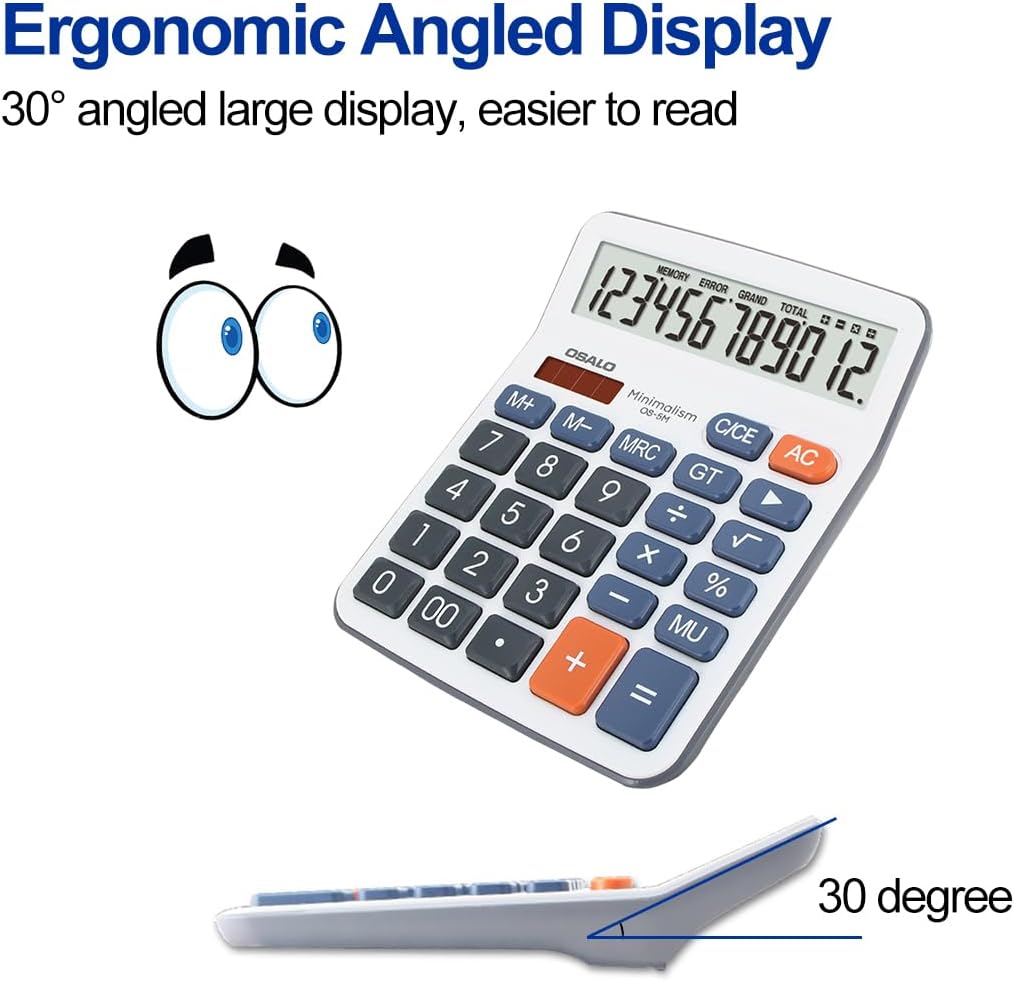
Rajah 4.3: Sisi view demonstrating the ergonomic 30-degree tilted LCD screen for improved readability.

Rajah 4.4: Terperinci view of the clear LCD screen, soft and silent keys, and the specially embossed '5' marking key for tactile recognition.

Rajah 4.5: Depan dan belakang views of the calculator, showing the overall design and battery compartment on the rear.
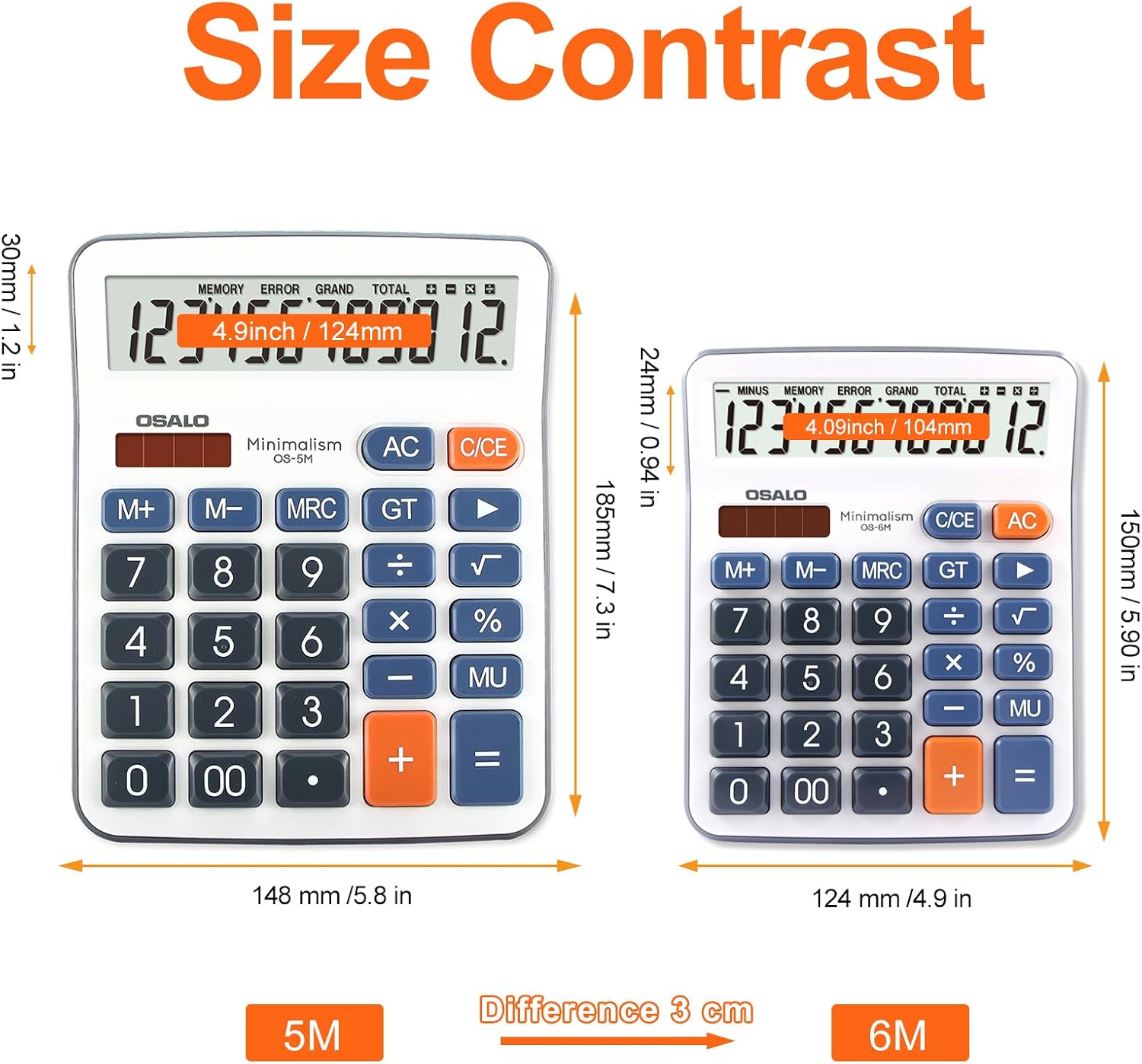
Figure 4.6: Size comparison of the OSALO OS-5M (left) with a smaller calculator, illustrating its larger dimensions for desktop use.

Gambar 4.7: Cthamples of the OSALO OS-5M calculator being used in different environments, such as a supermarket, office, business, and school.
Video 4.1: 360 darjah view of the OSALO OS-5M calculator, showcasinreka bentuknya dari semua sudut.
5. Persediaan
5.1 Pemasangan Bateri
The OSALO OS-5M calculator requires one AAA battery for operation. The battery may be pre-installed or included separately in the package. If not pre-installed, please follow these steps:
- Cari petak bateri di bahagian belakang kalkulator.
- Gently slide open the battery compartment cover.
- Masukkan satu bateri AAA, pastikan terminal positif (+) dan negatif (-) sejajar dengan betul dengan tanda di dalam petak.
- Tutup penutup petak bateri dengan selamat.
Nota: The calculator also features a solar panel for power. The solar panel helps extend battery life by providing power in well-lit conditions but does not recharge the installed battery.
6. Operasi
6.1 Pengiraan Asas
Untuk melakukan operasi aritmetik asas:
- Tekan ke ON/C/CE button to turn on the calculator or clear the current entry.
- Enter the first number using the number keys (0-9, 00).
- Press the desired operation key (+, -, ×, ÷). The operation symbol will appear on the display.
- Enter the second number.
- Tekan ke = key to display the result.
6.2 Fungsi Khas
- AC (Semua Jelas): Mengosongkan semua entri dan pengiraan, menetapkan semula kalkulator kepada sifar.
- C/CE (Clear Entry): Clears the last entered number or the current calculation without affecting previous operations in a sequence. Pressing it twice usually acts as an AC.
- M+ (Memory Plus): Menambah nilai yang dipaparkan pada memori.
- M- (Memori Tolak): Menolak nilai yang dipaparkan daripada memori.
- BSMM (Memori Ingat/Kosongkan): Tekan sekali untuk memanggil semula nilai yang disimpan dalam memori. Tekan dua kali untuk mengosongkan memori.
- GT (Jumlah Besar): Displays the grand total of all calculations performed since the last GT clear.
- % (Peratustage): Digunakan untuk peratusantage pengiraan. Untuk example, to calculate 10% of 200, enter 200 × 10 %.
- MU (Tambahan): Digunakan untuk pengiraan margin keuntungan.
- +/- (Perubahan Tanda): Menukar tanda nombor yang dipaparkan (positif kepada negatif, atau negatif kepada positif).
- √ (Akar Segiempat): Mengira punca kuasa dua nombor yang dipaparkan.
6.3 Penutupan Automatik
The calculator is equipped with an automatic shutdown feature. If left idle for approximately 8 minutes, it will automatically power off to conserve battery life. To turn it back on, press the ON/C/CE butang.
7. Penyelenggaraan
7.1 Pembersihan
Untuk mengekalkan rupa dan fungsi kalkulator:
- Lap bahagian luar kalkulator dengan kain lembut dan kering.
- Jangan gunakan pembersih, pelarut yang kasar atau sembur terus ke atas kalkulator.
- Avoid getting moisture into the display or button areas.
7.2 Penggantian Bateri
When the display becomes dim or the calculator functions erratically, it may be time to replace the AAA battery. Follow the battery installation steps in Section 5.1 to replace the battery. Dispose of used batteries according to local regulations.
8. Penyelesaian masalah
| Masalah | Kemungkinan Punca | Penyelesaian |
|---|---|---|
| Kalkulator tidak boleh dihidupkan. | Low or dead battery; insufficient light for solar power. | Replace the AAA battery. Ensure adequate lighting for solar operation. |
| Paparan malap atau berkelip. | Bateri lemah. | Gantikan bateri AAA. |
| Keputusan pengiraan yang salah. | Incorrect key input; complex calculation error. | Clear the calculator with AC and re-enter the calculation carefully. Refer to Section 6 for operation details. |
| Kekunci tidak responsif. | Dust or debris under keys; internal malfunction. | Gently clean around the keys. If the problem persists, contact customer support. |
9. Spesifikasi
| Ciri | Perincian |
|---|---|
| Jenama | OSALO |
| Nombor Model | OS-5M |
| Jenis Paparan | Skrin LCD |
| Saiz Skrin | 4.5 inci |
| Bilangan Digit | 12 |
| Dimensi Produk | 19 x 14.8 x 0.1 cm |
| Berat Barang | 170 g |
| Sumber Kuasa | Solar Powered, 1 AAA Battery (required) |
| bahan | plastik |
| warna | Kelabu |
| Jenis Kalkulator | Perniagaan |
| Tarikh Mula-mula Tersedia | 12 Mei 2022 |
10. Waranti dan Sokongan
For warranty information or technical support, please refer to the contact details provided with your purchase or visit the official OSALO webtapak. Simpan resit pembelian anda sebagai bukti pembelian untuk sebarang tuntutan waranti.