
h555lux
Hawks 555 Lux Digital Receiver User Manual
Model: h555lux
pengenalan
This manual provides comprehensive instructions for the setup, operation, and maintenance of your Hawks 555 Lux Digital Receiver. Please read this manual carefully before using the device to ensure optimal performance and longevity.
Produk Selesaiview
The Hawks 555 Lux is an advanced digital receiver designed for high-definition entertainment. It features 1GB RAM, 8MB internal flash memory, external Wi-Fi, and Bluetooth connectivity. It supports HD 1080 resolution and can store up to 8000 channels. Its robust design ensures durability and high utility.

Figure 1: Hawks 555 Lux Digital Receiver and its packaging.
Kandungan Pakej
Pastikan semua item ada dalam pakej:
- Hawks 555 Lux Digital Receiver
- Alat Kawalan Jauh Bluetooth
- Power Adapter (2 Amp)
- External Wi-Fi Adapter
- Kabel HDMI (jika disertakan)
- Manual Pengguna (dokumen ini)

Figure 2: All components included in the Hawks 555 Lux package.
Panduan Persediaan
1. Menyambungkan Penerima
- Sambungan Kuasa: Connect the power adapter to the DC 12V port on the back of the receiver and plug it into a power outlet.
- Output Video: Connect an HDMI cable from the HD OUT port on the receiver to the HDMI input on your TV.
- Antenna/LNB Input: Connect your satellite dish LNB cable to the LNB IN port on the receiver.
- External Wi-Fi: Insert the external Wi-Fi adapter into one of the USB ports.
- Alat Jauh Bluetooth: Ensure the Bluetooth remote control is paired. Refer to the "Operating" section for pairing instructions if needed.
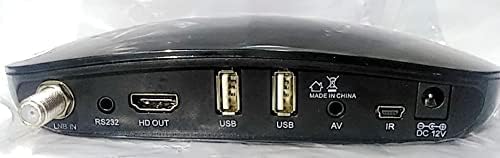
Figure 3: Rear panel connections of the Hawks 555 Lux receiver.
2. Penghidupan Awal dan Imbasan Saluran
- Hidupkan TV anda dan pilih input HDMI yang betul.
- The receiver will power on automatically. Follow the on-screen instructions for initial setup, including language selection and network configuration.
- Perform a channel scan to find available satellite channels. This process may take several minutes.
Arahan Operasi
Fungsi Kawalan Jauh
The Hawks 555 Lux comes with a Bluetooth remote control. Ensure it is paired with the receiver for full functionality.
- Butang Kuasa: Menghidupkan/mematikan penerima.
- Butang Navigasi (Atas/Bawah/Kiri/Kanan/OK): Navigasi menu dan sahkan pilihan.
- Jilid +/-: Melaraskan kelantangan audio.
- Saluran +/-: Menukar saluran.
- Butang Menu: Mengakses menu utama untuk tetapan dan ciri.
- Butang Keluar: Kembali ke skrin sebelumnya atau keluar dari menu.
- Papan kekunci angka: Direct channel input.
- Media Playback Buttons: Play, Pause, Stop, Fast Forward, Rewind for multimedia content.
Network Connectivity (Wi-Fi)
- Pergi ke Menu > Network Settings > Wi-Fi.
- Pilih rangkaian Wi-Fi anda dari senarai.
- Enter the password using the on-screen keyboard and confirm.
- Once connected, the receiver can access online features and updates.
Pengurusan Saluran
- Adding/Editing Channels: Access the channel management menu to scan for new channels, edit existing ones, or delete unwanted channels.
- Favorite Lists: Create custom favorite channel lists for quick access to your preferred channels.
Penyelenggaraan
- Pembersihan: Use a soft, dry cloth to clean the receiver's exterior. Do not use liquid cleaners or abrasive materials.
- Pengudaraan: Ensure the receiver has adequate ventilation. Do not block ventilation openings.
- Kemas kini Firmware: Periodically check for firmware updates via the network settings to ensure optimal performance and access to new features.
- Storan: Jika menyimpan peranti untuk tempoh yang lama, putuskan sambungannya daripada kuasa dan simpan di tempat yang sejuk dan kering.
Menyelesaikan masalah
| Masalah | Kemungkinan Punca | Penyelesaian |
|---|---|---|
| Tiada Kuasa | Kabel kuasa diputuskan; Isu salur keluar kuasa. | Periksa sambungan kuasa; Cuba soket yang berbeza. |
| Tiada Isyarat / Skrin Kosong | Incorrect HDMI input selected on TV; LNB cable disconnected; No channels scanned. | Select correct TV input; Check LNB connection; Perform channel scan. |
| Alat Kawalan Jauh Tidak Bertindak Balas | Bateri lemah/mati; Alat kawalan jauh tidak dipasangkan. | Replace batteries; Re-pair Bluetooth remote (refer to Operating section). |
| Kualiti Gambar Lemah | Weak signal; Incorrect display settings. | Check LNB alignment; Adjust display settings in receiver menu. |
Spesifikasi
| Jenama | Generik |
| Model | h555lux |
| ASIN | B09K93WPX6 |
| RAM | 1 GB |
| Memori Kilat | 8 MB (Dalaman) |
| Teknologi Ketersambungan | Bluetooth, External Wi-Fi |
| Output Video | HD 1080 (1 Total Video Output Port) |
| Mod Keluaran Audio | Stereo or Surround |
| Format Audio yang Disokong | Dolby Digital, DTS, AAC, MP3, PCM |
| semasa | 2 Amp |
| Peranti Serasi | Televisyen |
| warna | Hitam |
| Tarikh Tersedia Pertama | 25 Oktober 2021 |
Waranti dan Sokongan
For warranty information and technical support, please refer to the contact details provided by your retailer or the manufacturer's official webtapak. Simpan resit pembelian anda sebagai bukti pembelian untuk tuntutan waranti.
For further assistance, you may contact the seller through the Amazon platform or visit the product page for updated support information.
Ask a question about this manual
Ask about setup, troubleshooting, compatibility, parts, safety, or missing instructions. Manuals+ will review the question and use this page’s manual context to help answer it.