
pengenalan
The Apple AirPods (3rd Generation) are advanced wireless earbuds designed to deliver an immersive audio experience with features like Spatial Audio, Adaptive EQ, and extended battery life. They are sweat and water resistant, making them suitable for various activities. This manual provides essential information for setting up, operating, maintaining, and troubleshooting your AirPods.
Ciri-ciri Utama:
- Spatial audio with dynamic head tracking for immersive sound.
- Adaptive EQ automatically tunes music to your ears.
- Contoured design for comfortable fit.
- Force sensor for easy control of entertainment and calls.
- Sweat and water resistant for workouts and outdoor use.
- Sehingga 6 jam masa mendengar dengan sekali cas.
- Up to 30 hours total listening time with the MagSafe Charging Case.
- Quick access to Siri.
- Effortless setup and automatic switching between Apple devices.
- Audio sharing with another set of AirPods.
Persediaan
Initial Setup and Pairing:
To set up your AirPods with an Apple device (iPhone, iPad, iPod touch):
- Ensure your Apple device is running the latest iOS/iPadOS version.
- Unlock your Apple device and go to the Home screen.
- Open the lid of your AirPods Charging Case with your AirPods inside, and hold it near your Apple device.
- Animasi persediaan akan muncul pada skrin peranti anda. Ketik Sambung.
- Ikut sebarang arahan pada skrin.
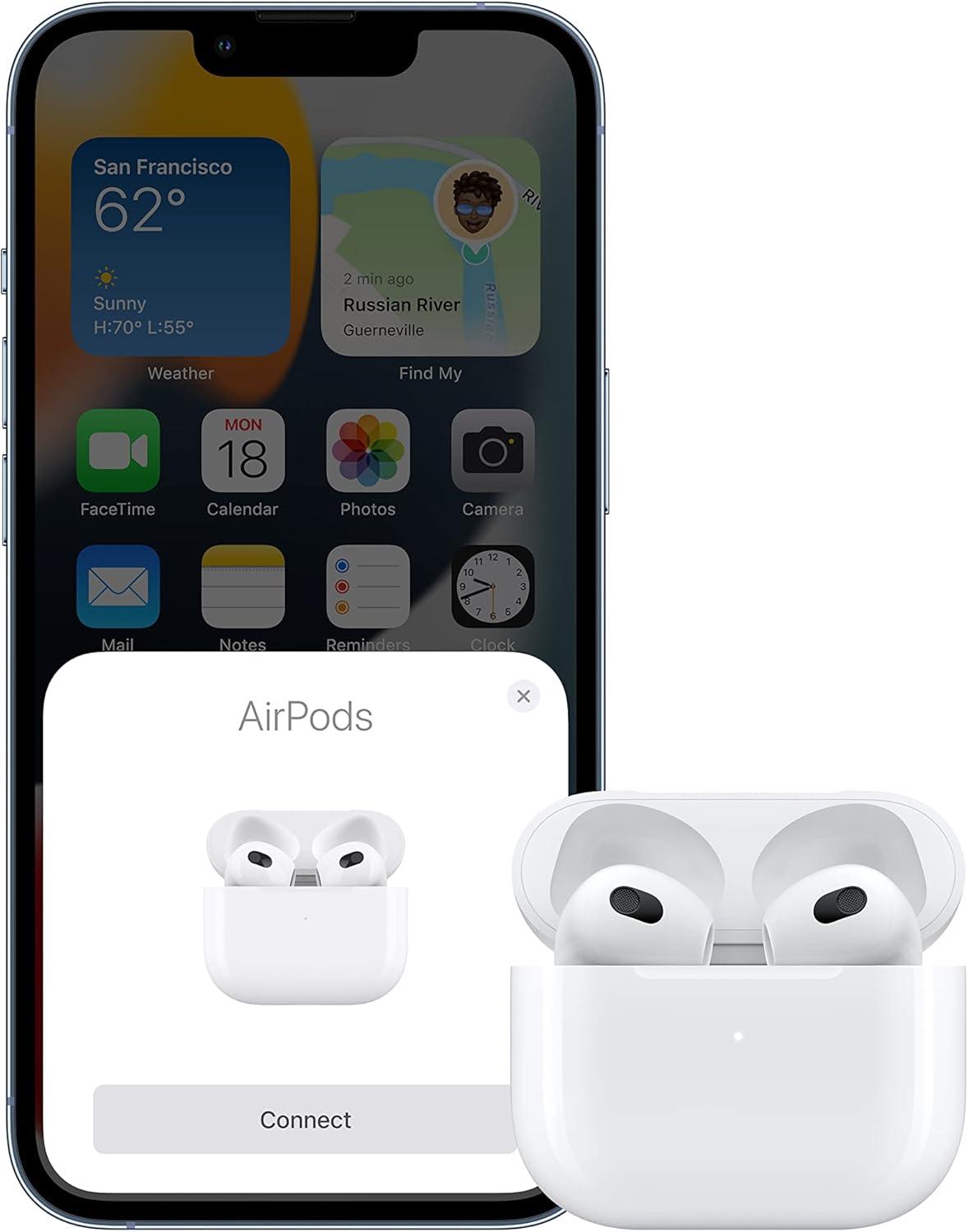
Image: An iPhone screen showing the AirPods connection prompt, with the AirPods (3rd Generation) charging case open beside it, ready for pairing.
Pairing with Non-Apple Devices:
To pair your AirPods with a non-Apple Bluetooth device (e.g., Android phone, PC):
- With your AirPods in the charging case, open the lid.
- Tekan dan tahan butang persediaan di bahagian belakang casing sehingga lampu status berkelip putih.
- On your device, go to Bluetooth settings and select your AirPods from the list of available devices.
Charging Your AirPods and Case:
The AirPods (3rd Generation) come with a MagSafe Charging Case, which can be charged wirelessly or via a Lightning to USB-C cable.
- Pengecasan Tanpa Wayar: Place the charging case with the status light facing up on a MagSafe charger or a Qi-certified charging mat. The status light will indicate charging.
- Pengecasan Berwayar: Connect the Lightning to USB-C cable (included) to the Lightning port on the bottom of the case and the other end to a USB-C power adapter.

Image: The Apple AirPods (3rd Generation) resting in their open MagSafe Charging Case, with a green indicator light visible, signifying charge.
Mengendalikan AirPods Anda
Force Sensor Controls:
The force sensor on the stem of each AirPod allows for easy control of audio playback and calls:
- Tekan sekali: Main, jeda atau jawab panggilan telefon.
- Tekan dua kali: Langkau ke hadapan.
- Tekan tiga kali: Langkau ke belakang.
- Tekan dan tahan: Aktifkan Siri.
Audio Spatial:
Spatial Audio with dynamic head tracking provides a theater-like experience, placing sound all around you. It works with supported content and devices, creating an immersive three-dimensional soundstage that adapts as you move your head.
Penukaran Automatik:
AirPods automatically switch between your active Apple devices (iPhone, iPad, Mac, Apple Watch) that are signed in with the same Apple ID, providing a seamless audio experience without manual re-pairing.
Perkongsian Audio:
You can easily share audio from your iPhone, iPad, iPod touch, or Apple TV with another set of AirPods. Simply bring the second pair of AirPods close to your device and follow the on-screen prompts.
Pengesanan Dalam Telinga:
AirPods use optical sensors and motion accelerometers to detect when they are in your ears. Audio automatically plays when you put them in and pauses when you take them out.
Penyelenggaraan
Cleaning Your AirPods and Charging Case:
Pembersihan berkala membantu mengekalkan kualiti dan kebersihan bunyi:
- Wipe AirPods and the charging case with a soft, dry, lint-free cloth.
- Untuk kotoran degil, ringankan dampen the cloth with isopropyl alcohol. Allow to dry completely before use.
- Do not use abrasive materials or submerge AirPods or the case in liquids.
- Use a dry cotton swab to clean the microphone and speaker meshes.
Tahan Air dan Peluh:
The AirPods (3rd Generation) and MagSafe Charging Case are sweat and water resistant for non-water sports and exercise, and they are rated IPX4 under IEC standard 60529. This means they are resistant to splashing water from any direction. They are bukan kalis air and should not be submerged in water or used for activities like swimming. Resistance may decrease as a result of normal wear.

Image: A person wearing Apple AirPods (3rd Generation) during a physical activity, with visible moisture on their face, illustrating the earbuds' sweat and water resistance.
Hayat Bateri:
Your AirPods provide:
- Up to 6 hours of listening time with a single charge (up to 5 hours with Spatial Audio enabled).
- Up to 4 hours of talk time with a single charge.
- With the MagSafe Charging Case, you can get up to 30 hours of listening time or up to 20 hours of talk time.
- A quick 5-minute charge in the case provides approximately 1 hour of listening time or 1 hour of talk time.
Menyelesaikan masalah
Isu dan Penyelesaian Biasa:
- AirPods tidak bersambung:
- Pastikan Bluetooth didayakan pada peranti anda.
- Check that AirPods are charged.
- Place AirPods in the case, close the lid, wait 15 seconds, then open the lid.
- Mulakan semula peranti anda.
- If issues persist, try resetting your AirPods (see below).
- Sound issues (low volume, distorted audio):
- Clean the speaker meshes on your AirPods.
- Check volume settings on your device.
- Pastikan AirPods dipasang dengan betul di telinga anda.
- Disable Spatial Audio temporarily to see if it resolves the issue.
- Masalah pengecasan:
- Ensure the Lightning cable is securely connected or the case is properly aligned on the wireless charger.
- Cuba kabel pengecasan atau penyesuai kuasa yang berbeza.
- Clean the Lightning port on the case.
Resetting Your AirPods:
If you experience persistent issues, you may need to reset your AirPods:
- Place your AirPods in their charging case and close the lid.
- Tunggu 30 saat, kemudian buka penutup.
- On your Apple device, go to Settings > Bluetooth, tap the i ikon di sebelah AirPods anda, kemudian ketik Lupakan Peranti Ini. Sahkan tindakan anda.
- With the lid open, press and hold the setup button on the back of the case for about 15 seconds, until the status light flashes amber, then white.
- Reconnect your AirPods by following the initial setup steps.
Spesifikasi
Spesifikasi Teknikal:
| Ciri | Perincian |
|---|---|
| Nama Model | AirPods (Generasi ke-3) |
| Nombor Model | MME73AM/A |
| Ketersambungan | Bluetooth 5.0, Apple H1 Chip |
| Sensors (each AirPod) | Dual beamforming microphones, Inward-facing microphone, Skin-detect sensor, Motion-detecting accelerometer, Speech-detecting accelerometer |
| Hayat Bateri (AirPods) | Up to 6 hours listening, up to 4 hours talk time |
| Hayat Bateri (dengan Sarung) | Up to 30 hours listening, up to 20 hours talk time |
| Kes Pengecasan | MagSafe Compatible, Wireless (Qi-certified), Lightning connector |
| Tahan Air | IPX4 (sweat and water resistant) |
| Dimensions (each AirPod) | 0.76 by 0.72 by 1.21 inches (19.21 by 18.26 by 30.79 mm) |
| Dimensi (Bekas Pengecasan) | 1.83 by 0.84 by 2.14 inches (46.40 by 21.38 by 54.40 mm) |
| Weight (each AirPod) | 0.15 auns (4.28 g) |
| Berat (Kes Pengecasan) | 1.34 auns (37.91 g) |
| Komponen yang Disertakan | AirPods (3rd generation), MagSafe Charging Case, Lightning to USB-C Cable, Documentation |
Waranti dan Sokongan
Maklumat Waranti:
Apple AirPods (3rd Generation) are covered by Apple's standard one-year limited warranty, which covers manufacturing defects. For detailed warranty terms and conditions, please refer to the documentation included with your product or visit the official Apple webtapak.
Sokongan Pelanggan:
For further assistance, technical support, or service, please visit the official Apple Support website or contact Apple customer service. You can find comprehensive support resources, FAQs, and contact options at support.apple.com/airpods.