
AOSHIDA RC-15A
Topping RC-15A Remote Control User Manual
Model: RC-15A
Brand: AOSHIDA
1. Pengenalan
This manual provides detailed instructions for the proper use and maintenance of your Topping RC-15A Remote Control. The RC-15A is designed to provide convenient wireless control over various Topping Digital-to-Analog Converters (DACs) and Headphone Amplifiers, enhancing your audio experience.
Sila baca manual ini dengan teliti sebelum mengendalikan peranti ini untuk memastikan prestasi dan jangka hayat yang optimum.
2. Produk Lebihview
The Topping RC-15A is a compact infrared remote control. It features a range of buttons for power, volume adjustment, input selection, and other specific functions depending on the connected Topping device.
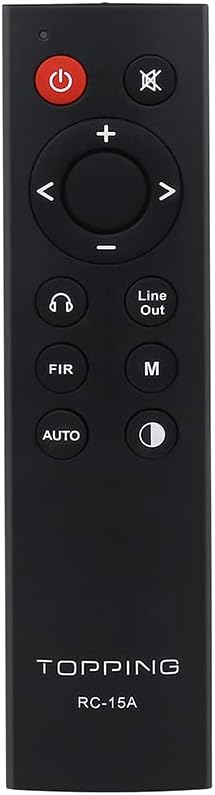
Rajah 2.1: Depan view of the RC-15A remote control, displaying the button layout including power, mute, volume up/down, navigation, input selection, and mode buttons.
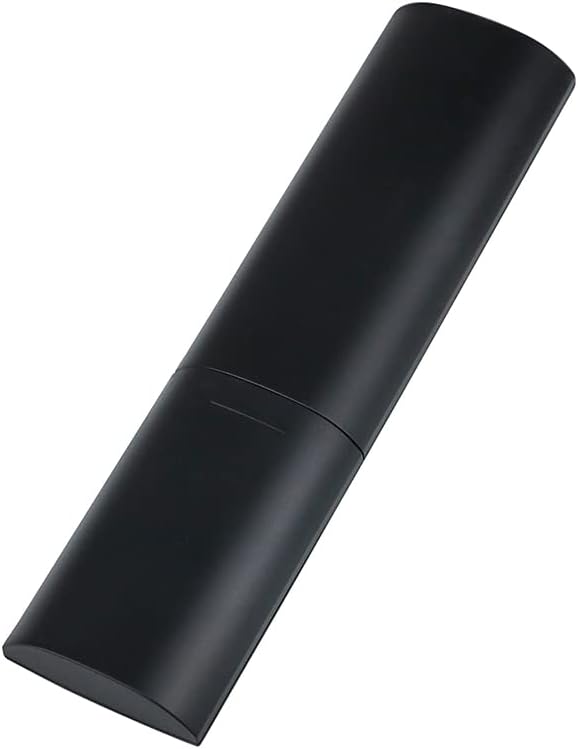
Rajah 2.2: Sisi dan belakang view of the RC-15A remote control, highlighting its sleek, black casing and ergonomic design.
Fungsi Butang:
- Butang kuasa (●): Turns the connected Topping device on or off.
- Butang Redam (✕): Membisukan atau menyahredamkan output audio.
- Kelantangan Naik/Turun (+/-): Menambah atau mengurangkan tahap kelantangan.
- Navigation Buttons (◀ ▶ ▲ ▼): Used for menu navigation or input selection, depending on the device.
- Headphone Output Button (♫): Switches to headphone output mode (if supported by the device).
- Line Out Button: Switches to line output mode (if supported by the device).
- FIR Button: Function varies by device, often related to filter settings.
- Butang M: Mode or Menu button, function varies by device.
- Butang AUTO: Automatic input selection or mode (function varies by device).
- Display Brightness Button (☽): Adjusts the display brightness of the connected device.
3. Persediaan
Pemasangan Bateri:
The RC-15A remote control requires batteries for operation. Batteries are not included and must be purchased separately. It typically uses two AAA batteries (Lithium recommended for longer life).
- Cari petak bateri di belakang alat kawalan jauh.
- Luncurkan penutup bateri ke bawah atau ke arah yang ditunjukkan oleh anak panah untuk membukanya.
- Masukkan dua bateri AAA, pastikan terminal positif (+) dan negatif (-) sejajar dengan tanda di dalam petak.
- Tutup penutup bateri dengan menggesernya kembali ke tempatnya sehingga ia berbunyi klik dengan selamat.
Nota: Tanggalkan bateri jika alat kawalan jauh tidak akan digunakan untuk tempoh yang lama bagi mengelakkan kebocoran dan kerosakan.
4. Arahan Operasi
The RC-15A remote control operates via infrared (IR) signals. Ensure there is a clear line of sight between the remote control and the IR receiver on your Topping device.
Peranti Serasi:
The RC-15A is pre-programmed to work with a range of Topping DACs and audio devices, including but not limited to:
- Topping E30, E30 II, E50, E70, E70V
- Topping DX3 Pro, DX3 Pro+, DX5, DX5 Lite, DX7 Pro, DX7 Pro+
- Topping D30 Pro, D50s, D90se, D90
Operasi asas:
- Hidupkan/Mati Kuasa: Point the remote at your Topping device and press the kuasa butang.
- Kawalan Kelantangan: Gunakan + butang untuk meningkatkan kelantangan dan - butang untuk mengurangkan kelantangan.
- Redam: Tekan ke bisu butang untuk menyenyapkan audio buat sementara waktu. Tekan sekali lagi untuk menyahbisu.
- Pemilihan Input: Use the navigation buttons (left/right arrows) or dedicated input buttons (if available on your device) to cycle through available inputs.
- Navigasi Menu: For devices with on-screen menus, use the navigation arrows (up/down/left/right) and potentially the 'M' or 'AUTO' button for selection or confirmation. Refer to your specific Topping device's manual for detailed menu operations.
Penting: The specific functions of some buttons (e.g., FIR, M, AUTO, Headphone Output, Line Out) may vary depending on the model and firmware version of your Topping DAC or amplifier. Always consult the user manual of your specific Topping audio device for detailed compatibility and functionality.
5. Penyelenggaraan
Proper maintenance ensures the longevity and reliable operation of your RC-15A remote control.
- Pembersihan: Wipe the remote control with a soft, dry cloth. Do not use abrasive cleaners, waxes, or solvents as they may damage the finish or internal components.
- Penggantian Bateri: Gantikan bateri apabila julat alat kawalan jauh berkurangan atau ia menjadi tidak responsif. Sentiasa gantikan semua bateri pada masa yang sama dengan yang baharu daripada jenis yang sama.
- Storan: Simpan alat kawalan jauh di tempat yang sejuk dan kering jauh dari cahaya matahari langsung dan suhu yang melampau.
- Elakkan Titisan: Lindungi alat kawalan jauh daripada kejutan fizikal dan jatuh, yang boleh merosakkan litar dalaman.
6. Penyelesaian masalah
If you encounter issues with your RC-15A remote control, try the following troubleshooting steps:
| Masalah | Kemungkinan Punca | Penyelesaian |
|---|---|---|
| Jauh tidak bertindak balas. | Bateri mati atau lemah. | Gantikan bateri dengan yang baru. |
| Jauh tidak bertindak balas. | No clear line of sight to device. | Ensure no obstructions between remote and device's IR receiver. Point directly at the device. |
| Jarak jauh adalah lemah. | Bateri lemah. | Gantikan bateri. |
| Butang tertentu tidak berfungsi. | Butang tersekat atau rosak. | Gently press the button multiple times. If still unresponsive, the remote may be faulty. |
| Jauh berfungsi untuk beberapa fungsi tetapi tidak berfungsi untuk yang lain. | Function not supported by your specific Topping device model. | Refer to the user manual of your Topping DAC/amplifier to confirm supported remote functions. |
7. Spesifikasi
| Ciri | Perincian |
|---|---|
| Model | RC-15A |
| Jenama | AOSHIDA (Manufacturer: TOPPING) |
| Teknologi Ketersambungan | Inframerah (IR) |
| Ciri Khas | Pre-programmed for Topping devices |
| Peranti Serasi | Topping E30, E30 II, E50, E70, E70V, DX3 Pro, DX3 Pro+, DX5, DX5 Lite, DX7 Pro, DX7 Pro+, D30 Pro, D50s, D90se, D90 |
| Bateri Diperlukan | Ya (2 x AAA, tidak termasuk) |
| Dimensi (Anggaran) | 21.6 x 11.7 x 9.1 cm (Dimensi Bungkusan) |
| Berat (Anggaran) | 40 g |
8. Waranti dan Sokongan
Information regarding the specific warranty period and support contact for the Topping RC-15A remote control is typically provided with the original purchase of your Topping audio device or on the manufacturer's official webtapak.
For technical support, warranty claims, or further inquiries, please refer to the documentation included with your Topping DAC/amplifier or visit the official Topping or AOSHIDA webtapak.
Ask a question about this manual
Ask about setup, troubleshooting, compatibility, parts, safety, or missing instructions. Manuals+ will review the question and use this page’s manual context to help answer it.