
1. Pengenalan dan Lebihview
The WOLFANG GA100 Action Camera is a versatile and robust device designed to capture high-quality video and photos in various environments, including underwater. Featuring 4K video recording, 20MP photos, Electronic Image Stabilization (EIS), and Wi-Fi connectivity, it is suitable for sports, outdoor adventures, and everyday use. This manual provides detailed instructions for setting up, operating, and maintaining your GA100 camera.

Image: WOLFANG GA100 Action Camera with key features highlighted.
2. Apa yang ada di dalam Kotak
Upon unboxing your WOLFANG GA100 Action Camera, please verify that all the following components are included:
- 1x GA100 Action Camera
- Kes kalis air 1x
- 1x External Microphone
- 1x Alat Kawalan Jauh
- 2x 1050mAh Batteries
- 1x Kabel USB
- Pemasangan Basikal 1x
- 1x Pemasangan Helmet
- 1x Extension Mount
- 1x J-hook Mount
- 1x penutup habuk
- 1x Bingkai
- 1x Long Thumbscrew
- 1x Short Thumbscrew
- 1x 360º Rotating Screw
- 1x Backpack Clip
- Pelekat pelekat 2x
- 2x Flat Adhesive Pads
- 4x Pembalut
- 1x Release Buckle
- 1x Manual Pengguna

Image: All accessories included in the WOLFANG GA100 Action Camera kit.
For a visual guide on the contents of the WOLFANG GA100 Action Camera kit, please watch the video below:
Video: Akhir terperinciview of the items included in the WOLFANG GA100 Action Camera package.
3. Ciri-ciri Produk
The WOLFANG GA100 Action Camera is equipped with advanced features to enhance your capturing experience:
- 4K UHD Video & 20MP Photo: Supports 4K 30fps video, along with 2.7K 30fps, 1080P 60fps and 30fps, and 720P 120fps. Photo resolution options include 20MP, 16MP, 12MP, and 8MP.
- 40M Waterproof Camera: The durable waterproof case allows exploration up to 40 meters underwater, ideal for swimming, surfing, snorkeling, and diving.
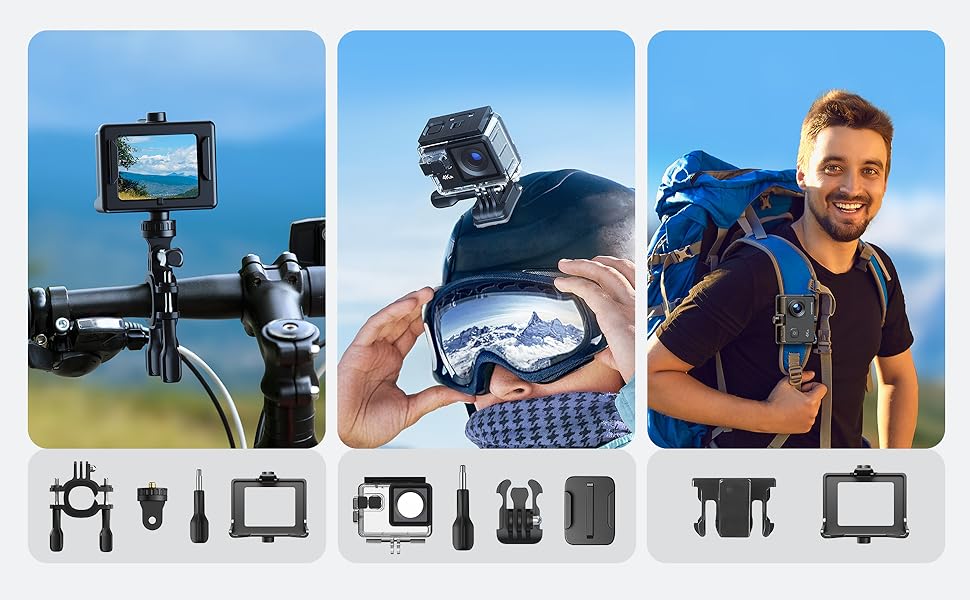
- Dual Microphone & Versatile Accessories: Features an external noise-canceling microphone for clear audio. Comes with multifunctional mounting accessories for various activities like biking, motorcycling, and skiing.
- EIS Image Stabilizer & Multiple Recording Modes: EIS Anti-shake function enhances video stability. Offers modes such as selfie, continuous recording, time-lapse, loop recording, slow motion, and auto mode.
- Wi-Fi Sharing & Dual Functionality: Connects to smartphones via the "IBK CAM" app for real-time sharing and remote control. Can also function as a webcam or dash cam.

Image: Visual representation of key features including EIS, Wi-Fi, Car Mode, PC Cam, External Mic, Remote Control, 40M Waterproof, and 170° Wide Angle.

Image: Comparison demonstrating the effectiveness of Electronic Image Stabilization (EIS) for smoother video capture.

Image: The WOLFANG GA100 Action Camera being used for underwater photography, highlighting its 40M waterproof capability.
Explore the capabilities of the WOLFANG GA100 Action Camera in this video:
Video: Tayangan video promosicasing various features and uses of the WOLFANG GA100 Action Camera.
See the WOLFANG GA100 in action underwater:
Video: Footage demonstrating the WOLFANG GA100's performance during underwater photography.
4. Persediaan
4.1. Pemasangan Bateri
To install the battery, open the battery compartment cover located at the bottom of the camera. Insert the 1050mAh battery according to the polarity indicators, then close the cover securely. Ensure the battery is fully charged before first use.
4.2. Pemasangan Kad MicroSD
Locate the microSD card slot on the side of the camera. Insert a compatible microSD card (Class 10 or higher, up to 128GB recommended) with the gold contacts facing the front of the camera until it clicks into place. To remove, press the card gently until it springs out.
4.3. Penggunaan Sarung Kalis Air
The waterproof case protects the camera for underwater use up to 40 meters. Before placing the camera inside, ensure the case's rubber seal is clean and free of debris. Close the latch firmly to create a watertight seal. Always test the waterproof case without the camera first to ensure it is sealed correctly.
4.4. Connecting External Microphone
Connect the external microphone to the dedicated microphone port on the side of the camera. This enhances audio quality, especially in noisy environments.
4.5. Pasangan Alat Kawalan Jauh
To pair the remote control with your camera, ensure both devices are powered on. Follow the instructions in the camera's menu to initiate pairing mode. Once paired, the remote control allows for convenient photo shooting and video recording from a distance.
4.6. App Connection (Wi-Fi)
Download the "IBK CAM" app from your smartphone's app store (available on App Store and Google Play). On the camera, press the UP button to turn on Wi-Fi. Turn off your smartphone's data and connect to the camera's Wi-Fi network. Allow all pop-up permissions requested by the app. Once connected, you can view real-time video, download or share photos and videos, and remotely control the camera.
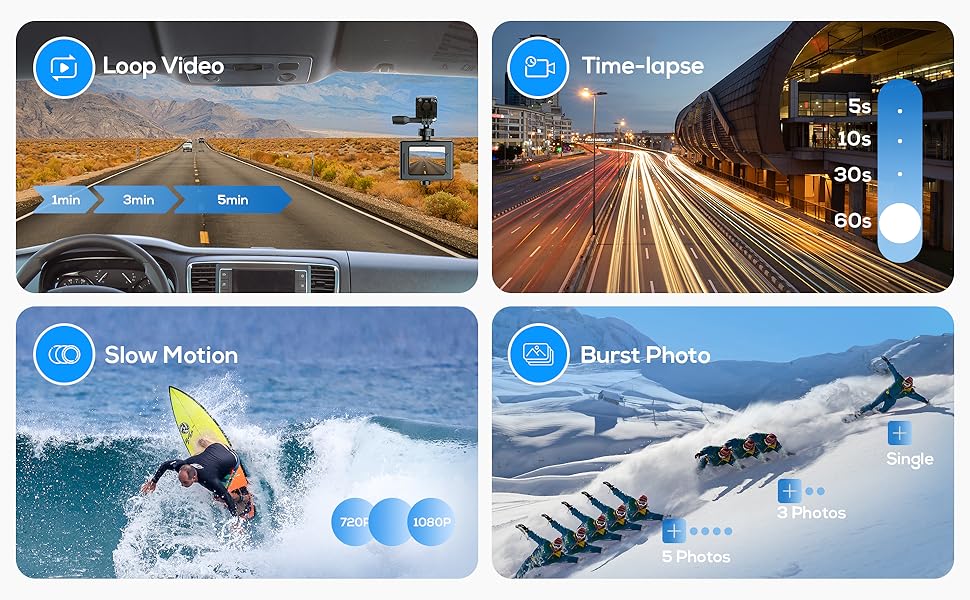
Image: Step-by-step guide for connecting the WOLFANG GA100 camera to the IBK CAM app on a smartphone using Wi-Fi.
5. Arahan Operasi
5.1. Operasi Asas
- Hidupkan/Mati Kuasa: Tekan dan tahan butang Kuasa/Mod untuk menghidupkan atau mematikan kamera.
- Penukaran Mod: Tekan butang Kuasa/Mod berulang kali untuk beralih antara mod yang berbeza (Video, Foto, Main Semula, Tetapan).
5.2. Rakaman Video
In Video mode, press the OK button to start recording. The recording indicator light will flash. Press the OK button again to stop recording.
5.3. Tangkapan Foto
In Photo mode, press the OK button to take a picture.
5.4. Main balik
In Playback mode, use the Up/Down buttons to navigate through your recorded videos and photos. Press the OK button to play a video or view gambar.
5.5. Navigasi Menu
From any mode, press the Power/Mode button until you reach the Settings mode. Use the Up/Down buttons to scroll through menu options and the OK button to select. Press the Power/Mode button to exit the menu.
5.6. Specific Recording Modes
The GA100 offers several specialized recording modes:
- Rakaman Gelung: Records video continuously, overwriting the oldest files when the memory card is full. Useful as a dash cam.
- Masa berlalu: Captures a series of photos at set intervals and stitches them into a video.
- Pergerakan Perlahan: Records video at a higher frame rate (e.g., 120fps) for smooth slow-motion playback.
- Foto Burst: Takes multiple photos in quick succession with a single press of the shutter button.

Imej: Visual examples of the camera's Loop Video, Time Lapse, Slow Motion, and Burst Photo capabilities.
Imej: Tambahan pulaamples illustrating the various recording modes available on the WOLFANG GA100.
6. Penyelenggaraan
6.1. Pembersihan
Wipe the camera body and lens with a soft, lint-free cloth. For the waterproof case, rinse with fresh water after each use in saltwater and allow it to air dry. Ensure no sand or debris is trapped in the seals.
6.2. Penyimpanan
Simpan kamera di tempat yang sejuk dan kering jauh dari cahaya matahari langsung dan suhu yang melampau. Tanggalkan bateri jika disimpan untuk tempoh yang lama.
6.3. Penjagaan Bateri
To prolong battery life, avoid fully discharging the batteries. Charge them regularly, even if not in use. Do not expose batteries to high temperatures.
7. Penyelesaian masalah
- Kamera tidak dihidupkan: Ensure the battery is charged and correctly inserted. Try using the second battery provided.
- Pembekuan kamera: Remove and reinsert the battery to reset the camera. If the issue persists, try formatting the microSD card (backup data first).
- Kualiti video/foto yang teruk: Check lens for smudges. Ensure sufficient lighting. Verify resolution settings in the camera menu.
- Water leakage in case: Inspect the waterproof case for cracks or damage. Clean the rubber seal thoroughly and ensure it's properly seated.
- Isu sambungan Wi-Fi: Ensure Wi-Fi is enabled on the camera and your phone's data is off. Re-pair the devices if necessary.
8. Spesifikasi
| Ciri | Perincian |
|---|---|
| Nama Jenama | WOLFANG |
| Nombor Model Item | GA100 |
| Berat Barang | 1.52 auns |
| Dimensi Produk | 2.56 x 2.28 x 1.77 inci |
| Bateri | 2 Bateri Lithium Metal diperlukan |
| Nama Warna | Hitam |
| Teknologi Penderia Foto | CMOS |
| Resolusi Tangkapan Video | 4K |
| Panjang Fokus Maksimum | 1 milimeter |
| Apertur Maksimum | 2 f |
| Jenis Memori Denyar | SD mikro |
| Format Tangkapan Video | MOV |
| Saiz Skrin | 2 Inci |
| Teknologi Ketersambungan | Wi-Fi |
| Ciri Khas | Diving camera, Bike camera, Action camera, Helmet camera, Underwater camera, Lightweight, Built-in and External Dual Microphones, WiFi Connection |
9. Waranti dan Sokongan
For warranty information and customer support, please refer to the official WOLFANG webtapak atau hubungi perkhidmatan pelanggan mereka secara langsung. Simpan resit pembelian anda sebagai bukti pembelian untuk sebarang tuntutan waranti.