
1. Pengenalan
The ENGINDOT Rotary Tool Kit, model RTD35ACL, is a versatile power tool designed for a wide range of precision tasks. With its variable speed control and numerous accessories, it is suitable for applications such as cutting, engraving, drilling, sanding, polishing, and grinding. This manual provides essential information for safe and effective operation, setup, maintenance, and troubleshooting.

Figure 1.1: The ENGINDOT Rotary Tool Kit and its included accessories.
2. Maklumat Keselamatan
Sentiasa utamakan keselamatan semasa mengendalikan alat kuasa. Baca dan fahami semua arahan sebelum digunakan. Simpan manual ini untuk rujukan pada masa hadapan.
- Perlindungan Mata: Sentiasa pakai cermin mata atau cermin mata keselamatan untuk melindungi mata anda daripada serpihan yang berterbangan.
- Perlindungan Tangan: Pakai sarung tangan yang sesuai untuk melindungi tangan anda.
- Kawasan Kerja: Pastikan kawasan kerja anda bersih, terang dan bebas daripada halangan.
- Bahan Kerja Selamat: Sentiasa selamatkan bahan kerja dengan kuat untuk mengelakkan pergerakan semasa operasi.
- Pengudaraan: Work in a well-ventilated area, especially when generating dust or fumes.
- Unplug When Changing Accessories: Always unplug the tool from the power source before changing accessories or performing maintenance.
- Kelajuan yang Betul: Select the correct speed for the accessory and material being worked on.
- Elakkan beban berlebihan: Do not force the tool; let the tool and accessory do the work.
- Jauhkan Kanak-kanak: Jangan benarkan kanak-kanak atau individu yang tidak terlatih mengendalikan alat ini.
3. Kandungan Pakej
Your ENGINDOT Rotary Tool Kit includes the following items:

Rajah 3.1: Terperinci view of all accessories included in the kit.
- 1 x Alat Putar
- 1 x Kotak Alat
- 1 x Accessory Case
- 1 x Transparent Shield
- 1 x Aci Fleksibel
- 1 x Chuck Tanpa Kunci
- 1 x Drilling Guide
- 25 x Fiberglass Cutting Off Wheels
- 1 x Mata Gerudi
- 5 x Mesh Cutting Discs
- 2 x Mandrel
- 3 x HSS Drills
- 14 x Band Mengempelas
- 1 x Sanding Shank
- 30 x Kertas Mengempelas
- 1 x Spanar
- 1 x sepana Allen
- 1 x Collet (φ3.2mm)
- 3 x Diamond Grinding Needles
- 1 x Engraving Cutter
- 8 x Grinding Wheels with Shanks
- 4 x Felt Wheels
- 1 x Mandrel (for felt wheels)
- 1 x Steel Brush
4. Produk Lebihview
The ENGINDOT Rotary Tool features a robust design with user-friendly controls and versatile attachments.

Figure 4.1: Main components of the rotary tool.
Ciri-ciri Utama:
- Quick-change Keyless Chuck: Allows for fast and easy accessory changes without needing a collet wrench. It accommodates attachments from 1/8'' to 1/32''.
- 6 Variable Speed Adjustment: Control the rotational speed from 10,000 RPM to 32,000 RPM, enabling precise work on various materials and tasks.
- Reka bentuk ergonomik: Lightweight and features a rubber handle for comfortable extended use.
5. Setup and Accessory Installation
Proper installation of accessories is crucial for safe and effective operation. Always ensure the tool is unplugged before changing any accessories.
5.1. Installing the Keyless Chuck
The keyless chuck allows for quick changes of various bits. Simply twist the chuck to open or close the jaws around the accessory shank.

Figure 5.1: The keyless chuck for easy accessory changes.
5.2. Installing a Sanding Band
- Cabut plag alat putar.
- Select the appropriate sanding band and sanding shank.
- Slide the sanding band onto the rubber drum of the sanding shank.
- Insert the sanding shank into the keyless chuck and tighten securely.
5.3. Installing a Cutting Disc and Protective Shield
- Cabut plag alat putar.
- Attach the desired cutting disc to a mandrel.
- Install the protective shield onto the tool's head, ensuring it is securely fastened.
- Insert the mandrel with the cutting disc into the keyless chuck and tighten.

Figure 5.2: The protective cover provides safety during cutting and grinding.
5.4. Installing the Cutting Guide
- Cabut plag alat putar.
- Attach the cutting guide to the tool's head.
- Adjust the depth of the cutting guide as needed for your application.
- Insert the appropriate cutting or drilling bit into the keyless chuck and tighten.

Figure 5.3: The cutting guide assists in precise cuts and drilling.
5.5. Installing the Flexible Shaft
The flexible shaft provides enhanced maneuverability for detailed work.
- Cabut plag alat putar.
- Unscrew the collet nut and remove the collet from the rotary tool.
- Insert the drive shaft of the flexible shaft into the collet opening of the rotary tool.
- Secure the flexible shaft by tightening the collet nut onto the tool.
- Insert the desired accessory into the chuck of the flexible shaft and tighten.
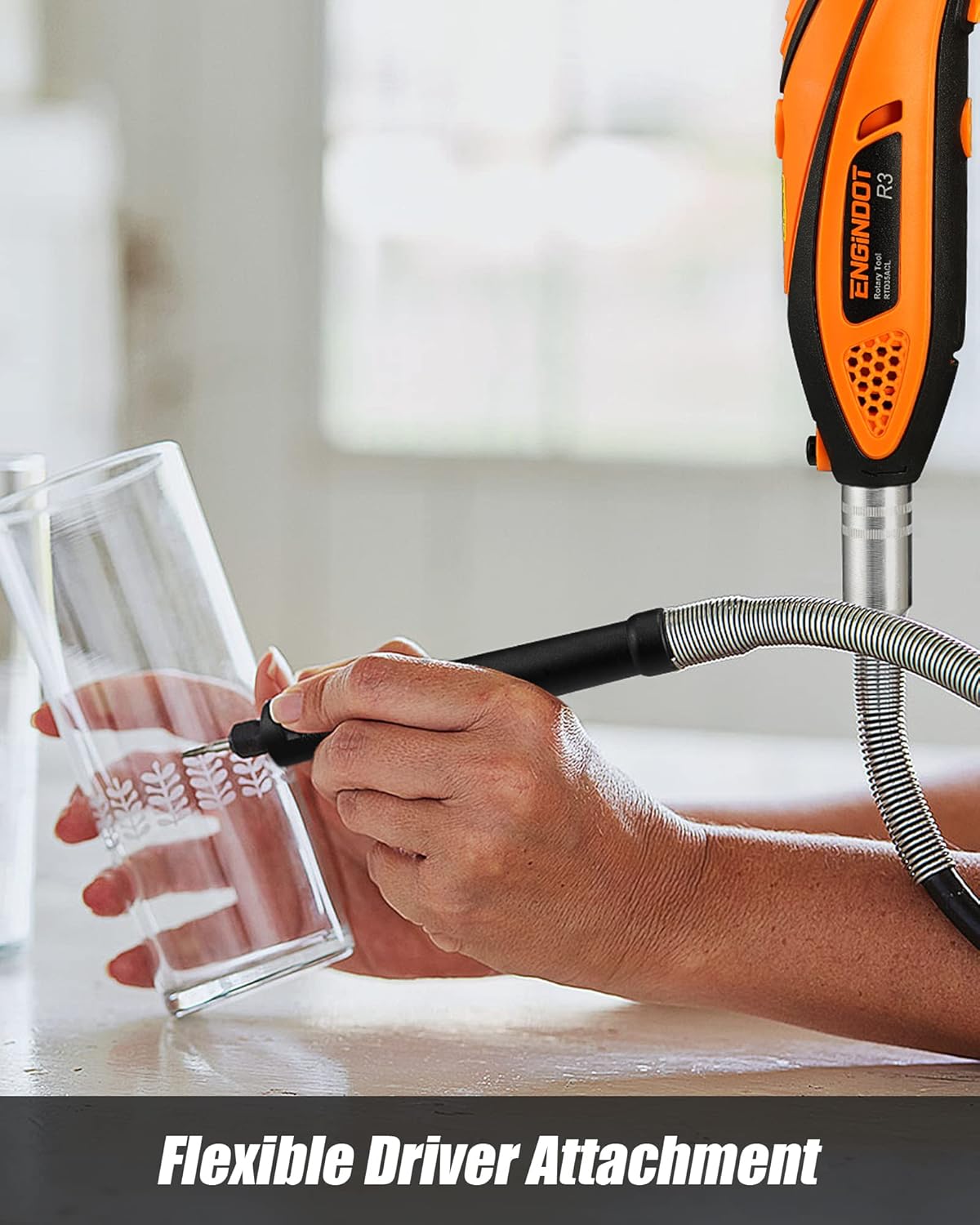
Figure 5.4: The flexible shaft allows for precise control in detailed tasks.
6. Operasi
Once accessories are installed, you can begin using your rotary tool for various applications. Always ensure the workpiece is stable and you are wearing appropriate safety gear.
6.1. General Usage Steps
- Select the appropriate accessory for your task.
- Install the accessory and any necessary attachments (e.g., protective shield, cutting guide, flexible shaft).
- Plug in the rotary tool.
- Hidupkan alat menggunakan suis Hidup/Mati.
- Adjust the speed using the variable speed dial to match the material and task. Start with a lower speed and increase as needed.
- Apply gentle pressure and let the tool do the work. Avoid excessive force.
- After use, turn off the tool and unplug it before removing accessories.
6.2. Permohonan Cthamples
- Pengamplasan: Use sanding bands or discs to smooth rough edges or surfaces.
- Ukiran/Ukiran: Utilize diamond grinding needles or engraving cutters for detailed work on wood, metal, or glass.
- Memotong: Employ cutting discs for precise cuts on various materials. Always use the protective shield.
- Penggerudian: Use drill bits for small holes. The drilling guide can assist in maintaining accuracy.
- Polishing/Cleaning: Attach felt wheels or steel brushes with polishing compound to shine surfaces or remove rust.
7. Penyelenggaraan
Regular maintenance ensures the longevity and optimal performance of your rotary tool.
- Pembersihan: After each use, clean the tool and accessories to remove dust and debris. Use a soft cloth; do not use harsh chemicals.
- Penggantian berus: The motor brushes may need replacement over time. Refer to the exploded view diagram (Figure 4.1) for the location of the replaceable motor brush caps.
- Storan: Store the tool and accessories in their original carrying case in a dry, secure location away from children.
- Pemeriksaan Kord: Regularly inspect the power cord for any damage. Do not use the tool if the cord is damaged.
8. Penyelesaian masalah
If you encounter issues with your rotary tool, refer to the following common troubleshooting steps:
| Masalah | Kemungkinan Punca | Penyelesaian |
|---|---|---|
| Alat tidak dihidupkan | No power supply, faulty switch, worn motor brushes | Check power connection, ensure switch is ON, inspect/replace motor brushes. |
| Getaran yang berlebihan | Bent accessory shank, improperly installed accessory | Replace bent accessory, re-install accessory securely in chuck. |
| Alat terlalu panas | Overloading, blocked ventilation slots | Reduce pressure, clear ventilation slots, allow tool to cool. |
| Prestasi berkurangan | Worn accessory, worn motor brushes | Replace accessory, inspect/replace motor brushes. |
9. Spesifikasi

Figure 9.1: Technical specifications of the ENGINDOT Rotary Tool.
| Spesifikasi | Perincian |
|---|---|
| Jenama | ENGINDOT |
| Nombor Model | RTD35ACL |
| Sumber Kuasa | Elektrik Bertali |
| Voltage | 120 Volt |
| Wattage | 135 Watt |
| Kelajuan Putaran Maksimum | 32000 RPM |
| Kelajuan Berubah | 6-step adjustment (10,000 - 32,000 RPM) |
| Dimensi Produk | 23.5 x 6 x 5 cm |
| Berat Barang | 1.83 kg |
| bahan | Rubber (handle) |
| Ciri Khas | Mudah alih |
| Penggunaan yang Disyorkan | Cutting, Engraving, Drilling, Sanding, Polishing, Grinding |
10. Waranti dan Sokongan
ENGINDOT products are manufactured to high-quality standards. For warranty information, technical support, or service inquiries, please refer to the contact information provided with your product packaging or visit the official ENGINDOT webtapak. Sila simpan bukti pembelian anda untuk tuntutan waranti.