
pengenalan
Thank you for choosing the Audizio SB85 Soundbar with Subwoofer. This manual provides essential information for the safe and correct operation of your new audio system. Please read it thoroughly before use and retain it for future reference. The SB85 is designed to enhance your television's audio, providing a rich, immersive sound experience for movies, games, and music, complete with a dedicated subwoofer for powerful bass.
Arahan Keselamatan
- Baca semua arahan dengan teliti sebelum mengendalikan peranti.
- Keep the unit away from water, moisture, and heat sources.
- Jangan sekat sebarang bukaan pengudaraan.
- Gunakan hanya lampiran/aksesori yang ditentukan oleh pengilang.
- Cabut plag radas semasa ribut petir atau apabila tidak digunakan untuk tempoh yang lama.
- Rujuk semua servis kepada kakitangan perkhidmatan yang berkelayakan.
- Do not expose the battery (if applicable) to excessive heat such as sunshine, fire, or the like.
Kandungan Pakej
Pastikan semua item ada di dalam kotak:
- Audizio SB85 Soundbar
- Subwufer Berwayar
- Alat Kawalan Jauh
- Optical Cable (Toslink)
- Kabel AUX
- Penyesuai Kuasa
- Manual Pengguna
Produk Selesaiview
The Audizio SB85 system consists of a soundbar and a separate wired subwoofer, designed to deliver a powerful and clear audio experience.
Ciri Bar Bunyi
- Integrated 150W speaker system with 4 speakers (2x 2cm range, 2x 2cm tweeter).
- Front LED display for status indication.
- Control buttons on the side panel.
- Multiple input options: HDMI (ARC), USB, Line In (AUX), Coaxial, Optical.
- Bluetooth 5.0 untuk penstriman audio tanpa wayar.

Image: Close-up of the Audizio SB85 Soundbar's control panel and its remote control, highlighting Bluetooth 5.0 and ease of use.

Imej: Dalaman view of the Audizio SB85 Soundbar's full-range speaker, emphasizing its 150W speaker system for an immersive audio experience.
Ciri Subwufer
- 5.25-inch wired subwoofer for enhanced bass response.

Image: Close-up of the Audizio SB85 wired subwoofer, designed to amplify bass frequencies.
Persediaan
1. penempatan
Place the soundbar centrally below your television. The subwoofer can be placed on the floor near the soundbar, ideally in a corner for optimal bass reflection, but ensure it is not obstructed.

Image: Audizio SB85 Soundbar and Subwoofer setup in a living room, demonstrating room-filling sound and clean design.

Image: Audizio SB85 Soundbar placed below a television, illustrating its universal compatibility with any TV.
2. Menyambung kepada Kuasa
Connect the power adapter to the DC IN port on the soundbar and then plug it into a wall outlet (230 Vac/50 Hz).
3. Menyambung Subwufer
Connect the wired subwoofer to the dedicated subwoofer output port on the soundbar.
4. Menyambung ke Sumber Audio
The SB85 offers several connection options:
- HDMI (ARC): For the best audio quality and control, connect an HDMI cable from the HDMI (ARC) port on the soundbar to the HDMI ARC port on your TV. This allows the TV to send audio to the soundbar and often enables TV remote control of the soundbar's volume.
- Optik (Toslink): Connect the included optical cable from the OPTICAL port on the soundbar to the Optical Digital Audio Out port on your TV or other audio source.
- Line In (AUX): Use the included AUX cable to connect the LINE IN port on the soundbar to the headphone jack or audio output of your device (e.g., smartphone, MP3 player).
- Sepaksi: Connect a coaxial cable (not included) from the COAXIAL port on the soundbar to the Coaxial Digital Audio Out port on your TV or other audio source.
- USB: Insert a USB flash drive into the USB port for MP3 playback.
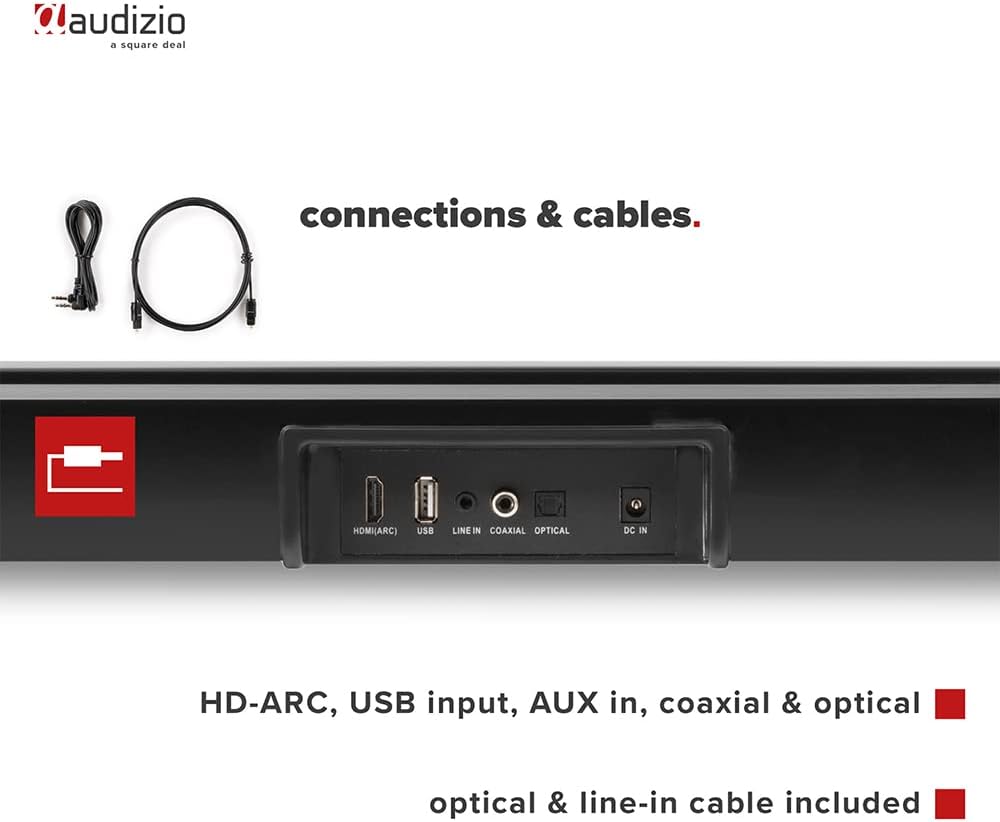
Imej: Belakang view of the Audizio SB85 Soundbar showing various connection ports: HDMI (ARC), USB, Line In, Coaxial, and Optical. Includes optical and line-in cables.
Arahan Operasi
1. Hidupkan/Mati Kuasa
Tekan butang Kuasa pada bar bunyi atau alat kawalan jauh untuk menghidupkan atau mematikan unit.
2. Pemilihan Sumber Input
Press the 'MODE' button on the soundbar or the remote control repeatedly to cycle through the available input sources: HDMI (ARC), Optical, Coaxial, AUX, USB, and Bluetooth. The selected input will be shown on the front LED display.
3. Kawalan Kelantangan
Use the 'VOL+' and 'VOL-' buttons on the soundbar or the remote control to adjust the volume. The 'MUTE' button on the remote control will temporarily silence the audio.
4. Berpasangan Bluetooth
- Switch the soundbar to Bluetooth mode using the 'MODE' button. The LED display will show 'BT'.
- Pada telefon pintar atau tablet anda, dayakan Bluetooth dan cari peranti yang tersedia.
- Select 'Audizio SB85' from the list of devices.
- Once paired, the soundbar will indicate a successful connection, and you can stream audio wirelessly.
5. Main semula USB
Masukkan pemacu kilat USB yang mengandungi audio MP3 files into the USB port. The soundbar will automatically switch to USB mode and begin playing the music. Use the remote control to navigate tracks (play/pause, next/previous).
6. Fungsi Alat Kawalan Jauh
The remote control provides full functionality for the soundbar, including power, mode selection, volume, mute, and playback controls for USB and Bluetooth modes.
Penyelenggaraan
Pembersihan
Wipe the soundbar and subwoofer surfaces with a soft, dry cloth. Do not use abrasive cleaners, waxes, or solvents as they may damage the finish. Ensure the device is unplugged before cleaning.
Penyimpanan
Jika menyimpan unit ini untuk tempoh yang lama, cabut plagnya dari soket kuasa dan simpan di tempat yang sejuk dan kering, jauh daripada cahaya matahari langsung dan suhu yang melampau.
Menyelesaikan masalah
| Masalah | Kemungkinan Punca | Penyelesaian |
|---|---|---|
| Tiada kuasa | Kabel kuasa tidak disambungkan; Salur keluar kuasa rosak | Periksa sambungan kabel kuasa; Cuba soket yang berbeza. |
| Tiada bunyi | Incorrect input selected; Volume too low; Mute activated; Cable connection loose | Select correct input source; Increase volume; Deactivate mute; Check all audio cable connections. |
| Bluetooth tidak bersambung | Soundbar not in Bluetooth mode; Device too far; Device already connected to another unit | Switch soundbar to BT mode; Move device closer; Disconnect from other devices and try again. |
| Alat kawalan jauh tidak berfungsi | Bateri berkurangan; Halangan antara alat kawalan jauh dan bar bunyi | Gantikan bateri; Keluarkan sebarang halangan. |
Spesifikasi
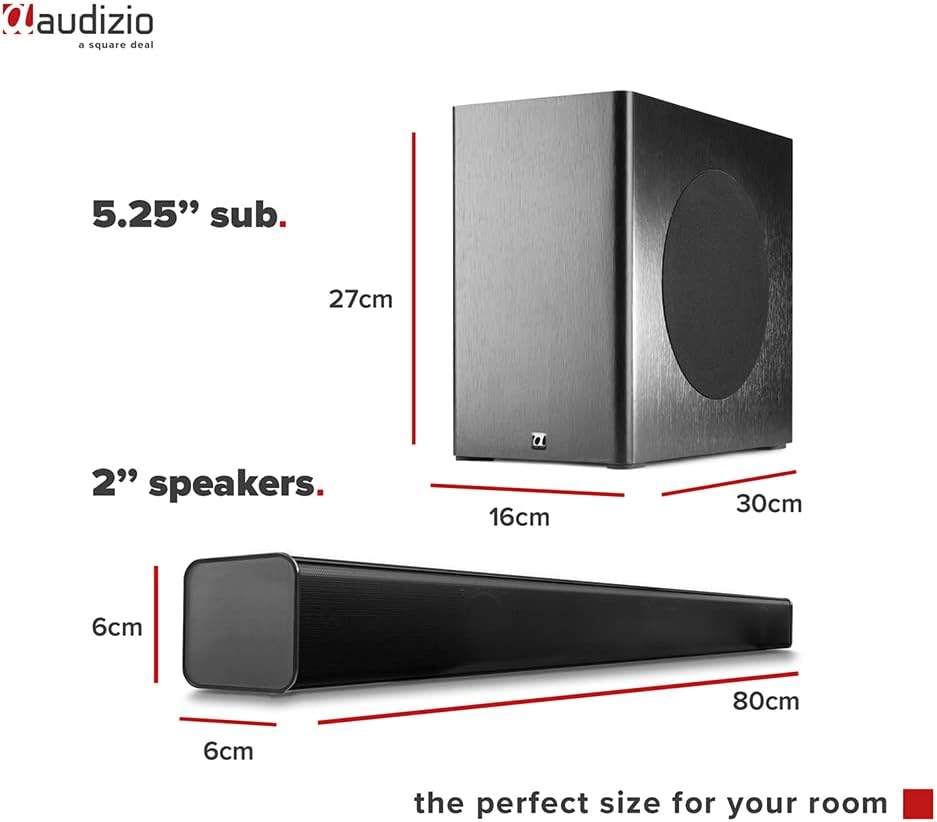
Image: Diagram showing the dimensions of the Audizio SB85 Soundbar and its subwoofer.
- Output Kuasa: 150W (Maks)
- Konfigurasi Pembesar Suara: 4 speakers (2x 2cm range, 2x 2cm tweeter)
- Saiz Subwoofer: 5.25 inci
- Julat Kekerapan: 50 Hz - 16,000 Hz
- SPL maks: 125 dB
- Ketersambungan: Bluetooth 5.0, HDMI (ARC), USB, Line In (AUX), Coaxial, Optical
- Mod Output Audio: Stereo
- Peranti Serasi: MP3 Player, Smartphone, TV
- Sumber Kuasa: 230 Vac/50 Hz (via electric cable)
- Dimensi Bar Bunyi (P x L x T): 80 x 6 x 6 cm
- Dimensi Subwoofer (P x L x T): 16 x 30 x 27 cm
- Jumlah Berat: 3.9 kg
- Nombor Model: 100.292
Waranti dan Sokongan
Untuk maklumat jaminan atau sokongan teknikal, sila rujuk dokumentasi yang disediakan semasa pembelian atau hubungi peruncit anda. Simpan bukti pembelian anda untuk sebarang tuntutan jaminan.