
1. Pengenalan
This manual provides detailed instructions for the assembly, operation, and maintenance of your Ticova Ergonomic Office Chair, Model M8. Designed for optimal comfort and support, this chair features multiple adjustable components to suit your individual needs. Please read this manual thoroughly before assembly and use to ensure proper function and longevity of your chair.

Figure 1.1: Ticova Ergonomic Office Chair (Model M8)
2. Ciri-ciri Produk
The Ticova Ergonomic Office Chair is engineered with advanced features to provide superior comfort and support during long hours of sitting:
- Sokongan Lumbar Boleh Laras: Customize the height and depth of the lumbar support to perfectly fit the curve of your spine, significantly reducing back fatigue and pain.
- Tempat letak kepala boleh laras: A large, curved foam headrest offers comprehensive neck and head support, with adjustable height and angle for personalized comfort.
- Tempat Letak Tangan Boleh Laras 3D: Unlike standard armrests, these can be adjusted in height, angle, and forward/backward position, providing optimal support for your arms and shoulders.
- High-Density Foam Seat: The 9CM thick seat cushion features a W-shaped and waterfall-edge design, distributing pressure evenly across your hips and thighs for enhanced comfort.
- Breathable Mesh Backrest: The backrest is made from a strong, tensile mesh material, ensuring excellent airflow to keep you cool and comfortable, even during extended use.
- Recline Function with Lock: The chair offers a recline angle of up to 130°, allowing you to find your most comfortable position for relaxation or focused work. The recline can be locked at various angles.
- Pembinaan Tahan Lama: Built with a robust base and a high-quality gas lift, the chair is designed for stability and long-term durability, having passed BIFMA tests.

Figure 2.1: Comprehensive Feature Overview

Figure 2.2: Revolutionizing Ergonomics with 3.0 Design
3. Persediaan dan Pemasangan
Before beginning assembly, ensure all parts are present and undamaged. Refer to the included assembly diagram for detailed steps. Typically, assembly involves the following sequence:
- Buka Pembungkusan Komponen: Keluarkan semua bahagian dari bungkusan dengan berhati-hati dan letakkannya di atas permukaan yang bersih dan rata.
- Pasang Kastor ke Pangkalan: Insert the five casters into the holes at the end of each leg of the chair base until they click securely into place.
- Masukkan Pengangkat Gas: Letakkan silinder pengangkat gas ke dalam lubang tengah tapak kerusi.
- Lampirkan Mekanisme pada Tempat Duduk: Secure the control mechanism to the underside of the seat cushion using the provided screws. Ensure the front of the mechanism faces the front of the seat.
- Sambungkan Tempat Duduk ke Lif Gas: Letakkan tempat duduk yang dipasang dengan berhati-hati pada silinder lif gas, pastikan ia berada di tengah dan stabil.
- Pasang Sandaran Belakang: Secure the backrest to the seat mechanism using the designated screws. Ensure all connections are tight and stable.
- Pasang tempat letak tangan: Attach the armrests to the seat or backrest as indicated in the assembly diagram, tightening all screws firmly.
All necessary tools are typically included. Ensure all screws are tightened securely before using the chair.

Figure 3.1: Chair in typical use environment
4. Arahan Operasi
Your Ticova Ergonomic Office Chair offers a range of adjustments to optimize your seating posture and comfort:
- Pelarasan Ketinggian Tempat Duduk: To raise the seat, lift the lever on the right side of the chair while taking your weight off the seat. To lower the seat, lift the lever while seated. Release the lever at the desired height.
- Pelarasan Sokongan Lumbar: The lumbar support can be adjusted both vertically (up and down by 4cm) and in depth (forward and backward by 3.5cm) using the knob located on the backrest. Rotate the knob to adjust depth and slide the entire lumbar support mechanism up or down to adjust height.
- Pelarasan sandaran kepala: The headrest can be adjusted in height (up to 13cm) and angle (up to 135° rotation). Grasp the headrest and move it to your preferred position.
- Penyesuaian Armrest: The 3D armrests offer three adjustment options:
- Ketinggian: Press the button on the side of the armrest and move it up or down (7cm range).
- Sudut: Rotate the armrest pad left or right (40° range).
- Maju/Mundur: Slide the armrest pad forward or backward (6cm range).
- Tilt/Recline Function: Pull out the lever on the left side of the chair to enable the recline function. Push the lever back in to lock the backrest at your desired angle (up to 130°). The tension of the recline can be adjusted by rotating the large knob located underneath the seat.

Figure 4.1: Lumbar Support Adjustment
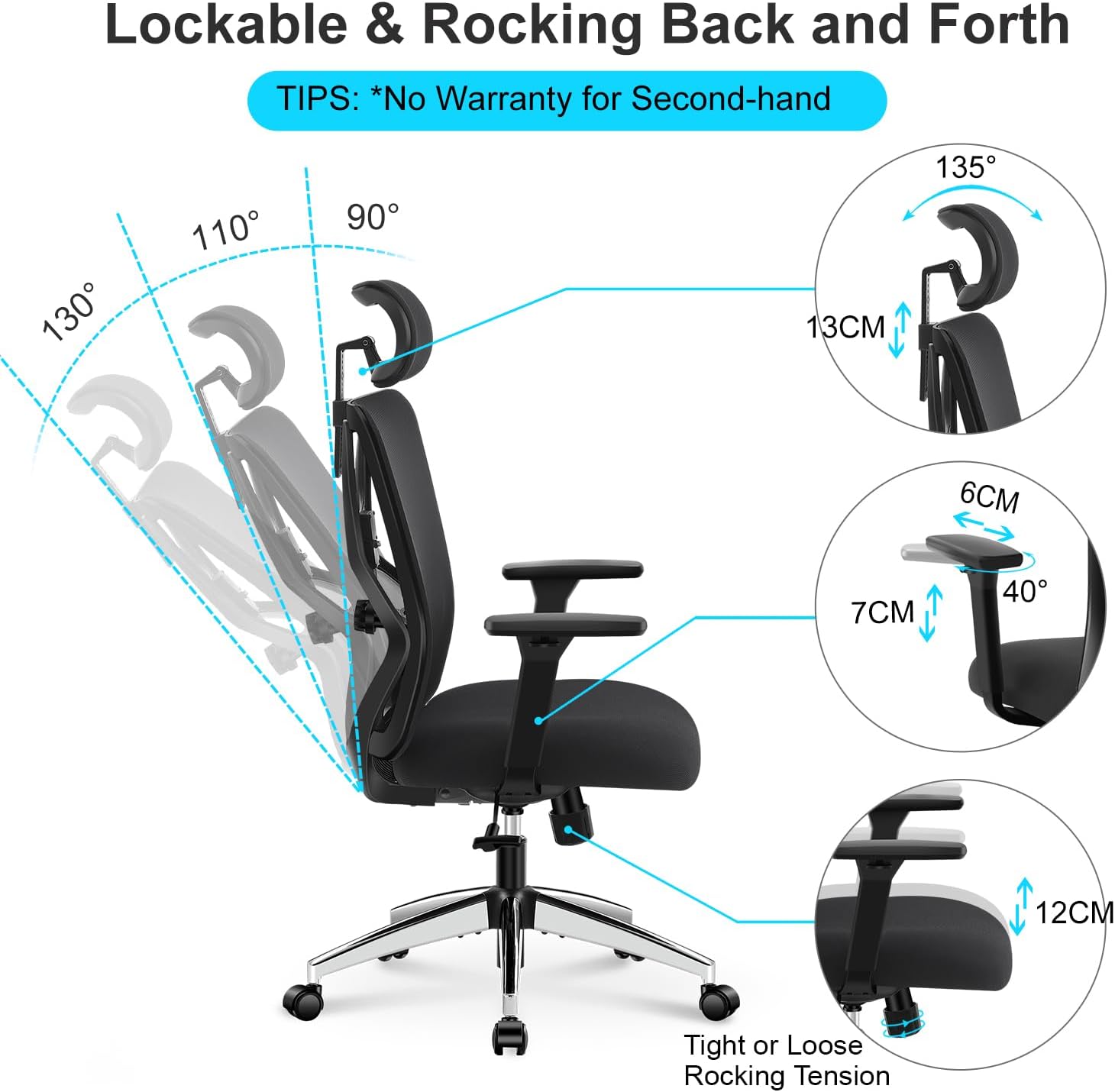
Figure 4.2: Recline and Adjustment Overview

Figure 4.3: 3D Armrest Adjustment

Figure 4.4: Adjustable Headrest
5. Penyelenggaraan
Regular maintenance will help preserve the appearance and functionality of your Ticova office chair:
- Pembersihan: For fabric and mesh surfaces, use a soft cloth dampened with mild soap and water. Avoid harsh chemicals or abrasive cleaners. For plastic and metal parts, wipe with a damp kain.
- Periksa Pengikat: Periodically check all screws and bolts to ensure they are tight. Re-tighten if necessary to prevent wobbling or noise.
- Penjagaan Kastor: Keep casters clean from hair and debris to ensure smooth rolling. If casters become stiff, a small amount of silicone lubricant can be applied to the axle.
- Lif Gas: Lif gas ini merupakan unit yang tertutup rapat dan tidak memerlukan penyelenggaraan. Jika anda mengalami masalah dengan pelarasan ketinggian, rujuk bahagian penyelesaian masalah.
6. Penyelesaian masalah
If you encounter any issues with your Ticova Ergonomic Office Chair, please refer to the following common problems and solutions:
| Masalah | Kemungkinan Punca | Penyelesaian |
|---|---|---|
| Chair Squeaks or Creaks | Pengikat longgar; geseran antara komponen. | Tighten all assembly screws. Apply a small amount of silicone spray lubricant to moving parts and joints, especially where metal meets metal. |
| Gas Lift Not Holding Height | Faulty gas lift cylinder. | This indicates a defect in the gas lift. Please contact customer support for a replacement. Do not attempt to repair the gas lift yourself. |
| Backrest Feels Loose/Unstable | Backrest attachment screws are loose or damaged. | Ensure the screws connecting the backrest to the seat mechanism are fully tightened. If the issue persists, inspect for any damaged components and contact support. |
| Roda Tidak Bergolek Dengan Lancar | Debris caught in casters; worn casters. | Remove any hair or debris from the caster wheels. If casters are worn, replacements may be needed. |
If the problem persists after attempting these solutions, please contact Ticova customer support for further assistance.

