
YABER YABER-V5-MINI
Manual Pengguna Projektor Mini YABER V5
Model: YABER-V5-MINI
1. Pengenalan
Terima kasih kerana membeliasing the YABER V5 Mini Projector. This manual provides detailed instructions for setting up, operating, and maintaining your projector to ensure optimal performance and longevity. Please read this manual thoroughly before use and keep it for future reference.

Image: The YABER V5 Mini Projector, shown with its included carrying bag and mini tripod, highlighting its portability and accessories.
2. Apa yang ada di dalam Kotak
Upon opening your YABER V5 Mini Projector package, please verify that all the following items are included:
- YABER V5 Mini Projector
- Membawa Beg
- Tripod Mini
- Alat Kawalan Jauh (bateri tidak disertakan)
- Kabel Kuasa
- Kabel HDMI
- AV kabel
- Manual Pengguna
- Cap Lens

Image: The retail packaging for the YABER V5 Mini Projector, indicating the product and its branding.
3. Ciri-ciri Produk
- Dual-Band WiFi Connectivity (5G/2.4G): The V5 supports both 5GHz and 2.4GHz WiFi bands, providing faster and more stable wireless screen mirroring for smoother video and image transmission from your smartphone or tablet.
- Bluetooth 5.0: Equipped with Bluetooth 5.0, allowing seamless connection to external Bluetooth speakers, headphones, or AirPods for enhanced audio experience.
- Enhanced Brightness & 1080P Full HD Support: Features enhanced German jade glass lenses and increased brightness for clearer and more vibrant images. Supports Full HD 1080P resolution for a high-quality viewpengalaman dalam.
- Giant Screen & Zoom Function: Capable of projecting images from 45 to 200 inches. The digital zoom function allows you to reduce the image size from 100% to 50% using the remote control without moving the projector.
- Keserasian Luas: Multiple input ports including HDMI, USB, VGA, AV, Audio, and TF card ensure compatibility with a wide range of devices such as TV boxes, Fire Stick TV, Chromecast, PCs, laptops, tablets, and smartphones.
- Panjang Lamp kehidupan: Utilizes SmarEco technology to minimize power consumption, extending the lampjangka hayat sehingga 100,000 jam.

Image: Illustration of the projector's dual-band (2.4GHz and 5GHz) WiFi capability, emphasizing faster transmission speeds for a smoother experience.

Image: The projector wirelessly connected to various Bluetooth audio devices like headphones and speakers, demonstrating its Bluetooth 5.0 capability.
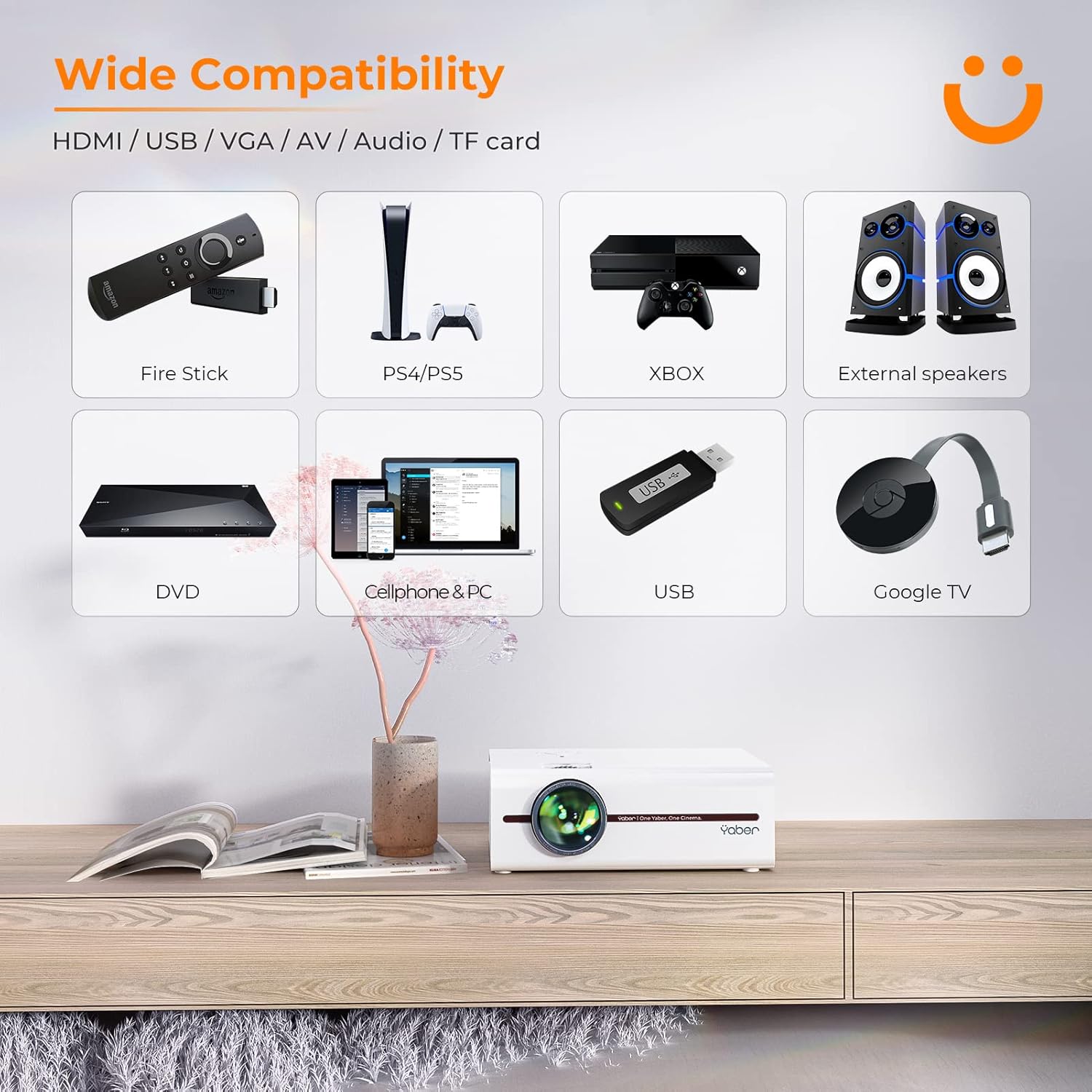
Image: A visual representation of the projector's wide range of compatible devices, including Fire Stick, PS4/PS5, Xbox, external speakers, DVD players, cellphones, PCs, USB drives, and Google TV, connected via various ports.
4. Persediaan
4.1 Initial Placement and Power
- Place the projector on a stable, flat surface or mount it using a compatible tripod. Ensure proper ventilation around the unit.
- Sambungkan kabel kuasa ke input kuasa projektor dan kemudian ke soket kuasa.
- Tekan butang kuasa pada projektor atau alat kawalan jauh untuk menghidupkannya.
4.2 Adjusting Image Focus and Keystone
Selepas dihidupkan, laraskan fokus dan pembetulan keystone untuk imej segi empat tepat yang jelas.
- Fokus: Putarkan gelang fokus pada kanta projektor sehingga imej kelihatan tajam dan jelas.
- Pembetulan Keystone: Use the keystone adjustment dial or the remote control to correct any trapezoidal distortion, ensuring the image is perfectly rectangular. The V5 supports both mechanical and digital keystone correction.

Image: A hand holding the projector's remote control, illustrating the ease of adjusting the projected image, including focus and keystone correction.
4.3 Menyambung Peranti
The YABER V5 offers various connectivity options:
- HDMI: Connect your laptop, game console, or streaming device via an HDMI cable.
- USB: Masukkan pemacu USB untuk memainkan media files secara langsung.
- DARI: Use the AV cable for older devices like DVD players.
- VGA: Connect to computers with a VGA output.
- Kad TF: Insert a TF card for media playback.
4.4 Pencerminan Skrin Tanpa Wayar (WiFi)
To mirror your smartphone or tablet screen wirelessly:
- Pastikan projektor dan peranti mudah alih anda disambungkan ke rangkaian WiFi yang sama.
- Pada projektor, pilih sumber input 'Pencerminan Skrin'.
- For iOS devices, open Control Center and tap 'Screen Mirroring' or 'AirPlay Mirroring', then select the projector from the list.
- For Android devices, enable 'Wireless Display', 'Smart View', 'Multi-screen', or similar function in your device settings, then select the projector.

Image: A visual comparison demonstrating the faster loading and transmission speed of 5GHz WiFi compared to 2.4GHz, highlighting the benefit for screen mirroring.
4.5 Sambungan Audio Bluetooth
To connect to a Bluetooth audio device:
- Dayakan Bluetooth pada pembesar suara atau fon kepala luaran anda dan tetapkannya kepada mod berpasangan.
- Pada projektor, navigasi ke menu tetapan Bluetooth.
- Pilih peranti anda daripada senarai peranti yang tersedia untuk dipasangkan.

Image: The YABER V5 projector wirelessly connected to an external Bluetooth speaker, illustrating the enhanced audio experience possible.
5. Arahan Operasi
5.1 Hidupkan/Mati Kuasa
- To power on, press the power button on the projector or remote.
- Untuk mematikan kuasa, tekan butang kuasa sekali lagi. Sahkan penutupan jika digesa.
5.2 Pemilihan Sumber Input
Use the 'Source' button on the remote or projector to cycle through available input sources (HDMI, USB, AV, VGA, TF Card, Screen Mirroring).
5.3 Menu Navigasi
Use the arrow keys on the remote or projector to navigate through the on-screen menu. Press 'OK' or 'Enter' to confirm selections. Use 'Return' or 'Exit' to go back or close the menu.
5.4 Adjusting Projection Size (Zoom Function)
To adjust the projection size without moving the projector, use the digital zoom function via the remote control. This allows you to shrink the image from 100% down to 50%.

Image: An illustration showing the digital zoom function, allowing the projected image size to be adjusted from 100% down to 50% without physically moving the projector.
6. Penyelenggaraan
6.1 Membersihkan Lensa
Use a soft, lint-free cloth specifically designed for optical lenses to gently wipe the projector lens. Avoid using abrasive cleaners or excessive pressure.
6.2 Membersihkan Badan Projektor
Wipe the exterior of the projector with a soft, dry cloth. Do not use liquid cleaners or solvents.
6.3 Pengudaraan
Ensure the projector's ventilation vents are clear and unobstructed to prevent overheating. Do not block the vents during operation.
6.4 Lamp kehidupan
The YABER V5 projector lamp has an estimated lifespan of up to 100,000 hours. No user replacement is typically required for the lamp.
7. Penyelesaian masalah
If you encounter issues with your YABER V5 Mini Projector, please refer to the following common problems and solutions:
| Masalah | Kemungkinan Punca | Penyelesaian |
|---|---|---|
| No image/No signal | Sumber input yang dipilih salah; Sambungan kabel longgar; Peranti tidak dihidupkan. | Select the correct input source. Check all cable connections. Ensure connected device is powered on. |
| Imej kabur | Focus not adjusted; Keystone not corrected. | Adjust the focus ring on the lens. Use keystone correction to square the image. |
| Tiada bunyi | Kelantangan terlalu rendah; Dibisukan; Peranti audio luaran tidak disambungkan/dipasangkan. | Increase volume. Unmute the projector. Ensure Bluetooth device is paired or external speakers are properly connected. |
| Screen mirroring issues (freezing/disconnection) | Weak WiFi signal; Network congestion; Device compatibility. | Ensure strong WiFi signal (preferably 5G). Reduce network traffic. Try a wired connection if wireless is unstable. |
| Alat kawalan jauh tidak berfungsi | Bateri mati; Halangan antara alat kawalan jauh dan projektor. | Replace batteries. Ensure no objects are blocking the IR receiver on the projector. |
If the problem persists after trying these solutions, please contact YABER customer support for assistance.
8. Spesifikasi
| Ciri | Perincian |
|---|---|
| Nombor Model | YABER-V5-MINI |
| Resolusi Paparan | 1920 x 1080 (Full HD Supported) |
| Teknologi Ketersambungan | Bluetooth, Wi-Fi (5G/2.4G), USB, HDMI, VGA, AV, TF Card |
| Ciri Khas | Portable, Built-in Wi-Fi, Bluetooth, Digital Zoom, Hi-Fi Stereo Speaker |
| Penggunaan yang Disyorkan | Pawagam Rumah |
| Dimensi Produk | 8.19 x 6.63 x 3.07 inci |
| Berat Barang | 2.2 paun |
| Lamp kehidupan | Sehingga 100,000 jam |
9. Waranti dan Sokongan
YABER provides comprehensive support for your V5 Mini Projector:
- 6-Month Return Policy: Enjoy a 6-month return period from the date of purchase.
- Waranti 3 Tahun: The projector is covered by a 3-year warranty for repairs.
- Sokongan Teknikal Profesional Sepanjang Hayat: YABER offers professional technical assistance for the lifetime of the product.
For any inquiries or support needs, please contact YABER customer service through their official channels or the retailer where you purchased the product.
Ask a question about this manual
Ask about setup, troubleshooting, compatibility, parts, safety, or missing instructions. Manuals+ will review the question and use this page’s manual context to help answer it.