
1. Pengenalan
This manual provides detailed instructions for the installation, operation, and maintenance of your DAVITU Weinview Weintek MT8051iP HMI Panel. Please read this manual thoroughly before using the device to ensure proper and safe operation. Keep this manual for future reference.
2. Maklumat Keselamatan
Sentiasa patuhi langkah keselamatan berikut untuk mengelakkan kecederaan dan kerosakan pada peranti:
- Pastikan bekalan kuasa memenuhi keperluan peranti.
- Jangan dedahkan peranti kepada suhu yang melampau, kelembapan atau cahaya matahari langsung.
- Elakkan daripada menjatuhkan atau meletakkan peranti kepada kesan yang kuat.
- Jangan cuba membuka atau mengubah suai peranti. Rujuk semua servis kepada kakitangan yang berkelayakan.
- Jauhkan peranti daripada bahan mudah terbakar dan cecair.
- Gunakan hanya aksesori dan kabel yang diluluskan.
3. Kandungan Pakej
Sahkan bahawa semua item terdapat dalam pakej:
- DAVITU Weinview Weintek MT8051iP HMI Panel
- Mounting Brackets (if applicable)
- Penyambung Kuasa
- Manual Pengguna (dokumen ini)
Jika terdapat barang yang hilang atau rosak, sila hubungi penjual anda dengan segera.
4. Produk Lebihview
The DAVITU Weinview Weintek MT8051iP is a 4.3-inch Human Machine Interface (HMI) touch panel designed for industrial control and monitoring applications. It features an intuitive touch screen and Ethernet connectivity for seamless integration into various systems.
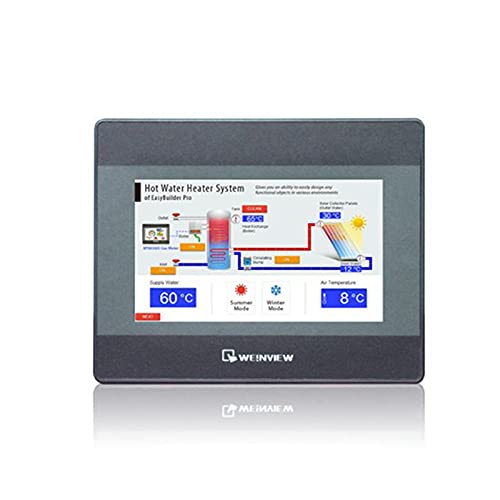
Rajah 1: Depan view of the DAVITU Weinview Weintek MT8051iP HMI Panel, showing the 4.3-inch touch display.
4.1 Ciri-ciri Utama
- Skrin Sentuh LCD TFT 4.3 inci
- Ethernet Communication Support
- Reka Bentuk Padat
- Diperakui CE
5. Persediaan dan Pemasangan
5.1 Mounting the HMI Panel
- Prepare an opening in the control panel according to the dimensions provided in the specifications section.
- Insert the HMI panel into the opening from the front.
- Secure the panel using the provided mounting brackets from the rear. Tighten the screws evenly to ensure a snug fit without over-tightening.
5.2 Sambungan Kuasa
- Pastikan sumber kuasa dimatikan sebelum menyambungkannya.
- Connect the power cable to the designated power input terminal on the HMI panel.
- Connect the other end of the power cable to a compatible DC power supply (e.g., 24V DC).
- Sahkan semua sambungan selamat sebelum menggunakan kuasa.
5.3 Sambungan Ethernet
- Connect a standard Ethernet cable (RJ45) from your network switch or PLC to the Ethernet port on the HMI panel.
- Pastikan sambungannya kukuh.
6. Arahan Operasi
6.1 Menghidupkan/Mematikan
- Hidupkan kuasa: Apply power to the HMI panel. The device will boot up automatically. The boot screen will display, followed by the configured application interface.
- Matikan: To power off, disconnect the power supply. It is recommended to save any unsaved data in the application before powering off.
6.2 Menggunakan Skrin Sentuh
- The HMI panel features a resistive touch screen. Use your finger or a non-sharp stylus to interact with the interface.
- Tap to select buttons, input fields, or navigate menus.
- Drag gestures may be supported by the application for scrolling or moving elements.
6.3 Konfigurasi Perisian
The HMI panel requires project files created with compatible software (e.g., EasyBuilder Pro). Refer to the software's documentation for detailed instructions on project creation, downloading, and configuration. The Ethernet port allows for project downloads and communication with PLCs or other devices.
7. Penyelenggaraan
7.1 Membersihkan Panel
- Turn off the device and disconnect power before cleaning.
- Gunakan kain yang lembut dan tidak berbulu dampened with a mild, non-abrasive cleaner (e.g., screen cleaner or water) to wipe the screen and casing.
- Do not use harsh chemicals, solvents, or abrasive materials, as these can damage the surface.
- Pastikan tiada cecair memasuki peranti.
7.2 Pertimbangan Alam Sekitar
To ensure optimal performance and longevity, operate the HMI panel within its specified environmental conditions (temperature, humidity). Avoid dusty environments, as dust accumulation can affect cooling and component lifespan.
8. Penyelesaian masalah
| Masalah | Kemungkinan Punca | Penyelesaian |
|---|---|---|
| Panel tidak boleh dihidupkan. | Tiada bekalan kuasa atau vol tidak betultage. | Check power cable connection. Verify power supply voltage sepadan dengan spesifikasi. |
| Skrin sentuh tidak bertindak balas. | Screen calibration issue or software freeze. | Restart the device. If issue persists, check software configuration or recalibrate the touch screen (if supported by the application). |
| Ethernet communication failure. | Incorrect cable, network configuration, or device settings. | Check Ethernet cable connection. Verify IP address and network settings. Ensure PLC/device is properly configured. |
| Display shows garbled characters. | Software or firmware issue. | Re-download the project file. Contact technical support if the problem continues. |
9. Spesifikasi
| Ciri | Perincian |
|---|---|
| Nombor Model | MT8051iP |
| Saiz Paparan | 4.3 inci |
| Jenis Paparan | LCD TFT |
| Jenis Panel Sentuh | Resistif |
| Komunikasi | Ethernet |
| Pensijilan | CE |
| Input Kuasa | (Typical: 24V DC, check device label for exact range) |
| Suhu Operasi | (Refer to product datasheet for specific range) |
| Dimensi (W x H x D) | (Refer to product datasheet for specific dimensions) |
10. Waranti dan Sokongan
10.1 Maklumat Waranti
This product comes with a standard manufacturer's warranty. Please refer to the warranty card included with your purchase or contact your vendor for specific warranty terms and conditions. The warranty typically covers defects in materials and workmanship under normal use.
10.2 Sokongan Teknikal
For technical assistance, troubleshooting beyond this manual, or service inquiries, please contact your authorized DAVITU distributor or reseller. When contacting support, please have your product model number (MT8051iP) and purchase information readily available.
Sumber Dalam Talian: For additional resources, including software downloads, FAQs, and updated documentation, please visit the official DAVITU or Weintek webtapak.