
pengenalan
Thank you for choosing the Sengled Smart Bulb. This manual provides essential information for setting up, operating, and maintaining your new smart lighting product. The Sengled Smart Bulb offers advanced features including app and voice control, 16 million colors, tunable white light, scheduling, and remote access, all without requiring a separate hub.
Panduan Persediaan
Follow these steps to set up your Sengled Smart Bulb:
- Muat turun Aplikasi Sengled Home: Cari untuk 'Sengled Home' in the App Store (iOS) or Google Play Store (Android) and install the application.
- Daftar/Log Masuk: Buka apl dan ikut arahan pada skrin untuk membuat akaun baharu atau log masuk jika anda sudah mempunyai akaun.
- Pasang Mentol: Twist the Sengled Smart LED bulb into a standard E26 medium base socket. Ensure the power is turned off before installation.
- Hidupkan kuasa: Turn on the light switch to power on the bulb. The bulb should blink to indicate it's in pairing mode.
- Tambahkan Peranti dalam Apl: In the Sengled Home app, tap the '+' icon to add a new device. Select 'Light Bulb' and follow the in-app guide to complete the setup.
- Sambung ke Wi-Fi: The bulb will connect to your home's 2.4GHz Wi-Fi network. No additional hub is required.
- Penyepaduan Pembantu Suara (Pilihan): If you wish to use voice control, link your Sengled Home account with your Amazon Alexa or Google Assistant account through their respective apps.
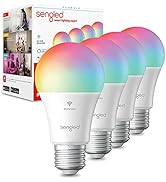
Image: Steps for setting up the Sengled Smart Bulb using the Sengled Home app.

Image: A Sengled Smart Bulb installed in a ceiling light fixture.
Arahan Operasi
The Sengled Smart Bulb offers versatile control options:
Kawalan Apl
- Hidup/Mati: Toggle the bulb's power directly from the app.
- Peredupan: Laraskan kecerahan daripada 1% kepada 100%.
- Pilihan Warna: Choose from 16 million colors to match your mood or decor.
- Putih boleh merdu: Select white light temperatures from 2000K (warm white) to 6500K (cool white).
- Penjadualan: Set timers and routines for automatic on/off times, dimming, or color changes.
- Kawalan Kumpulan: Create groups of bulbs to control multiple lights simultaneously.
- Mod Pemandangan: Apply pre-set or custom scenes for various activities or moods.
Image: A smartphone screen displaying the Sengled Home app interface for color selection.
Kawalan Suara
Control your smart bulbs hands-free using voice commands with Amazon Alexa or Google Assistant. Examples:
- "Alexa, bukak lampu ruang tamu."
- "Hei Google, tetapkan lampu bilik tidur kepada biru."
- "Alexa, dim the kitchen to 50%."
Image: A person interacting with a smart speaker to control the Sengled Smart Bulb via voice commands.
Alat Kawalan Jauh
Manage your lighting from anywhere using the Sengled Home app on your smartphone, ensuring your home always looks occupied, even when you're away.
Wake Up to Light Feature
Program your bulbs to slowly brighten over a set period, simulating a natural sunrise to help you wake up gently.
Video: Official Sengled video demonstrating the 100-watt smart bulb's features and Alexa compatibility.
Penyelenggaraan
Sengled Smart Bulbs are designed for long-term use with a service life of 22.8 years. No specific maintenance is required beyond occasional dusting with a soft, dry cloth. Ensure the bulb is not exposed to water or excessive humidity.
Menyelesaikan masalah
If you encounter issues with your Sengled Smart Bulb, consider the following:
- Isu Ketersambungan: Ensure your Wi-Fi network is 2.4GHz (5G networks are not supported). Try restarting your router and the bulb.
- Mentol Tidak Bertindak balas: Check if the bulb is securely screwed into the socket and if the power switch is on. Try turning the power off and on again to reset the bulb.
- Voice Command Problems: Verify that your Alexa or Google Assistant device is properly linked to your Sengled Home account and that the device names are correctly configured.
- Isu Apl: Ensure your Sengled Home app is updated to the latest version. Try force-closing and reopening the app.
For further assistance, please refer to the support section or contact customer service.
Spesifikasi
| Ciri | Perincian |
|---|---|
| Jenama | Berdendam |
| Nombor Model | W12-N15 |
| Jenis Cahaya | LED |
| Wattage | 100 watts equivalent (actual power consumption not specified, but typically lower for LED) |
| Kecerahan | 1500 Lumen |
| Saiz Bentuk Mentol | A19 |
| Pangkalan Mentol | E26 Sederhana |
| Warna Cerah | Multicolor (16 Million Colors) & Tunable White (2000K to 6500K) |
| Indeks Paparan Warna (CRI) | >90 |
| Teknologi Ketersambungan | Wi-Fi (2.4 GHz sahaja) |
| Jenis Pengawal | Amazon Alexa, Google Assistant, SmartThings |
| Hayat Operasi Sumber Cahaya | 22.8 Tahun |
| Penggunaan Dalaman/Luar | Dalaman |
| Jenis Bahan | Polimer Sintetik (PMMA) |
Waranti dan Sokongan
Sengled Smart Bulbs come with a Waranti 2 tahun. For warranty claims or technical support, please visit the official Sengled website or contact their customer service. Live customer service is available in the U.S.
Untuk maklumat lanjut dan sokongan, lawati sengled.com.