
DEWINNER B09FJFW84C
DEWINNER Oscillating Multi-Tool User Manual
Model: B09FJFW84C
Brand: DEWINNER
1. Pengenalan
Thank you for choosing the DEWINNER Oscillating Multi-Tool. This versatile 300W power tool is designed for a wide range of applications including cutting, sanding, grinding, and scraping. Its variable speed control and multi-angle oscillating action provide precision and efficiency for various tasks. Please read this manual carefully before operation to ensure safe and effective use of the tool.
2. Arahan Keselamatan Am
AMARAN: Baca semua amaran keselamatan, arahan, ilustrasi dan spesifikasi yang disediakan dengan alat kuasa ini. Kegagalan mematuhi semua arahan yang disenaraikan di bawah boleh mengakibatkan renjatan elektrik, kebakaran dan/atau kecederaan serius.
2.1 Keselamatan Kawasan Kerja
- Pastikan kawasan kerja bersih dan terang. Kawasan bersepah atau gelap mengundang kemalangan.
- Jangan kendalikan alatan kuasa dalam atmosfera yang mudah meletup, seperti dalam kehadiran cecair mudah terbakar, gas atau habuk. Alat kuasa menghasilkan percikan api yang boleh menyalakan habuk atau asap.
- Jauhkan kanak-kanak dan orang ramai semasa mengendalikan alat kuasa. Gangguan boleh menyebabkan anda hilang kawalan.
2.2 Keselamatan Elektrik
- Palam alat kuasa mesti sepadan dengan alur keluar. Jangan sekali-kali mengubah suai palam dalam apa jua cara.
- Elakkan sentuhan badan dengan permukaan yang dibumikan atau dibumikan, seperti paip, radiator, julat dan peti sejuk. Terdapat peningkatan risiko kejutan elektrik jika badan anda dibumikan atau dibumikan.
- Jangan dedahkan alatan kuasa kepada hujan atau keadaan basah. Air yang memasuki alat kuasa akan meningkatkan risiko kejutan elektrik.
2.3 Keselamatan Diri
- Sentiasa pakai pelindung mata. Gunakan cermin mata keselamatan, cermin mata atau pelindung muka.
- Berpakaian dengan betul. Jangan memakai pakaian atau barang kemas yang longgar. Jauhkan rambut dan pakaian anda daripada bahagian yang bergerak.
- Sentiasa berwaspada, perhatikan apa yang anda lakukan dan gunakan akal semasa mengendalikan alat kuasa.
3. Komponen dan Ciri
Familiarize yourself with the parts of your DEWINNER Oscillating Multi-Tool and its included accessories.

Figure 3.1: Tool Components Overview
- Pelarasan 6-Kelajuan: Dial to select desired oscillation speed.
- Enkapsulasi: Ergonomic housing for comfortable grip.
- Tukar: Suis hidup / mati.
- Aluminium Alloy Head: Durable head for accessory attachment.
- Pengambilan Udara: Vents for motor cooling.
- Pengudaraan: Additional vents for heat dissipation.
- Universal Adaptor: For attaching various accessories.

Rajah 3.2: Aksesori yang Disertakan
- Plunge Cutting Blade: For making precise cuts in various materials.
- Scraper Blade (x2): For removing paint, adhesive, or other materials.
- Semicircle Blade: Ideal for flush cutting and larger cuts.
- Sanding Base Plate: For attaching sandpaper for sanding tasks.
- Sandpaper (18 sheets): Assorted grits (240*5, 120*5, 80*5, 60*3) for various sanding needs.
- Sepana Hex: For securing and changing accessories.
Ciri-ciri Utama:
- 6 Kelajuan Boleh Ubah: Adjust speed from 0-23000 RPM to match the application and material.
- 3° Oscillating Angle: Provides efficient cutting, sanding, and grinding action.
- Soft Anti-Vibration Grip: Enhances user comfort and control during extended use.
- Quick Accessory Change: Designed for easy and fast blade replacement.
4. Setup and Accessory Installation
Always ensure the tool is unplugged from the power source before installing or changing accessories.
4.1 Attaching/Changing Accessories
- Unplug the Tool: Disconnect the multi-tool from the power outlet.
- Loosen the Bolt: Use the provided hex wrench to counter-rotate and loosen the accessory mounting bolt on the tool head.

Figure 4.1: Loosening the Accessory Bolt
- Place the Accessory: Align the accessory (blade, scraper, or sanding pad) with the universal adaptor on the tool head. Ensure it sits flush and securely.
Figure 4.2: Placing the Accessory
- Tighten the Bolt: Use the hex wrench to clockwise rotate and firmly tighten the accessory mounting bolt. Ensure the accessory is securely fastened and does not wobble.
Figure 4.3: Tightening the Accessory Bolt
- Untuk Pengamplasan: If using the sanding base plate, attach the desired sandpaper sheet by pressing it firmly onto the hook-and-loop surface of the pad.
5. Arahan Operasi
5.1 Menghidupkan/Mematikan
- To turn the tool ON, slide the power switch forward.
- To turn the tool OFF, slide the power switch backward.

Figure 5.1: Power Switch Location
5.2 Melaraskan Kelajuan
The tool features a 6-level variable speed adjustment dial. Rotate the dial to select the appropriate speed for your application.
- Lower speeds (1-2) are suitable for delicate work, sanding, or when more control is needed.
- Medium speeds (3-4) are good for general cutting and scraping.
- Higher speeds (5-6) are ideal for aggressive cutting and grinding.
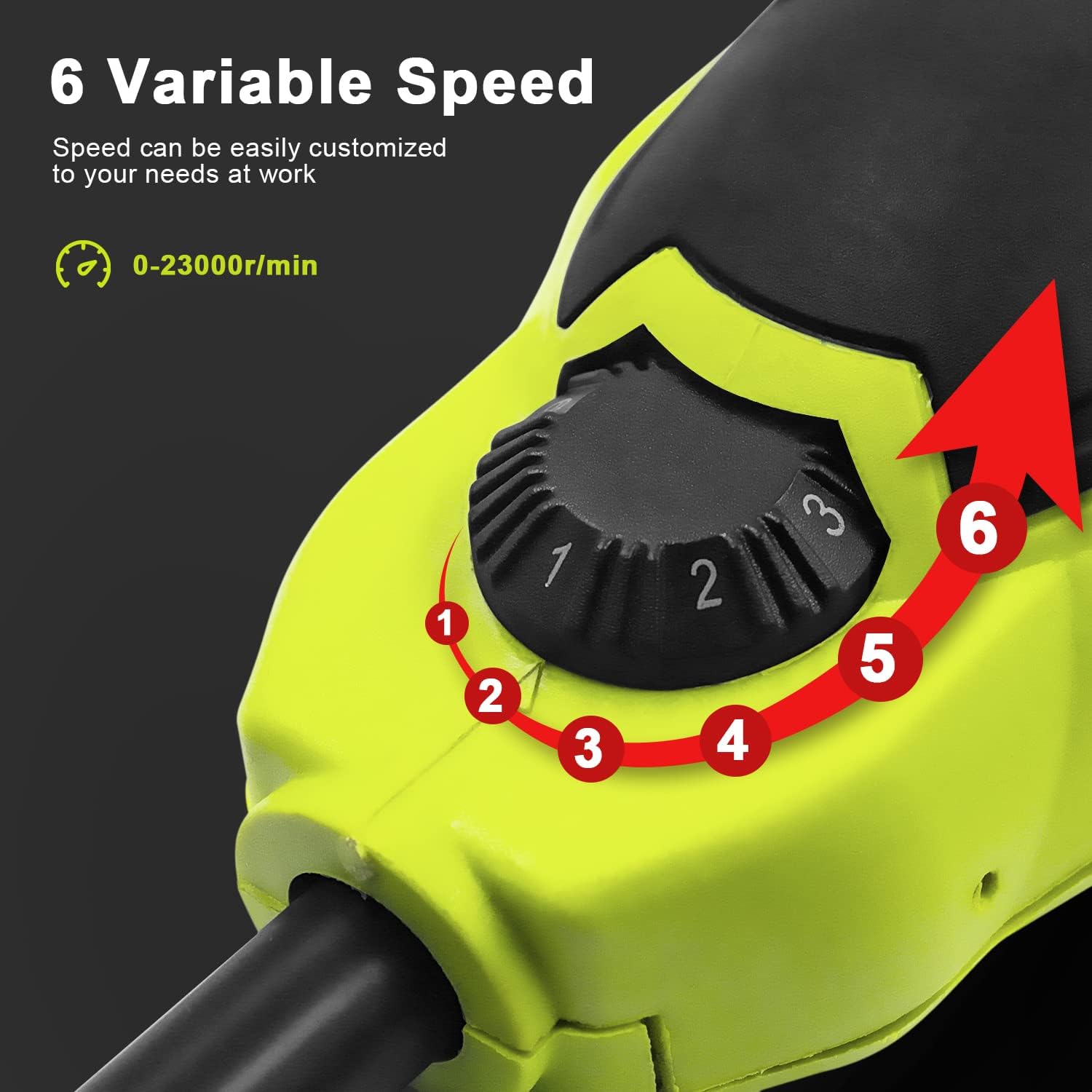
Figure 5.2: Speed Adjustment Dial
5.3 Permohonan Cthamples
The DEWINNER Oscillating Multi-Tool is highly versatile. Here are some common applications:
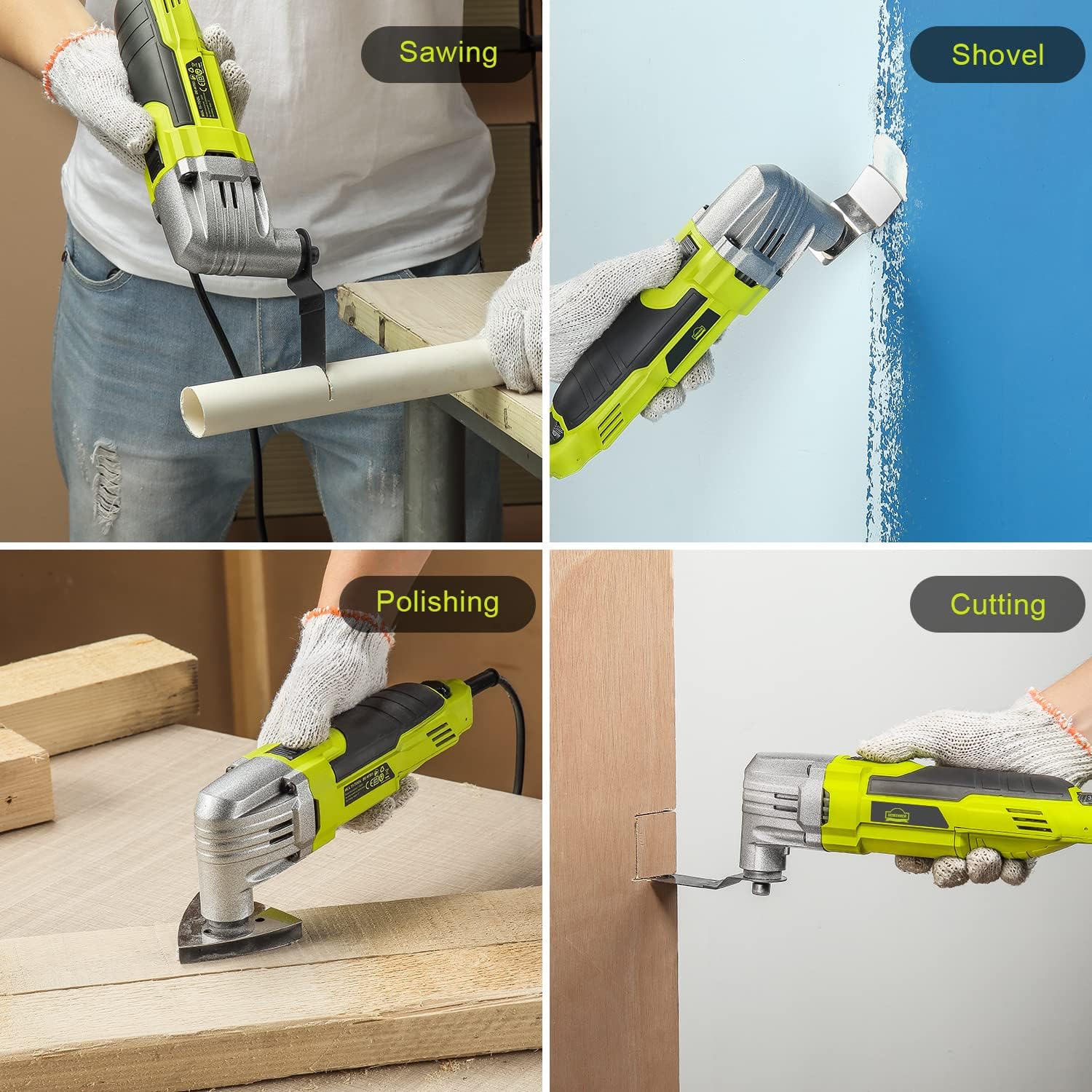
Melihat: Use appropriate saw blades for cutting wood, plastic, or soft metals. Apply steady, even pressure.
Shoveling/Scraping: Attach a scraper blade to remove old paint, caulk, or adhesive from surfaces.
Polishing/Sanding: Use the sanding base plate with appropriate grit sandpaper for smoothing surfaces. Move the tool in a consistent pattern.
Memotong: For plunge cuts or flush cuts, select the correct blade and guide the tool carefully into the material.
6. Penyelenggaraan
Regular maintenance ensures the longevity and optimal performance of your multi-tool. Always unplug the tool before performing any maintenance.
6.1 Pembersihan
- Selepas setiap penggunaan, lap alat dengan bersih, damp kain. Jangan gunakan bahan kimia yang keras atau pembersih yang kasar.
- Pastikan bukaan pengudaraan bersih daripada habuk dan serpihan untuk mengelakkan terlalu panas. Gunakan udara termampat jika perlu.
- Clean accessories (blades, scrapers) after use to remove residue and prolong their lifespan.
6.2 Penyimpanan
- Simpan alat tersebut di tempat yang kering, selamat, dan jauh daripada kanak-kanak.
- Protect the power cord from damage. Do not wrap it tightly around the tool.
6.3 Accessory Care
- Inspect blades and other accessories for wear or damage before each use. Replace worn or damaged accessories immediately.
- Store accessories in a protective case or organizer to prevent damage and loss.
7. Penyelesaian masalah
If you encounter issues with your DEWINNER Oscillating Multi-Tool, refer to the table below for common problems and solutions.
| Masalah | Kemungkinan Punca | Penyelesaian |
|---|---|---|
| Alat tidak bermula. | Tiada bekalan kuasa. Suis kuasa dimatikan. | Check power outlet and cord. Ensure power switch is in the ON position. |
| Alat menjadi terlalu panas. | Bukaan pengudaraan yang disekat. Beban berlebihan. | Clean ventilation openings. Reduce pressure on the tool; allow it to cool. |
| Accessory wobbles or falls off. | Accessory not tightened properly. Incorrect accessory installation. | Ensure the accessory bolt is fully tightened. Re-install accessory, ensuring it is flush with the adaptor. |
| Prestasi berkurangan. | Worn or dull accessory. Tetapan kelajuan yang salah. | Gantikan aksesori. Adjust speed dial to a higher setting for the task. |
If the problem persists after trying these solutions, please contact DEWINNER customer support.
8. Spesifikasi Teknikal
| Ciri | Spesifikasi |
|---|---|
| Jenama | DEWINNER |
| Model | B09FJFW84C |
| Kuasa Input | 300W |
| Kelajuan tanpa beban | 0-23000 RPM |
| Sudut Berayun | 3° |
| Sumber Kuasa | Elektrik Bertali |
| Dimensi Pakej | 32.4 x 10.8 x 8.8 cm |
| Berat Barang | 1.71 kilogram |
| Pengeluar | vanbox |
| Negara Asal | China |

Rajah 8.1: Spesifikasi Utama Lebihview
9. Waranti dan Sokongan
DEWINNER products are manufactured to high-quality standards. For warranty information, technical support, or service inquiries, please refer to the contact information provided with your purchase or visit the official DEWINNER webtapak. Sila simpan bukti pembelian anda untuk tuntutan waranti.
Ask a question about this manual
Ask about setup, troubleshooting, compatibility, parts, safety, or missing instructions. Manuals+ will review the question and use this page’s manual context to help answer it.