1. Pengenalan
This manual provides essential instructions for setting up, operating, and maintaining your TECHPAD Smartwatch SW Sport Pro. Please read this guide thoroughly to ensure proper use and to maximize the features of your device. The smartwatch is designed to integrate with both iOS and Android smartphones, offering multisport tracking, notification alerts, and health monitoring capabilities.

Imej 1.1: Depan view of the TECHPAD Smartwatch SW Sport Pro displaying various metrics.
2. Kandungan Pakej
Sila sahkan bahawa semua item terdapat dalam pakej:
- TECHPAD Smartwatch SW Sport Pro (with pre-installed strap)
- Kabel Pengecasan
- Manual Pengguna (dokumen ini)
3. Panduan Persediaan
3.1. Mengecas Jam Pintar
Before first use, fully charge your smartwatch. Connect the charging cable to the charging port on the back of the smartwatch and plug the USB end into a standard USB power adapter (not included) or a computer's USB port. The watch display will indicate charging status.
3.2. Menghidupkan/Mematikan
- Hidupkan kuasa: Tekan dan tahan butang sisi sehingga skrin menyala.
- Matikan: Navigate to the 'Settings' menu on the smartwatch, then select 'Power Off' or press and hold the side button, then confirm power off.
3.3. Pemasangan Apl dan Berpasangan
To unlock the full functionality of your smartwatch, you must pair it with your smartphone via a companion application. The specific app name is not provided, please refer to the packaging or product information for the correct app to download from the App Store (iOS) or Google Play Store (Android).
- Download and install the companion app on your iOS or Android smartphone.
- Pastikan Bluetooth didayakan pada telefon pintar anda.
- Buka aplikasi dan ikut arahan pada skrin untuk membuat akaun dan menyediakan pro andafile.
- Within the app, select 'Add Device' or 'Pair Smartwatch' and choose 'SW Sport Pro' from the list of available devices.
- Confirm the pairing request on both your smartphone and smartwatch if prompted.
Once paired, the smartwatch will synchronize data with your phone, and you can customize settings through the app.
4. Arahan Operasi
4.1. Navigasi Asas
The TECHPAD Smartwatch SW Sport Pro features a responsive touch screen and a side button for navigation:
- Leret ke atas/bawah: Tatal melalui menu dan pemberitahuan.
- Leret Kiri/Kanan: Access different widgets or quick functions (e.g., heart rate, activity data).
- Ketik: Pilih item atau sahkan tindakan.
- Butang Sisi: Press to return to the home screen or wake the device. A long press may access power options.
4.2. Ciri-ciri Utama
Your smartwatch offers a range of features to enhance your daily life and fitness:
- Multisport Mode: Track various activities such as running, walking, cycling, and more. Select your desired sport from the activity menu to begin tracking.
- Monitor Tidur: Automatically tracks your sleep patterns, including deep sleep, light sleep, and awake times. View detailed analysis in the companion app.
- Pemberitahuan Tolak: Receive alerts for incoming calls, text messages, and app notifications directly on your wrist. The smartwatch will vibrate to alert you.
- Amaran Panggilan: See who is calling and choose to accept or reject calls from your smartwatch (call answering functionality may vary).
- Alarms: Set silent vibrating alarms through the companion app to wake you up or remind you of important events.
- GPS melalui Telefon Pintar: When connected to your smartphone, the smartwatch can utilize your phone's GPS for more accurate distance and route tracking during outdoor activities.

Image 4.1: Smartwatch display showing real-time health and activity data.
4.3. Menyesuaikan Muka Jam
You can change the watch face to personalize your device. This is typically done through the companion app, where you can browse and download various watch face designs. Some watch faces may allow for customization of displayed information.
5. Penyelenggaraan dan Penjagaan
To ensure the longevity and optimal performance of your TECHPAD Smartwatch SW Sport Pro, follow these care guidelines:
- Pembersihan: Regularly clean the smartwatch and strap with a soft, damp cloth. Avoid using harsh chemicals or abrasive materials. Ensure the charging contacts are clean and dry.
- Tahan Air: Refer to the product specifications for the exact water resistance rating. Avoid exposing the device to hot water, steam, or high-pressure water jets.
- Suhu: Do not expose the smartwatch to extreme temperatures (very hot or very cold) as this can damage the battery and internal components.
- mengecas: Use only the provided charging cable. Do not attempt to force the charger into the port.
- Penjagaan Tali: If the strap is removable, clean it separately. Ensure it is securely reattached before wearing.
6. Penyelesaian masalah
Jika anda menghadapi masalah dengan jam tangan pintar anda, cuba penyelesaian berikut:
- Jam tangan pintar tidak dihidupkan: Ensure the device is fully charged. Connect it to the charging cable and allow it to charge for at least 30 minutes before attempting to power on again.
- Tidak boleh berpasangan dengan telefon pintar:
- Pastikan Bluetooth didayakan pada telefon pintar anda.
- Pastikan jam tangan pintar berada dalam julat Bluetooth telefon anda.
- Restart both your smartwatch and smartphone.
- Kosongkan cache Bluetooth pada telefon anda (jika berkenaan) dan cuba pasangkan semula.
- Pastikan apl pendamping yang betul dipasang dan dikemas kini.
- Pemberitahuan tidak muncul:
- Check notification settings within the companion app to ensure they are enabled for desired applications.
- Verify that your smartphone's notification settings allow the companion app to display alerts.
- Ensure the smartwatch is connected via Bluetooth to your phone.
- Penjejakan aktiviti tidak tepat:
- Ensure the smartwatch is worn snugly on your wrist, about one finger's width above your wrist bone.
- Update your personal information (height, weight, age) in the companion app for better accuracy.
- For GPS-dependent activities, ensure your phone's GPS is active and the smartwatch is connected to the phone.
- Hayat bateri pendek:
- Kurangkan kecerahan skrin.
- Lumpuhkan pemantauan kadar denyutan jantung berterusan jika tidak diperlukan.
- Limit the number of apps sending notifications to the smartwatch.
- Pastikan jam tangan pintar dicas sepenuhnya sebelum digunakan.
Jika masalah berterusan, hubungi sokongan pelanggan untuk bantuan lanjut.
7. Spesifikasi
| Ciri | Penerangan |
|---|---|
| Model | TECHPAD Smartwatch SW Sport Pro |
| Jenis Paparan | AMOLED |
| Saiz Skrin | 1 inci |
| Sistem Operasi | Android Wear (as specified) |
| Ketersambungan | Bluetooth |
| Peranti Serasi | Telefon pintar (iOS, Android) |
| Ciri Khas | Sleep Monitor, Multisport Mode, Push Notifications, Call Alerts, Alarms, Touch Screen, GPS via smartphone |
| Hayat Bateri (Bersedia) | Sehingga 15 hari |
| Battery Life (Training) | 4 hingga 6 hari |
| bentuk | Bulat |
| Termasuk Aksesori | Strap, Charging Cable |
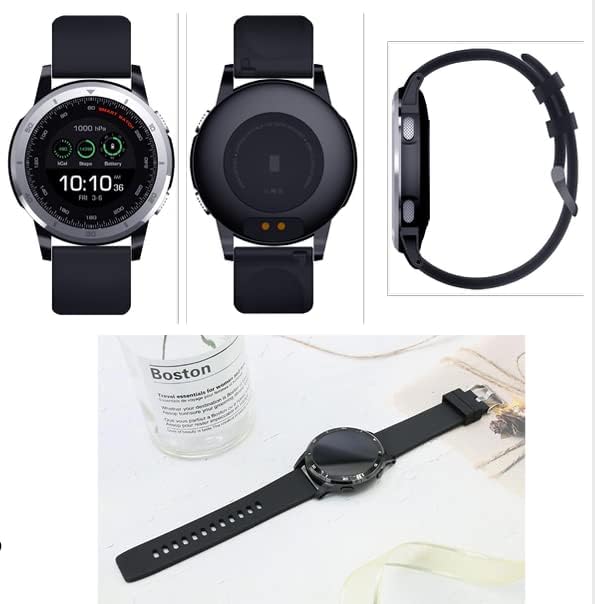
Image 7.1: Various angles of the smartwatch, including its charging contacts and side profile.
8. Waranti dan Sokongan
For warranty information, please refer to the warranty card included with your product or visit the official TECH PAD webtapak. Simpan bukti pembelian anda untuk tuntutan waranti.
If you require technical support or have questions not covered in this manual, please contact TECH PAD customer service. Contact details can typically be found on the product packaging or the official brand webtapak.