
1. Pengenalan
This manual provides detailed instructions for the installation, operation, and maintenance of your MAIMEIMI 85mm GPS Speedometer. Designed for a wide range of applications including cars, tractors, trucks, boats, and marine vessels, this speedometer features a clear TFT screen, IP67 waterproof rating, and a wide 9-32VDC working voltage range. Please read this manual thoroughly before installation and use to ensure proper function and safety.
2. Kandungan Pakej
Setelah membuka bungkusan anda, sila sahkan bahawa semua item berikut disertakan:
- 1 x GPS Speedometer (85mm / 3-3/8")
- 1 x GPS Antenna (3-meter cable length)
- 1 x Manual Arahan

Image: Contents of the MAIMEIMI GPS Speedometer package.
3. Ciri-ciri Produk
- TFT Screen Display: Provides clear visibility of speed, odometer, trip meter, battery voltage, and course over ground (COG).
- Lebar Voltage Julat: Operates on 9-32VDC, suitable for various vehicle types.
- Waterproof & Anti-fogging: IP67 rated for water and fog resistance, ensuring reliable performance in challenging environments.
- Multiple Unit Switching: Easily switch between kilometers per hour (km/h), miles per hour (mph), and knots (rounded to one decimal).
- GPS Signal Acquisition: Initial signal acquisition takes approximately 30 seconds, with faster connections under clear skies.
- Odometer & Trip Meter: Odometer (0-999999km) is adjustable via the back button. Trip meter (0-999.9km) resets when power is off.
- Orientation Pointer: Displays Course Over Ground (COG) for directional awareness.
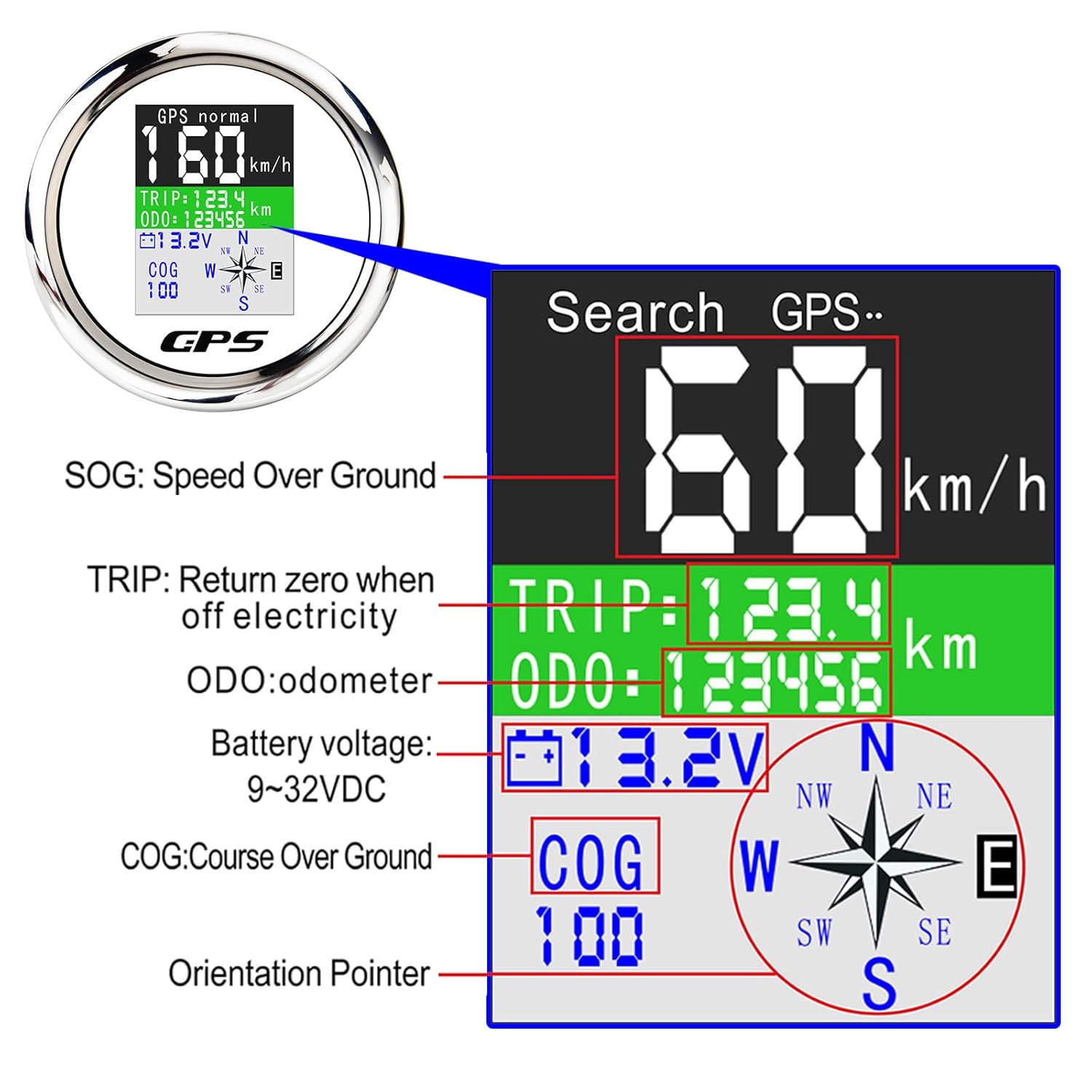
Image: Detailed display information of the GPS Speedometer.

Image: The speedometer undergoing a waterproof test.
4. Persediaan dan Pemasangan
Follow these steps for proper installation of your GPS Speedometer:
- Sediakan Lubang Pemasangan: Open an 85mm (3 3/8") diameter hole in your panel. Ensure there is a 55mm (2 3/16") depth clearance behind the panel for the gauge body.
- Insert the Gauge: Carefully place the speedometer into the prepared hole.
- Secure the Gauge: Use the provided mounting ring to screw down and secure the gauge firmly in place.
- Sambungan Pendawaian:
- Connect the Black wire to Ground (-).
- Connect the Red wire to 9-30VDC power supply.
- Sambungkan Antena GPS: Plug the GPS antenna into the designated port on the back of the speedometer. The GPS antenna can be optionally mounted using 3M double-sided tape.

Image: Front and back dimensions of the GPS Speedometer.

Image: Basic wiring diagram for the speedometer.

Image: Step-by-step installation guide for the gauge.
5. Arahan Operasi
Once installed and powered, the speedometer will begin searching for a GPS signal. After acquiring a signal, it will display speed and other data.
- Penukaran Unit: To change the speed unit (km/h, mph, or knots), press the button located on the back of the speedometer. The unit will cycle through the options and save automatically.
- Pelarasan Odometer: The odometer value can be adjusted using the button on the back.
- Meter Perjalanan: The trip meter automatically resets to zero when the power is turned off.

Image: Display showing selectable speed units.
Video: Demonstration of the 85mm GPS Speedometer, including unit switching and waterproof features.
6. Penyelenggaraan
To ensure the longevity and optimal performance of your GPS Speedometer, follow these general maintenance guidelines:
- Regularly clean the screen and bezel with a soft, damp kain. Elakkan pembersih yang kasar.
- Pastikan semua sambungan pendawaian kekal kukuh dan bebas daripada kakisan.
- Periodically check the GPS antenna for any damage or obstruction to maintain signal integrity.
- While the unit is IP67 waterproof, avoid prolonged submersion or high-pressure water jets.
7. Penyelesaian masalah
If you encounter any issues with your GPS Speedometer, consider the following common solutions:
- Tiada Isyarat GPS: Pastikan antena GPS mempunyai jernih view of the sky. Obstructions can block the signal. Allow up to 30 seconds for initial signal acquisition.
- Bacaan Kelajuan Salah: Verify that the correct unit (km/h, mph, knots) is selected. If the issue persists, ensure the GPS antenna is securely connected.
- Paparan Tidak Berfungsi: Check all power connections to ensure they are secure and receiving the correct voltage (9-32VDC).
- Butang Tidak Responsif: Ensure the unit is clean and free from debris around the buttons.
Jika masalah berterusan selepas mencuba langkah-langkah ini, sila hubungi khidmat pelanggan untuk bantuan lanjut.
8. Spesifikasi
| Spesifikasi | Perincian |
|---|---|
| Dimensi Produk | 3.82 x 3.78 x 2.2 inci; 10.88 auns |
| Bekerja Voltage | 9-32VDC |
| Penilaian Kalis Air | IP67 |
| bahan | Stainless Steel, Plastic, Anti-Fogging Glass |
| Julat Kelajuan | 0-600 km/j |
| Odometer Range | 0-999999 km (adjustable) |
| Trip Meter Range | 0-999.9 km (resets on power off) |
| Pengeluar | MAIMEIMI |
9. Waranti dan Sokongan
For warranty information or technical support, please refer to the contact details provided with your purchase documentation or visit the official MAIMEIMI webtapak. Simpan bukti pembelian anda untuk sebarang tuntutan waranti.