
1. Pengenalan
This manual provides essential information for the safe and efficient use of your OnePlus Nord N100 LTE smartphone. Please read this guide thoroughly before operating your device to ensure optimal performance and longevity. Keep this manual for future reference.
2. Produk Lebihview
The OnePlus Nord N100 LTE (Model BE2012) is a feature-rich smartphone designed for daily communication and entertainment. Key features include a 13MP Triple Camera System, an 8MP Front Camera, a large 90Hz display for immersive viewing, 4GB RAM, and 64GB of internal storage. It operates on Android 10 and is factory unlocked for major GSM carriers like T-Mobile, Sprint, and AT&T.

Imej 2.1: Bahagian Depan dan Belakang View of the OnePlus Nord N100 LTE Smartphone. The device features a punch-hole display on the front and a triple camera setup with a fingerprint sensor on the back.

Image 2.2: Diagram highlighting key features of the OnePlus Nord N100, including the 6.52" HD+ LCD Display, Triple Camera System, 64 GB built-in storage, 18W Fast Charging, and Large 5000mAh battery.
3. Persediaan
3.1 Memasukkan Kad SIM dan SD
- Cari dulang SIM di sisi peranti anda.
- Use the SIM ejector tool (not included in renewed package) to open the tray.
- Letakkan kad Nano-SIM dan/atau kad microSD anda ke dalam dulang, pastikan orientasinya betul.
- Tolak dulang perlahan-lahan ke dalam peranti sehingga ia berbunyi pada tempatnya.
3.2 Kuasa Awal Hidup
- Press and hold the Power button (located on the side) until the OnePlus logo appears.
- Ikut arahan pada skrin untuk melengkapkan persediaan awal, termasuk pemilihan bahasa, sambungan Wi-Fi dan persediaan akaun Google.
4. Mengendalikan Peranti Anda
4.1 Navigasi Asas
- Skrin sentuh: Ketik untuk memilih, leret untuk menatal, cubit untuk mengezum.
- Butang Kuasa: Press to lock/unlock the screen. Press and hold for power options.
- Butang Kelantangan: Adjust media volume, ringtone volume, and alarm volume.
- Sensor cap jari: Located on the rear of the device for secure unlocking.
4.2 Ciri Paparan
The OnePlus Nord N100 features a 6.52-inch HD+ LCD display with a 90Hz refresh rate, providing a smooth visual experience for scrolling and gaming. The display resolution is 1920 x 1080 pixels.
5. Ciri-ciri Kamera
Capture your moments with the versatile camera system.
5.1 Sistem Kamera Belakang
- Kamera Utama: 13MP sensor for clear and detailed photos.
- Kanta Makro: 2MP dedicated lens for close-up shots.
- Penderia Kedalaman: 2MP sensor for enhanced portrait mode with background blur.
Kamera hadapan 5.2
Kamera hadapan 8MP sesuai untuk swafoto dan panggilan video.

Image 5.1: Diagram illustrating the triple camera system of the OnePlus Nord N100, detailing the 13MP Main Camera, Macro Lens, and Specialized Camera (Depth Sensor).
6. Pengurusan Bateri
The device is equipped with a 5000 Milliamp Hours (mAh) Lithium Polymer battery, providing long-lasting power for extended use. Charging is facilitated via the USB-C port.
6.1 Mengecas
- Connect the provided USB Cable and Adapter to your device and a power outlet.
- Ensure you use the original or certified compatible charging accessories for optimal performance and safety.
7. Ketersambungan
- Pembawa Tanpa Wayar: Unlocked for all major GSM carriers (T-Mobile, Sprint, AT&T). Not compatible with Cricket, Xfinity, Visible, or other CDMA networks. Verify carrier frequency compatibility.
- Teknologi Ketersambungan: USB (Type-C).
- Teknologi Komunikasi Tanpa Wayar: Cellular, Wi-Fi, Bluetooth.
- GPS: Integrated GPS functionality for location services.
- Jack Audio: No traditional headphone jack. Audio output is via USB-C or Bluetooth.
8. Spesifikasi
| Ciri | Perincian |
|---|---|
| Nama Model | BE2012 |
| Jenama | OnePlus |
| Sistem Operasi | Android 10.0 |
| RAM | 4 GB |
| Kapasiti Penyimpanan Memori | 64 GB |
| Saiz Skrin | 6.52 Inci |
| Resolusi | 1920 x 1080 |
| Kadar Segar Semula | 90 hertz |
| Model CPU | Snapdragon |
| Kapasiti Bateri | 5000 Miliamp jam |
| Berat Barang | 11.3 auns |
| warna | Midnight Frost |
9. Penyelenggaraan
9.1 Kemas Kini Perisian
Your device runs on Android 10.0. Periodically check for software updates in the device settings to ensure optimal performance, security, and access to new features. Available storage may be less due to device software updates and app usage.
9.2 Pembersihan dan Penjagaan
- Gunakan kain lembut dan tidak berbulu untuk membersihkan skrin dan badan peranti.
- Elakkan menggunakan bahan kimia yang keras atau bahan kasar yang boleh merosakkan kemasan.
- Lindungi peranti anda daripada suhu yang melampau dan cahaya matahari langsung.
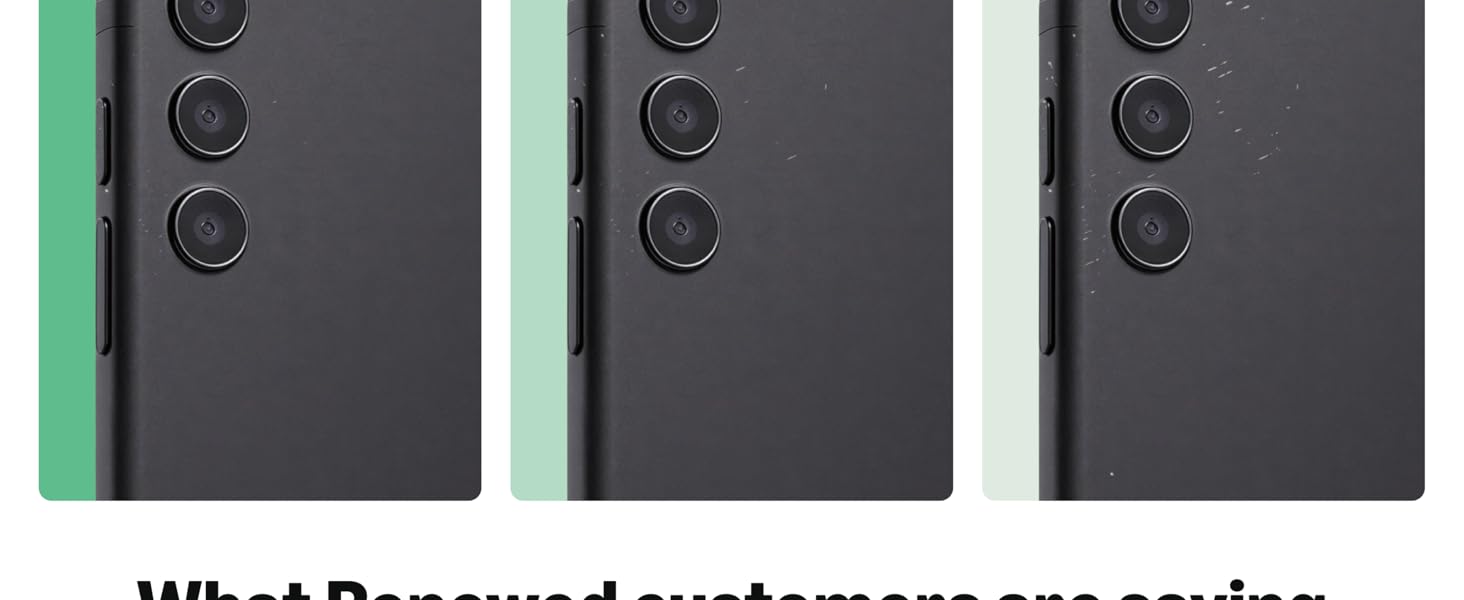
Image 9.1: Guidelines for Amazon Renewed product conditions, detailing criteria for 'Excellent', 'Good', and 'Acceptable' states regarding cosmetic damage, screen condition, and battery life.
10. Penyelesaian masalah
10.1 Isu Lazim
- Peranti tidak bertindak balas: Press and hold the Power button for 10-15 seconds to force restart.
- Isu sambungan rangkaian: Check SIM card insertion, toggle Airplane Mode, or restart the device.
- Bateri cepat habis: Close unused apps, reduce screen brightness, or check for rogue apps in battery settings.
10.2 Tetapan Semula Kilang
Jika anda mengalami masalah berterusan, tetapan semula kilang boleh menyelesaikannya. Amaran: Ini akan memadamkan semua data pada peranti anda. Sandarkan maklumat penting sebelum meneruskan.
- Pergi ke Tetapan > Sistem > Tetapkan semula pilihan.
- Pilih 'Padam semua data (tetapan semula kilang)'.
- Confirm your choice and follow the on-screen prompts.
11. Waranti dan Sokongan
This Amazon Renewed device comes with a 90-day store limited warranty. For support or warranty claims, please contact the seller directly.
11.1 Apa yang ada di dalam Kotak
- OnePlus Nord N100 LTE Smartphone (Renewed)
- Premium aftermarket charger
- Kabel USB
Please note that renewed products may have minor scuffs or scratches and ship in non-retail packaging.