
Sonel SON001
Manual Arahan Multimeter Perindustrian Sonel CMM 30
Model: SON001
1. Pengenalan
The Sonel CMM 30 is an advanced industrial multimeter engineered for versatility, modern functionality, and exceptional durability. This device integrates 11 fundamental measurement functions along with additional features, providing a broad spectrum of applications for professionals. Its robust design includes drop protection and an IP67 rated casing, ensuring reliable performance even in challenging environments.
Key features include a smartphone application for remote reading and data saving via wireless communication, an automatically adjusting backlight for optimal screen visibility, and a built-in flashlight for illumination in dark conditions. This manual provides essential information for the safe and effective use of your CMM 30 multimeter.
2. Maklumat Keselamatan
Always adhere to the following safety precautions to prevent electric shock, injury, or damage to the meter or equipment under test.
- Read and understand all instructions and safety information in this manual before operating the meter.
- Jangan gunakan meter jika ia kelihatan rosak atau jika penebat pada wayar ujian terjejas.
- Sentiasa putuskan sambungan kuasa ke litar dan nyahcas semua voltan tinggitage capacitors before making resistance, continuity, diode, or capacitance measurements.
- Berhati-hati apabila bekerja dengan voltagadalah melebihi 30V AC RMS, puncak 42V atau 60V DC. Ini voltagia menimbulkan bahaya kejutan.
- Jangan melebihi had input maksimum untuk sebarang fungsi.
- Ensure the function switch is in the correct position for the desired measurement before connecting the test leads to the circuit.
- Gantikan bateri sebaik sahaja penunjuk bateri rendah muncul untuk memastikan bacaan yang tepat.
- Jangan kendalikan meter dalam persekitaran gas meletup, wap atau habuk.
3. Kandungan Pakej
Verify that all items listed below are present and undamaged upon opening the package:
- Sonel CMM 30 Industrial Multimeter
- Petunjuk Ujian (Merah dan Hitam)
- Temperature Probe (K-type thermocouple)
- 4 x AAA Batteries (pre-installed or separate)
- Manual Pengguna (dokumen ini)
Jika terdapat sebarang barang yang hilang atau rosak, sila hubungi pembekal anda dengan segera.
4. Produk Lebihview
Familiarize yourself with the components of your Sonel CMM 30 multimeter:
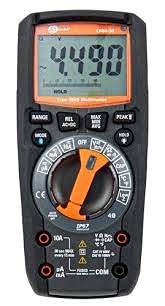
Rajah 4.1: Depan view of the Sonel CMM 30 Industrial Multimeter. This image displays the device's main components, including the digital display, the central rotary function switch, and the various input terminals for test leads.
4.1. Paparan
The large LCD shows measurement readings, units, function indicators, and battery status. It features an automatic backlight that adjusts to ambient light conditions for optimal visibility.
4.2. Suis Fungsi Putar
This central switch is used to select the desired measurement function (e.g., Voltage, Current, Resistance, Capacitance, Temperature, Frequency).
4.3. Butang Fungsi
Various buttons provide additional controls and features:
- RANGE: Toggles between manual and automatic ranging.
- ARAHAN: Selects sub-functions within a main rotary switch position (e.g., AC/DC voltage, Diod/Kesinambungan).
- DIBERI: Membekukan bacaan paparan semasa.
- MAX/MIN/AVG: Records maximum, minimum, and average readings.
- REL: Relative mode, subtracts a stored value from subsequent measurements.
- Bluetooth/Light: Activates Bluetooth connectivity for the smartphone app and controls the built-in flashlight.
4.4. Input Jacks
These are the connection points for the test leads:
- COM: Common terminal for the black test lead.
- VΩHzCAP°C: Input untuk voltage, resistance, frequency, capacitance, and temperature measurements (red test lead).
- mAµA: Input untuk miliampere dan mikroampere current measurements (red test lead).
- 10A: Input for up to 10 Ampere current measurements (red test lead).
5. Persediaan
5.1. Pemasangan Bateri
The Sonel CMM 30 requires 4 AAA batteries. These may be pre-installed or included separately.
- Pastikan multimeter dimatikan.
- Cari petak bateri di bahagian belakang meter.
- Gunakan pemutar skru untuk melonggarkan skru yang menahan penutup bateri.
- Tanggalkan penutup bateri.
- Insert the 4 AAA batteries, observing the correct polarity (+ and -) as indicated inside the compartment.
- Replace the battery cover and tighten the screw(s) securely.
Nota: Always use fresh batteries of the same type. Remove batteries if the meter is not used for an extended period to prevent leakage.
6. Arahan Operasi
6.1. Menghidupkan/Mematikan
Turn the rotary function switch from the OFF position to any desired measurement function to power on the meter. To power off, turn the switch back to the OFF position.
6.2. Basic Measurement Procedures
Before any measurement, ensure the test leads are correctly inserted into the appropriate input jacks for the selected function.
6.2.1. Jldtage Pengukuran (AC/DC)
- Insert the black test lead into the COM jack and the red test lead into the VΩHzCAP°C jack.
- Putar suis putar kepada V~ (AC Voltage) atau V- (Vol DCtage) position. If both are combined, use the MODE button to select AC or DC.
- Connect the test leads in parallel across the circuit or component to be measured.
- Baca voltagnilai e pada paparan.
6.2.2. Pengukuran Semasa (AC/DC)
Awas: Never connect the meter in parallel for current measurement. Always connect in series with the circuit.
- Insert the black test lead into the COM jack. For currents up to 10A, insert the red test lead into the 10A jack. For smaller currents (mA/µA), insert the red test lead into the mAµA jack.
- Turn the rotary switch to the A~ (AC Current) or A- (DC Current) position, or the mA/µA position as appropriate. Use the MODE button to select AC or DC if needed.
- Buka litar di mana arus akan diukur dan sambungkan meter secara bersiri.
- Baca nilai semasa pada paparan.
6.2.3. Pengukuran Rintangan
- Insert the black test lead into the COM jack and the red test lead into the VΩHzCAP°C jack.
- Turn the rotary switch to the Ω (Resistance) position.
- Ensure the circuit or component is de-energized before connecting the test leads across it.
- Baca nilai rintangan pada paparan.
6.2.4. Pengukuran Kapasiti
- Insert the black test lead into the COM jack and the red test lead into the VΩHzCAP°C jack.
- Turn the rotary switch to the CAP (Capacitance) position.
- Pastikan kapasitor dinyahcas sepenuhnya sebelum menyambungkan petunjuk ujian merentasinya.
- Baca nilai kapasitans pada paparan.
6.2.5. Pengukuran Suhu
- Insert the temperature probe into the VΩHzCAP°C and COM jacks, observing polarity if applicable.
- Turn the rotary switch to the °C/°F (Temperature) position.
- Letakkan hujung probe suhu pada atau berhampiran objek yang suhunya hendak diukur.
- Baca nilai suhu pada paparan.
6.3. Ciri Lanjutan
6.3.1. Pengukuran RMS Sebenar
The CMM 30 features True RMS for AC voltage and current measurements, providing accurate readings for non-sinusoidal waveforms.
6.3.2. Wireless Communication and Smartphone App
The CMM 30 can connect wirelessly to a smartphone application, allowing for remote reading and saving of measurements. This is particularly useful in hard-to-reach or hazardous locations.
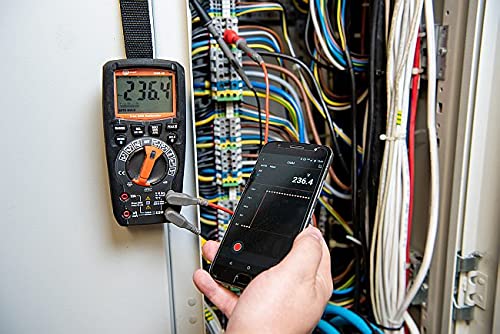
Figure 6.1: The Sonel CMM 30 Multimeter connected to an electrical panel, demonstrating its wireless communication feature. A smartphone displays the measurement reading remotely, highlighting the convenience for inaccessible areas.
Untuk menggunakan ciri ini:
- Download the official Sonel CMM app from your smartphone's app store.
- Dayakan Bluetooth pada telefon pintar anda.
- Press the Bluetooth button on the multimeter to activate its wireless communication.
- Follow the app's instructions to pair with your CMM 30 and begin remote monitoring.
6.3.3. Lampu Suluh Terbina dalam
The integrated flashlight assists in illuminating measurement areas, especially in low-light conditions. Activate it by pressing the dedicated light button.
6.4. Durability and IP67 Rating
The CMM 30 is designed with an IP67 rating, signifying its protection against dust ingress and immersion in water up to 1 meter for 30 minutes. This makes it suitable for demanding industrial environments.
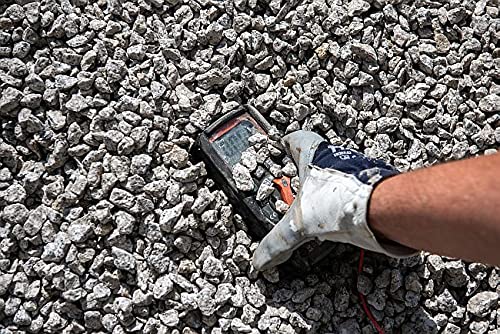
Figure 6.2: The Sonel CMM 30 Multimeter partially submerged in gravel, illustrating its robust construction and resistance to dust and debris, a testament to its IP67 rating.
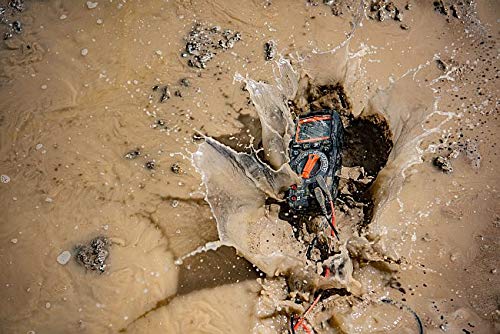
Figure 6.3: The Sonel CMM 30 Multimeter creating a splash as it impacts a muddy puddle, demonstrating its exceptional water resistance and ability to withstand harsh, wet conditions.
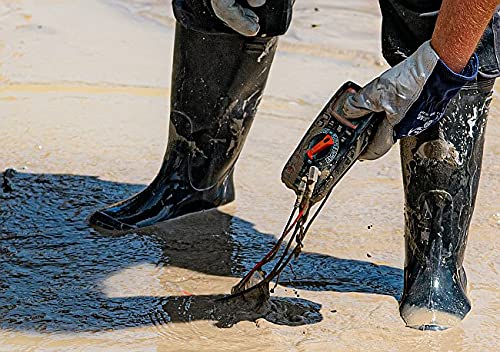
Figure 6.4: A person, wearing protective boots and gloves, retrieves the Sonel CMM 30 Multimeter from a muddy environment. This image emphasizes the device's resilience and ease of handling even after exposure to challenging conditions.
7. Penyelenggaraan
7.1. Pembersihan
Lap meter casing dengan iklanamp kain dan detergen lembut. Jangan gunakan bahan pelelas atau pelarut. Pastikan meter kering sepenuhnya sebelum digunakan.
7.2. Penggantian Bateri
Refer to Section 5.1 for battery replacement instructions. Replace batteries promptly when the low battery indicator appears on the display.
7.3. Penyimpanan
When not in use for extended periods, store the multimeter in a dry, cool place, away from direct sunlight and extreme temperatures. Remove the batteries to prevent leakage.
8. Penyelesaian masalah
| Masalah | Kemungkinan Punca | Penyelesaian |
|---|---|---|
| Meter tidak dihidupkan. | Bateri mati atau tidak dipasang dengan betul. | Periksa kekutuban bateri atau gantikan bateri. |
| Tiada bacaan atau "OL" (Lebihan) dipaparkan. | Incorrect function selected; open circuit; measurement exceeds range. | Select correct function; check circuit continuity; switch to a higher range or auto-range. |
| Bacaan yang tidak tepat. | Bateri lemah; wayar/jek ujian kotor; gangguan luaran. | Gantikan bateri; bersihkan wayar/bicu; jauhi medan elektromagnet yang kuat. |
| Isu sambungan Bluetooth. | Bluetooth not enabled on meter/phone; app issues; distance. | Ensure Bluetooth is on; restart app/phone; reduce distance between devices. |
9. Spesifikasi
| Ciri | Spesifikasi |
|---|---|
| Jenama | Sonel |
| Nombor Model | SON001 |
| warna | Hitam |
| Berat Barang | 418 g |
| Dimensi Pakej | 30 x 15 x 10 cm |
| Bateri | 4 bateri AAA diperlukan (termasuk) |
| Fungsi Pengukuran | AC / DC Voltage, AC/DC Current, Resistance, Capacity, Temperature, Duty Cycle, Frequency |
| Bermula | Manual dan Automatik |
| RMS sebenar | Yes (for AC voltage dan semasa) |
| Peringkat Perlindungan Ingress (IP). | IP67 |
| Ketersambungan | Wireless (Smartphone App) |
| Ciri-ciri Tambahan | HOLD function, Built-in flashlight, Backlight auto-adjustment |
10. Waranti dan Sokongan
10.1. Maklumat Waranti
Sonel products are manufactured to high standards and are warranted against defects in materials and workmanship for a period specified by your regional distributor from the date of purchase. This warranty does not cover damage caused by misuse, unauthorized modification, accident, or neglect. Please retain your proof of purchase for warranty claims.
10.2. Sokongan Teknikal
For technical assistance, troubleshooting beyond this manual, or warranty inquiries, please contact your local Sonel distributor or the authorized service center. Contact information can typically be found on the Sonel official webtapak atau melalui tempat pembelian anda.
When contacting support, please have your product model number (SON001) and purchase date readily available.
Ask a question about this manual
Ask about setup, troubleshooting, compatibility, parts, safety, or missing instructions. Manuals+ will review the question and use this page’s manual context to help answer it.