
1. Pengenalan
Thank you for choosing the KRUPS Essential EA8105 Automatic Espresso Machine. This appliance is designed to deliver a perfectly balanced coffee experience, from bean to cup. Equipped with advanced KRUPS Thermoblock technology, it ensures optimal temperature control for exceptional coffee flavor. This manual provides essential information for the safe and efficient use, setup, operation, and maintenance of your machine.
2. Arahan Keselamatan
- Baca semua arahan dengan teliti sebelum menggunakan perkakas.
- Jangan rendamkan perkakas, kord kuasa, atau palamkan ke dalam air atau sebarang cecair lain.
- Pastikan voltage yang ditunjukkan pada perkakas sepadan dengan vol utama andatage.
- Jauhkan perkakas daripada kanak-kanak.
- Cabut plag perkakas daripada salur keluar kuasa apabila tidak digunakan dan sebelum membersihkan.
- Jangan kendalikan sebarang perkakas dengan kord atau palam yang rosak, atau selepas perkakas tidak berfungsi atau rosak dalam apa jua cara.
- Use only original KRUPS accessories and spare parts.
- Perkakas ini adalah untuk kegunaan rumah sahaja.
3. Komponen Produk

Rajah 3.1: Depan view of the KRUPS Essential EA8105 Automatic Espresso Machine, showing the bean hopper, control panel, coffee spouts, and steam nozzle.
- Bean Hopper: Untuk biji kopi keseluruhan.
- Panel Kawalan: Buttons and dial for various functions (on/off, coffee volume, steam).
- Tangki Air: Removable tank for water.
- Muncung Kopi: Dispenses brewed coffee.
- Muncung Stim: Untuk susu berbuih.
- Dulang Drip: Mengumpul cecair berlebihan.
- Bekas Kopi: Mengumpul serbuk kopi terpakai.
- Aqua Filter Claris Cartridge: Water filter for improved water quality.

Rajah 3.2: jarak dekat view of the coffee spouts and steam nozzle, highlighting the dispensing area.
4. Persediaan
4.1 Membongkar
- Tanggalkan mesin dan semua aksesori daripada pembungkusan dengan berhati-hati.
- Tanggalkan semua filem pelindung dan bahan pembungkusan.
- Place the machine on a stable, flat, heat-resistant surface, away from water splashes.
4.2 Water Tank and Aqua Filter Claris
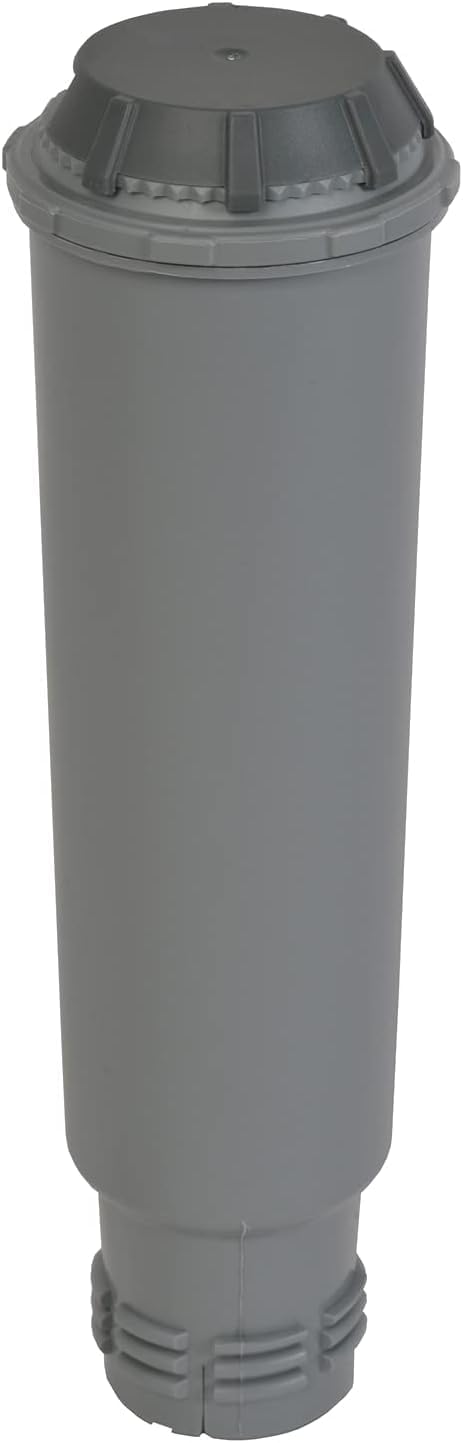
Rajah 4.1: The Aqua Filter Claris water filter cartridge, designed to reduce chlorine and limescale.
- Tanggalkan tangki air dari bahagian belakang mesin.
- If using the Aqua Filter Claris cartridge (included), prepare it according to its separate instructions (usually involves rinsing).
- Insert the prepared filter into the water tank.
- Isi tangki air dengan air segar dan sejuk sehingga tahap MAKSIMUM.
- Place the water tank back into the machine, ensuring it is securely seated.
4.3 Bean Hopper
- Buka penutup corong kacang yang terletak di atas mesin.
- Fill the hopper with whole coffee beans. Do not use ground coffee, instant coffee, or caramelized beans, as this can damage the grinder.
- Tutup penutup dengan selamat.
4.4 Penggunaan Pertama / Priming
- Pasangkan mesin ke soket kuasa yang dibumikan.
- Hidupkan mesin menggunakan butang kuasa.
- The machine will perform an initial rinse cycle. Follow any on-screen prompts or indicator lights.
- Letakkan bekas di bawah muncung kopi untuk mengumpul air.
- Once the rinse cycle is complete, the machine is ready for use.
5. Arahan Operasi
5.1 Membuat Espresso/Kopi
- Pastikan tangki air diisi dan corong kacang mengandungi biji kopi.
- Letakkan satu atau dua cawan di bawah muncung kopi.
- Use the central dial to select your desired coffee volume (e.g., 20ml to 220ml).
- Press the coffee button (single or double cup, depending on model) to start brewing.
- The machine will grind the beans, tamp, and extract the coffee. Brewing will stop automatically.
5.2 Melaraskan Kekuatan Kopi
The coffee strength can typically be adjusted by changing the grinding fineness (if available on your model) or by selecting a smaller coffee volume for a more concentrated shot.
5.3 Steam Nozzle / Milk Frothing
- Isi jag dengan susu sejuk (tenusu atau bukan tenusu).
- Position the steam nozzle into the milk, just below the surface.
- Activate the steam function (refer to your machine's specific button/dial for steam).
- Gerakkan periuk ke atas dan ke bawah untuk menghasilkan buih.
- Once desired texture is achieved, turn off the steam function.
- Penting: Immediately clean the steam nozzle after each use to prevent milk residue buildup.
6. Penyelenggaraan
6.1 Pembersihan Harian
- Empty and rinse the drip tray and coffee grounds container.
- Lap bahagian luar mesin dengan iklanamp kain.
- Clean the steam nozzle thoroughly after each use.
6.2 Penyahkelasan
The machine features an automatic cleaning and descaling program. The 'CALC' indicator light will illuminate when descaling is required. Follow the instructions provided by the machine's display or indicator lights for the descaling process. Use only KRUPS descaling solution.
6.3 Aqua Filter Claris Replacement
The Aqua Filter Claris cartridge should be replaced approximately every 2-3 months, or as indicated by the machine. Regular filter replacement helps maintain water quality and reduces limescale buildup.
7. Penyelesaian masalah
- Kopi tidak dihidangkan: Check water tank level, ensure beans are in the hopper, check for blockages in coffee spouts.
- Weak coffee: Adjust coffee volume to a smaller setting, check bean freshness, ensure grinder is not clogged.
- Mesin tidak dihidupkan: Check power connection, ensure plug is fully inserted into the outlet.
- Bocor: Ensure water tank is correctly seated, check drip tray for overflow.
- Mesej ralat: Refer to the machine's display or indicator lights for specific error codes and consult the full manual or KRUPS support.
8. Spesifikasi
| Jenama | KRUPS |
| Nombor Model | EA8105 |
| warna | putih |
| Jenis Pembancuh Kopi | Mesin Espresso (Bean-to-Cup) |
| Ciri Khas | Water Filter (Aqua Filter Claris) |
| bahan | Kuprum (komponen dalaman) |
| Mod Pengendalian | Automatik Sepenuhnya |
| Jenis Kopi | Kacang Penuh |
| Komponen yang Disertakan | Kartrij Penapis |
| Mesin basuh pinggan mangkuk selamat | Tidak |
9. Waranti dan Sokongan
For warranty information, please refer to the warranty card included with your product or visit the official KRUPS website. For technical support, spare parts, or service, please contact KRUPS customer service in your region. Keep your proof of purchase for warranty claims.