
1. Pengenalan
Thank you for choosing the Greadio MD-T26 Portable AM/FM/SW Radio. This manual provides detailed instructions for the proper setup, operation, and maintenance of your radio. Please read this manual thoroughly before use to ensure optimal performance and longevity of your device.
The Greadio MD-T26 is a versatile portable radio featuring AM, FM, and Shortwave (SW) bands, an LCD display for clear frequency and time viewing, and dual power options for both indoor and outdoor use. It is designed for ease of use with large, accessible controls and a built-in speaker for clear audio.

Rajah 1: Depan view of the Greadio MD-T26 Portable AM/FM/SW Radio.
2. Ciri-ciri Produk
- Sambutan Berbilang Band: Receives AM, FM, and Shortwave (SW) frequencies.
- Paparan LCD: Clear digital display for frequency and time settings.
- Pilihan Kuasa Dwi: Operates via AC power or 4 x D cell batteries (not included).
- Pembesar Suara Berkualiti Tinggi: Integrated 2W speaker for clear sound output.
- Kawalan Nada: Adjustable tone settings (Low/High) for personalized audio.
- Jack fon telinga: 3.5mm stereo earphone jack for private listening.
- Reka Bentuk Mudah Alih: Equipped with a sturdy handle for easy transport.
3. Persediaan
3.1 Menghidupkan Radio
The Greadio MD-T26 radio offers two methods for power supply:
- Bekalan Kuasa AC: For indoor use, connect the included AC power cable to the radio's AC input jack and then plug it into a standard wall outlet.
- Bekalan Kuasa Bateri: For portable use, insert four (4) D cell batteries (not included) into the battery compartment located on the back of the radio. Ensure correct polarity (+/-) as indicated inside the compartment.
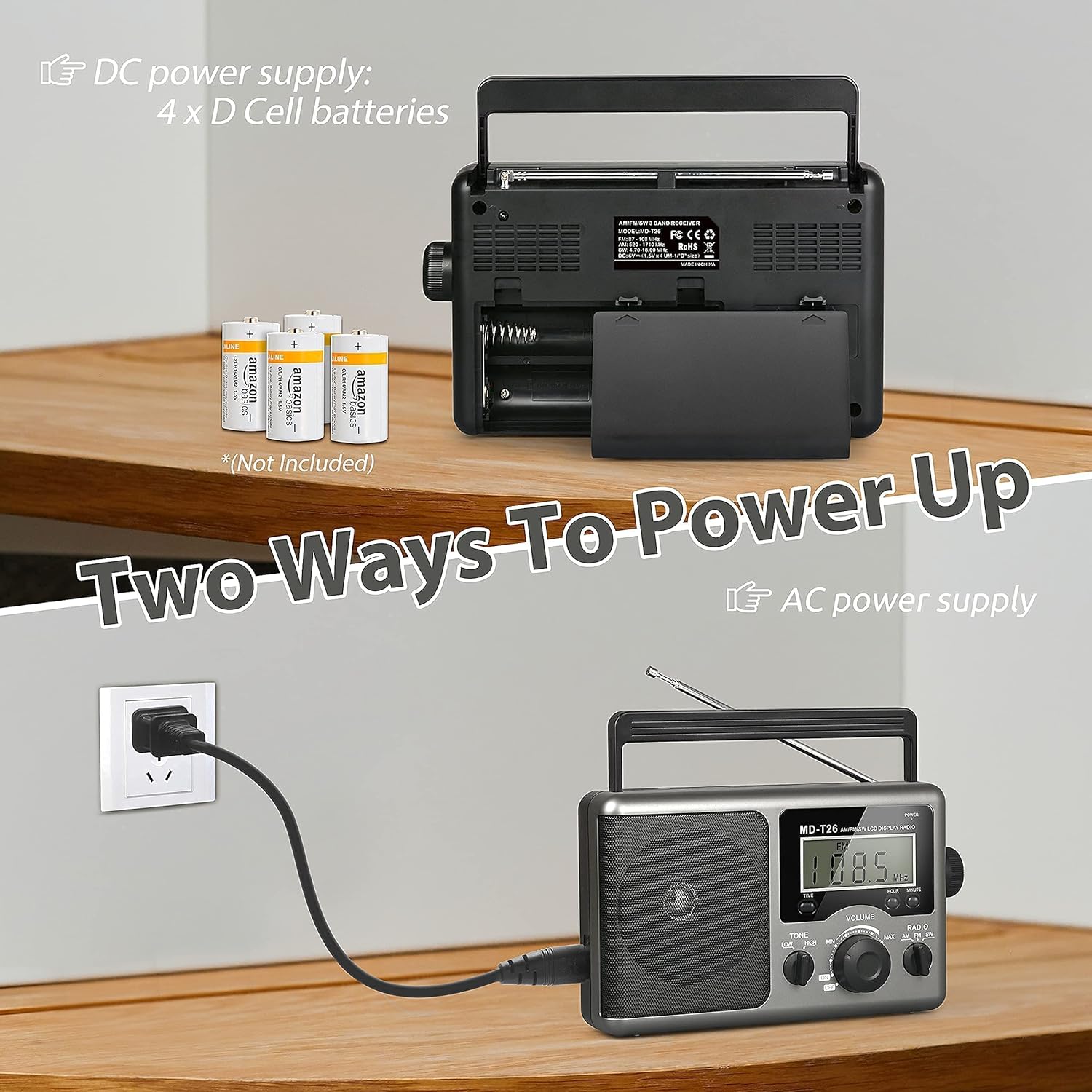
Figure 2: Illustration of AC power connection and battery compartment for D cell batteries.
3.2 Pelarasan Antena
For optimal reception, adjust the antenna as follows:
- FM/SW Reception: Extend the telescopic antenna fully and adjust its angle for the clearest signal.
- Sambutan AM: The radio uses a built-in ferrite rod antenna for AM. Rotate the entire radio unit to find the strongest signal.
4. Arahan Operasi
4.1 Kawalan Ke Atasview

Rajah 3: Terperinci view of the radio's control panel.
- Butang kuasa: Located on the top right, press to turn the radio ON/OFF.
- Tombol PENALAAN: Located on the right side, rotate to select radio stations.
- Tombol VOLUME: Located on the front panel, rotate to adjust the sound level.
- RADIO Band Selector: Switch between AM, FM, and SW bands.
- TONE Switch: Select between LOW and HIGH tone settings.
- TIME/HOUR/MINUTE Buttons: Used for setting the time on the LCD display.
4.2 Turning On and Selecting a Band
- Tekan ke KUASA button to turn on the radio. The LCD display will illuminate.
- Gunakan RADIO band selector switch to choose your desired band: AM, FM, or SW.
4.3 Menala ke Stesen
Setelah jalur dipilih, putar perlahan-lahan MENALA knob on the right side of the radio. Observe the frequency displayed on the LCD screen. Stop rotating when you hear your desired station clearly.
4.4 Menyelaraskan Kelantangan dan Nada
- Kelantangan: Putar JILID tombol pada panel hadapan mengikut arah jam untuk meningkatkan kelantangan dan lawan arah jam untuk mengurangkannya.
- Nada: Gunakan TONA switch to select between 'LOW' for a warmer sound or 'HIGH' for a brighter sound, according to your preference.
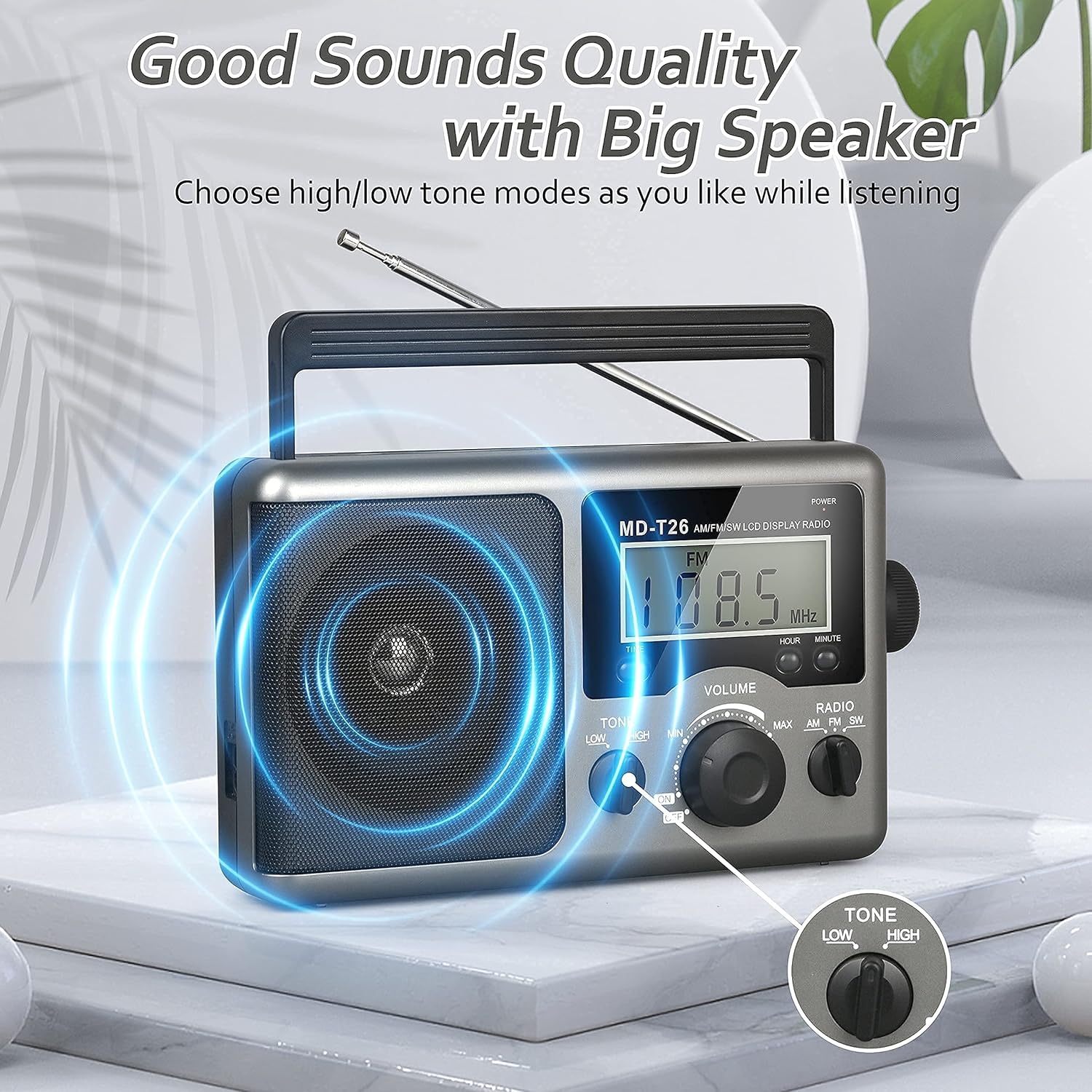
Figure 4: Speaker and Tone control detail.
4.5 Menetapkan Masa
The LCD display can also show the current time. To set the time:
- Tekan ke MASA button once to enter time setting mode.
- Gunakan JAM butang untuk menyesuaikan jam.
- Gunakan MINIT butang untuk menyesuaikan minit.
- The time system is 24-hour format.
4.6 Using the Earphone Jack
For private listening, plug any standard 3.5mm stereo earphones (not included) into the JACK EARPHONE located on the side of the radio. The internal speaker will automatically mute when earphones are connected.
5. Penyelenggaraan
- Pembersihan: Lap bahagian luar radio dengan kain lembut dan kering. Jangan gunakan pembersih atau pelarut yang kasar.
- Penjagaan Bateri: If the radio will not be used for an extended period, remove the D cell batteries to prevent leakage and damage.
- Storan: Simpan radio di tempat yang sejuk dan kering jauh dari cahaya matahari langsung dan suhu yang melampau.
- Tahan Air: Radio ini adalah tidak kalis air. Avoid exposure to rain, moisture, or splashing water.
6. Penyelesaian masalah
| Masalah | Kemungkinan Punca | Penyelesaian |
|---|---|---|
| Tiada kuasa | AC cable not connected, batteries depleted or incorrectly inserted. | Check AC cable connection. Replace batteries or ensure correct polarity. |
| Sambutan yang lemah / Statik | Antenna not extended/adjusted, weak signal area, interference. | Extend and adjust telescopic antenna (FM/SW). Rotate radio for AM. Move to an area with better signal. Avoid sources of electronic interference. |
| Tiada bunyi dari pembesar suara | Volume too low, earphones connected. | Increase volume. Disconnect earphones if not intended for private listening. |
| Paparan LCD tidak berfungsi | Masalah kuasa, kerosakan dalaman. | Check power supply. If problem persists, contact customer support. |
7. Spesifikasi
| Ciri | Perincian |
|---|---|
| Jenama | Greadio |
| Nombor Model | MD-T26 |
| Teknologi Ketersambungan | Auxiliary (for earphone) |
| Teknologi Penala | AM, FM, SW |
| Sumber Kuasa | AC Power, 4 x D Cell Batteries |
| Peranti Serasi | Fon telinga |
| Jenis Paparan | LCD |
| Antara Muka Perkakasan | 3.5mm Audio Jack |
| Tahap Ketahanan Air | Bukan Tahan Air |
8. Waranti dan Sokongan
8.1 Maklumat Waranti
Greadio provides a Waranti 12 bulan for this product, covering manufacturing defects from the date of purchase. Additionally, a Jaminan wang dikembalikan 30 hari ditawarkan.
Waranti ini tidak meliputi kerosakan yang disebabkan oleh salah guna, kemalangan, pengubahsuaian tanpa kebenaran atau haus dan lusuh biasa.
8.2 Sokongan Pelanggan
For any questions, technical assistance, or warranty claims, please contact Greadio customer service. We offer Perkhidmatan pelanggan 24/7 untuk membantu anda.
Sila rujuk pembungkusan produk atau maklumat peruncit webtapak untuk maklumat hubungan terkini.