
1. Arahan Keselamatan Penting
Please read all instructions carefully before using the Inventum OV307B convection oven to ensure safe and efficient operation. Keep this manual for future reference.
- Keselamatan Elektrik: Ensure the oven is connected to a grounded power outlet with the correct voltage. Do not immerse the cord, plug, or oven in water or other liquids.
- Permukaan Panas: The oven's exterior and interior surfaces become very hot during operation. Always use oven mitts when handling hot items or reaching into the oven.
- Penyeliaan: Close supervision is necessary when the oven is used by or near children. Do not leave the oven unattended during operation.
- Pengudaraan: Ensure adequate space around the oven for proper ventilation. Do not block any ventilation openings.
- Bahan mudah terbakar: Do not place flammable materials (e.g., paper, plastic, cloth) on or near the oven.
- Pembersihan: Sentiasa cabut plag ketuhar dan biarkan ia sejuk sepenuhnya sebelum dibersihkan.
- kerosakan: Do not operate the oven if it has a damaged cord or plug, or if it has been dropped or damaged in any way. Contact customer support for assistance.
2. Produk Lebihview
Familiarize yourself with the components and controls of your Inventum OV307B convection oven.
2.1 Oven Exterior and Controls
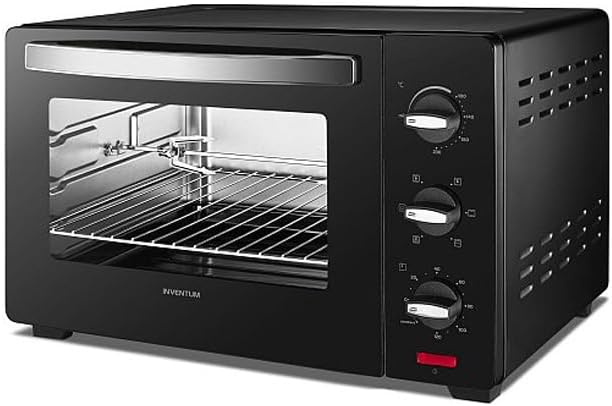
Imej 1: Depan view of the Inventum OV307B convection oven, showcasing its black finish, glass door, and control panel with three rotary knobs on the right side.
The Inventum OV307B features a compact design with a durable black exterior. The front includes a large glass door for easy viewing of food during cooking. On the right side, a control panel houses three rotary knobs for adjusting temperature, cooking function, and timer settings.
2.2 Oven Interior and Accessories
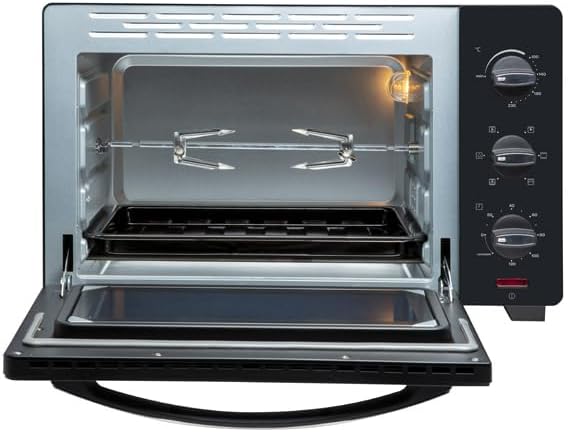
Imej 2: Dalaman view of the Inventum OV307B convection oven with the door open, showing the oven rack, crumb tray, and rotisserie spit assembly.
The oven interior is designed for efficient heat distribution. It includes a removable oven rack for placing baking dishes and a crumb tray at the bottom to collect drips and crumbs, making cleaning easier. A rotisserie spit assembly is also visible, indicating the oven's rotisserie function.
2.3 Fungsi Panel Kawalan
- Tombol Kawalan Suhu: Digunakan untuk menetapkan suhu memasak yang dikehendaki.
- Tombol Pemilih Fungsi: Used to choose the cooking mode (e.g., top heat, bottom heat, convection, rotisserie).
- Tombol Pemasa: Used to set the cooking duration. May include a 'stay on' function.
2.4 Aksesori Termasuk
- Rak ketuhar: For supporting baking pans, dishes, or food directly.
- Dulang Kerak: Placed at the bottom to catch food particles and drips.
- Rotisserie Spit: For roasting poultry or other meats evenly.
3. Persediaan
3.1 Membongkar dan Meletakkan
- Carefully remove all packaging materials, including any internal packing or protective films.
- Place the oven on a stable, heat-resistant, and level surface.
- Ensure there is at least 10-15 cm (4-6 inches) of clear space on all sides and above the oven for proper ventilation. Do not place the oven directly against a wall or under cabinets.
- Jangan letakkan ketuhar berhampiran bahan mudah terbakar atau sumber haba.
3.2 Sebelum Penggunaan Pertama
- Wash the oven rack, crumb tray, and rotisserie spit in warm, soapy water. Rinse thoroughly and dry completely.
- Lap bahagian dalam dan luar ketuhar dengan iklanamp kain.
- To eliminate any manufacturing odors, operate the oven empty for approximately 15 minutes at the highest temperature setting (e.g., 230°C) using the convection function. Ensure the room is well-ventilated during this process. A slight odor or smoke is normal during this initial burn-off.
- Allow the oven to cool completely before its first use with food.
4. Arahan Operasi
4.1 Operasi Asas
- Pasangkan: Connect the oven to a suitable power outlet.
- Tempat Makanan: Place food on the oven rack or in a suitable baking dish, then insert it into the oven. Ensure the crumb tray is in place at the bottom.
- Tetapkan Suhu: Turn the Temperature Control Knob to the desired cooking temperature.
- Pilih Fungsi: Turn the Function Selector Knob to choose the appropriate cooking mode (e.g., top heat, bottom heat, top and bottom heat with convection, rotisserie).
- Tetapkan Pemasa: Turn the Timer Knob to the desired cooking time. The oven will begin heating. A bell will sound when the timer expires, and the oven will turn off automatically. For continuous operation, select the 'stay on' position if available.
4.2 Menggunakan Fungsi Rotisserie
- Skewer the food (e.g., whole chicken) onto the rotisserie spit, securing it with the forks.
- Insert the rotisserie spit into the designated slots inside the oven.
- Select the rotisserie function using the Function Selector Knob.
- Set the temperature and timer as required for your recipe.
4.3 Pemanasan awal
For best results, preheat the oven to the desired temperature before placing food inside. Set the temperature and function, then allow the oven to heat for 5-10 minutes, or until the indicator light (if present) turns off, signaling the temperature has been reached.
5. Penyelenggaraan dan Pembersihan
Pembersihan yang kerap memastikan prestasi optimum dan memanjangkan jangka hayat ketuhar anda.
- Sentiasa Cabut plag: Sebelum membersihkan, sentiasa cabut plag ketuhar dari salur keluar kuasa dan biarkan ia sejuk sepenuhnya.
- Luaran: Lap permukaan luar dengan lembut, damp kain. Jangan gunakan pembersih yang melelas atau pad penyental, kerana ia boleh merosakkan kemasan.
- Dalaman: Lap dinding dalaman dengan iklanamp cloth and mild detergent. For stubborn stains, a non-abrasive oven cleaner designed for convection ovens can be used, following the product instructions carefully. Ensure all cleaner residue is removed.
- Aksesori: The oven rack, crumb tray, and rotisserie spit can be washed in warm, soapy water. Rinse and dry thoroughly.
- Pintu kaca: Bersihkan pintu kaca dengan pembersih kaca atau iklanamp kain.
- Jangan Tenggelamkan: Jangan sekali-kali merendam badan ketuhar, kord atau palam ke dalam air atau sebarang cecair lain.
6. Penyelesaian masalah
If you encounter issues with your Inventum OV307B, refer to the table below for common problems and solutions.
| Masalah | Kemungkinan Punca | Penyelesaian |
|---|---|---|
| Ketuhar tidak dihidupkan. | Tidak dipasang; kuasa outage; pemasa tidak ditetapkan. | Ensure the oven is securely plugged into a working outlet. Check your household circuit breaker. Turn the timer knob to a desired cooking time. |
| Makanan tidak masak sekata. | Oven not preheated; food placed too close to heating elements; overcrowding. | Preheat the oven before placing food inside. Ensure proper spacing around food for air circulation. Avoid overcrowding the oven. |
| Asap berlebihan semasa memasak. | Food spills; grease buildup; initial burn-off. | Clean the oven interior and crumb tray thoroughly. Ensure the crumb tray is clean before each use. If it's the first use, some smoke is normal during burn-off. |
| Rotisserie spit tidak berputar. | Spit not correctly installed; rotisserie function not selected. | Ensure the rotisserie spit is properly seated in its drive mechanism. Select the rotisserie function using the Function Selector Knob. |
If the problem persists after attempting these solutions, please contact Inventum customer support.
7. Spesifikasi
Key technical details for the Inventum OV307B convection oven:
- Jenama: Inventum
- model: OV307B
- warna: Hitam
- Jenis Kawalan: Tombol Putar
- Sumber Kuasa: Elektrik
- Komponen yang Disertakan: Oven rack, Crumb tray, Rotisserie spit
- Bilangan Rak: 1
- ASIN: B09C8VFFC7
8. Waranti dan Sokongan
8.1 Maklumat Waranti
Your Inventum OV307B convection oven comes with a standard manufacturer's warranty. Please refer to the separate warranty card included with your purchase for specific terms, conditions, and duration. Keep your proof of purchase for warranty claims.
8.2 Sokongan Pelanggan
For technical assistance, spare parts, or any questions regarding your Inventum OV307B, please contact Inventum customer support. Contact details can typically be found on the official Inventum webtapak atau pada dokumentasi jaminan anda.