
BUFFBEE Portable Sound Machine
Buffbee Portable Sound Machine
Manual Arahan
pengenalan
Thank you for choosing the Buffbee Portable Sound Machine. This compact and versatile device is designed to create a calming environment, helping to soothe and promote better sleep for infants, children, and adults. With a selection of 17 soothing sounds and 8 gentle night light colors, it's perfect for use at home or while traveling.

Depan view of the Buffbee Portable Sound Machine, showcasing its compact design and illuminated light ring.
Getting Started & Setup
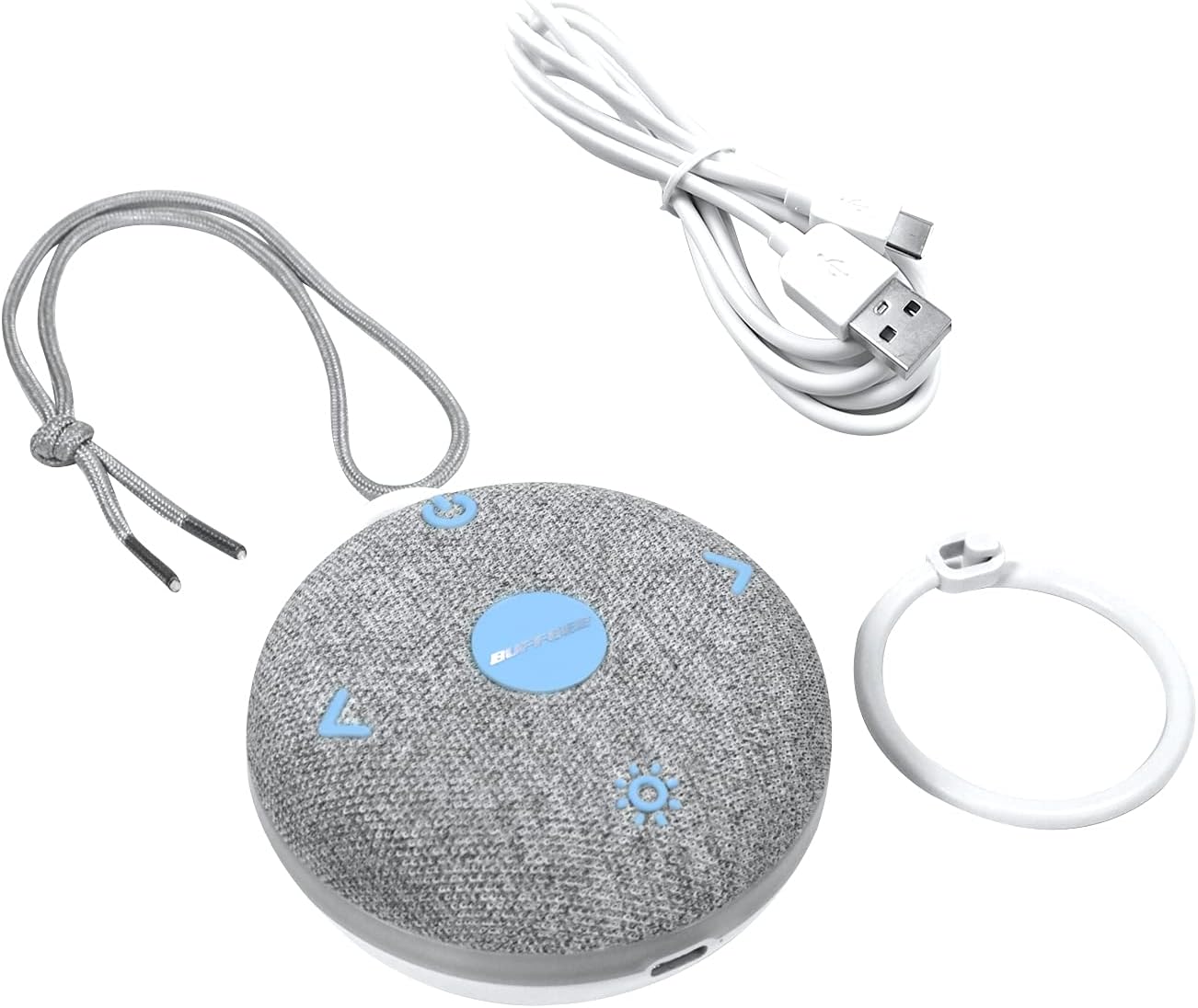
Before first use, please fully charge your Buffbee Portable Sound Machine. Use the provided USB cable to connect the device to a compatible USB power source (e.g., wall adapter, computer USB port).
- mengecas: Connect the USB charging cable to the charging port on the device. The charging indicator light will show the charging status. A full charge typically takes a few hours.
- mudah alih: The machine comes with a baby-safe clip for easy attachment to strollers, car seats, or cribs, enhancing its portability.
The Buffbee Portable Sound Machine shown with its included USB charging cable and attachment ring.
Panduan Operasi
Familiarize yourself with the control buttons located on the device's surface.
- Hidupkan/Mati Kuasa: Press and hold the power button (usually indicated by a universal power symbol) to turn the device on or off.
- Pemilihan Bunyi: Press the sound selection buttons (often indicated by left/right arrows or a music note symbol) to cycle through the 17 available soothing sounds. These include 5 white noises, 2 fan sounds, and 10 nature sounds (ocean, shushing, lullaby, fetal tone, campfire, summer night, rain, bird, brook, waves).

Sebuah meletup view diagram illustrating the internal components and highlighting the 17 soothing sound options available.
- Pelarasan Kelantangan: Use the volume up (+) and volume down (-) buttons to adjust the sound output to your desired level.
- Kawalan Cahaya Malam: Press the light button (often indicated by a sun or light bulb symbol) to activate the night light. Continue pressing to cycle through the 8 soft color options.

The Buffbee Portable Sound Machine displaying its 8-color night light feature, providing gentle illumination.
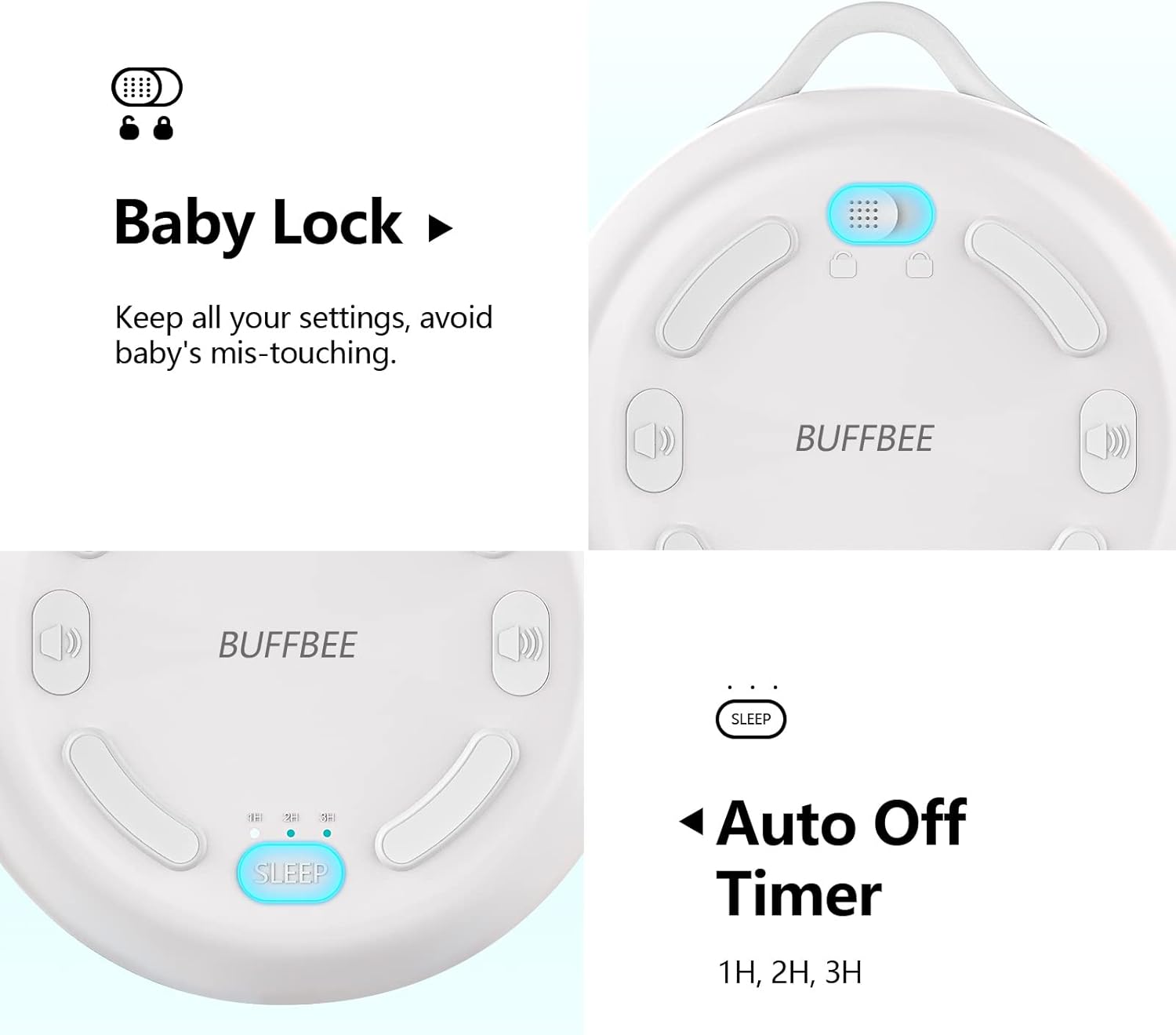
- Pemasa Mati Otomatis: The device features an auto-off timer. Press the timer button (often labeled 'SLEEP' or with a clock icon) to set the device to automatically turn off after 1, 2, or 3 hours. This conserves battery life and ensures the sound stops after a desired period.
- Baby Lock Feature: To prevent accidental button presses by curious hands, activate the Baby Lock feature. This locks all settings, ensuring uninterrupted operation. Refer to the diagram below for the location of the Baby Lock switch.
Terperinci view of the back of the sound machine, highlighting the Baby Lock switch and the Auto Off Timer settings (1H, 2H, 3H).
Penjagaan dan Penyelenggaraan
- Pembersihan: Lap peranti dengan kain lembut dan kering. Jangan gunakan pembersih yang melelas atau rendam peranti di dalam air.
- Storan: Apabila tidak digunakan untuk tempoh yang lama, simpan peranti di tempat yang sejuk dan kering jauh dari cahaya matahari langsung.
- Penjagaan Bateri: Untuk memanjangkan hayat bateri, elakkan daripada menyahcas sepenuhnya bateri dengan kerap. Cas peranti dengan kerap, walaupun tidak digunakan secara berterusan.
Menyelesaikan masalah
| Masalah | Kemungkinan Punca | Penyelesaian |
|---|---|---|
| Peranti tidak dihidupkan. | Bateri habis. | Cas peranti menggunakan kabel USB yang disediakan. |
| Tiada bunyi atau kelantangan rendah. | Kelantangan ditetapkan terlalu rendah atau disenyapkan. | Increase the volume using the '+' button. |
| Lampu malam tidak berfungsi. | Light feature is off. | Press the light button to activate and cycle through colors. |
| Peranti dimatikan secara tidak dijangka. | Auto-off timer is active or battery is low. | Check timer settings. Ensure device is fully charged. The New Edition is designed to avoid beeping when battery is low. |
| Butang tidak bertindak balas. | Baby Lock feature is enabled. | Toggle the Baby Lock switch to the unlocked position. |
Spesifikasi Produk
| Jenama | BUFFBEE |
| Model | Mesin Bunyi Mudah Alih |
| ASIN | B09C1LTT37 |
| Dimensi Produk | 9.4 x 8.89 x 3.81cm; 220g |
| Sumber Kuasa | Battery Powered (Built-in rechargeable Li-ion battery) |
| Number of Soothing Sounds | 17 |
| Warna Cahaya Malam | 8 |
| Hayat Bateri | Sehingga 12 jam |
| Jenis Penyambung | USB |
Waranti dan Sokongan
For warranty information or technical support, please refer to the product packaging or contact BUFFBEE customer service through the retailer where the product was purchased. Keep your proof of purchase for any warranty claims.
Ask a question about this manual
Ask about setup, troubleshooting, compatibility, parts, safety, or missing instructions. Manuals+ will review the question and use this page’s manual context to help answer it.