
CASIO BGA-280-6ADR
CASIO Baby-G BGA-280 Series User Manual
Model: BGA-280-6ADR
pengenalan
Thank you for choosing the CASIO Baby-G BGA-280 Series watch. This manual provides detailed instructions on how to use and maintain your watch. Please read this manual carefully to ensure proper operation and to get the most out of its features.

Rajah 1: Depan view of the BGA-280-6ADR watch. This image displays the watch's translucent pink case and strap, with a clear view of its analog hands and digital display, indicating the current time and day.
Langkah-langkah Keselamatan
Untuk memastikan penggunaan jam tangan anda selamat dan betul, sila patuhi langkah berjaga-jaga berikut:
- Do not attempt to open the watch case or remove its back cover.
- Avoid exposing the watch to extreme temperatures (above 60°C or below -10°C) or direct sunlight for prolonged periods.
- Do not expose the watch to strong magnetic fields or static electricity.
- Clean the watch with a soft, dry cloth. Do not use chemical cleaners.
- The watch is water resistant up to 10 BAR. Avoid operating buttons underwater.
Pengenalan Komponen
Familiarize yourself with the various components and buttons of your BGA-280 watch:

Rajah 2: Sisi view of the BGA-280-6ADR watch, showing the button layout. This image clearly displays the four buttons located on the sides of the watch case, which are used for various functions and mode navigation.
| Komponen | Fungsi |
|---|---|
| A Button (Adjust) | Digunakan untuk masuk dan keluar dari mod tetapan, dan untuk mengesahkan tetapan. |
| B Button (Light) | Mengaktifkan lampu latar LED. |
| C Button (Mode) | Cycles through the different watch modes (Timekeeping, World Time, Stopwatch, Timer, Alarm). |
| D Button (Search/Forward) | Used to change settings (increase values) and for search functions in certain modes. |
| Paparan Digital | Shows time, date, and other mode-specific information. |
| Analog Hands | Indicate the current hour and minute. |
Persediaan
Setting the Home City and Time
- Dalam Mod Penjagaan Masa, tahan butang A button for about two seconds until the city code starts to flash on the digital display. This indicates the setting mode.
- Tekan ke D button to scroll through the city codes until your desired Home City is displayed. Refer to the World Time City Code List (not provided in this manual, refer to full Casio manual if needed).
- Tekan ke C button to cycle through the settings: City Code → DST (Daylight Saving Time) → 12/24-hour format → Seconds → Hour → Minute → Year → Month → Day → Illumination Duration → Button Tone.
- Semasa tetapan berkelip, gunakan D button to change it. For DST, press D to toggle between ON and OFF.
- After configuring all settings, press the A button to exit the setting mode. The watch will automatically adjust the analog hands to match the digital time.
Arahan Operasi
Navigating Modes
Tekan ke C button to cycle through the watch's modes in the following order:
Timekeeping Mode → World Time Mode → Stopwatch Mode → Timer Mode → Alarm Mode
Mod Penjagaan Masa
This is the default mode, displaying the current time and date for your Home City.
- Kepada view the current date, press the D butang.
- To return to the time display, press the D butang lagi.
Mod Waktu Dunia
Mod ini membolehkan anda view the current time in 48 cities (31 time zones) around the world.
- Daripada Mod Penjagaan Masa, tekan C to enter World Time Mode. The city code of the currently selected World Time City will be displayed.
- Tekan ke D button to scroll through the city codes.
- To swap your Home City and World Time City, hold down the A butang selama kira-kira tiga saat.
Mod Jam Randik
The stopwatch measures elapsed time in 1/100-second units for the first 60 minutes, and 1-second units thereafter, up to 24 hours.
- From World Time Mode, press C to enter Stopwatch Mode. The display will show "0'00"00".
- Tekan D untuk memulakan/menghentikan jam randik.
- Semasa jam randik dihentikan, tekan A to reset it to "0'00"00".
Mod Pemasa
The countdown timer can be set from 1 minute to 24 hours in 1-minute increments.
- From Stopwatch Mode, press C to enter Timer Mode.
- tahan A button for about two seconds until the hour setting starts to flash.
- Gunakan D button to change the hour, then press C untuk beralih ke tetapan minit.
- Gunakan D butang untuk menukar minit.
- Tekan A untuk keluar dari mod tetapan.
- Tekan D to start/stop the countdown timer. An alarm will sound when the countdown reaches zero.
Mod Penggera
The watch has five daily alarms and an hourlisyarat masa y.
- From Timer Mode, press C to enter Alarm Mode. The alarm number (AL1, AL2, etc.) will be displayed.
- Tekan D to cycle through the alarms (AL1 to AL5, SNZ, SIG).
- Untuk menetapkan penggera, pilih penggera yang diingini (cth., AL1) dan tahan A button for about two seconds until the hour setting flashes.
- Gunakan D button to change the hour, then press C untuk beralih ke tetapan minit.
- Gunakan D butang untuk menukar minit.
- Tekan A untuk keluar dari mod tetapan.
- To turn an alarm ON/OFF, select the alarm and press D. "ON" or "OFF" will appear.
- Untuk menghidupkan Hourly Time Signal (SIG) ON/OFF, select SIG and press D.
Pencahayaan
The watch is equipped with an LED backlight for easy reading in the dark.
- Tekan ke B butang untuk menerangi paparan.
- The illumination duration can be set in the Timekeeping Mode settings (refer to "Setting the Home City and Time").
Penyelenggaraan
Membersihkan Jam Tangan Anda
Regular cleaning helps maintain the appearance and longevity of your watch.
- Wipe the watch case and band with a soft, dry cloth to remove dirt and moisture.
- Untuk kotoran degil, gunakan kain lembutampened with water and a mild neutral detergent, then wipe dry.
- Do not use volatile agents like thinner, benzine, alcohol, or abrasive cleaners, as they may damage the resin components.
Tahan Air
Your BGA-280 watch is water resistant to 10 BAR (100 meters). This means it is suitable for everyday use, showering, swimming, and snorkeling. However, it is not suitable for scuba diving.
- Jangan sentuh butang jam tangan semasa ia basah atau tenggelam dalam air.
- Selepas terdedah kepada air masin, bilas jam tangan dengan air tawar dan lap sehingga kering.
- Avoid exposing the watch to strong water pressure, such as from a high-pressure car wash.
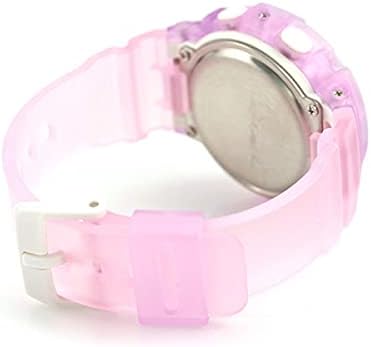
Rajah 3: Belakang view of the BGA-280-6ADR watch. This image shows the stainless steel case back, where important information such as the model number and water resistance rating (10 BAR) are engraved.
Menyelesaikan masalah
Jika anda menghadapi sebarang masalah dengan jam tangan anda, sila rujuk masalah dan penyelesaian biasa berikut:
| Masalah | Penyelesaian |
|---|---|
| Jarum analog tidak sepadan dengan masa digital. | This can happen after setting the Home City. The hands should automatically adjust. If not, refer to the full manual for manual hand alignment. |
| Tiada paparan atau paparan malap. | The battery may be low. Contact a CASIO service center for battery replacement. |
| Butang tidak bertindak balas. | Ensure the watch is not wet. If the issue persists, a reset may be needed (refer to full manual) or contact support. |
| Masa tidak betul. | Check your Home City and DST settings. Re-adjust if necessary. |
Spesifikasi
| Ciri | Perincian |
|---|---|
| Nombor Model | BGA-280-6ADR |
| Jenama | CASIO |
| Pergerakan | Kuarza |
| Tahan Air | 10 BAR (100 meter) |
| Masa Dunia | 31 time zones (48 cities + UTC), daylight saving on/off, Home city/World time city swapping |
| Jam randik | 1/100-second stopwatch, Measuring capacity: 23:59'59.99'', Measuring modes: Elapsed time, split time, 1st-2nd place times |
| Pemasa | Countdown timer, Measuring unit: 1 second, Countdown range: 1 minute to 24 hours (1-minute increments and 1-hour increments) |
| Penggera | 5 daily alarms, Hourlisyarat masa y |
| Pencahayaan | LED light (Super Illuminator), selectable illumination duration (1.5 seconds or 3 seconds), afterglow |
| Kalendar | Kalendar automatik penuh (hingga tahun 2099) |
| Ketepatan | ±30 saat sebulan |
| Hayat Bateri | Lebih kurang 3 tahun pada CR1220 |
Waranti dan Sokongan
Your CASIO Baby-G watch is covered by a manufacturer's warranty. Please refer to the warranty card included with your purchase for specific terms and conditions, including warranty period and coverage details.
For technical support, repairs, or further inquiries, please contact your local authorized CASIO service center or visit the official CASIO webtapak untuk maklumat hubungan.
- Official CASIO Webtapak: www.casio.com
- Perkhidmatan Pelanggan: Refer to your regional CASIO webtapak untuk butiran hubungan tempatan.
Ask a question about this manual
Ask about setup, troubleshooting, compatibility, parts, safety, or missing instructions. Manuals+ will review the question and use this page’s manual context to help answer it.