
FGI Aroya Solus
AROYA Solus 3-in-1 Soil Analyzer User Manual
Model: Aroya Solus
pengenalan
The AROYA Solus 3-in-1 Soil Analyzer is an advanced device designed for precise measurement of soil moisture, electrical conductivity (EC), and temperature. It integrates the reliable TEROS 12 sensor with Bluetooth connectivity, allowing for real-time data monitoring via the user-friendly Solus App on your smartphone. This tool is essential for optimizing plant health and growth by providing critical data for nutrient feeding schedules and environmental control.
The TEROS 12 sensor utilizes 70 MHz capacitance technology and unique calibration to ensure high accuracy and consistency, minimizing the impact of salinity and soil texture on readings. Its robust epoxy body and stainless steel needles are built for durability, designed to withstand tough field conditions for up to 10 years.
Apa yang ada dalam Kotak
- TEROS 12 Sensor
- ZSC Bluetooth Module
- Solus App (download required)
- 2 Bateri AA (termasuk)
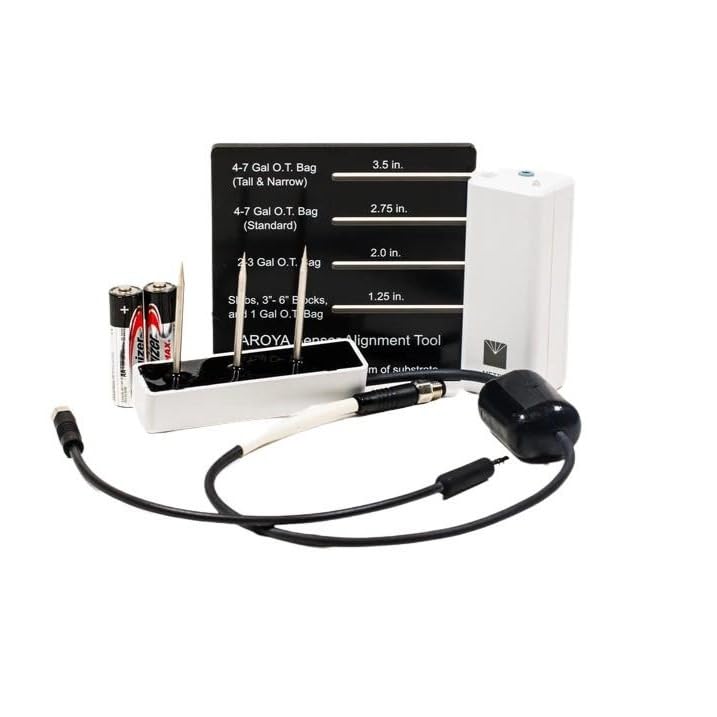
Image: The AROYA Solus kit components, showing the TEROS 12 sensor, ZSC Bluetooth module, and two AA batteries.
Persediaan
- Pasang Bateri: Open the battery compartment of the ZSC Bluetooth Module and insert the two AA batteries, ensuring correct polarity.
- Sambungkan Sensor: Plug the cable from the TEROS 12 sensor into the designated port on the ZSC Bluetooth Module.
- Download Solus App: Download the official Solus App by AROYA from your device's app store (available for iOS and Android).
- Berpasangan melalui Bluetooth: Open the Solus App and follow the on-screen instructions to pair your ZSC Bluetooth Module with your smartphone. Ensure Bluetooth is enabled on your device.

Image: The TEROS 12 sensor connected to the ZSC Bluetooth module, ready for use.
Operasi
The AROYA Solus system is designed for quick and easy spot-checks of soil conditions. It measures water content (WC), electrical conductivity (EC), and temperature in various substrates.
Taking a Reading:
- Sediakan Sensor: Ensure the sensor needles are clean and free of debris.
- Insert into Substrate: Carefully insert the sensor needles into the desired substrate (soil, coco coir, or rockwool). For optimal accuracy, use the AROYA Sensor Alignment Tool to ensure proper insertion depth and angle, aligning the edge of the tool with the bottom of the substrate.
- Activate Reading: With the Solus App open and connected to the ZSC Bluetooth Module, tap the "Take Reading" button within the app.
- View Data: The app will display real-time measurements for soil moisture, EC, and temperature.
Nota Penting: This device is designed for use in solid substrates (soil, coco coir, rockwool) and is not for use in liquids.
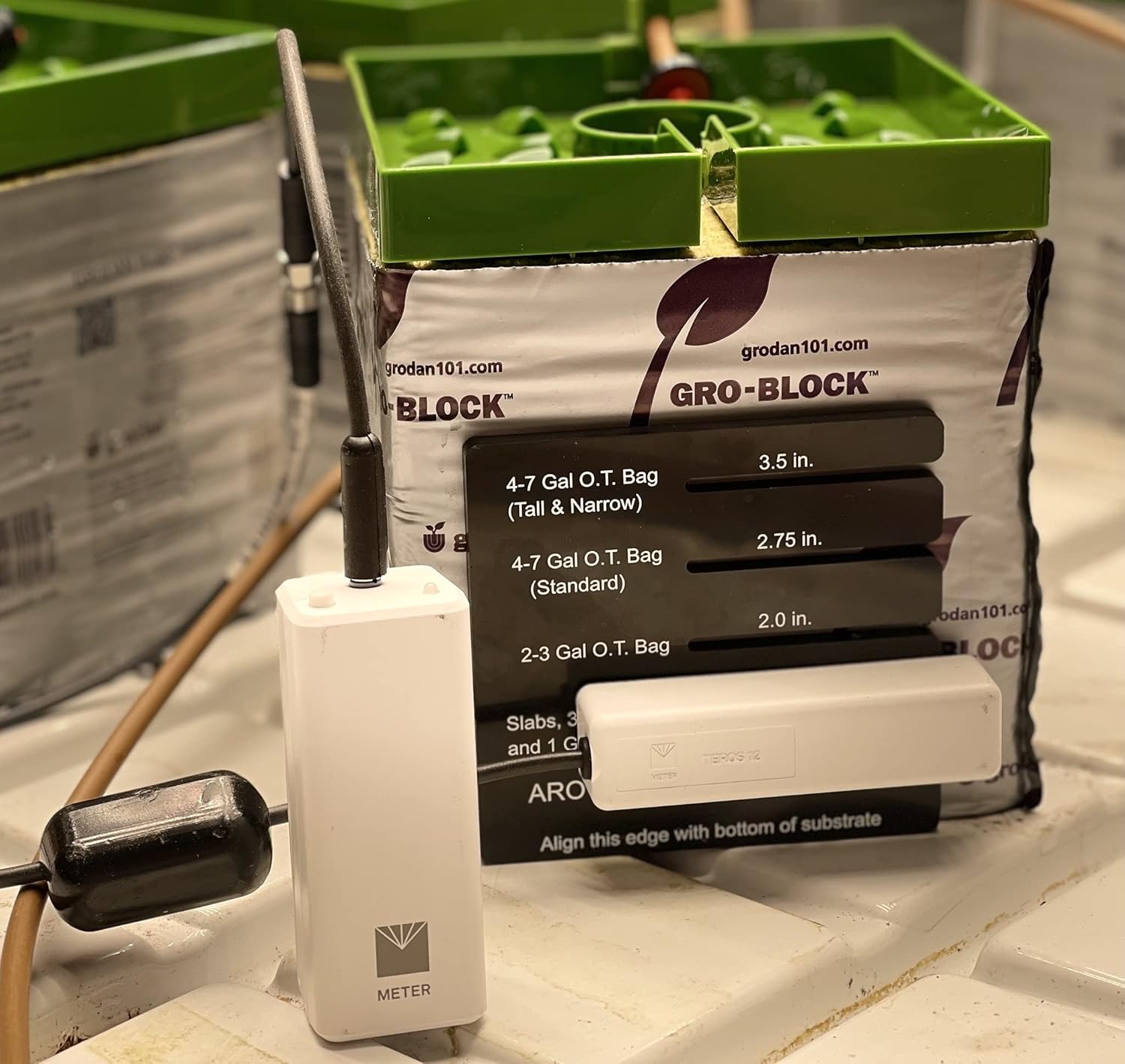
Image: The AROYA Solus sensor correctly inserted into a grow block, demonstrating typical usage.

Image: The Solus App interface displaying real-time soil data, including moisture percentage, temperature, and electrical conductivity.
Video: Tamatview of the Aroya Solus Soil Bluetooth Moisture Content Meter, demonstrating its components and basic function for understanding nutrient levels and creating feeding schedules.
Penyelenggaraan
- Pembersihan: After each use, gently wipe the sensor needles with a clean, damp cloth to remove any soil or substrate residue. Avoid abrasive materials that could damage the needles.
- Penggantian Bateri: When the Solus App indicates low battery or the device fails to power on, replace the two AA batteries in the ZSC Bluetooth Module.
- Storan: Store the AROYA Solus in a clean, dry environment away from extreme temperatures and direct sunlight. Protect the sensor needles from physical damage.
- Ketahanan: The robust design of the TEROS 12 sensor ensures long-term performance, with an expected lifespan of up to 10 years in typical field conditions.
Menyelesaikan masalah
| Masalah | Kemungkinan Punca | Penyelesaian |
|---|---|---|
| Device not connecting to app / "Unrecognizable device" error | Bluetooth not enabled, low batteries, app outdated, connection issue with sensor cable. |
|
| Inconsistent or inaccurate readings | Improper sensor insertion, dirty sensor needles, sensor damage, substrate not supported. |
|
| App not displaying real-time data | Poor Bluetooth signal, app glitch, device not actively taking a reading. |
|
Spesifikasi
| Ciri | Perincian |
|---|---|
| Dimensi Produk | 6 x 4 x 1 inci; 1.1 paun |
| Nombor Model Item | Aroya Solus |
| Bateri | 2 bateri AA (termasuk) |
| Tarikh Tersedia Pertama | 3 Ogos 2021 |
| Pengeluar | Aroya |
| ASIN | B09BTLTR5C |
Waranti dan Sokongan
For specific warranty information regarding your AROYA Solus 3-in-1 Soil Analyzer, please refer to the documentation provided with your purchase or visit the official AROYA webtapak. Syarat waranti biasanya meliputi kecacatan pembuatan untuk tempoh tertentu.
For technical support, troubleshooting assistance, or inquiries about product functionality, please contact the manufacturer, Aroya, or the seller, Forever Green Indoors. Contact details can usually be found on their respective websites or on your purchase receipt.
Anda boleh melawat FGI Store on Amazon untuk maklumat lanjut dan produk.