
1. Pengenalan
Thank you for choosing the FLEXISPOT E9 Electric Standing Desk. This manual provides essential information for the safe and efficient assembly, operation, and maintenance of your new desk. Please read it thoroughly before use and keep it for future reference.
The FLEXISPOT E9 is designed for easy assembly with minimal parts, ensuring a smooth setup experience. It offers a wide height adjustment range from 73 cm to 123 cm, with a swift adjustment speed of 25mm/s for a stress-free transition between sitting and standing positions. Its robust design supports up to 50 kg, allowing you to safely adjust the desk height with your equipment in place.
The desk features a smart touch panel for intuitive one-touch operation, enabling you to effortlessly switch between sitting and standing postures to optimize your workspace for health and activity. The compact 60 cm x 120 cm tabletop provides ample workspace while harmonizing with various room aesthetics. Its minimalist design makes it suitable for home offices, studies, or even as a versatile dining or hobby table in your living room.

Image: The FLEXISPOT E9 Electric Standing Desk, highlighting its adjustable height from 73-123cm and 120cm width.
2. Persediaan dan Pemasangan
The FLEXISPOT E9 desk is designed for straightforward assembly. Follow these steps to set up your desk:
- Buka Pembungkusan Komponen: Carefully remove all parts from the packaging and verify against the parts list in your included manual.
- Attach the Beam: The desk's beam is pre-attached to the tabletop. Simply rotate the support columns into place.
- Pasang Kaki: Securely attach the desk feet to the support columns using the provided screws and tools.
- Connect Remote Control: Connect the remote control cable to the control box under the desk.
- Sambungan Kuasa: Plug the power cable into the control box and then into a wall outlet.
All necessary assembly tools are included in the package. Assembly typically requires one person and can be completed in approximately 15 minutes.
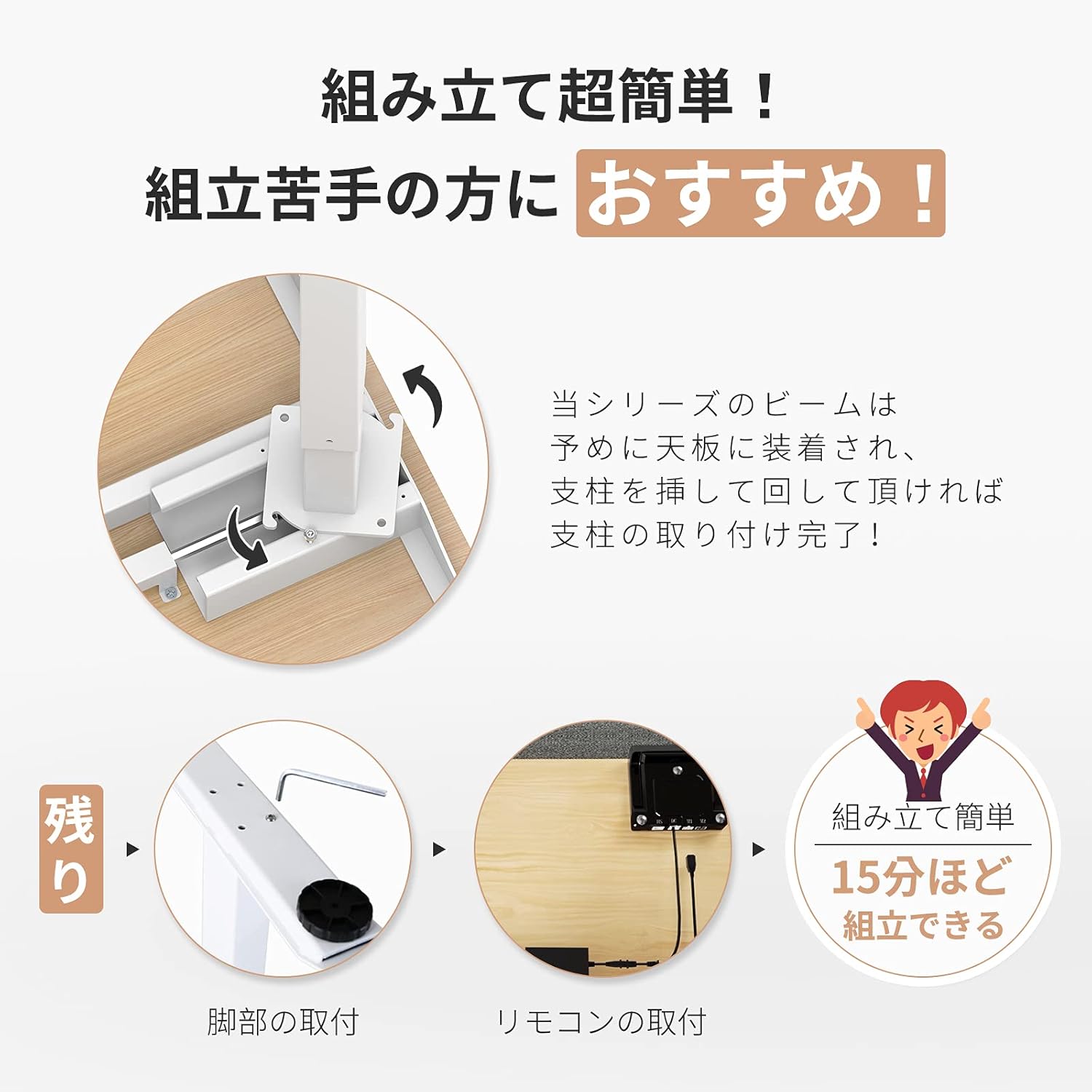
Image: Visual guide demonstrating the simple assembly process, including beam rotation, foot attachment, and remote control connection.
3. Arahan Operasi
The FLEXISPOT E9 features an intuitive control panel for easy height adjustment and memory functions.
3.1 Panel Kawalan Selesaiview

Image: The control panel, indicating the LED panel, up button, down button, and four height memory preset buttons.
- Panel LED: Memaparkan ketinggian meja semasa.
- Butang Atas/Bawah (▲ / ▼): Press and hold to adjust the desk height upwards or downwards. Release to stop at the desired height.
- Memory Preset Buttons (1, 2, 3, 4): Simpan dan ingat semula tetapan ketinggian pilihan.
3.2 Menetapkan Pratetap Memori
- Laraskan meja pada ketinggian yang diingini menggunakan butang Atas/Bawah.
- Press and hold one of the memory preset buttons (1, 2, 3, or 4) until the LED panel flashes or beeps, indicating the height has been saved.
3.3 Mengingat semula Pratetap Memori
Simply press the desired memory preset button (1, 2, 3, or 4). The desk will automatically move to the saved height.
3.4 Safety Features (Anti-Collision)
The desk is equipped with a built-in sensor to detect obstacles during height adjustment. If an obstruction is encountered, the desk will automatically stop and reverse slightly to prevent damage or injury.
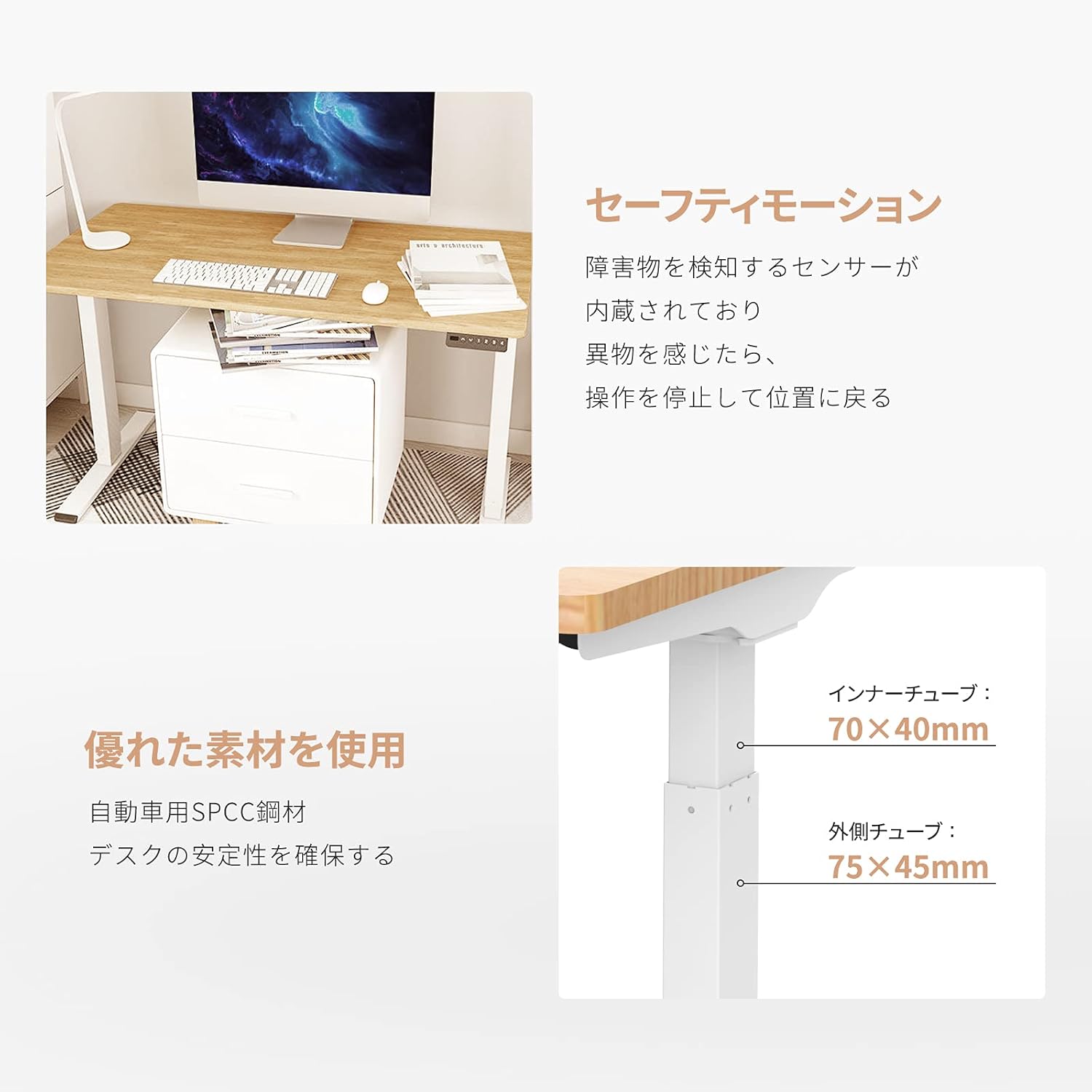
Image: Explanation of the safety motion feature, where the desk stops and reverses upon detecting an obstacle. Also shows inner tube (70x40mm) and outer tube (75x45mm) dimensions.
4. Penyelenggaraan
To ensure the longevity and optimal performance of your FLEXISPOT E9 Electric Standing Desk, follow these maintenance guidelines:
- Pembersihan tetap: Wipe the desk surface and legs with a soft, damp kain. Elakkan pembersih yang melelas atau bahan kimia keras yang boleh merosakkan kemasan.
- Pengurusan Kabel: Ensure all cables are neatly organized and not tangled or pinched, especially during height adjustments. Use cable ties or management trays if necessary.
- Semak Sambungan: Periodically check that all screws and connections are secure. Tighten if any looseness is detected.
- Elakkan beban berlebihan: Jangan melebihi kapasiti berat maksimum 50 kg.
- Keadaan Persekitaran: Keep the desk in a dry environment and avoid extreme temperatures or direct sunlight.
5. Penyelesaian masalah
If you encounter any issues with your FLEXISPOT E9 Electric Standing Desk, please refer to the following common troubleshooting steps:
- Meja Tidak Bergerak:
- Periksa sama ada kabel kuasa dipasang dengan kukuh pada kedua-dua meja dan soket dinding.
- Pastikan tiada halangan yang menghalang pergerakan.
- Try resetting the desk by unplugging it for 30 seconds and then plugging it back in.
- Pergerakan tidak sekata:
- Pastikan meja diletakkan pada permukaan yang rata.
- Verify that the weight on the desk is evenly distributed.
- Error Codes on LED Display:
- Refer to the full product manual (if provided separately) for specific error code meanings and solutions.
- Often, an error can be cleared by resetting the desk (unplugging and replugging).
Jika langkah-langkah ini tidak menyelesaikan masalah, sila hubungi khidmat pelanggan FLEXISPOT untuk bantuan lanjut.
6. Spesifikasi
Detailed technical specifications for the FLEXISPOT E9 Electric Standing Desk:
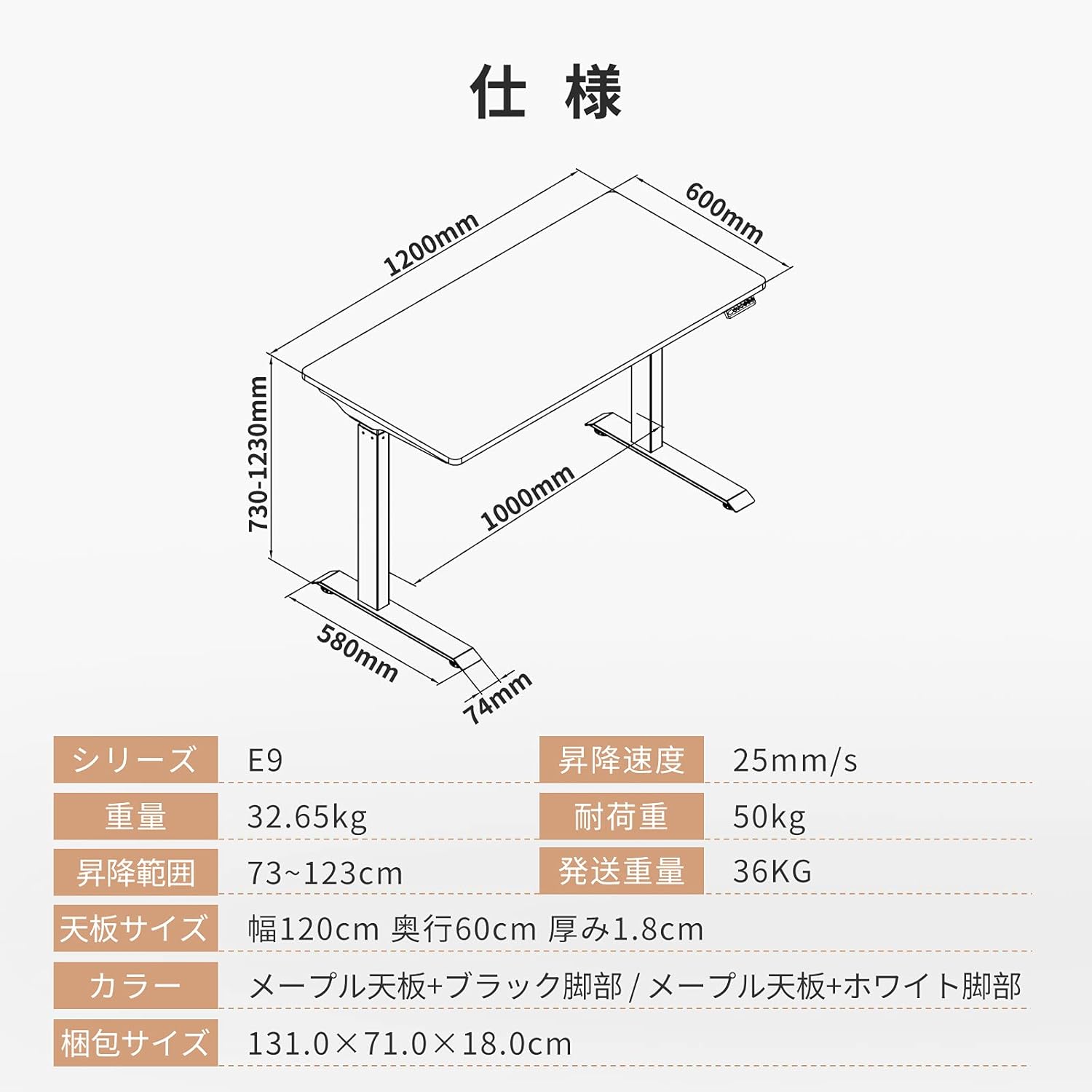
Image: Technical drawing with key dimensions: 1200mm width, 600mm depth, 730-1230mm height range, 1000mm base width, 580mm base depth, 74mm foot height.
| Ciri | Perincian |
|---|---|
| Jenama | FLEXISPOT |
| Model | E9 |
| Jenis Meja | Computer Desk, Electric Standing Desk |
| Dimensi Produk (D x W x H) | 60 cm x 120 cm x 73-123 cm |
| Julat Pelarasan Tinggi | 73 cm hingga 123 cm |
| Kelajuan Pelarasan Ketinggian | 25 mm/s |
| Maximum Recommended Weight Capacity | 50 kg |
| Saiz Atas Meja | 120 cm (Width) x 60 cm (Depth) x 1.8 cm (Thickness) |
| Bahan Atas Meja | Maple (Finish: Paint) |
| Bahan Asas | Wood (Legs: Black) |
| Perhimpunan Diperlukan | ya |
| Recommended Persons for Assembly | 1 |
| Ciri Khas | Height Adjustment Function, Anti-Collision Sensor |
| Berat Barang | 35.9 kg |
| Berat Penghantaran | 36 kg |
| GTIN / UPC | 810072794987 |
7. Waranti dan Sokongan
FLEXISPOT provides a free long-term manufacturer's warranty for the E9 Electric Standing Desk. This warranty includes unlimited support responses during the warranty period, offering complete peace of mind.
FLEXISPOT has established a dedicated support system in Japan, including a call center, to ensure excellent after-sales service for our customers. In the event that you require support, our team will assist you in Japanese, eliminating any language concerns.
For warranty claims, technical assistance, or any other inquiries, please contact FLEXISPOT customer service through the official webtapak atau maklumat hubungan yang diberikan bersama pembelian anda.