
pengenalan
The Macally BTBLZKEYSG is a full-size backlit Bluetooth keyboard designed specifically for Mac and iOS devices. It features a MacOS-specific layout with 107 scissor-switch keys and 14 convenient shortcuts, enhancing workflow and productivity. This keyboard allows seamless pairing and switching between up to three Bluetooth-enabled devices, including MacBooks, iMacs, iPhones, and iPads. The integrated white LED backlighting offers three adjustable brightness levels for comfortable typing in various lighting conditions. Powered by a built-in 1500mAh rechargeable battery, it provides extended usage time between charges.
Kandungan Pakej
- Macally BTBLZKEYSG Backlit Bluetooth Keyboard
- Kabel Pengecas USB-C
- Manual Arahan
Ciri-ciri Produk
- Kekunci Bercahaya Belakang: Crisp white LEDs with 3 brightness levels for typing in low-light environments. Backlight can be turned off.
- MacOS Specific Layout: 107 scissor-switch keys with 14 macOS shortcuts for familiar and efficient use.
- Multi-Device Bluetooth: Easily pair and switch between up to 3 Bluetooth-enabled devices (Mac, iPhone, iPad) within a 30 ft wireless range.
- Bateri boleh dicas semula: Built-in 1500mAh battery provides 1 to 4 weeks of runtime with backlighting on. USB-C charging cable included.
- Reka Bentuk Nipis dan Selesa: Only 0.87 inches thin with an integrated kickstand for ergonomic typing.
Persediaan
1. Mengecas Papan Kekunci
Before initial use, fully charge the keyboard. Connect the supplied USB-C charging cable to the keyboard's USB-C port and the other end to a USB power source (e.g., computer USB port, USB wall adapter). The LED indicator will show charging status.
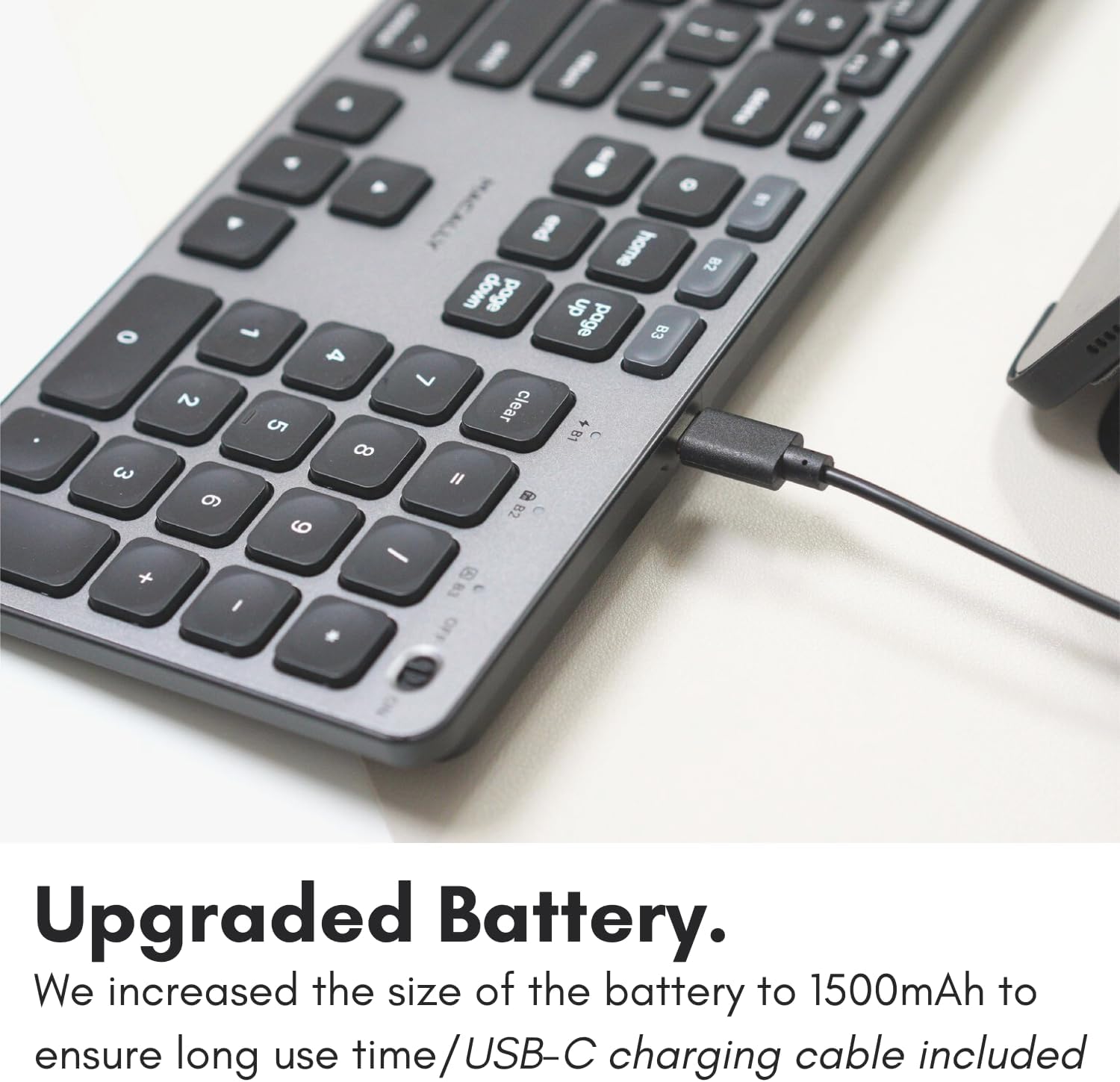
Image: The USB-C charging port on the side of the Macally BTBLZKEYSG keyboard, with the charging cable inserted.
2. Menghidupkan
Locate the power switch on the keyboard, usually on the top right edge. Slide the switch to the 'ON' position.
3. Berpasangan dengan Peranti
- Pastikan papan kekunci dihidupkan.
- Press and hold one of the Bluetooth pairing keys (B1, B2, or B3) for 3-5 seconds until the corresponding LED indicator above the key starts blinking rapidly. This indicates the keyboard is in pairing mode.
- On your Mac or iOS device, go to Tetapan Sistem (atau Keutamaan Sistem) > Bluetooth.
- Look for "Macally BTBLZKEYSG" (or similar name) in the list of available devices and click/tap to connect.
- Jika digesa, masukkan kod gandingan yang dipaparkan pada skrin anda menggunakan papan kekunci dan tekan Masuk.
- Once connected, the LED indicator for the selected Bluetooth channel will stop blinking and remain solid for a few seconds before turning off.

Image: The Macally BTBLZKEYSG keyboard shown with a MacBook and an iPad, illustrating its multi-device capability.
Arahan Operasi
MacOS Specific Keys and Shortcuts
The keyboard features a standard MacOS layout, including function keys (F1-F12) that double as media and system control shortcuts. Use the Fn key in combination with these keys to access their secondary functions.
- Fn+F1: Kurangkan kecerahan paparan
- Fn+F2: Tingkatkan kecerahan paparan
- Fn+F3: Kawalan Misi
- Fn+F4: Launchpad
- Fn+F7: Trek Sebelumnya
- Fn+F8: Main/Jeda
- Fn+F9: Trek Seterusnya
- Fn+F10: Redamkan Kelantangan
- Fn+F11: Kurangkan Kelantangan
- Fn+F12: Tingkatkan Kelantangan
Kawalan Lampu Latar
The keyboard's backlight can be adjusted to three brightness levels or turned off completely. Use the dedicated backlight control keys, typically located near the function keys or arrow keys, to cycle through the brightness settings.

Image: The Macally BTBLZKEYSG keyboard with its white LED backlighting illuminated at different intensity levels.
Bertukar Antara Peranti Berpasangan
To switch between your paired Bluetooth devices, simply press the corresponding Bluetooth pairing key (B1, B2, or B3) that your device is connected to. The keyboard will automatically connect to the selected device.
Penyelenggaraan
Untuk memastikan jangka hayat dan prestasi optimum papan kekunci anda, ikut garis panduan penyelenggaraan ini:
- Pembersihan: Gunakan kain lembut dan tidak berbulu sedikit dampened with water or a mild cleaning solution to wipe the keyboard surface. Avoid harsh chemicals or abrasive materials.
- Penyingkiran habuk: Gunakan udara termampat untuk mengeluarkan habuk dan serpihan dari antara kekunci.
- Storan: When not in use for extended periods, store the keyboard in a dry, cool place.
- Elakkan Cecair: Do not expose the keyboard to excessive moisture or spill liquids on it.
Menyelesaikan masalah
| Masalah | Penyelesaian |
|---|---|
| Papan kekunci tidak dihidupkan. | Ensure the power switch is in the 'ON' position. Charge the keyboard using the supplied USB-C cable. |
| Papan kekunci tidak berpasangan dengan peranti. | Ensure the keyboard is in pairing mode (LED blinking). Check your device's Bluetooth settings to ensure Bluetooth is enabled and the keyboard is visible. Try restarting both the keyboard and your device. |
| Papan kekunci kerap terputus. | Ensure the keyboard is within the 30 ft wireless range of your device. Check for interference from other wireless devices. Ensure the keyboard battery is sufficiently charged. |
| Lampu latar tidak berfungsi. | Press the backlight control keys to cycle through brightness levels. Ensure the keyboard battery is charged, as low battery may disable backlighting. |
| Kunci tidak bertindak balas. | Check the Bluetooth connection. If connected, try restarting the keyboard. Ensure no debris is lodged under the keys. |
Spesifikasi
| Ciri | Perincian |
|---|---|
| Nombor Model | BTBLZKEYSG |
| Ketersambungan | Bluetooth, Wayarles |
| Peranti Serasi | Mac Mini / Pro Studio, iMac, Macbook Air, MacBook Pro, iPhone, iPad |
| Penerangan Papan Kekunci | Backlit Keyboard for Mac |
| Ciri Khas | Backlit, Multi-Device Bluetooth, Rechargeable |
| warna | Kelabu |
| Backlighting papan kekunci | Single Color (White), 3 Brightness Levels |
| Dimensi Produk | 16.8"L x 4.6"W x 0.87"H |
| Bilangan Kunci | 107 |
| Sumber Kuasa | Dikuasakan oleh Bateri (1500mAh boleh dicas semula) |
| Jenis Suis | Tactile Scissor Keys |
| Susun atur papan kekunci | QWERTY (MacOS) |
| bahan | aluminium |
| UPC | 701107500362 |
Video Produk Rasmi
Video: Tamatview of the Macally Backlit Bluetooth Keyboard for Mac & iOS, highlighting its features and compatibility.
Waranti dan Sokongan
The Macally BTBLZKEYSG Backlit Bluetooth Keyboard comes with a warranty of up to two years. For technical support, warranty claims, or further assistance, please visit the official Macally webtapak atau hubungi bahagian perkhidmatan pelanggan mereka.