
1. Pengenalan
The CAMMHD C2 is a compact, head-mounted 4K video camera designed for hands-free recording. It features 6-axis anti-shake stabilization, Wi-Fi connectivity for app control, and a long-lasting 2200mAh battery, making it suitable for various activities such as vlogging, travel, and sports. This manual provides detailed instructions for the proper use and maintenance of your CAMMHD C2 camera.

Figure 1: CAMMHD C2 4K Head-Mounted Video Camera
2. Kandungan Pakej
Sila sahkan bahawa semua item yang disenaraikan di bawah disertakan dalam pakej anda. Jika ada item yang hilang atau rosak, sila hubungi sokongan pelanggan.
- CAMMHD C2 4K Head-Mounted Camera
- Headband Bracket
- Kurung Helmet
- Pelekat Pelekat 3M
- Mounting Bracket Tools
- Kabel Pengecasan USB Jenis-C
- Penyesuai Kuasa
- 32GB Memory Card (pre-installed or separate)
- Manual Pengguna

Rajah 2: Aksesori yang disertakan
3. Produk Lebihview
Biasakan diri anda dengan komponen dan kawalan kamera.
3.1 Komponen Kamera
- Kanta: Merakam video dan foto.
- Power/Wi-Fi Button: Powers the device on/off and activates Wi-Fi.
- Butang Foto: Takes still images.
- Butang Rekod: Memulakan dan menghentikan rakaman video.
- Lampu Penunjuk: Displays device status (power, recording, Wi-Fi).
- Slot Kad TF: Insert microSD card for storage.
- Pelabuhan Jenis-C: Untuk pengecasan dan pemindahan data.
- Butang Tetapkan Semula: Menetapkan semula peranti kepada tetapan kilang.

Rajah 3: Depan view of the CAMMHD C2 camera

Rajah 4: Bawah view of the CAMMHD C2 camera showing ports
4. Persediaan
4.1 Pengecasan Awal
Before first use, fully charge the camera using the provided USB Type-C cable and power adapter. The indicator light will show charging status.
4.2 Memasukkan Kad Memori
Locate the TF card slot. Gently insert the provided 32GB microSD card (or another compatible card up to 512GB) until it clicks into place. Ensure the camera is powered off before inserting or removing the memory card.
4.3 Memasang Kamera
The CAMMHD C2 offers versatile mounting options:
4.3.1 Head-Worn Installation
Attach the camera to the headband bracket. Adjust the headband for a comfortable and secure fit on your head. This method provides a first-person perspective.
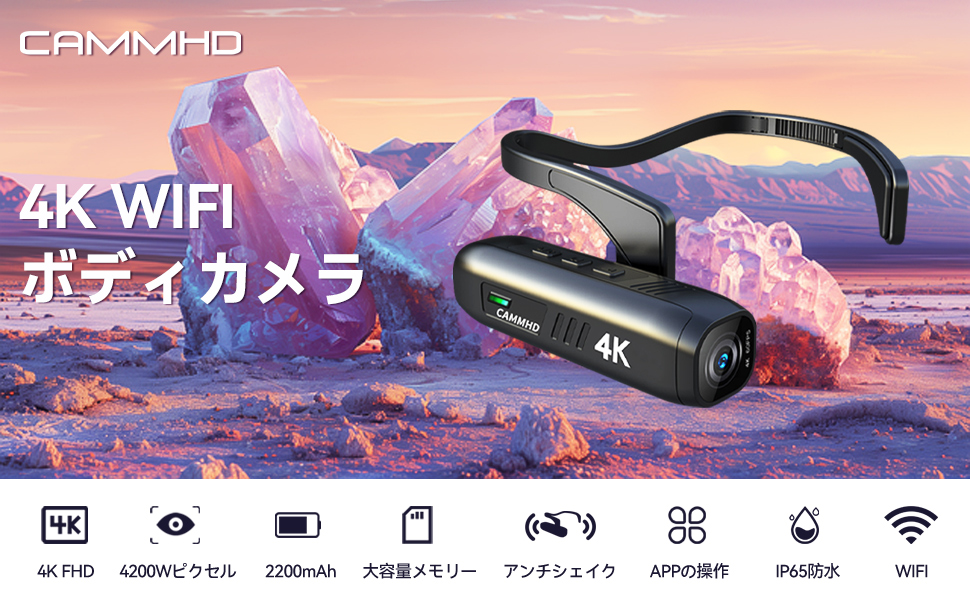
Figure 5: Head-worn installation for hands-free recording
4.3.2 Helmet-Mounted Installation
Use the helmet bracket and 3M adhesive pads to securely attach the camera to your helmet. Ensure the adhesive surface is clean and dry before application for optimal adhesion.

Figure 6: Helmet-mounted installation for secure attachment
5. Operasi
5.1 Hidupkan/Mati Kuasa
Tekan dan tahan butang Butang Kuasa/Wi-Fi for a few seconds to turn the camera on or off. The indicator light will illuminate when powered on.
5.2 Merakam Video
Tekan ke Butang Rekod once to start video recording. Press it again to stop recording. The indicator light will change to show recording status.
5.3 Mengambil Foto
Tekan ke Butang Foto once to capture a still image.
5.4 Wi-Fi Connection and App Control
The CAMMHD C2 supports Wi-Fi connectivity for real-time viewing, control, and file transfer via a smartphone app.
- Download the "Viidure Camera" app from your smartphone's app store.
- Power on the CAMMHD C2 camera.
- Tekan ke Butang Kuasa/Wi-Fi briefly to activate Wi-Fi mode on the camera. The indicator light will show Wi-Fi status.
- On your smartphone, go to Wi-Fi settings and connect to the camera's Wi-Fi network (e.g., "M20Pro_20F_XXXXXXXXXX"). The default Wi-Fi password is 12345678.
- Open the "Viidure Camera" app. You can now view hidup footage, control recording, adjust settings, and transfer files directly to your smartphone.
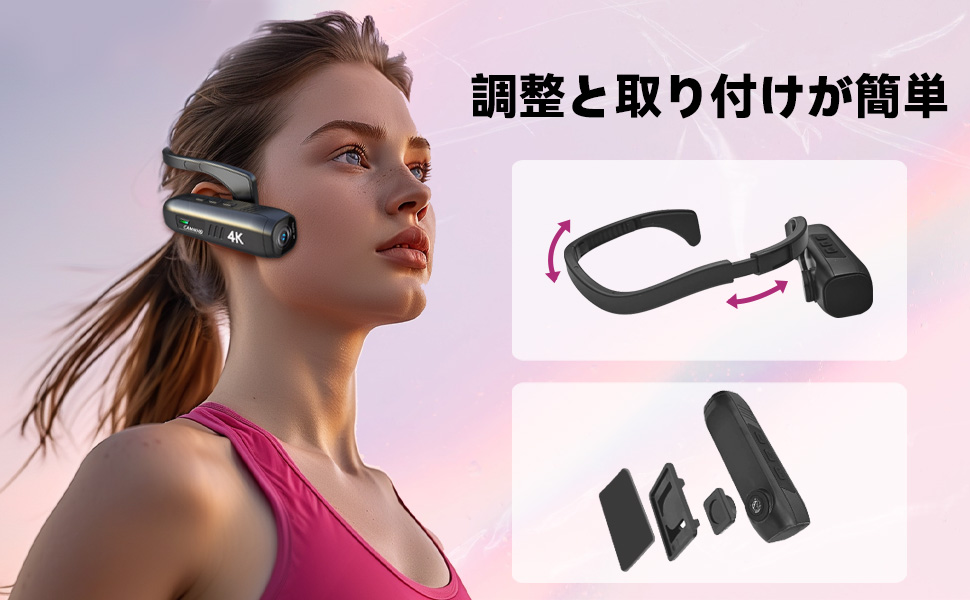
Figure 7: Wi-Fi app control interface
5.5 Ciri-ciri Utama
- 4K Resolusi Tinggi: Records videos in 3840 x 2160 4K at 30fps or 2704 x 1520 2K at 30fps for clear and vivid footage.
- 6-Axis Anti-Shake: Advanced stabilization technology minimizes blur from movement, ensuring smooth video.
- Hayat Bateri yang Panjang: Integrated 2200mAh battery provides approximately 5-7 hours of continuous recording.
- Kanta Sudut Lebar: 130-degree wide-angle lens captures a broader field of view.
- Storan Boleh Dikembangkan: Menyokong kad microSD sehingga 512GB.
6. Penyelenggaraan
- Pastikan kanta kamera bersih menggunakan kain lembut dan tidak berbulu. Elakkan bahan yang kasar.
- Simpan kamera di tempat yang sejuk dan kering jauh dari cahaya matahari langsung dan suhu yang melampau.
- Regularly back up your recorded data to prevent loss.
- Ensure the Type-C port cover is securely closed when not in use to protect against dust and moisture.
7. Penyelesaian masalah
| Masalah | Kemungkinan Punca | Penyelesaian |
|---|---|---|
| Kamera tidak dihidupkan. | Bateri lemah; kerosakan peranti. | Cas kamera sepenuhnya. Jika masalah berterusan, hubungi sokongan. |
| Tidak dapat menyambung ke Wi-Fi. | Incorrect password; Wi-Fi not activated on camera; app issue. | Ensure Wi-Fi is active on camera. Verify password (12345678). Restart camera and app. |
| Kualiti video kurang baik. | Lens is dirty; low light conditions; incorrect resolution settings. | Clean the lens. Ensure adequate lighting. Check resolution settings in the app. |
| Kamera membeku atau menjadi tidak bertindak balas. | Gangguan perisian. | Tekan butang Reset. |
8. Spesifikasi
| Ciri | Perincian |
|---|---|
| Jenama | CAMMHD |
| Model | C2 |
| Resolusi Tangkapan Video | 4K (3840 x 2160) @ 30fps, 2K (2704 x 1520) @ 30fps |
| Teknologi Penderia Foto | CMOS (Sony 386 sensor) |
| Format Tangkapan Video | MP4 |
| Format Audio | WAV |
| Ketersambungan | USB, Wi-Fi |
| Ciri Khas | 4K, Wi-Fi, Vlog, 6-axis Anti-shake |
| Kapasiti Bateri | 2200mAh Litium-ion |
| Purata Hayat Bateri | 5-7 Jam |
| Sokongan Storan | Up to 512GB microSD card (32GB included) |
| Berat badan | 75g |
| Dimensi (D x W x H) | 28 x 26 x 101 mm |
9. Waranti dan Sokongan
The CAMMHD C2 camera comes with a Waranti 1 tahun from the date of purchase. For technical support, warranty claims, or any inquiries, please contact CAMMHD customer service through the retailer where you purchased the product or visit the official CAMMHD webtapak.
Sumber Dalam Talian: For additional support, FAQs, and firmware updates, please refer to the CAMMHD official store or product page: CAMMHD Official Store