
EYETOO CE13
Manual Pengguna Kamera Papan Pemuka Cermin TOGUARDCAR 1080P
Model: CE13
1. Pengenalan
The TOGUARDCAR 1080P Mirror Dash Cam (Model CE13) is an advanced vehicle recording system designed to enhance driving safety and provide comprehensive surveillance. It features a 4.3-inch IPS full touch screen, dual high-definition cameras for front and rear recording, and intelligent functions such as G-sensor emergency locking, loop recording, and parking monitoring.
This manual provides detailed instructions for the proper setup, operation, and maintenance of your dash cam to ensure optimal performance and longevity.
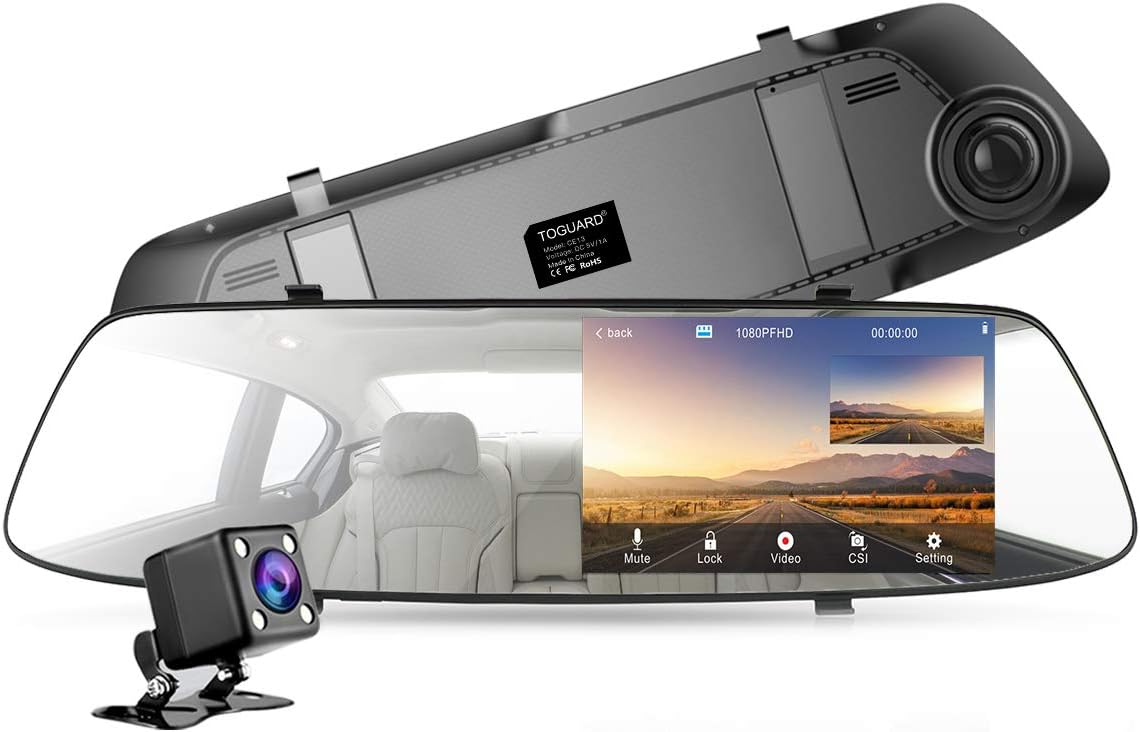
Image: The TOGUARDCAR 1080P Mirror Dash Cam with its included rear camera, showcasing the main unit and its display interface.
2. Kandungan Pakej
Sila sahkan bahawa semua item yang disenaraikan di bawah disertakan dalam pakej anda:
- Mirror Dash Cam (Main Unit)
- belakang View Kamera
- Connection Cable for Rear View Kamera
- Pengecas Kereta
- Kit Hardwire
- Mounting Straps (for mirror attachment)
- Kabel USB
- Klip Kabel
- Dust Cloth
- Linggis (untuk penghalaan kabel)
- Manual Pengguna

Image: A visual representation of all components included in the TOGUARDCAR Mirror Dash Cam package.
3. Panduan Persediaan
3.1. Memasang Kamera Papan Pemuka Cermin
- Secure the Mirror Dash Cam over your vehicle's existing rearview mirror using the provided rubber mounting straps. Ensure it is firmly attached and does not obstruct your view.
- Laraskan sudut kanta kamera hadapan untuk menangkap medan yang diingini view melalui cermin depan.
3.2. Connecting the Rear View Kamera
- Pasang bahagian belakang view camera at the rear of your vehicle, typically above the license plate or inside the rear window. Ensure it has a clear view.
- Route the rear camera's connection cable from the rear of the vehicle to the main Mirror Dash Cam unit. Use the provided crowbar to tuck the cable neatly along the vehicle's trim and headliner for a clean installation.
- Connect the rear camera cable to the designated port on the Mirror Dash Cam.
3.3. Sambungan Kuasa
- Connect the car charger to the Mirror Dash Cam's power input port.
- Pasangkan pengecas kereta ke soket kuasa 12V kenderaan anda (soket pemetik api).
- For continuous power and parking monitoring, consider using the optional hardwire kit (professional installation recommended).
3.4. Memasukkan Kad Mikro SD
- Insert a high-speed (Class 10 or higher) Micro SD card into the designated slot on the dash cam. Ensure the card is inserted correctly until it clicks into place.
- It is recommended to format the Micro SD card within the dash cam's settings before first use and periodically thereafter to ensure stable recording.

Image: A diagram illustrating the simple clip-type installation process for the mirror dash cam and cable routing.

Image: The dash cam seamlessly integrated into a vehicle's interior, displaying both front and rear camera views.
4. Arahan Operasi
The TOGUARDCAR Mirror Dash Cam is designed for intuitive operation via its full touch screen. Here are the primary functions:
4.1. Hidupkan/Mati Kuasa
- The dash cam will automatically power on and begin recording when your vehicle's ignition is turned on.
- Ia akan mati secara automatik apabila pencucuhan dimatikan.
4.2. Antara Muka Skrin Sentuh
Navigate through menus, settings, and playback options by tapping and swiping on the 4.3-inch IPS touch screen. The sensitive touch screen ensures easy and quick access to all functions.
4.3. Dual Camera Recording
The dash cam simultaneously records from both the 1080P high-definition front camera (170° field of view) and the 720P rear view camera (120° field of view), providing comprehensive coverage of your driving environment.

Image: Icons illustrating key features: Front & Rear Camera, Loop Recording, G-Sensor, Rear View Mirror function, Parking Monitor, and Touch Screen.
4.4. Rakaman Gelung
When the memory card reaches its full capacity, the loop recording function automatically overwrites the oldest video segments with new ones. This ensures continuous recording without manual intervention.

Image: A visual representation of seamless loop recording, showing older video files sedang ditulis ganti apabila yang baharu direkodkan.
4.5. G-Sensor (Emergency Lock)
The built-in G-sensor detects sudden shakes or collisions. In the event of an impact, it automatically locks the current video segment, preventing it from being overwritten by loop recording. This ensures critical evidence is preserved.

Image: A diagram explaining the G-Sensor's function, showing how it locks video files upon detecting a collision.
4.6. Pemantauan Tempat Letak Kereta
When enabled, the parking monitor function acts as an unattended surveillance guard. If an impact is detected while the vehicle is parked and the ignition is off, the dash cam will automatically power on and record a short video, then power off again. This requires a continuous power supply (e.g., via the hardwire kit).
4.7. Belakang View Display & Parking Assistance
When the vehicle is shifted into reverse gear, the dash cam automatically displays the rear camera's view on the screen, often with parking guidelines. This assists in safe parking by eliminating blind spots.

Image: The dash cam display showing a clear rear view with parking assistance lines, aiding in safe vehicle maneuvering.
4.8. Wide Angle Viewing
The front camera offers a 170° wide-angle view, and the rear camera offers a 120° wide-angle view. These wide fields of view capture more of the road and surroundings, reducing visual blind spots compared to traditional mirrors.

Image: A diagram illustrating the extensive 170-degree front and 120-degree rear wide-angle viewing capabilities of the dash cam.
5. Penyelenggaraan
5.1. Formatting the Micro SD Card
To ensure optimal performance and prevent recording errors, it is crucial to format the Micro SD card regularly (e.g., once a month). This clears old data and maintains the card's health.
5.2. Pembersihan
Use the provided dust cloth or a soft, lint-free cloth to gently clean the dash cam's screen and lenses. Avoid using abrasive cleaners or solvents that could damage the device.
5.3. Temperature Considerations
The dash cam is designed to operate within a specific temperature range. Avoid prolonged exposure to extreme temperatures (very hot or very cold) to prevent damage to the device and ensure proper function.

Image: An illustration indicating the suitable temperature range for the dash cam's operation, from cold to hot conditions.
6. Penyelesaian masalah
If you encounter issues with your TOGUARDCAR Mirror Dash Cam, please refer to the following common problems and solutions:
- Dash Cam Tidak Dihidupkan:
Ensure the car charger is securely plugged into both the dash cam and the vehicle's 12V power outlet. Check if the vehicle's power outlet is functioning. If using a hardwire kit, verify its connection. - Rakaman Berhenti atau Terhenti:
This is often due to a full or corrupted Micro SD card. Format the Micro SD card within the dash cam's settings. If the issue persists, try a different high-speed (Class 10 or higher) Micro SD card. - Skrin Sentuh Tidak Responsif:
Try restarting the dash cam by unplugging and re-plugging the power cable. If the problem continues, a factory reset might be necessary (refer to the device settings for this option). - Kualiti Video Lemah:
Ensure the camera lenses are clean and free from smudges or dirt. Check that the protective film has been removed from the lenses. Verify that the recording resolution is set to 1080P in the settings. - G-Sensor Not Working Properly:
Adjust the G-sensor sensitivity in the dash cam's settings. If it's too high, it may trigger too easily; if too low, it may not detect impacts. - Kamera Belakang Tidak Dipaparkan:
Check the connection of the rear camera cable to both the rear camera and the main dash cam unit. Ensure the cable is not damaged.
Jika langkah ini tidak menyelesaikan isu ini, sila hubungi sokongan pelanggan untuk mendapatkan bantuan lanjut.
7. Spesifikasi
| Ciri | Spesifikasi |
|---|---|
| Nama Model | 4.3” mirror dash cam (CE13) |
| Resolusi Kamera Depan | 1080P FHD |
| Resolusi Kamera Belakang | 720P |
| Saiz Paparan | 4.3 inci |
| Jenis Paparan | IPS Full Touch Screen LCD |
| Bidang Kamera Depan View | 170° |
| Rear Camera Field of View | 120° |
| Teknologi Ketersambungan | USB |
| Ciri Khas | Built-In Speaker, G-Sensor, Loop Recording, Reverse Assist |
| Sumber Kuasa | 1 Lithium Polymer battery required (internal), Car Charger |
| Dimensi Produk | 12.91 x 2.95 x 0.39 inci |
| Berat Barang | 1.68 paun |
8. Waranti dan Sokongan
TOGUARDCAR is committed to providing reliable road safety solutions. We offer professional customer service to assist with any issues you may encounter.
8.1. Sokongan Pelanggan
For technical assistance, troubleshooting not covered in this manual, or any other inquiries, please contact our customer service team. We aim to resolve any issues within 24 hours.
Please refer to the product packaging or the official TOGUARDCAR webtapak untuk maklumat hubungan terkini.
8.2. Maklumat Waranti
Specific warranty details are typically provided with your purchase documentation or on the official product page. Please retain your proof of purchase for warranty claims.