
pengenalan
This manual provides detailed instructions for the setup, operation, and maintenance of your Ipega PG-9089 Wireless Bluetooth Game Controller. Please read this manual carefully before use to ensure proper functionality and extend the product's lifespan. The Ipega PG-9089 is a versatile game controller designed for multi-platform compatibility, offering an enhanced gaming experience across various devices.
Produk Selesaiview
The Ipega PG-9089 is a wireless Bluetooth game controller featuring an ergonomic design and broad compatibility. It includes an integrated extendable phone holder, making it convenient for mobile gaming on the go.
Ciri-ciri Utama:
- Wireless Bluetooth connectivity for seamless gaming.
- Compatible with Android, iOS, and PC devices.
- Integrated extendable phone holder for smartphones up to 6.2 inches.
- High sensitivity and accuracy buttons for precise control.
- Ergonomic design for comfortable extended gameplay sessions.

Rajah 1: Depan view of the Ipega PG-9089 Wireless Bluetooth Game Controller, showcasing its black and red design with dual analog sticks and face buttons.
Kandungan Pakej
Sila sahkan bahawa pakej anda mengandungi item berikut:
- 1 x Ipega PG-9089 Wireless Bluetooth Game Controller
- 1 x Kabel Pengecas USB
- 1 x Manual Pengguna
Persediaan dan Sambungan
Mengecas Pengawal
Before initial use, ensure the controller is fully charged. Connect the supplied USB charging cable to the controller's charging port and the other end to a standard USB power source (e.g., PC USB port, USB wall adapter). The charging indicator light will illuminate during charging and turn off once the battery is full.
Berpasangan Bluetooth
The PG-9089 supports various connection modes. Select the appropriate mode for your device.
Sambungan Peranti Android:
- Pastikan pengawal dimatikan.
- Tekan dan tahan butang Satu butang + butang HOME simultaneously until the indicator light flashes rapidly. This signifies Android standard pairing mode.
- On your Android device, navigate to Bluetooth settings and search for available devices.
- Select "PG-9089" from the list to pair. The indicator light will become solid once connected.
iOS Device Connection:
- Pastikan pengawal dimatikan.
- Tekan dan tahan butang butang Y + butang HOME simultaneously until the indicator light flashes rapidly. This signifies iOS standard pairing mode.
- On your iOS device, navigate to Bluetooth settings and search for available devices.
- Select "PG-9089" from the list to pair. The indicator light will become solid once connected.
PC (Windows) Connection:
The controller can be connected to a PC via Bluetooth or USB cable.
Bluetooth Connection (PC):
- Pastikan pengawal dimatikan.
- Tekan dan tahan butang butang X + butang HOME simultaneously until the indicator light flashes rapidly. This puts the controller into PC X-Input mode.
- On your PC, go to Bluetooth settings and add a new device.
- Select "PG-9089" from the list to pair. The indicator light will become solid once connected.
Wired Connection (PC):
- Connect the controller to your PC using the supplied USB cable.
- The controller should be automatically recognized as a game controller.
Arahan Operasi
Susun atur Butang
Familiarize yourself with the controller's button layout for optimal gameplay and function access.

Rajah 2: Diagram illustrating the button layout of the Ipega PG-9089, including D-Pad, A/B/X/Y buttons, L1/L2, R1/R2, Home, Select, Start, Turbo, and analog sticks with L3/R3 functions.
Pemegang Telefon Bersepadu
The controller features an extendable holder designed to securely mount your smartphone for mobile gaming.
- Gently pull the top part of the holder upwards to extend it.
- Carefully place your smartphone into the holder, ensuring it is securely seated. The holder supports phones up to 6.2 inches.

Rajah 3: sebelah view of the Ipega PG-9089 demonstrating the integrated extendable phone holder in use, securely holding a smartphone.
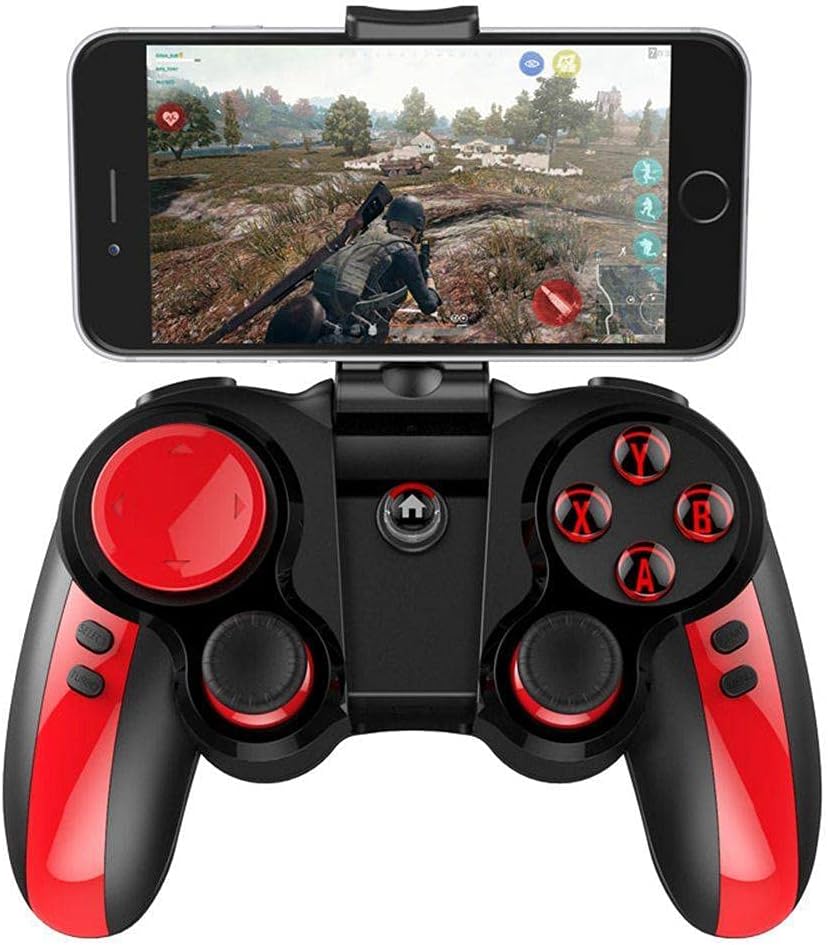
Rajah 4: The Ipega PG-9089 controller with a smartphone mounted in its holder, displaying a game in progress, illustrating its practical application.
Fungsi TURBO
The TURBO function allows for rapid, continuous input of a button press, which can be beneficial in games requiring fast, repeated actions.
- Press the button you wish to set to TURBO (e.g., A, B, X, Y, L1, R1, L2, R2).
- While holding that button, press the butang TURBO once. The selected button will now continuously input as long as it is held down.
- To cancel the TURBO function for a specific button, repeat the process: press the button and then press the butang TURBO sekali lagi.
Penyelenggaraan
- Clean the controller regularly with a soft, dry cloth. Do not use harsh chemicals or abrasive cleaners.
- Avoid exposing the controller to extreme temperatures, direct sunlight, or high humidity.
- Simpan pengawal di tempat yang sejuk dan kering apabila tidak digunakan.
- Do not attempt to disassemble or repair the controller yourself, as this may void the warranty and cause damage.
Menyelesaikan masalah
Pengawal tidak bersambung melalui Bluetooth:
- Pastikan pengawal dicas sepenuhnya.
- Sahkan bahawa Bluetooth didayakan pada peranti anda.
- Make sure the controller is in the correct pairing mode for your device (Android, iOS, or PC).
- Try forgetting the device on your Bluetooth settings and re-pairing.
- Mulakan semula kedua-dua pengawal dan peranti anda.
Butang tidak bertindak balas:
- Periksa sama ada pengawal disambungkan dengan betul.
- Ensure the game or application supports game controllers.
- Try resetting the controller (if a reset button is available, otherwise power cycle).
- Recharge the controller.
Phone not fitting in holder:
- The holder supports phones up to 6.2 inches. Ensure your phone's size is within this limit.
- Remove any bulky phone cases that might prevent proper fitting.
Spesifikasi
| Ciri | Perincian |
|---|---|
| Model | PG-9089 |
| Ketersambungan | Bluetooth, USB Wired |
| Keserasian | Android, iOS, PC (Windows, Macintosh) |
| Phone Holder Support | Sehingga 6.2 inci |
| warna | Hitam, Merah |
| Pengeluar | IPEGA |
| Dimensi Pakej | 16.4 x 14 x 7 cm |
| Berat badan | 280 g |
Waranti dan Sokongan
For warranty information and technical support, please refer to the warranty card included with your product or visit the official Ipega webtapak. Simpan resit pembelian anda sebagai bukti pembelian untuk sebarang tuntutan waranti.
Pengeluar: IPEGA
model: PG-9089
ASIN: B0997F4ZZH