
1. Pengenalan
Thank you for choosing the Hoco ES39 Wireless Bluetooth Earphones. This manual provides essential information for setting up, operating, and maintaining your earphones. Please read it carefully before use to ensure optimal performance and longevity of your device.
The Hoco ES39 earphones offer a seamless audio experience with Bluetooth 5.0 connectivity, a convenient charging case, and a water-resistant design suitable for various activities.
2. Kandungan Pakej
- Hoco ES39 Wireless Bluetooth Earphones (Left & Right)
- Kes Pengecasan
- Ear Cushions (pre-installed or in various sizes)
- Kabel Pengecas USB
- Manual Pengguna
3. Produk Lebihview
Familiarize yourself with the components of your Hoco ES39 earphones.
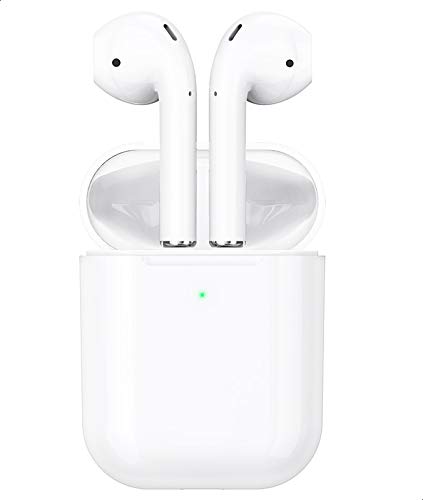
This image shows the Hoco ES39 wireless earphones, one placed outside its charging case and the other inside, alongside a smartphone. This illustrates the compact design and how the earphones are used with a mobile device.
- Earbud: Left (L) and Right (R) earphones with touch control areas.
- Sarung Pengecasan: Stores and charges the earphones. Features an LED indicator for battery status.
- Port Pengecasan: Located on the charging case for power input.
- Penunjuk LED: On both earphones and the charging case, indicating charging status, pairing mode, and battery level.
4. Persediaan
4.1 Mengecas Fon Telinga dan Sarung
Sebelum penggunaan pertama, cas sepenuhnya fon telinga dan bekas pengecas.
- Caskan Kes Pengecasan: Connect the provided USB charging cable to the charging port on the case and a power source. The LED indicator on the case will show charging status and turn solid when fully charged.
- Cas Fon Telinga: Place the earphones into their respective slots in the charging case. Ensure they are correctly seated. The earphones will begin charging automatically. The LED indicators on the earphones will show charging status and turn off when fully charged.
4.2 Berpasangan dengan Peranti Bluetooth
The Hoco ES39 earphones are designed for automatic pairing.
- Aktifkan Bluetooth: Ensure Bluetooth is enabled on your smartphone or other device.
- Power On Earphones: Open the charging case and remove both earphones. They will automatically power on and enter pairing mode. The LED indicator on one earphone will flash, indicating it's ready to pair.
- Sambung: On your device, search for Bluetooth devices and select "Hoco ES39" from the list. Once connected, a voice prompt will confirm successful pairing.
- Penggunaan Earbud Tunggal: Either earbud can be used independently. Simply remove one earbud from the case, and it will automatically connect to the last paired device.
5. Arahan Operasi
The Hoco ES39 earphones feature intuitive touch controls.

This image features the Hoco ES39 earphones within their open charging case, positioned beside a smartphone displaying a music player interface. This highlights the product's primary function for audio playback.
5.1 Hidupkan/Mati Kuasa
- Hidupkan kuasa: Remove earphones from the charging case. They will power on automatically. Alternatively, long-press the touch control area for 3 seconds.
- Matikan: Place earphones back into the charging case. They will power off automatically. Alternatively, long-press the touch control area for 5 seconds.
5.2 Main balik Muzik
- Main/Jeda: Ketukan sekali pada mana-mana fon telinga.
- Lagu Seterusnya: Ketik dua kali pada fon telinga kanan.
- Trek Sebelumnya: Ketik dua kali pada fon telinga kiri.
- Kawalan Kelantangan: Laraskan kelantangan terus daripada peranti anda yang disambungkan.
5.3 Pengurusan Panggilan
- Jawab/Tamatkan Panggilan: Ketukan sekali pada fon telinga semasa panggilan masuk atau panggilan aktif.
- Tolak Panggilan: Long-press on either earphone for 2 seconds during an incoming call.
5.4 Pembantu Suara
- Aktifkan Pembantu Suara: Ketik tiga kali pada mana-mana fon telinga untuk mengaktifkan pembantu suara peranti anda (cth., Siri, Google Assistant).
6. Penyelenggaraan
Proper care ensures the longevity of your Hoco ES39 earphones.
- Pembersihan: Gunakan kain lembut, kering dan bebas serabut untuk membersihkan fon telinga dan sarung pengecas. Jangan gunakan bahan kimia yang keras atau bahan yang melelas.
- Storan: Always store the earphones in their charging case when not in use to protect them and keep them charged.
- Tahan Air: The earphones have an IPX-1 water resistance rating, meaning they are protected against vertically falling drops of water. They are resistant to light splashes and sweat but are not designed for immersion in water or use during heavy rain. Avoid exposing them to excessive moisture.
- Suhu: Avoid exposing the earphones to extreme temperatures (hot or cold) or direct sunlight for extended periods.
7. Penyelesaian masalah
If you encounter issues with your Hoco ES39 earphones, try the following solutions:
- Fon telinga tidak berpasangan:
- Ensure both earphones and the charging case are sufficiently charged.
- Turn off and then turn on Bluetooth on your device.
- Forget "Hoco ES39" from your device's Bluetooth list and attempt to re-pair.
- Place both earphones back into the charging case, close the lid, wait a few seconds, then open and remove them to reset.
- No sound from one or both earphones:
- Semak tahap kelantangan pada peranti anda yang disambungkan.
- Pastikan fon telinga disambungkan dengan betul ke peranti anda.
- Cuba mainkan sumber audio yang berbeza.
- Isu pengecasan:
- Sahkan kabel pengecasan disambungkan dengan selamat pada kedua-dua bekas dan sumber kuasa.
- Cuba kabel USB atau penyesuai kuasa yang lain.
- Ensure the charging contacts on the earphones and inside the case are clean and free of debris.
- Earphones disconnect frequently:
- Ensure you are within the effective Bluetooth range (typically 10 meters/33 feet) without significant obstacles.
- Kurangkan gangguan daripada peranti wayarles lain.
8. Spesifikasi
| Ciri | Spesifikasi |
|---|---|
| Jenama | Hoco |
| Model | ES39 |
| Versi Bluetooth | 5.0 |
| Kapasiti Bateri (Kes Pengecasan) | 320 mAh |
| Masa Mengecas | Lebih kurang 1 jam |
| Masa Berbual | Lebih kurang 3 jam |
| Penilaian Ketahanan Air | IPX-1 |
| Mikrofon | Termasuk |
| Berat badan | 46 gram (jumlah) |
| Faktor Bentuk | Dalam Telinga |
| Teknologi Ketersambungan | Tanpa wayar |
| Jenis Kawalan | Touch Control, Volume Control (via connected device) |
| Bahan | plastik |
| Peranti Serasi | Multi-device (Smartphones, Tablets, etc.) |
9. Waranti dan Sokongan
Hoco products are designed and manufactured to the highest quality standards. For information regarding warranty coverage, please refer to the warranty card included in your package or contact your retailer.
For technical support or customer service inquiries, please visit the official Hoco website or contact your local distributor. Please have your product model (ES39) and purchase details ready when seeking support.