
Redragon K601-RGB
Redragon DITI K601-RGB One-Handed Gaming Keyboard Instruction Manual
pengenalan
Welcome to the instruction manual for your new Redragon DITI K601-RGB One-Handed Gaming Keyboard. This compact mechanical keyboard is designed for competitive gaming, offering programmable macro keys, customizable RGB backlighting, and durable blue mechanical switches for a tactile and responsive experience. This manual will guide you through the setup, operation, maintenance, and troubleshooting of your device.

Imej: The Redragon DITI K601-RGB One-Handed Gaming Keyboard showcasinreka bentuknya yang padat dan lampu latar RGB yang bertenaga.
Maklumat Keselamatan
- Jauhkan papan kekunci daripada cecair dan kelembapan berlebihan.
- Elakkan suhu yang melampau.
- Jangan cuba membuka atau mengubah suai papan kekunci. Ini boleh membatalkan jaminan anda dan menyebabkan kerosakan.
- Bersihkan papan kekunci dengan kain lembut dan kering. Elakkan bahan kimia yang keras.
- Produk ini tidak kalis air.
Kandungan Pakej
Sila semak kandungan pakej semasa membuka kotak untuk memastikan semua item ada:
- Redragon DITI K601-RGB One-Handed Gaming Keyboard
- Kabel USB
- Manual Pengguna (dokumen ini)
Panduan Persediaan
1. Menyambung Papan Kekunci
- Cari port USB yang tersedia pada PC atau komputer riba anda.
- Plug the USB connector of the Redragon DITI K601-RGB keyboard into the USB port.
- The operating system will automatically detect and install the necessary drivers.
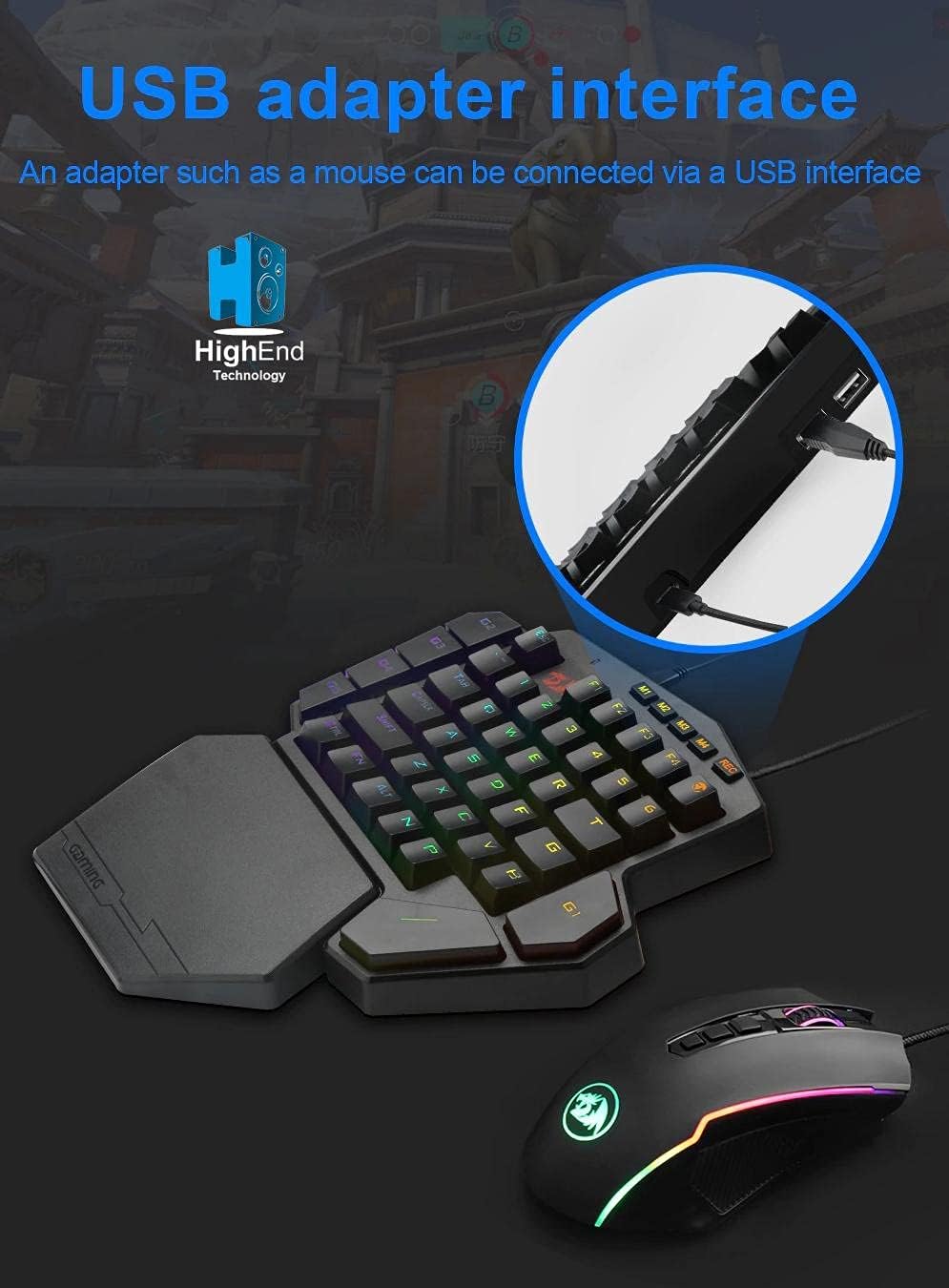
Imej: Illustrates connecting the Redragon DITI K601-RGB keyboard via its USB interface to a computer.
2. Driver and Software Installation (Optional for Advanced Features)
For full customization, including macro programming and advanced RGB lighting effects, it is recommended to install the Redragon software.
- Visit the official Redragon webtapak (www.redragonzone.com) dan navigasi ke bahagian sokongan atau muat turun.
- Cari untuk the DITI K601-RGB model and download the latest driver and software package.
- Ikut arahan pada skrin untuk menyelesaikan pemasangan.
Arahan Operasi
Fungsi Utama Asas
The DITI K601-RGB features a compact layout optimized for gaming. Standard keys function as labeled.

Imej: jarak dekat view of the Redragon DITI K601-RGB keyboard, highlighting the dustproof blue mechanical switches and keycap design.
Pengaturcaraan Makro
The keyboard supports custom macro programming for enhanced in-game control. This feature is managed through the Redragon software.
- Open the Redragon DITI K601-RGB software.
- Navigate to the "Macro" tab or section.
- Create a new macro by recording key presses and delays.
- Assign the created macro to one of the programmable keys (e.g., G1-G5 or M1-M4, if available on your model).
- Save your profile.

Imej: Screenshot of the Redragon DITI K601-RGB software's main page, illustrating the custom macro programming interface and profile pengurusan.
Penyesuaian Pencahayaan RGB
Customize the RGB backlighting to match your setup or mood using the dedicated software.
- In the Redragon software, locate the "Light" or "RGB" settings.
- Choose from various preset lighting effects or create your own custom patterns.
- Adjust brightness, speed, and color schemes.
- Simpan pro pencahayaan pilihan andafile.
Penyelenggaraan
Pembersihan
- Putuskan sambungan papan kekunci daripada komputer anda sebelum membersihkan.
- Use a soft, lint-free cloth to wipe down the surface of the keyboard.
- Untuk habuk dan serpihan di antara kunci, gunakan udara termampat.
- Jangan gunakan pembersih cecair, pelarut atau bahan yang melelas.
Penyimpanan
Simpan papan kekunci di tempat yang sejuk dan kering, jauh daripada cahaya matahari langsung dan suhu yang melampau apabila tidak digunakan untuk tempoh yang lama.
Menyelesaikan masalah
Papan Kekunci Tidak Membalas
- Pastikan kabel USB dipasang dengan kukuh pada papan kekunci dan komputer.
- Cuba pasangkan papan kekunci ke port USB yang berbeza.
- Mulakan semula komputer anda.
- Check your computer's Device Manager to see if the keyboard is recognized. Reinstall drivers if necessary.
Keys Not Working Correctly
- Clean around the affected keys with compressed air to remove any debris.
- If using custom macros, ensure they are correctly programmed and assigned in the software.
- Uji papan kekunci pada komputer lain untuk menolak isu khusus sistem.
Isu Pencahayaan RGB
- Ensure the Redragon software is running and the lighting settings are correctly configured.
- Check for any firmware updates for the keyboard on the Redragon webtapak.
- Reset lighting settings to default within the software.
Spesifikasi Produk
| Jenama | Redragon |
| Nombor Model | K601-RGB |
| Ketersambungan | USB berwayar |
| Peranti Serasi | PC, Laptop |
| Jenis Papan Kekunci | Papan Kekunci Permainan Mekanikal |
| Jenis Suis | Suis Mekanikal Biru |
| Ciri Khas | Programmable Macro Keys, Customizable RGB Lighting, Gaming Design |
| warna | Hitam |
| Penggunaan yang Disyorkan | Gaming (FPS, LoL, PUBG) |
| Susun atur papan kekunci | Compact QWERTY (One-Handed) |
| Tahan Air | Bukan Tahan Air |
| Komponen yang Disertakan | Kabel USB |
Maklumat Waranti
Redragon products typically come with a limited manufacturer's warranty. Please refer to the warranty card included with your product or visit the official Redragon webtapak untuk terma dan syarat waranti terperinci khusus untuk wilayah anda. Simpan bukti pembelian anda untuk tuntutan waranti.
Sokongan Pelanggan
If you encounter any issues or have questions not covered in this manual, please contact Redragon customer support.
- Webtapak: www.redragonzone.com (Check for regional support contacts)
- e-mel: Rujuk kepada website for specific contact emails.
- telefon: Rujuk kepada website for specific contact numbers.
Ask a question about this manual
Ask about setup, troubleshooting, compatibility, parts, safety, or missing instructions. Manuals+ will review the question and use this page’s manual context to help answer it.