
pengenalan
The Poly DA75 is a versatile USB-A/USB-C digital adapter designed to connect Poly Quick Disconnect (QD) headsets to computers. It ensures clear audio quality for call center environments, supporting both USB-A and USB-C connections for compatibility with various systems. This adapter is engineered to work seamlessly with platforms such as Avaya, Genesys, and Cisco, providing a reliable audio solution for professionals.
Ciri-ciri utama termasuk:
- Ketersambungan Universal: Equipped with both USB-A and USB-C connectors on the cable for broad compatibility with new and legacy equipment.
- Intelligent Headset Recognition: Automatically adjusts audio performance to the specific Poly Quick Disconnect headset for optimized call quality.
- Perlindungan Akustik: Incorporates features to manage safe volume levels, protecting user hearing.
- Penyepaduan Platform: Fully compatible with leading call center platforms including Avaya, Genesys, and Cisco.
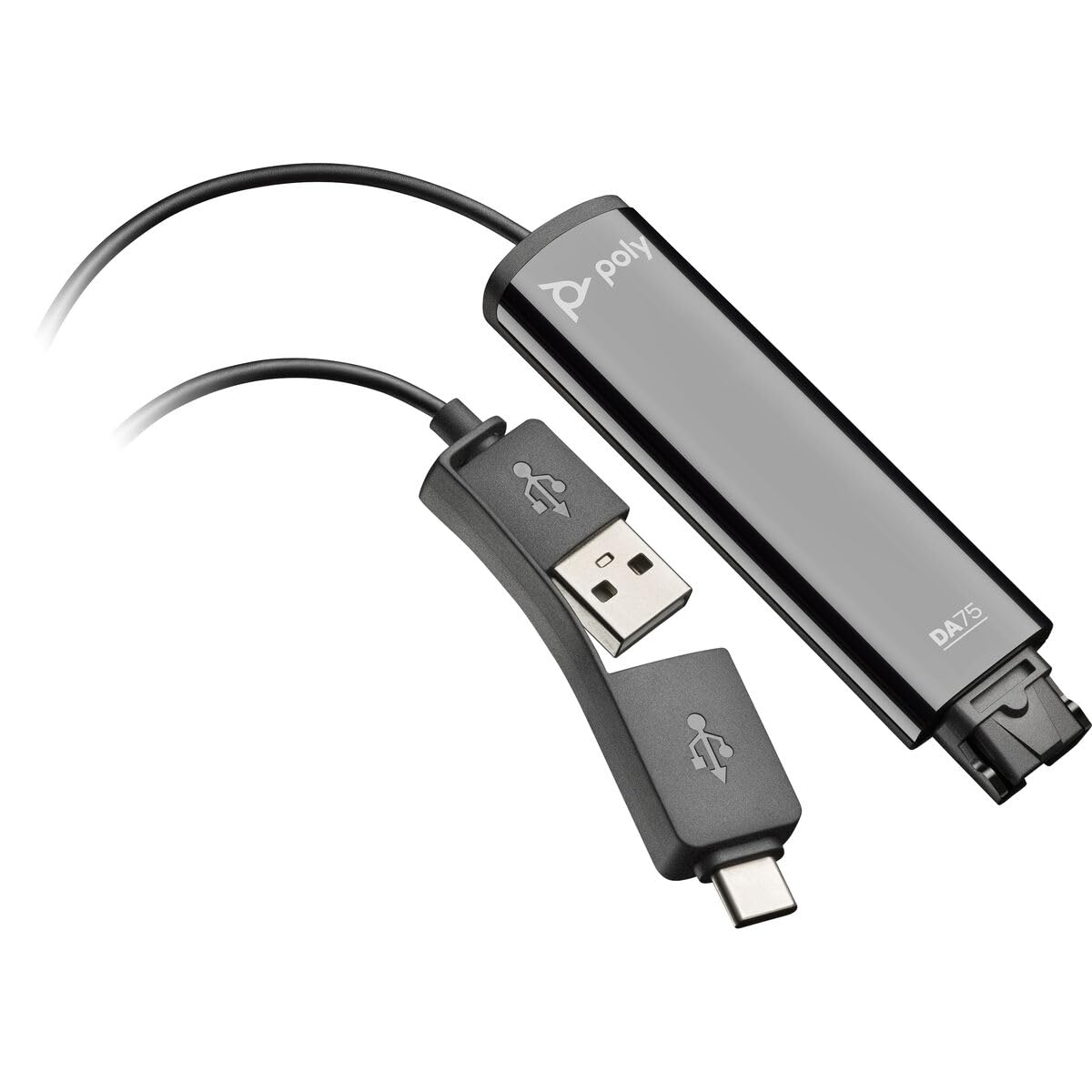
Image: The Poly DA75 USB-A/USB-C Digital Adapter, showing its dual USB-A and USB-C connectors and the Quick Disconnect port for headsets.
Apa yang ada dalam Kotak
The Poly DA75 package typically includes the following items:
- Poly DA75 USB-A/USB-C Digital Adapter
- Dokumentasi (Panduan Mula Pantas, Maklumat Keselamatan)
Note: Headsets are sold separately and are not included with the DA75 adapter.
Persediaan
Follow these steps to set up your Poly DA75 Digital Adapter:
- Sambungkan Fon Kepala: Connect your Poly Quick Disconnect (QD) headset to the QD port on the Poly DA75 adapter. Ensure the connection is secure.
- Sambung ke Komputer:
- If your computer has a USB-A port, use the USB-A connector on the DA75 cable.
- If your computer has a USB-C port, use the USB-C connector on the DA75 cable.
Plug the appropriate USB connector into an available USB port on your computer.
- Pemasangan Pemandu: The DA75 is a plug-and-play device. Your operating system (Windows, macOS) should automatically detect the device and install the necessary drivers. This process may take a few moments.
- Sahkan Pengecaman Peranti:
- Windows: Pergi ke Settings > System > Sound or Panel Kawalan > Bunyi. The Poly DA75 should appear as an audio input and output device.
- macOS: Pergi ke System Settings > Sound. The Poly DA75 should appear as an input and output device.
Select the Poly DA75 as your default communication device for both playback and recording.
- Konfigurasi Perisian: If you are using communication software (e.g., Avaya, Genesys, Cisco, Microsoft Teams, Zoom), ensure that the Poly DA75 is selected as the audio device within the application's settings.
Arahan Operasi
The Poly DA75 adapter facilitates audio communication through your connected Poly QD headset. Its operation is primarily managed through your computer's operating system and communication software.
- Membuat/Menerima Panggilan: Use your communication software to initiate or answer calls. The audio will be routed through your connected Poly QD headset via the DA75 adapter.
- Kawalan Kelantangan: Adjust the listening volume using your computer's system volume controls or the volume controls within your communication application.
- Redam Mikrofon: Mute and unmute your microphone using the controls provided by your communication software.
- Audio Optimization: The DA75 automatically optimizes audio for your specific Poly QD headset. No manual adjustments are typically required for audio profiles.
Penyelenggaraan
To ensure the longevity and optimal performance of your Poly DA75 Digital Adapter, follow these maintenance guidelines:
- Pembersihan: Gently wipe the adapter with a soft, dry, anti-static cloth. Do not use liquid cleaners or abrasive materials.
- Storan: Simpan penyesuai di tempat yang sejuk dan kering jauh dari cahaya matahari langsung dan suhu yang melampau.
- Pengendalian: Elakkan membengkokkan atau memusingkan kabel secara berlebihan, terutamanya berhampiran penyambung, untuk mengelakkan kerosakan dalaman.
- Ketersambungan: Ensure the Quick Disconnect (QD) connection and USB connections are clean and free of debris before connecting.
Menyelesaikan masalah
If you encounter issues with your Poly DA75 Digital Adapter, refer to the following troubleshooting steps:
| Masalah | Kemungkinan Punca | Penyelesaian |
|---|---|---|
| Tiada audio daripada set kepala |
|
|
| Mikrofon tidak berfungsi |
|
|
| Adapter not recognized by computer |
|
|
Spesifikasi
| Ciri | Perincian |
|---|---|
| Nombor Model | 218266-01 |
| Jenama | POLI |
| Jenis Penyambung | USB-A, USB-C (dual connector) |
| Peranti Serasi | Poly Quick Disconnect (QD) Headsets |
| Kegunaan Khusus | PC, Call Center Platforms (Avaya, Genesys, Cisco) |
| warna | Hitam |
| Dimensi Item (L x W x H) | 0.98 x 0.39 x 2.95 inci |
| Berat Barang | 30 Gram |
| Bilangan Pelabuhan | 2 (USB-A/USB-C to QD) |
| UPC | 197029650054, 017229175112 |
Waranti dan Sokongan
Maklumat Waranti: The Poly DA75 Digital Adapter comes with a Waranti terhad pengeluar 2 tahun. Waranti ini melindungi kecacatan pada bahan dan mutu kerja di bawah penggunaan biasa. Sila simpan bukti pembelian anda untuk tuntutan waranti.
Sokongan Teknikal: For technical assistance, product inquiries, or warranty service, please contact Poly customer support. Visit the official Poly website for the most up-to-date support contact information, FAQs, and additional resources.
Sumber Dalam Talian: Sokongan Poli Webtapak