
pengenalan
This manual provides detailed instructions for the installation, operation, and maintenance of your Yunir Brushless Motor Controller Kit. This kit is designed for electric scooters, bikes, and similar vehicles, offering reliable performance with its brushless motor controller and clear LCD display. Please read this manual thoroughly before installation and use to ensure proper function and safety.
Maklumat Keselamatan
- Sentiasa putuskan bekalan elektrik sebelum melakukan sebarang pemasangan, penyelenggaraan atau penyelesaian masalah.
- Pastikan semua sambungan selamat dan terlindung dengan betul untuk mengelakkan litar pintas.
- Do not expose the controller or display to extreme temperatures, direct sunlight for prolonged periods, or corrosive substances.
- While the LCD display is rainproof, avoid submerging the components in water.
- Jika anda tidak pasti tentang mana-mana langkah pemasangan, sila rujuk juruteknik yang berkelayakan.
Produk Selesaiview
The Yunir Brushless Motor Controller Kit provides efficient and sensitive control for your electric vehicle. It features a robust, rainproof design and includes an LCD display for clear data visualization.
- Pembinaan Tahan Lama: Made from premium materials, ensuring a light, robust, and rainproof design suitable for various weather conditions.
- Paparan LCD yang jelas: The backlit LCD display clearly shows status and data, making it easy to read even in dim environments. Intuitive buttons allow for quick operation.
- Quiet and Sensitive Control: The brushless controller operates quietly and offers high sensitivity for smooth vehicle performance.
- Keserasian Serbaguna: Supports 36V/48V systems with 350W power output, ensuring efficient operation for compatible electric vehicles.

Image: The Yunir Brushless Motor Controller Kit, including the controller unit and the LCD display.
Persediaan dan Pemasangan
Follow these steps for proper installation of the controller and LCD display.
1. Gambarajah Pendawaian Pengawal
Refer to the diagram below for connecting the controller to your electric vehicle's components. Ensure each wire is connected to its corresponding function.

Image: Detailed wiring diagram for the Yunir Brushless Motor Controller, showing connections for accelerator, lamp, brake, display, Hall sensor, and power.
2. Cable Identification
Each cable in the kit is color-coded for easy identification and connection:
- merah: Positive power connection
- hitam: Negative power connection
- Kuning: Kuasa keluaran
- coklat: Positive lamp elektrod
- putih: Negative lamp elektrod
- Biru: Isyarat paparan
- hijau: Isyarat diterima
3. LCD Display Mounting
The LCD display comes with a holder designed to fit 22.5 mm handlebars. Mount the display securely in a position that allows for easy viewing while operating your vehicle.

Image: The LCD display holder, designed for secure mounting on 22.5mm handlebars.

Image: The rainproof LCD display mounted on handlebars, showing its suitability for all weather conditions.
Arahan Operasi
1. Fungsi Paparan LCD
The LCD display provides real-time information about your vehicle's status and performance. Use the intuitive buttons to navigate through different modes and settings.

Imej: Dari dekat view of the LCD display screen, showing various parameters like speed, battery level, and distance.
- Lampu latar: The display features a backlight for clear visibility in low-light conditions.
- Paparan Data: Shows essential data such as speed, battery level, distance, and more.
- Butang: Use the buttons to power on/off, adjust settings, and switch display modes.
2. Parameter Settings (P13)
The controller allows for adjustment of certain parameters. One important setting is P13, which relates to the product power and booster type.
- The factory default setting for product power is 8. This is suitable for most standard split boosters.
- If your vehicle uses an integrated booster, you may need to adjust the P13 setting to 12.
- In cases of incompatible booster types, adjust P13 to either 8 or 12 as required for optimal performance.
Note: The controller model may be sent randomly. Ensure compatibility before ordering and installation.
Penyelenggaraan
- Pembersihan: Wipe the controller and display with a soft, damp kain. Jangan gunakan bahan kimia yang keras atau pembersih yang kasar.
- Sambungan: Periksa semua sambungan wayar secara berkala untuk memastikan ia selamat dan bebas daripada kakisan.
- Pemeriksaan: Inspect the cables and housing for any signs of damage, wear, or fraying. Replace damaged components immediately.
- Storan: If storing the vehicle for an extended period, ensure the components are clean and stored in a dry environment.
Menyelesaikan masalah
If you encounter issues with your Yunir Brushless Motor Controller Kit, consider the following common troubleshooting steps:
- Tiada Kuasa/Paparan Mati: Check all power connections, including battery and main switch. Ensure the battery is charged.
- Motor Tidak Bertindak balas: Verify all motor phase lines and Hall sensor connections are correct and secure. Check the speed throttle connection.
- Incorrect Speed/Data: Ensure the LCD display signal wire is properly connected. If applicable, check P13 settings for booster compatibility.
- Operasi sekejap: Periksa semua pendawaian untuk sambungan longgar atau penebat yang rosak.
- Kod Ralat: If the LCD display shows an error code, consult the specific error code documentation for your display model (if available) or contact support.
Jika masalah berterusan selepas mencuba langkah-langkah ini, sila hubungi khidmat pelanggan untuk bantuan lanjut.
Spesifikasi
| Ciri | Perincian |
|---|---|
| Nombor Model | Yunirfq7a8cnm1g7609-02 |
| Voltage Keserasian | 36V/48V |
| Output Kuasa | 350W |
| Dimensi Pengawal | Lebih kurang 8.8 cm x 5.2 cm x 3 cm (3.46 inci x 2.04 inci x 1.18 inci) |
| LCD Display Dimensions | Approx. 8 cm x 5 cm (3.15 in x 1.97 in) |
| Handlebar Diameter (for display) | 22.5 mm |
| Berat Barang | 11.4 auns (lebih kurang 323 gram) |
| kalis hujan | Yes (LCD Display) |
| Bateri Diperlukan | No (for controller/display operation, relies on vehicle battery) |
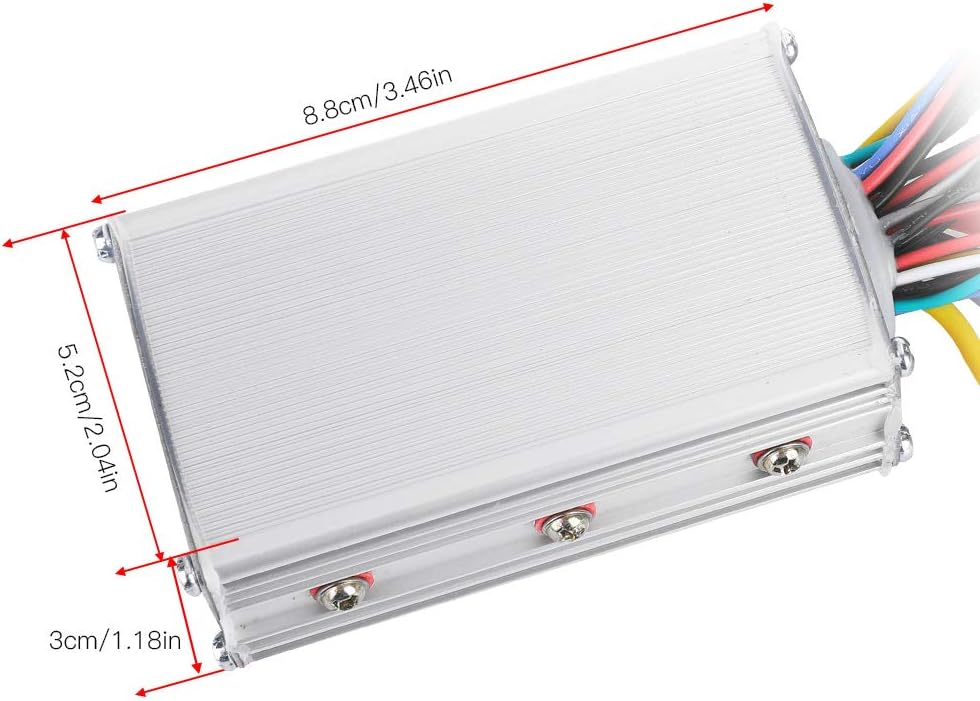
Image: Dimensions of the Yunir Brushless Motor Controller unit.

Image: Dimensions of the Yunir LCD Display unit.
Maklumat Waranti
This product is covered by a standard manufacturer's warranty. Please refer to your purchase documentation or contact the retailer for specific warranty terms and conditions. Keep your proof of purchase for any warranty claims.
Sokongan Pelanggan
For technical assistance, troubleshooting, or inquiries regarding your Yunir Brushless Motor Controller Kit, please contact Yunir customer support through the retailer where the product was purchased. Provide your model number (Yunirfq7a8cnm1g7609-02) and a detailed description of the issue for efficient service.