
pengenalan
This manual provides detailed instructions for the setup, operation, and maintenance of your Depusheng MX8 Professional 8-Channel Audio Mixer. Please read this manual thoroughly before using the device to ensure proper function and to prevent damage. Keep this manual for future reference.
Maklumat Keselamatan
- Bekalan Kuasa: Gunakan hanya penyesuai kuasa yang ditentukan. Pastikan voltage sepadan dengan bekalan kuasa tempatan anda.
- Air dan Kelembapan: Jangan dedahkan pengadun kepada air, hujan atau kelembapan berlebihan. Elakkan meletakkan objek berisi cecair di atas unit.
- Pengudaraan: Pastikan pengudaraan yang mencukupi di sekeliling unit. Jangan sekat bukaan pengudaraan.
- haba: Jauhkan unit ini daripada sumber haba seperti radiator, daftar haba, dapur atau peralatan penghasil haba yang lain.
- Servis: Jangan cuba servis unit ini sendiri. Rujuk semua servis kepada kakitangan perkhidmatan yang berkelayakan.
- Kuasa Hantu: When using condenser microphones, ensure +48V phantom power is activated. Turn off phantom power before connecting or disconnecting microphones to prevent damage.
Kandungan Pakej
Selepas membuka bungkusan, sahkan bahawa semua item ada dan dalam keadaan baik:
- Depusheng MX8 Audio Mixer Unit
- Penyesuai Kuasa
- Manual Pengguna
Produk Selesaiview dan Kawalan
Familiarize yourself with the layout and functions of the Depusheng MX8 mixer.
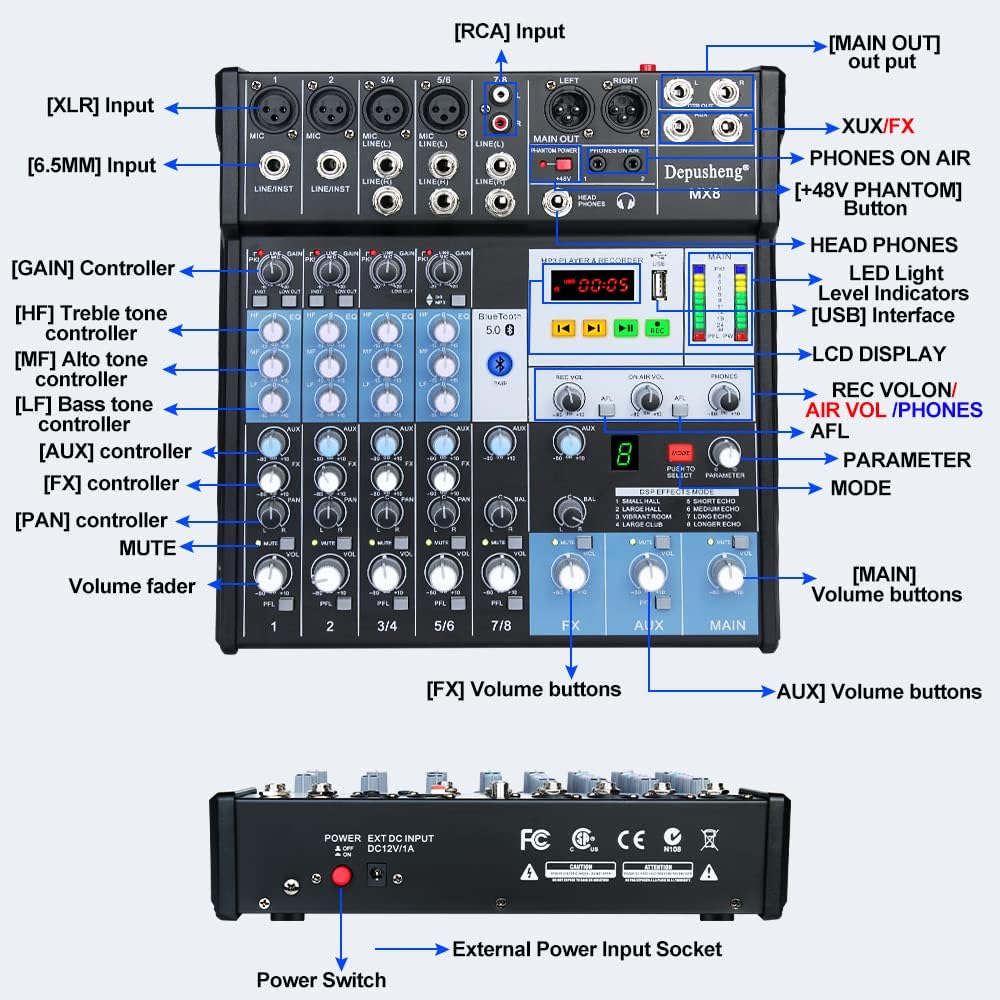
Rajah 1: Panel hadapan di atasview of the Depusheng MX8 mixer, showing various input/output jacks, control knobs, faders, and the MP3 player/recorder section.
The mixer features multiple input channels, equalization controls, DSP effects, Bluetooth connectivity, and USB playback/recording capabilities. Key components include:
- Antara Muka Input: XLR, 6.5mm (1/4 inch) Line/Instrument, RCA.
- Antaramuka Output: Main Out (XLR, 6.5mm), Control Room Out, Aux Out, FX Send, Headphone Out.
- Kawalan Saluran: GAIN, High (HF), Mid (MF), Low (LF) tone controllers, AUX, FX, PAN, MUTE, Volume fader.
- MP3 Player & Recorder: USB interface, LCD display, control buttons, LED indicator lights.
- Kesan DSP: Mode selection and parameter adjustment for 8 built-in effects.
- Kuasa Hantu: +48V button for condenser microphones.
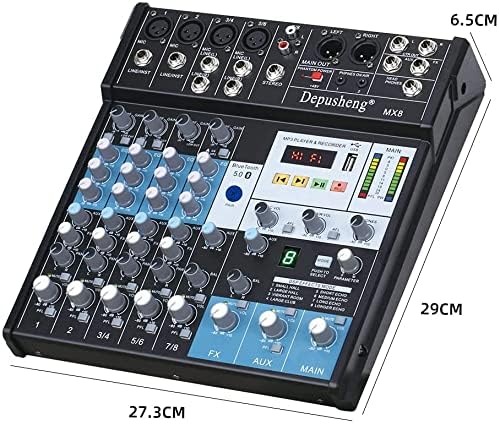
Rajah 2: Dimensions of the Depusheng MX8 Audio Mixer.
Persediaan
Follow these steps to set up your Depusheng MX8 mixer.
1. Sambungan Kuasa
Connect the provided power adapter to the 'DC12V/1A' input socket on the rear of the mixer. Plug the adapter into a suitable power outlet. Use the power switch located next to the power input to turn the unit on or off.
2. Microphone Connections
- Mikrofon Dinamik: Connect dynamic microphones using XLR cables to the MIC inputs or 6.5mm (1/4 inch) TS/TRS cables to the LINE/INST inputs.
- Mikrofon Pemeluwap: Connect condenser microphones using XLR cables to the MIC inputs. Press the +48V PHANTOM button to supply power to the microphone. Ensure the button is off before connecting or disconnecting.
3. Sambungan Fon Kepala
Connect your monitor headphones to the HEAD PHONES output jack using a 6.5mm (1/4 inch) TRS connector. Adjust the headphone volume using the dedicated TELEFON tombol.
4. Amplifier or Mobile Speaker Connection
Sambungkan KELUAR UTAMA (XLR or 6.5mm) of the mixer to the input of your amplifier or powered speakers. Adjust the main output volume using the UTAMA volume fader.
5. Sambungan Komputer
Connect the mixer to your computer using a USB cable. The mixer functions as a USB soundcard, allowing for audio input and output with your computer.

Rajah 3: Connection diagram illustrating various devices connected to the Depusheng MX8 mixer.
Operasi
1. Equalization (EQ) Adjustment
Each channel features a 3-band equalizer to shape the tone of your audio source. Adjust the knobs for High (HF), Mid (MF), and Low (LF) frequencies to achieve your desired sound.

Rajah 4: Tiga-stage equalization controls for adjusting high, mid, and low frequencies.
2. Kesan DSP
The mixer includes 8 Digital Signal Processing (DSP) reverb effects. Use the MODE button to cycle through the effects (Small Hall, Large Hall, Vibrant Room, Large Club, Short Echo, Medium Echo, Long Echo, Longer Echo). Adjust the PARAMETER tombol untuk melaraskan kesan yang dipilih.

Rajah 5: DSP effects section with 8 reverb options.
3. Sambungan Bluetooth
Untuk menyambungkan peranti Bluetooth:
- Pastikan pengadun dihidupkan.
- Aktifkan Bluetooth pada peranti mudah alih anda.
- Cari untuk available devices and select "Depusheng-MX8" to pair.
- Once connected, you can stream audio wirelessly from your device to the mixer.

Rajah 6: Establishing a wireless Bluetooth connection with the mixer.
4. Main Semula dan Rakaman USB
The mixer supports USB playback and recording functions:
- Main balik USB: Masukkan pemacu kilat USB yang mengandungi audio files into the USB port. Use the MP3 player controls (play, pause, skip) to navigate and play music.
- Rakaman USB: Tekan ke REC button on the MP3 player/recorder section to start recording audio directly to a connected USB flash drive.
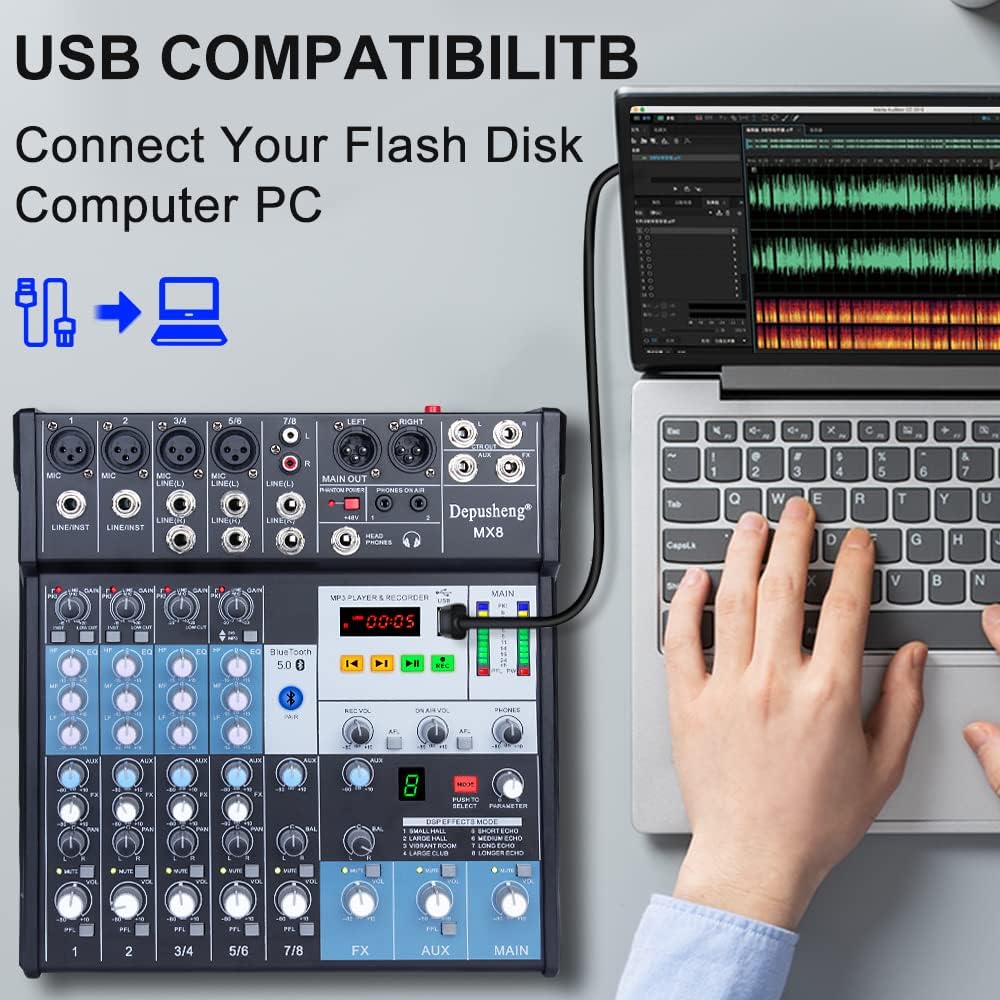
Rajah 7: Connecting a USB flash drive to the mixer for playback or recording.
5. Computer Recording
To record audio to your computer:
- Connect the mixer to your computer via USB.
- Open your preferred Digital Audio Workstation (DAW) or recording software on your computer.
- Select the mixer as your audio input device within the software settings.
- Adjust input levels on the mixer and in your software, then begin recording.
Video 1: Demonstrates various setup and operation aspects of the Depusheng MX8 mixer, including connecting microphones (0:08-0:22), adjusting EQ (0:23-0:26), connecting headphones (0:31-0:38), connecting to an amplifier/speakers (0:39-0:46), selecting DSP effects (0:47-0:53), Bluetooth pairing (0:54-1:06), USB playback (1:08-1:16), and computer recording (1:27-1:31).
Penyelenggaraan
To ensure the longevity and optimal performance of your Depusheng MX8 mixer, follow these maintenance guidelines:
- Pembersihan: Gunakan kain lembut dan kering untuk membersihkan bahagian luar unit. Jangan gunakan pembersih, pelarut atau lilin yang kasar.
- Storan: Apabila tidak digunakan, simpan pengadun di tempat yang sejuk dan kering, jauh daripada cahaya matahari langsung dan suhu yang melampau.
- Perlindungan Debu: Cover the mixer with a dust cover when not in use to prevent dust accumulation in faders and knobs.
Menyelesaikan masalah
If you encounter issues with your Depusheng MX8 mixer, refer to the following common problems and solutions:
| Masalah | Kemungkinan Punca | Penyelesaian |
|---|---|---|
| Tiada kuasa | Penyesuai kuasa tidak bersambung atau rosak; suis kuasa dimatikan. | Check power connections; ensure power switch is on; try a different outlet. |
| Tiada keluaran bunyi | Incorrect cable connections; main volume fader down; amppembesar/pembesar suara dimatikan atau diredamkan. | Verify all audio cable connections; increase main volume; check amplifier/speaker status. |
| Mikrofon tidak berfungsi | Microphone not connected properly; GAIN knob too low; +48V phantom power off for condenser mics. | Check microphone connection; increase GAIN; activate +48V for condenser mics. |
| Isu sambungan Bluetooth | Peranti tiada dalam mod berpasangan; pengadun tidak dapat ditemui; gangguan. | Ensure mixer is in Bluetooth mode; restart both devices; move closer to the mixer. |
| Main balik USB tidak berfungsi | Pemacu USB tidak diformat dengan betul; tidak disokong file format; faulty USB drive. | Ensure USB is FAT32 formatted; use supported audio formats (e.g., MP3); try another USB drive. |
Spesifikasi
- Bilangan Saluran: 8
- Teknologi Ketersambungan: Bluetooth, USB
- Sumber Kuasa: Elektrik Bertali
- Berat Barang: 5.41 paun (2.46 Kilogram)
- Dimensi Pakej: 15.08 x 12.28 x 3.82 inci
- Kesan DSP: 8 built-in reverb effects
- Kuasa Hantu: +48V
Waranti dan Sokongan
For warranty information or technical support, please refer to the documentation included with your purchase or contact Depusheng customer service. Keep your proof of purchase for any warranty claims.