
1. Pengenalan
Terima kasih kerana membeliasing the CaDA C51014W Remote Control Construction Block Kit. This manual provides detailed instructions for assembly, operation, maintenance, and troubleshooting to ensure you get the most out of your product. This versatile 2-in-1 kit allows you to build either a Mixer Truck or a Liftable Flatbed Truck, both controllable via remote control, offering an engaging and educational building experience.
2. Produk Lebihview
The CaDA C51014W kit is designed to provide a realistic and interactive building experience, culminating in two functional remote-controlled construction vehicles. The kit contains 814 pieces, a remote control, and all necessary components for assembly.

Rajah 2.1: The CaDA C51014W kit, showcasing the completed mixer truck model and its remote control unit. This image provides a general overview of the product and its primary components.
2.1 Ciri-ciri Utama
- 2-in-1 Building Options: Construct either a detailed Mixer Truck or a functional Liftable Flatbed Truck from the same set of blocks.
- Fungsi Kawalan Jauh: Both models are fully remote-controlled, allowing for forward, backward, and steering movements.
- Butiran Realistik: Features include a manually rotatable mixer drum on the Mixer Truck, and a foldable, manually liftable bed on the Flatbed Truck. Doors are openable, and tires are made of rubber for enhanced realism.
- Nilai Pendidikan: Promotes imagination, creativity, and teamwork through hands-on building and play.
- Keserasian: CaDA blocks are compatible with other major building block brands, allowing for expanded creative possibilities.
3. Arahan Perhimpunan
The CaDA C51014W kit includes a comprehensive, illustrated instruction manual. Please follow the step-by-step diagrams carefully for successful assembly. It is recommended to sort the blocks before starting to facilitate the building process.
- Buka bungkusan semua komponen dan sahkan dengan senarai bahagian yang disediakan dalam manual arahan.
- Follow the numbered steps in the manual to assemble your chosen model (Mixer Truck or Liftable Flatbed Truck).
- Pastikan semua sambungan kukuh untuk mengelakkan bahagian daripada tertanggal semasa permainan.
- Once the main structure is complete, proceed with installing the motor and battery unit as per the instructions.
- Finally, connect the remote control receiver to the motor unit.
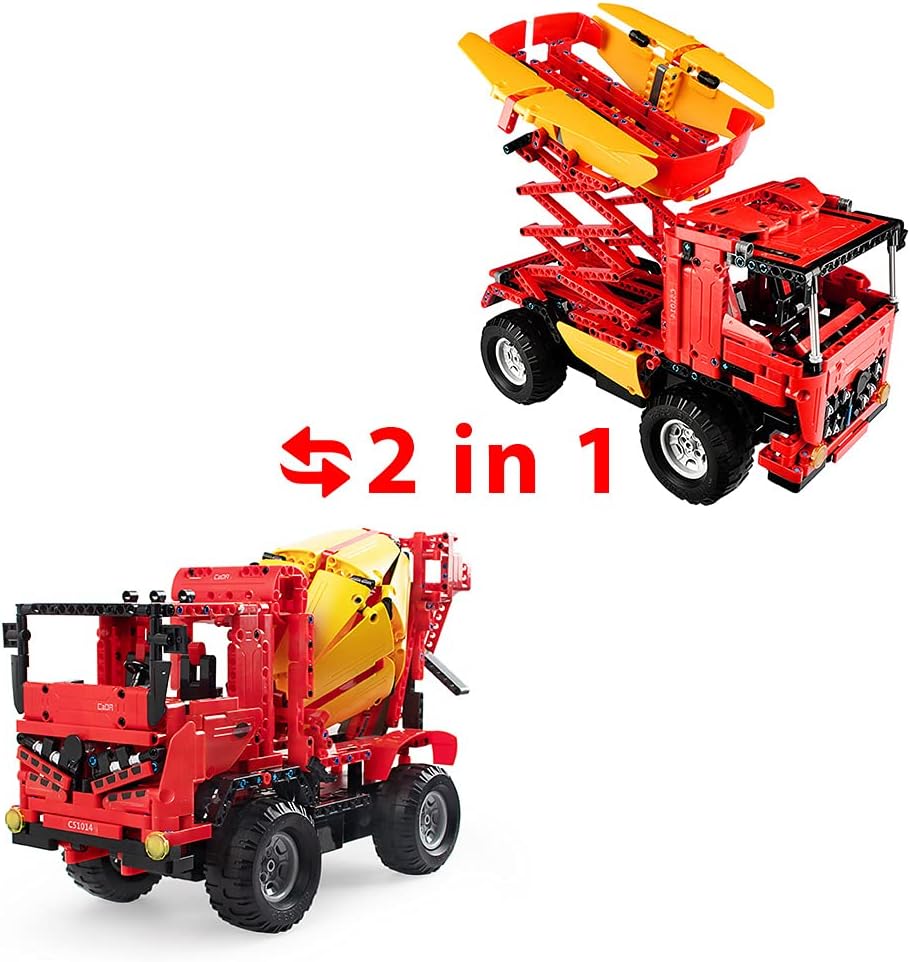
Rajah 3.1: This image illustrates the 2-in-1 building capability of the CaDA C51014W kit, showing both the mixer truck and the liftable flatbed truck that can be constructed from the same set of blocks.
4. Arahan Operasi
4.1 Pemasangan dan Pengecasan Bateri
- The main unit's battery is rechargeable. Connect the USB charging cable (not included) to the main unit's battery port and a suitable USB power source.
- For the first charge, allow 4-5 hours for a full charge. Subsequent charges will typically take 2-3 hours.
- A full charge provides approximately 15-20 minutes of operation.
- The remote control requires 2 AAA batteries (not included). Insert them into the remote control's battery compartment, observing polarity.
4.2 Operasi Kawalan Jauh
Once the model is assembled and batteries are installed, power on the main unit and the remote control. The remote control allows for precise movement and steering.
- Gunakan kayu bedik/butang kiri untuk pergerakan ke hadapan dan ke belakang.
- Gunakan kayu bedik/butang kanan untuk stereng kiri dan kanan.
- Alat kawalan jauh mempunyai jarak berkesan sehingga 25 meter.
- For the Mixer Truck, the mixer drum can be rotated manually using the dial on the side.
- For the Liftable Flatbed Truck, the truck bed can be manually lifted and lowered using the foldable mechanism.

Rajah 4.1: This image demonstrates the remote control functionality of the CaDA C51014W, showing the mixer truck moving forward, backward, and turning, controlled by the included remote.

Rajah 4.2: This image highlights the manual rotation feature of the mixer drum on the CaDA C51014W mixer truck, indicating its 360-degree movement.

Rajah 4.3: This image shows the liftable flatbed truck model from the CaDA C51014W kit, demonstrating its manual lifting mechanism for the truck bed.
5. Penyelenggaraan
- Keep the blocks and electronic components clean and free from dust. Use a soft, dry cloth for cleaning.
- Elakkan mendedahkan produk kepada suhu yang melampau atau cahaya matahari langsung untuk tempoh yang lama.
- This product is not waterproof. Do not expose it to water or high humidity.
- When not in use, remove batteries from both the main unit and the remote control to prevent leakage and prolong battery life. Store the product in a cool, dry place.
- Regularly check for any loose parts and re-secure them to maintain structural integrity.
6. Penyelesaian masalah
| Masalah | Kemungkinan Punca | Penyelesaian |
|---|---|---|
| Product does not move or respond to remote control. |
|
|
| Missing or broken parts during assembly. | Manufacturing defect or oversight. | Refer to the "Warranty and Support" section for instructions on requesting replacement parts. Please provide the part number from the manual and the quantity needed. |
| Hayat bateri lebih pendek daripada jangkaan. |
|
|
7. Spesifikasi
| Atribut | Perincian |
|---|---|
| Nombor Model | C51014W |
| Bilangan Kepingan | 814 |
| bahan | ABS (Acrylonitrile Butadiene Styrene) |
| Completed Dimensions (L x W x H) | 41 cm x 16 cm x 26 cm |
| Berat badan | 2.1 kg |
| Umur Disyorkan | 6 tahun ke atas |
| Kelajuan Maks | 3.9 km/j |
| Battery Type (Main Unit) | Boleh dicas semula (termasuk) |
| Charging Method (Main Unit) | USB (kabel tidak disertakan) |
| Jenis Bateri (Kawalan Jauh) | 2 x bateri AAA (tidak termasuk) |
| Masa Operasi | 15-20 minutes (after 2-3 hours charge) |
| Julat Kawalan Jauh | Sehingga 25 meter |
| Kalis air | Tidak |
8. Amaran Keselamatan
- Bahaya tercekik: Small parts. Not suitable for children under 4 years old due to potential choking hazards. Adult supervision is recommended during assembly and play.
- Keselamatan Bateri:
- Do not leave batteries in high-temperature environments.
- Avoid overcharging the main unit battery.
- Remove all batteries from the product and remote control when not in use for extended periods.
- Buang bateri mengikut peraturan tempatan.
- Keserasian: While CaDA blocks are compatible with other brands, ensure proper fit and function when mixing sets to avoid damage.
9. Waranti dan Sokongan
If you encounter any issues with missing or defective parts, please contact CaDA Japan Official Shop directly. They will arrange for replacement parts to be sent to you promptly. To expedite the process, please provide the part number(s) from the assembly manual and the quantity required, along with your shipping address.
For general inquiries or further assistance, please refer to the official CaDA website or contact their customer support. You can also search for "CaDA c51014w" on YouTube for product demonstrations and assembly videos.
No official seller videos were found in the provided product data for direct embedding in this manual.