
pengenalan
This manual provides instructions for the setup, operation, and maintenance of your USARMT BN59-01289A Universal Remote Control. This remote is designed as a compatible replacement for various Samsung LED Smart TV models, including those in the MU6290/D, MU6490/D, and MU6070 series, and substitutes for original remotes like TM1240A, BN59-01199F, BN59-01301A, BN59-01315A, and AA59-00666A.

Rajah 1: Depan view of the BN59-01289A Universal Remote Control.
Persediaan
Pemasangan Bateri
The USARMT BN59-01289A remote control requires two AAA batteries (not included). Follow these steps to install the batteries:
- Cari penutup petak bateri di belakang alat kawalan jauh.
- Luncurkan penutup ke bawah atau tekan selak (jika ada) untuk membuka petak.
- Masukkan dua bateri AAA, pastikan terminal positif (+) dan negatif (-) sejajar dengan tanda di dalam petak.
- Gantikan penutup petak bateri dengan menggelongsorkannya semula ke tempatnya sehingga ia berbunyi dengan selamat.
Once batteries are installed, the remote is pre-programmed and ready for use with compatible Samsung TVs. No additional setup or programming is required.
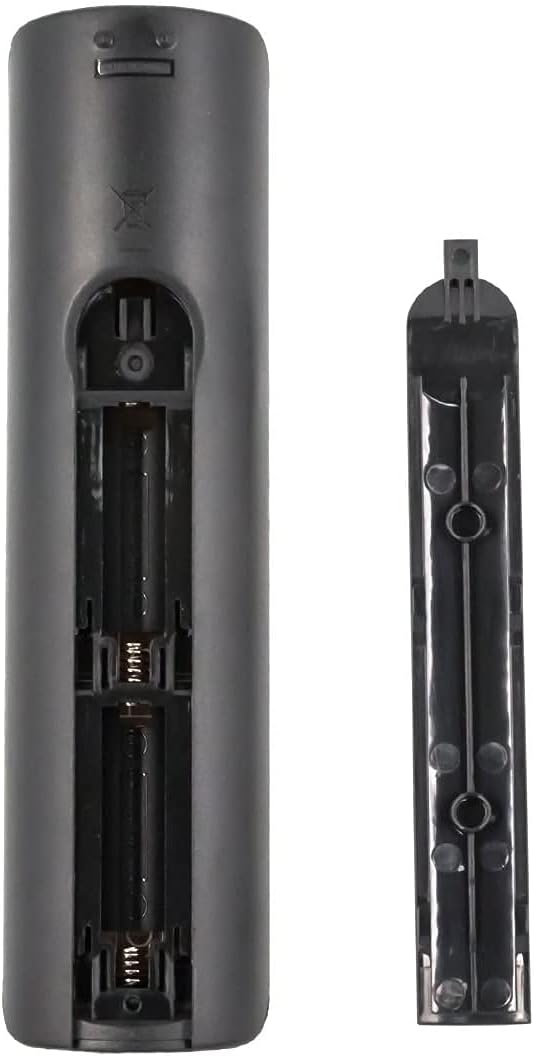
Figure 2: Battery compartment of the BN59-01289A remote control.
Operasi
Fungsi Butang
The following describes the functions of the buttons on your USARMT BN59-01289A remote control:

Rajah 3: Susun atur dan fungsi butang kawalan jauh.
- kuasa (●): Turns the TV on and off.
- SUMBER: Displays and selects available video sources.
- Butang Nombor (0-9): Masukkan nombor saluran secara langsung.
- PRA-CH: Kembali ke saluran sebelumnya.
- VOL +/-: Melaraskan tahap kelantangan.
- CH +/-: Menukar saluran.
- HILANGKAN: Cuts off the sound temporarily.
- SENARAI CH: Displays channel lists on the screen.
- E-MANUAL: Displays the electronic manual (if supported by TV).
- TIDUR: Accesses the sleep timer function.
- INFO: Displays information on the TV screen.
- Smart Hub Button (🏠): Press to access the Smart Hub dashboard or hold down to access most recently used apps and notifications.
- Directional Pad (Up, Down, Left, Right) & Enter: Navigate menus and confirm selections.
- KEMBALI: Kembali ke menu sebelumnya.
- EXIT: Keluar dari menu atau aplikasi semasa.
- Color Buttons (RED, GREEN, YELLOW, BLUE): Provide shortcut keys for interactive functions, depending on the TV or application.
- UKURAN P: Selects the Picture Size.
- CC/VD: Closed Captioning / Video Description.
- REC: Record function (if supported by TV and external device).
- Kawalan Main Semula (Main, Jeda, Berhenti, Maju Pantas, Putar Balik): Kawal main balik media.
Model TV yang Serasi
This remote control is compatible with a wide range of Samsung LED Smart TVs. Some of the compatible models include, but are not limited to:

Figure 4: Partial list of compatible Samsung TV models.
- UN55MU6071
- UN32N5300AFXZA
- UN40MU6290
- UN40NU7100
- UN43MU6290
- UN43NU7100
- UN49MU6290F
- UN50MU6070
- UN50NU7100F
- UN55FH6200F
- UN55MU6071F
- UN55MU6290
- UN55MU6490F
- UN55NU7100
- UN58MU6071
- UN58MU6100
- UN58NU7100
- UN65MU1290
- UN65MU6070F
- UN65MU6290
- UN65NU7100
- UN75MU6290
- UN75NU7100
This remote also serves as a substitute for original Samsung remote models such as TM1240A, BN59-01199F, BN59-01301A, BN59-01315A, AA59-00666A, BN59-01178W, AA59-00594A, AA59-00784C, and AA59-00582A.
Penyelenggaraan
Pembersihan
Untuk mengekalkan prestasi dan penampilan alat kawalan jauh:
- Lap alat kawalan jauh dengan kain lembut dan kering.
- Jangan gunakan pembersih yang melelas, lilin atau pelarut.
Penjagaan Bateri
- Gantikan bateri apabila tindak balas alat kawalan jauh menjadi lembap atau tidak konsisten.
- Tanggalkan bateri jika alat kawalan jauh tidak akan digunakan untuk tempoh yang lama untuk mengelakkan kebocoran.
- Buang bateri terpakai secara bertanggungjawab mengikut peraturan tempatan.
Menyelesaikan masalah
Jika anda mengalami masalah dengan alat kawalan jauh anda, rujuk kepada penyelesaian biasa berikut:
| Masalah | Penyelesaian |
|---|---|
| Jauh tidak bertindak balas. |
|
| Butang tertentu tidak berfungsi. |
|
| Alat jauh berfungsi secara berselang-seli. |
|
Spesifikasi
| Ciri | Perincian |
|---|---|
| Nombor Model | BN59-01289A |
| Jenama | USARMT |
| Dimensi Produk | 7 x 2 x 0.5 inci |
| Berat Barang | 3 auns |
| warna | Hitam |
| Ciri Khas | Universal (Pre-programmed for compatible Samsung TVs) |
| Bilangan Maks Peranti yang Disokong | 1 (Televisyen) |
| Peranti Serasi | Television (Various Samsung LED Smart TV models) |
Maklumat Waranti
Produk ini dilindungi oleh a 30-Day Hassle-Free Return Policy. Please refer to your purchase documentation or contact customer support for details regarding returns or exchanges.
Sokongan Pelanggan
For any questions or assistance, customer support inquiries are typically responded to within 1 business day. Please refer to the seller's contact information provided at the time of purchase for direct support.