
pengenalan
This manual provides detailed instructions for the setup, operation, and maintenance of your Brydge 11 MAX+ Wireless Keyboard Case. Designed to enhance your iPad experience, this keyboard case features a multi-touch trackpad, a magnetic SnapFit case, and Bluetooth 5.0 connectivity for seamless integration.
Apa yang ada dalam Kotak
- 1 x Brydge 11 MAX+ Keyboard Case
- 1 x Manual Pengguna
- Charging Cable (USB-C, may be included depending on region/bundle)

Sila pastikan semua item hadir sebelum meneruskan persediaan.
Keserasian
The Brydge 11 MAX+ Wireless Keyboard Case is compatible with the following iPad models:
- iPad Pro 11-inch (1st, 2nd, 3rd, & 4th generations)
- iPad Air 11-inch (4th, 5th generations, & M2)
Nota: This keyboard case is not designed for use with the 11-inch iPad Pro (M4).
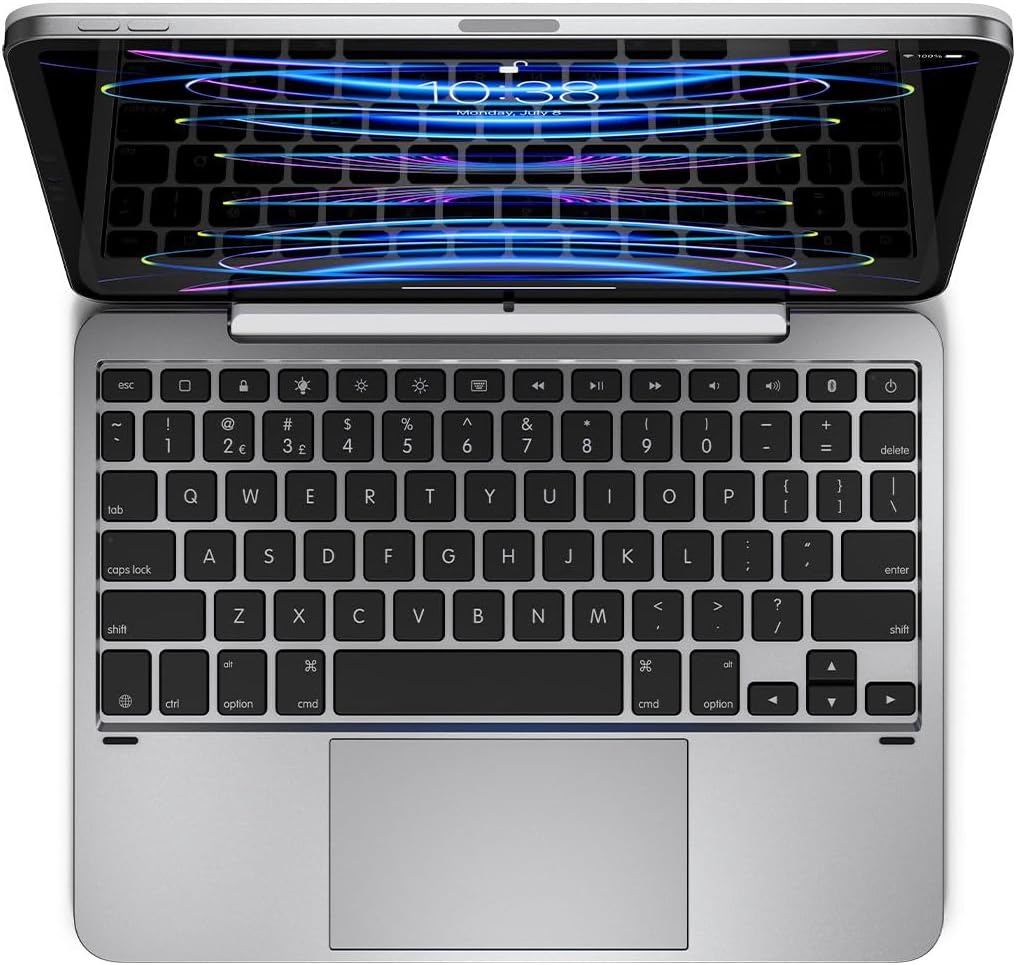
Persediaan
1. Memasang iPad Anda
- Align your iPad with the magnetic back cover of the Brydge 11 MAX+ case.
- The iPad will securely snap into place due to the integrated magnets.
- Ensure the iPad is firmly attached before use. The magnetic connection allows for easy attachment and removal, enabling quick transitions between laptop and tablet modes.

2. Berpasangan Bluetooth
- Turn on your Brydge 11 MAX+ keyboard.
- Pada iPad anda, pergi ke tetapan > Bluetooth.
- Select "Brydge 11.0 MAX+" from the list of available devices.
- Sahkan kod pasangan jika digesa.

3. Kemas Kini Perisian Tegar
To ensure optimal performance and access to the latest features, regularly check for firmware updates using the Brydge Connect app. Download the app from the App Store on your iPad.
Arahan Operasi
1. Using the Multi-Touch Trackpad
The integrated multi-touch trackpad supports various iPadOS gestures for efficient navigation. Refer to your iPad's iPadOS settings for a complete list of supported gestures and customization options.

2. Adjusting Backlit Keys
The keyboard features adjustable backlit keys with three brightness levels. Use the dedicated backlight keys on the top row of the keyboard to cycle through the brightness settings or turn the backlight off.

3. Hayat Bateri dan Pengecasan
The Brydge 11 MAX+ offers extended battery life, providing up to 3 months of use on a single charge. When the backlight is used consistently, battery life is approximately 40 hours. To charge the keyboard, connect a USB-C cable to the charging port located on the side of the keyboard.

4. Melaraskan Viewsudut
The keyboard case allows for a 135° screen rotation, providing flexible viewing angles for various tasks, from typing to media consumption.

Penyelenggaraan
To maintain your Brydge 11 MAX+ Wireless Keyboard Case, follow these guidelines:
- Lap permukaan luar dengan lembut, damp kain. Elakkan bahan kimia yang keras atau pembersih yang kasar.
- Keep the keyboard free from dust and debris. Use compressed air to clean between keys if necessary.
- Elakkan daripada mendedahkan peranti kepada suhu yang melampau atau cahaya matahari langsung untuk tempoh yang lama.
Menyelesaikan masalah
If you encounter issues with your Brydge 11 MAX+ keyboard case, consider the following:
- Papan kekunci tidak bersambung: Ensure Bluetooth is enabled on your iPad and the keyboard is powered on. Try unpairing and re-pairing the keyboard.
- Pad jejak tidak bertindak balas: Check that the keyboard is fully charged. Restart your iPad and the keyboard. Ensure no settings are disabling trackpad functionality in iPadOS.
- Kekunci tidak berfungsi: Verify the keyboard is charged and connected. If specific keys are unresponsive, try cleaning around them.
- Bateri cepat habis: Reduce backlight brightness or turn it off when not needed. Ensure the keyboard is fully charged before use.
For further assistance, refer to the official Brydge support resources.
Spesifikasi
| Dimensi Produk | 9.75 x 7.34 x 0.66 inci (9.8"L x 7.3"W x 0.7"H) |
| Berat Barang | 1.65 paun |
| Pengeluar | Bridge |
| Nombor Model Item | BRY4033 |
| Bateri | 1 bateri Lithium Ion diperlukan (termasuk) |
| Teknologi Ketersambungan | Bluetooth 5.0 |
| Ciri Khas | Backlit, Multi-Touch Trackpad |
| Sokongan Warna Lampu Latar Papan Kekunci | Single Color (3 brightness levels) |
| Putaran Skrin | Sehingga 135° |
Waranti & Sokongan
The Brydge 11 MAX+ Wireless Keyboard Case comes with a 1-year limited hardware warranty. For detailed warranty information, product support, FAQs, and contact options, please visit the official Brydge webtapak.
Video Produk Rasmi: