
Infinix x609
Infinix X609 Smart 2 Dual SIM 3G Smartphone User Manual
1. Pengenalan
Welcome to the user manual for your Infinix X609 Smart 2 smartphone. This guide provides essential information to help you set up, operate, maintain, and troubleshoot your device. Please read this manual carefully to ensure proper use and to maximize the performance of your smartphone.
2. Maklumat Keselamatan Penting
- Do not use the device in prohibited areas, such as aircraft or hospitals.
- Elakkan daripada mendedahkan peranti kepada suhu yang melampau, cahaya matahari langsung atau kelembapan yang tinggi.
- Use only original or certified accessories to prevent damage and ensure safety.
- Do not attempt to disassemble, repair, or modify the device yourself. Refer to qualified service personnel.
- Keep the device and its accessories out of reach of small children.
- Lupuskan peranti dan bateri secara bertanggungjawab mengikut peraturan tempatan.
3. Kandungan Pakej
Sila semak kandungan kotak produk anda. Jika terdapat sebarang barang yang hilang atau rosak, hubungi peruncit anda.
- Infinix X609 Smart 2 Smartphone
- Penyesuai Kuasa
- Kabel USB
- Fon kepala (mungkin berbeza mengikut rantau)
- Alat Ejector SIM
- Panduan Mula Pantas
- Kad Waranti
4. Peranti Lebihview
Familiarize yourself with the physical features of your Infinix X609 Smart 2 smartphone.
This image displays the rear panel of the Infinix X609 Smart 2 smartphone. Visible features include the main camera module in the upper left corner, a circular fingerprint sensor below it, the 'Infinix' logo centrally placed, and 'smart' branding near the bottom. The phone has a smooth, matte Aqua Blue finish.
Komponen Utama:
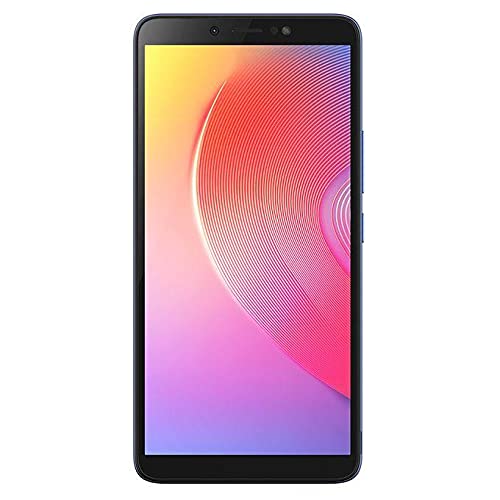
- Depan: 6.0-inch LCD Touchscreen, Front Camera, Earpiece, Light Sensor.
- Sebelah Kanan: Power Button, Volume Up/Down Buttons.
- Atas: Bicu Fon Kepala 3.5mm.
- Bawah: USB Charging Port, Microphone, Speaker.
- belakang: Main Camera, LED Flash, Fingerprint Sensor, Infinix Logo.
5. Persediaan
5.1 Inserting SIM Cards and Memory Card
- Cari dulang kad SIM di sisi telefon anda.
- Masukkan alat ejektor SIM ke dalam lubang kecil di sebelah dulang dan tolak perlahan-lahan sehingga dulang terkeluar.
- Place your Nano-SIM cards into the designated slots (this device supports dual SIM). Ensure the gold contacts face downwards.
- If using a microSD card for expanded storage, place it into its dedicated slot on the tray.
- Tolak dulang kembali ke dalam telefon dengan berhati-hati sehingga parasnya rata dengan sisi.
5.2 Mengecas Bateri
Sebelum penggunaan pertama, cas sepenuhnya bateri peranti.
- Sambungkan kabel USB ke port pengecasan pada telefon anda.
- Sambungkan hujung kabel USB yang lain ke penyesuai kuasa.
- Palamkan penyesuai kuasa ke salur keluar dinding.
- Penunjuk pengecasan akan muncul pada skrin.
5.3 Menghidupkan/Mematikan
- Untuk Menghidupkan: Press and hold the Power button until the Infinix logo appears.
- Untuk Mematikan: Tekan dan tahan butang Kuasa sehingga menu pilihan kuasa muncul, kemudian ketik 'Matikan'.
- Untuk Mulakan Semula: Tekan dan tahan butang Kuasa sehingga menu pilihan kuasa muncul, kemudian ketik 'Mulakan Semula'.
5.4 Persediaan Awal
Setelah dihidupkan buat kali pertama, ikuti arahan pada skrin untuk menyelesaikan persediaan awal:
- Pilih bahasa anda.
- Sambung ke rangkaian Wi-Fi.
- Terima terma dan syarat.
- Log masuk ke akaun Google anda atau buat akaun baharu.
- Sediakan kunci skrin (PIN, corak, kata laluan atau cap jari).
6. Mengendalikan Telefon Pintar Anda
6.1 Navigasi Asas
Your Infinix X609 Smart 2 features a touchscreen for interaction:
- Ketik: Untuk memilih item atau membuka aplikasi.
- Sentuh dan Tahan: Untuk mengakses menu kontekstual atau mengalihkan item.
- Leret: Untuk menatal senarai atau bertukar antara skrin.
- Cubit: Untuk mengezum masuk atau keluar pada imej dan web muka surat.
6.2 Membuat Panggilan
- Tap the 'Phone' icon on the home screen.
- Masukkan nombor telefon menggunakan pad dail.
- Tap the 'Call' button to initiate the call.
6.3 Menghantar Mesej
- Tap the 'Messages' icon.
- Ketik ikon 'Mesej Baharu'.
- Masukkan nombor penerima atau pilih daripada kenalan.
- Taip mesej anda dalam medan teks.
- Tap 'Send'.
6.4 Kesambungan Internet
- Wi-Fi: Go to Settings > Wi-Fi, turn Wi-Fi on, and select your network.
- Data Mudah Alih (3G): Go to Settings > Network & internet > Mobile network, and ensure 'Mobile data' is enabled.
6.5 Menggunakan Kamera
Your device is equipped with an 8MP rear camera.
- Tap the 'Camera' icon.
- Bingkai pukulan anda.
- Tap the 'Shutter' button to take a photo.
- Switch to video mode by swiping or tapping the mode selector.
6.6 Kesambungan Bluetooth
Untuk menyambung ke peranti Bluetooth:
- Go to Settings > Connected devices > Bluetooth.
- Hidupkan Bluetooth.
- Pilih peranti yang anda ingin pasangkan daripada senarai peranti yang tersedia.
6.7 Navigasi GPS
The device supports GPS for location services and navigation applications. Ensure location services are enabled in Settings > Location.
7. Penyelenggaraan
7.1 Membersihkan Peranti Anda
- Gunakan kain lembut dan tidak berbulu untuk membersihkan skrin dan badan telefon.
- Elakkan menggunakan bahan kimia yang keras, pembersih yang melelas, atau semburan aerosol.
- The device is water-resistant; however, avoid submerging it in water. Wipe off any splashes immediately.
7.2 Penjagaan Bateri
Your device uses a Lithium-ion battery with a capacity of 3000-4000 mAh.
- Elakkan menyahcas sepenuhnya bateri dengan kerap.
- Jangan biarkan peranti mengecas untuk tempoh yang lama selepas ia dicas sepenuhnya.
- Simpan peranti di tempat yang sejuk dan kering apabila tidak digunakan untuk jangka masa yang lama.
7.3 Kemas Kini Perisian
Regularly check for and install software updates to ensure optimal performance and security. Go to Settings > About phone > System update.
8. Penyelesaian masalah
Jika anda menghadapi masalah dengan peranti anda, cuba penyelesaian berikut:
| Masalah | Penyelesaian |
|---|---|
| Peranti tidak dihidupkan | Pastikan bateri dicas. Sambungkan ke pengecas dan tunggu beberapa minit sebelum cuba menghidupkan semula. |
| Tidak dapat bersambung ke rangkaian (3G) | Check if SIM cards are properly inserted. Ensure mobile data is enabled in settings. Try restarting the device. Contact your network provider if the issue persists. |
| Skrin sentuh tidak bertindak balas | Restart the device. If the issue continues, perform a factory reset (backup data first). |
| Bateri cepat habis | Tutup aplikasi yang tidak digunakan yang berjalan di latar belakang. Kurangkan kecerahan skrin. Lumpuhkan Wi-Fi, Bluetooth atau GPS apabila tidak digunakan. |
| Apps are crashing | Clear the cache of the problematic app (Settings > Apps > [App Name] > Storage > Clear cache). Update the app or reinstall it. |
9. Spesifikasi
| Ciri | Perincian |
|---|---|
| Jenama | Infinix |
| Nama Model | X609 Smart 2 |
| Sistem Operasi | Android 6.0 |
| Pemproses | MediaTek Chipset |
| Saiz Paparan | 6.0 inci |
| Jenis Paparan | Skrin Sentuh LCD |
| Teknologi Selular | 3G, GSM, LTE |
| Slot Kad SIM | Dual SIM |
| Kapasiti Bateri | 3000-4000 mAh (Lithium-ion) |
| Resolusi Kamera Belakang | 8 Megapiksel |
| Ketersambungan | Bluetooth, GPS, 3.5mm Headphone Jack |
| Tahan Air | kalis air |
| warna | Biru Aqua |
| ASIN | B0979Z4JPM |
10. Waranti dan Sokongan
Your Infinix X609 Smart 2 smartphone comes with a limited warranty. Please refer to the warranty card included in your package for detailed terms and conditions, including the warranty period and coverage.
For technical support, service, or further inquiries, please visit the official Infinix website or contact their customer service through the information provided on your warranty card or the Infinix brand store page: Infinix Store.
Ask a question about this manual
Ask about setup, troubleshooting, compatibility, parts, safety, or missing instructions. Manuals+ will review the question and use this page’s manual context to help answer it.