
pengenalan
This manual provides essential instructions for the proper use and maintenance of your Easytry123 replacement remote control. This remote is designed to be compatible with various Hisense Smart 4K UHD LED TV models. Please read this manual thoroughly before operating the remote control.
Produk Selesaiview
The Easytry123 replacement remote control is an ergonomic, button-controlled device utilizing infrared technology for seamless interaction with compatible Hisense televisions. It features dedicated buttons for power, volume, channel control, navigation, and quick access to popular streaming services.



Persediaan
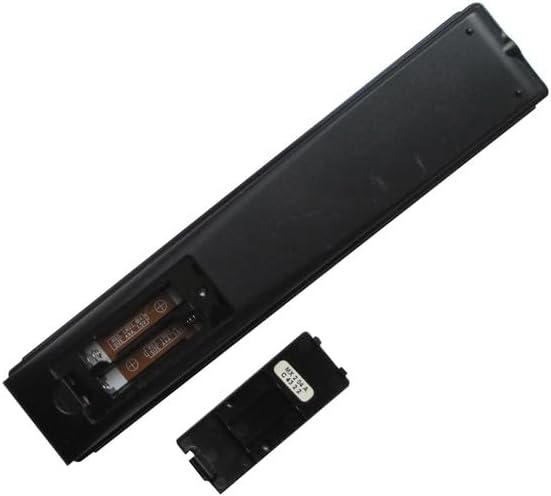
Pemasangan Bateri
- Cari petak bateri di belakang alat kawalan jauh.
- Slide the battery cover downwards or press the latch and lift to open. (Refer to Figure 3 and Figure 4)
- Masukkan dua (2) bateri AAA, pastikan terminal positif (+) dan negatif (-) sejajar dengan tanda di dalam petak.
- Replace the battery cover by sliding it back into position until it clicks securely. (Refer to Figure 5)
No additional setup or coding is required for this replacement remote control. It is designed to work directly with compatible Hisense TV models once batteries are installed.
Arahan Operasi
This remote control operates using infrared (IR) signals. Ensure there is a clear line of sight between the remote's IR emitter (located at the top front) and your television's IR receiver.
- Butang Kuasa: Tekan ke kuasa button (usually red, top right) to turn the TV on or off.
- Kawalan Kelantangan: Gunakan VOL+ dan VOL - butang untuk melaraskan kelantangan audio.
- Kawalan Saluran: Gunakan CH ^ dan CH v buttons to change TV channels.
- Pad Navigasi: The central circular pad with directional arrows (Atas bawah kiri kanan) and a central OK/Masuk button is used to navigate menus and select options.
- Butang Belakang: Tekan ke belakang button (left arrow) to return to the previous screen or menu.
- Butang rumah: Tekan ke Rumah button (house icon or circle) to access the TV's main smart interface.
- Butang Pintasan Apl: Dedicated buttons for services like anduh, Google Play, Fandango Sekarang, dan Tikilive provide quick access to these applications.
- Butang Pembantu Google: The button with the Google Assistant logo (colored dots) activates voice commands if your TV supports this feature.
- Input/123 Button: This button (often labeled '123' or with an input icon) allows you to switch between different input sources (HDMI, AV, etc.).
- Butang Bisukan: The button with a crossed-out speaker icon mutes or unmutes the TV audio.
- Kawalan Main Semula: Buttons like Main/Jeda, Putar balik, dan Cepat Ke Hadapan are used for media playback.
- CC (Closed Captioning): Menghidupkan atau mematikan kapsyen tertutup.
- NRT (No Remote Timer): Functionality may vary by TV model.
- MTS (Bunyi Televisyen Berbilang saluran): Allows selection of audio tracks (e.g., stereo, SAP).
Penyelenggaraan
- Pembersihan: Lap alat kawalan jauh dengan kain lembut dan kering. Jangan gunakan pembersih cecair atau bahan yang melelas.
- Penjagaan Bateri: Gantikan bateri apabila tindak balas alat kawalan jauh menjadi perlahan atau berhenti berfungsi. Tanggalkan bateri jika alat kawalan jauh tidak akan digunakan untuk tempoh yang lama bagi mengelakkan kebocoran.
- Storan: Simpan alat kawalan jauh di tempat yang sejuk dan kering jauh dari cahaya matahari langsung dan suhu yang melampau.
Menyelesaikan masalah
- Jauh tidak bertindak balas:
- Ensure new AAA batteries are correctly installed with proper polarity.
- Check for any obstructions between the remote and the TV's IR receiver.
- Halakan alat kawalan jauh terus ke TV.
- Try replacing the batteries with a fresh set.
- Certain functions not working:
- This is a replacement remote and may not support all advanced functions of your original TV remote.
- Verify that your TV model is listed as compatible with this remote.
- Gangguan: Strong light sources or other infrared devices can sometimes interfere with the remote's signal.
Spesifikasi
| Jenama | Easytry123 |
| Peranti Serasi | Television (Various Hisense Smart 4K UHD LED TV Models) |
| Teknologi Ketersambungan | Inframerah |
| Jenis Pengawal | Kawalan Butang |
| Ciri Khas | Ergonomik |
| Bateri Diperlukan | 2 bateri AAA |
Nota Penting
- This is a replacement remote control and is not a universal remote control.
- The replacement item may not work with all functions as the original remote. Some advanced or specific features of your original remote might not be supported.
- Ia adalah mudah digunakan and does not require a manual or batteries to be included in the package.
- ada no need for setup or code programming; it works directly with compatible models.
- Sentiasa ensure our remote matches the model number of your unit untuk keserasian yang optimum.
Waranti dan Sokongan
Specific warranty information for this product is not provided in this manual. For any issues or support inquiries, please refer to the seller or retailer from whom the product was purchased. Ensure you retain your proof of purchase for any potential warranty claims.