
1. Pengenalan
The Livoo TES242 is a versatile device that integrates a Bluetooth speaker, a 15W fast wireless charger, and an LED ambient light. This manual provides essential information for the safe and efficient use of your device. Please read it thoroughly before operation and retain it for future reference.
2. Arahan Keselamatan
- Jangan dedahkan peranti kepada air, lembapan atau suhu yang melampau.
- Jauhkan peranti daripada sumber haba, cahaya matahari langsung dan bahan mudah terbakar.
- Use only the provided USB cable for power. Ensure the power adapter (not included) meets the required specifications (e.g., 5V/2A or higher for optimal charging).
- Jangan cuba membuka, membaiki atau mengubah suai peranti. Ini akan membatalkan waranti dan boleh menyebabkan kerosakan atau kecederaan.
- Jauhkan daripada kanak-kanak.
- Avoid placing metal objects or cards with magnetic strips (e.g., credit cards) on the wireless charging pad, as this may damage the device or the objects.
3. Kandungan Pakej
Sila semak pakej untuk item berikut:
- Livoo TES242 LED Speaker with Wireless Charger
- Kabel Kuasa USB
- Manual Pengguna (dokumen ini)
4. Produk Lebihview
Familiarize yourself with the components and controls of your Livoo TES242 device.
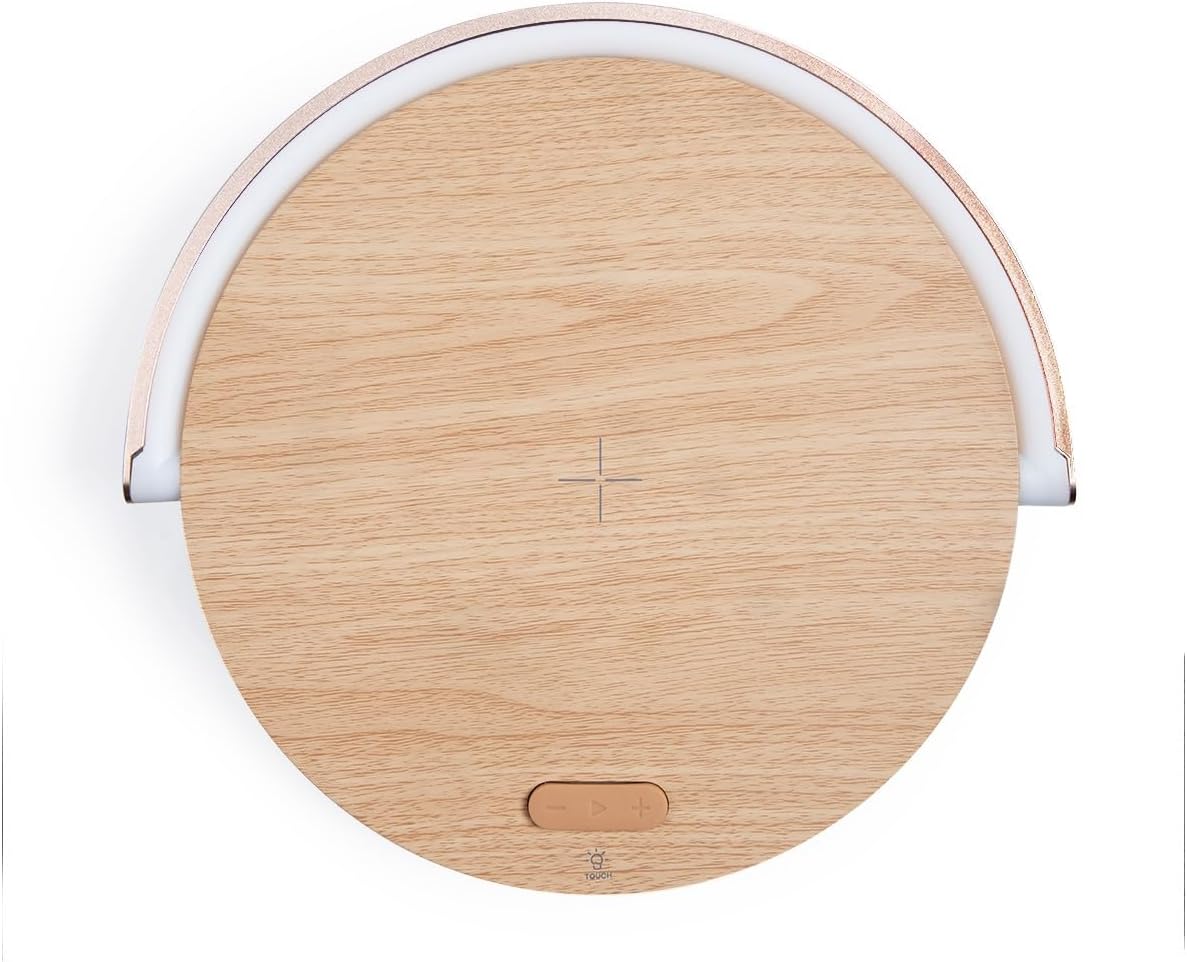
Rajah 4.1: Atas View daripada Peranti. This image shows the top surface of the Livoo TES242, highlighting the central cross symbol for wireless charging alignment and the control buttons located below it.

Figure 4.2: Device with Phone on Charging Pad. Bersudut view illustrating a smartphone positioned on the wireless charging pad, with the LED light arch illuminated, demonstrating the device in use.
Kawalan dan Penunjuk:
- Pad Pengecasan Wayarles: Central area on the top surface for QI-compatible device charging.
- LED Light Arch: Provides ambient lighting, pivots for direction adjustment.
- Touch Button (Light Control): Located on the base, cycles through LED light modes.
- Pembesar suara Bluetooth: Pembesar suara bersepadu untuk output audio.
- Port Input USB-C: Untuk menyambungkan kabel kuasa.
5. Persediaan
5.1 Sambungan Kuasa
- Connect the small end of the provided USB power cable to the USB-C input port on the Livoo TES242.
- Connect the larger end of the USB cable to a compatible USB power adapter (e.g., a smartphone charger, minimum 5V/2A recommended for optimal performance, not included).
- Plug the power adapter into a wall outlet. The device will power on automatically or can be turned on by pressing a power button if available (refer to product overview for specific button locations).
5.2 Caj Permulaan
For optimal battery performance, it is recommended to fully charge the Livoo TES242 before its first use. The device has a built-in 1500 mAh Li-ion battery, providing up to 4 hours of audio playback on a full charge.
6. Arahan Operasi
6.1 Berpasangan Bluetooth
To connect your smartphone or other Bluetooth-enabled device:
- Ensure the Livoo TES242 is powered on. It will automatically enter Bluetooth pairing mode, indicated by an audible prompt or flashing light (if applicable).
- Pada telefon pintar atau peranti audio anda, dayakan Bluetooth dan cari peranti yang tersedia.
- Pilih "TES242" atau "Livoo Speaker" daripada senarai peranti yang ditemui.
- Once connected, a confirmation sound will be heard from the speaker. You can now play audio through the speaker.
- The effective Bluetooth range is up to 10 meters (33 feet).
6.2 Fungsi Pengecasan Tanpa Wayar
The Livoo TES242 features a 15W fast wireless charging pad:
- Ensure the Livoo TES242 is connected to a power source.
- Place your QI-compatible smartphone or device directly onto the center of the charging pad. Align your device with the cross symbol for optimal charging.
- Charging will begin automatically. Your device's screen or charging indicator will confirm that it is charging.
- For fast charging, ensure your power adapter supports the required output (e.g., 9V/1.67A).
6.3 Mod Lampu LED
The integrated LED light arch offers three ambient lighting modes:
- Locate the "Touch" button on the base of the device.
- Tap the "Touch" button to cycle through the available light modes: Cahaya Semulajadi, Cahaya Putih, dan Cahaya Kuning.
- The LED arch can be manually pivoted to adjust the direction of the light as desired.
7. Penyelenggaraan
- Pembersihan: Use a soft, dry cloth to clean the surface of the device. Do not use liquid cleaners, aerosols, or abrasive chemicals, as these may damage the finish or internal components.
- Storan: Apabila tidak digunakan untuk tempoh yang lama, simpan peranti di tempat yang sejuk dan kering, jauh dari cahaya matahari langsung dan suhu yang melampau.
- Penjagaan Bateri: To prolong battery life, avoid fully discharging the battery frequently. Recharge the device regularly, even if not in constant use.
8. Penyelesaian masalah
If you encounter issues with your Livoo TES242, please refer to the following common problems and solutions:
| Masalah | Kemungkinan Punca | Penyelesaian |
|---|---|---|
| Peranti tidak dihidupkan. | No power connection or depleted battery. | Ensure the USB cable is securely connected to both the device and a working power adapter. Charge the device for at least 30 minutes. |
| Tidak boleh berpasangan melalui Bluetooth. | Speaker not in pairing mode, Bluetooth off on source device, or out of range. | Ensure the speaker is powered on and in pairing mode. Turn Bluetooth off and on again on your source device. Move the source device closer to the speaker (within 10m). Forget "TES242" from your device's Bluetooth list and try pairing again. |
| Pengecasan tanpa wayar tidak berfungsi. | Phone not QI-compatible, misaligned, or thick phone case. | Verify your phone supports QI wireless charging. Re-position the phone centrally on the charging pad, aligning it with the cross symbol. Remove any thick phone cases that might interfere with charging. Ensure the speaker is connected to a sufficient power source. |
| Kualiti bunyi yang buruk atau gangguan sambungan. | Weak Bluetooth signal or interference. | Move your paired device closer to the speaker. Ensure there are no large obstructions between the speaker and your device. Avoid placing the speaker near other electronic devices that may cause interference. |
9. Spesifikasi
Technical details for the Livoo TES242 LED Speaker with Wireless Charger:
| Ciri | Spesifikasi |
|---|---|
| Jenama | Livoo |
| Nombor Model | TES242 |
| Teknologi Ketersambungan | Bluetooth |
| Kuasa Keluaran Pembesar Suara | 5 W |
| Julat Bluetooth | Sehingga 10 meter |
| Wireless Charging Standard | Qi |
| Kuasa Pengecasan Tanpa Wayar | 15 W Fast Charge |
| Max Output (Wireless Charging) | 9 V / 1.67 A |
| Peranti Serasi | Smartphones, Bluetooth-enabled audio devices |
| Mod Lampu LED | 3 (Natural, White, Yellow) |
| Jenis Bateri | Li-ion |
| Kapasiti Bateri | 1500 mAh |
| Masa Main Balik Audio | Sehingga 4 jam |
| Sumber Kuasa | Kabel USB (termasuk) |
| Keluaran Voltage | 5 Volt (DC) |
| Amppemadam | 1.67 A |
| Jumlah Port USB | 1 |
| Bahan Dalaman | Akrilonitril Butadiena Stirena (ABS) |
| warna | kayu |
| Mudah alih | ya |
| Negara Asal | Perancis |
10. Waranti dan Sokongan
The Livoo TES242 LED Speaker with Wireless Charger comes with a Waranti 2 tahun dari tarikh pembelian. Waranti ini meliputi kecacatan pembuatan di bawah penggunaan biasa.
For technical support, warranty claims, or further assistance, please contact your retailer or visit the official Livoo weblaman web untuk maklumat khidmat pelanggan.