
pengenalan
The Daewoo DIBT2626 is a compact and versatile wireless portable Bluetooth speaker designed for audio playback and hands-free communication. It features Bluetooth 5.0 connectivity, FM radio, an SD card slot for MP3 playback, a USB port, and an AUX input. The speaker is equipped with a 1200 mAh lithium-ion battery, providing up to 4 hours of playback on a 2-hour charge. Its robust design includes a metal speaker grille and protective rubber edges.
Maklumat Keselamatan
Untuk memastikan operasi yang selamat dan memanjangkan hayat peranti anda, sila patuhi perkara berikut:
- Jangan dedahkan pembesar suara kepada suhu yang melampau, cahaya matahari langsung atau kelembapan yang tinggi.
- Elakkan daripada menjatuhkan atau menundukkan pembesar suara kepada impak yang kuat.
- Jangan cuba membuka atau mengubah suai pembesar suara. Ini akan membatalkan jaminan dan boleh menyebabkan kerosakan.
- Jauhkan pembesar suara daripada air dan cecair lain.
- Gunakan hanya kabel pengecas USB yang disediakan atau kabel yang diperakui.
- Bersihkan pembesar suara dengan kain lembut dan kering. Jangan gunakan pembersih atau pelarut yang melelas.
Kandungan Pakej
- Daewoo DIBT2626 Wireless Portable Bluetooth Speaker
- Kabel Pengecas USB
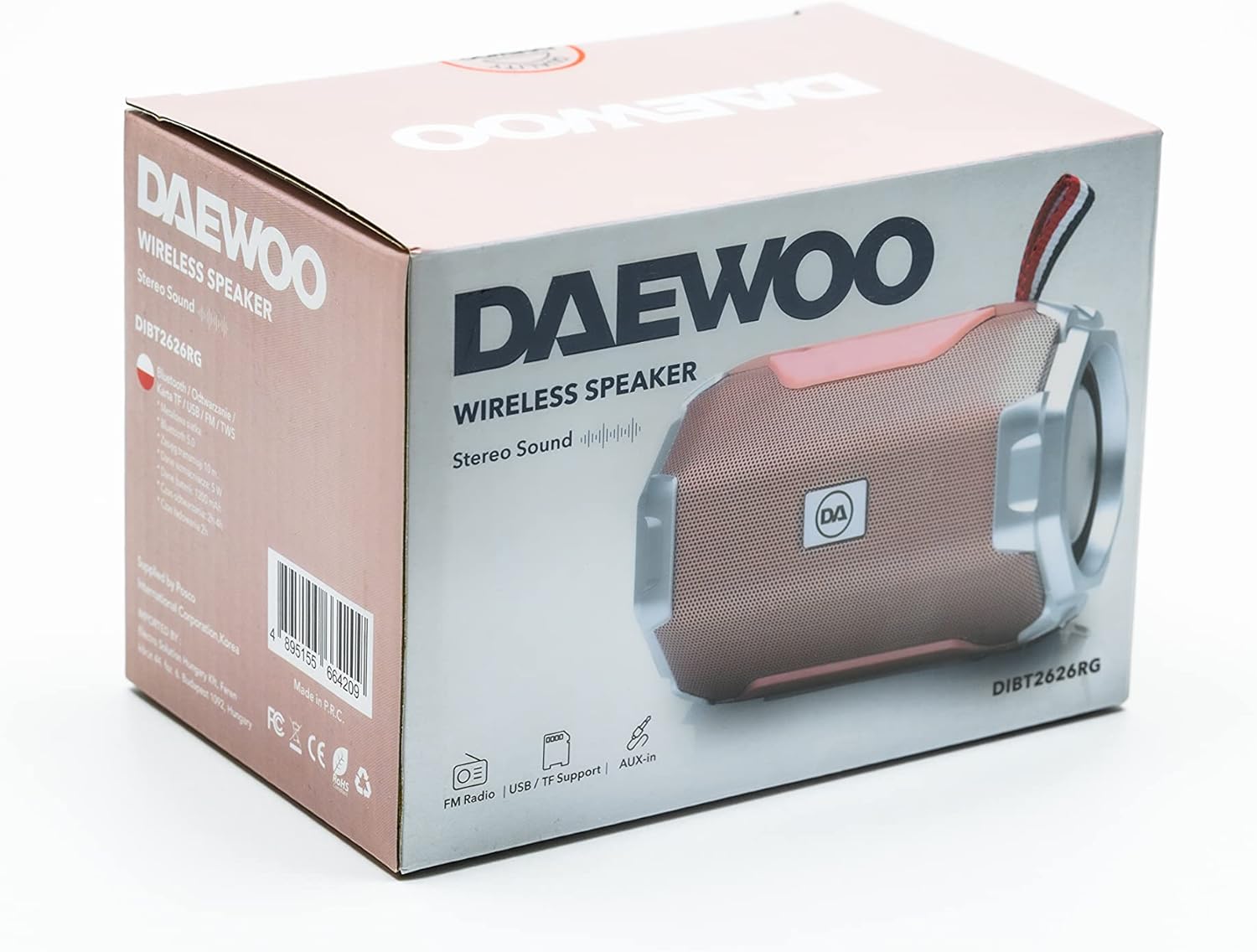
Image: The retail packaging box for the Daewoo DIBT2626 speaker, showing the product image and branding.
Produk Selesaiview
Biasakan diri anda dengan kawalan dan port pembesar suara.
Panel Kawalan
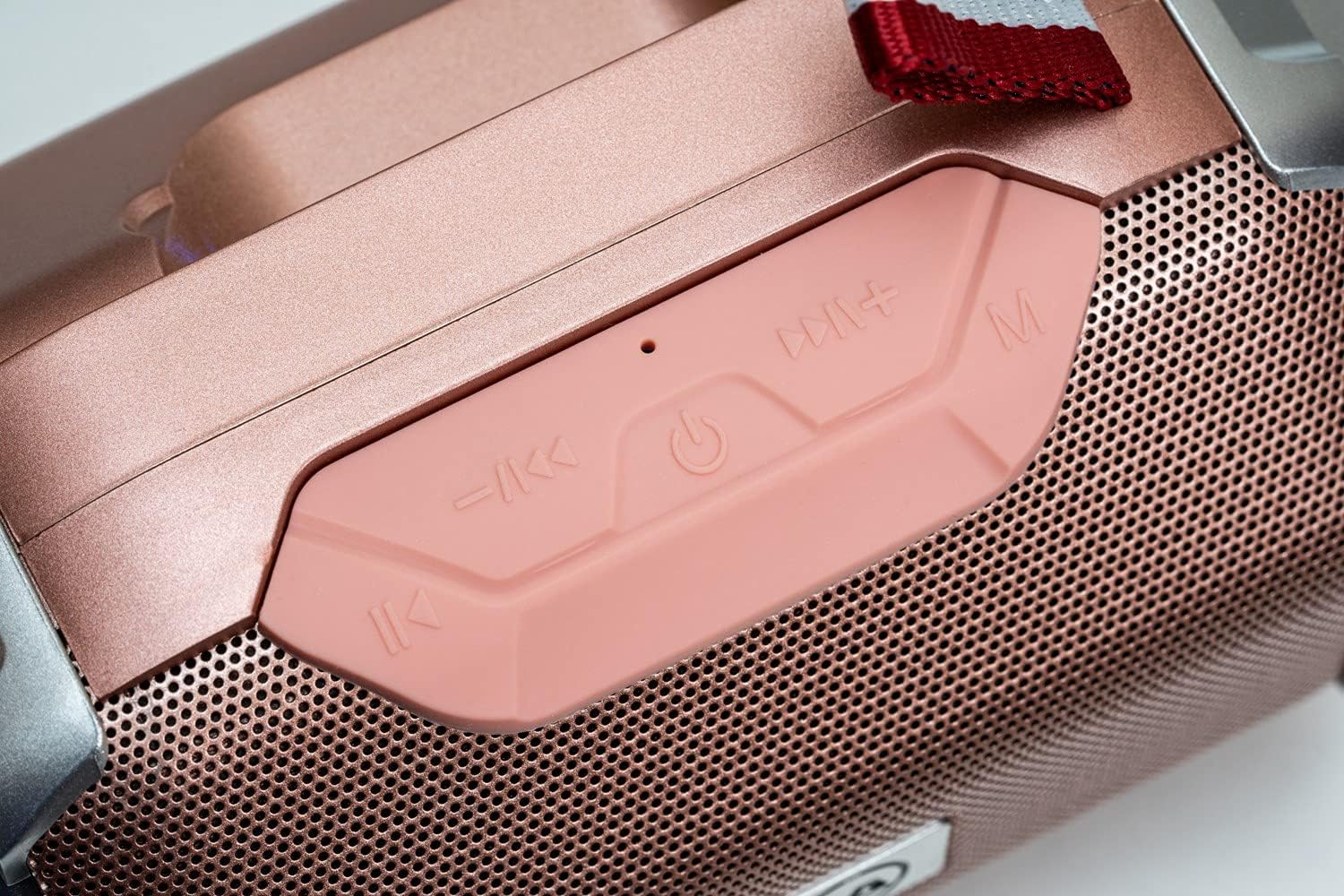
Imej: Dari dekat view of the speaker's control panel, featuring four buttons and an LED indicator.
- Trek / Kelantangan Sebelumnya: Short press for previous track, long press to decrease volume.
- Kuasa / Main / Jeda: Long press to power on/off. Short press to play/pause music. In call mode, short press to answer/end call.
- Trek / Kelantangan Seterusnya: Short press for next track, long press to increase volume.
- Mod (M): Short press to switch between Bluetooth, FM Radio, SD Card, USB, and AUX modes.
- Penunjuk LED: Indicates power status, charging, and Bluetooth pairing.
Pelabuhan Kesambungan

Imej: A terperinci view of the speaker's rear panel, showing the AUX, USB, TF (SD card), and DC 5V charging ports.
- Pelabuhan AUX: For connecting external audio devices via a 3.5mm audio cable.
- Port USB: For playing music from a USB flash drive.
- TF Card Slot (SD Card): For playing MP3 files dari kad microSD.
- Pelabuhan DC 5V: Micro USB port for charging the speaker.

Image: The Daewoo DIBT2626 speaker in rose gold, showcasing its front grille, control panel, and fabric hook.
Persediaan
1. Mengisi Speaker
- Sambungkan kabel pengecas USB yang disediakan ke port DC 5V pada pembesar suara.
- Sambungkan hujung kabel USB yang satu lagi ke penyesuai kuasa USB (tidak disertakan) atau port USB komputer.
- The LED indicator will illuminate during charging. A full charge takes approximately 2 hours.
- Once fully charged, the LED indicator may change color or turn off, depending on the model. Disconnect the charging cable.
A fully charged speaker provides up to 4 hours of playback time.
2. Menghidupkan/Mematikan
- Untuk Menghidupkan: Tekan lama Kuasa / Main / Jeda button until you hear an audible prompt or the LED indicator lights up.
- Untuk Mematikan: Tekan lama Kuasa / Main / Jeda button again until you hear an audible prompt or the LED indicator turns off.
Mod Pengendalian
1. Mod Bluetooth
- Pastikan pembesar suara dihidupkan. Ia akan memasuki mod gandingan Bluetooth secara automatik, ditunjukkan oleh LED yang berkelip.
- Pada peranti mudah alih anda (telefon pintar, tablet, komputer riba), dayakan Bluetooth dan cari peranti yang tersedia.
- Select "DIBT2626" from the list of devices.
- Once paired, the LED indicator will stop flashing, and you will hear a confirmation sound.
- You can now play audio from your device through the speaker. Use the speaker's control buttons or your device to adjust volume, play/pause, and skip tracks.
2. Mod Radio FM
- Hidupkan pembesar suara.
- Tekan ke Mod (M) butang berulang kali sehingga anda memasuki mod Radio FM.
- To auto-scan and save available stations, short press the Kuasa / Main / Jeda butang. Pembesar suara akan mengimbas dan menyimpan stesen secara automatik.
- Gunakan Trek / Kelantangan Sebelumnya dan Trek / Kelantangan Seterusnya butang untuk menavigasi antara stesen yang disimpan.
3. SD Card / USB Mode
- Insert a microSD card (TF card) with MP3 files into the TF Card slot or a USB flash drive into the USB port.
- Power on the speaker. It should automatically detect the storage device and switch to SD Card or USB mode, beginning playback. If not, press the Mod (M) button to select the correct mode.
- Gunakan butang kawalan pembesar suara untuk main/jeda, langkau trek dan melaraskan kelantangan.
4. Mod AUX
- Sambungkan satu hujung kabel audio 3.5mm (tidak disertakan) ke port AUX pada pembesar suara.
- Connect the other end of the audio cable to the audio output jack of your external device.
- Power on the speaker. It should automatically switch to AUX mode. If not, press the Mod (M) butang untuk memilih mod AUX.
- Kawal main balik dan kelantangan daripada peranti luaran anda.
5. Panggilan Bebas Tangan
- Apabila disambungkan melalui Bluetooth ke telefon pintar anda, pembesar suara boleh digunakan untuk panggilan bebas tangan.
- When an incoming call is received, short press the Kuasa / Main / Jeda butang untuk menjawab panggilan.
- To end a call, short press the Kuasa / Main / Jeda butang lagi.
Penyelenggaraan
- Pastikan pembesar suara bersih dengan mengelapnya dengan kain lembut dan kering.
- Elakkan menggunakan bahan kimia yang keras, pelarut pembersih atau detergen yang kuat.
- Simpan pembesar suara di tempat yang sejuk dan kering apabila tidak digunakan untuk tempoh yang lama.
- Charge the battery periodically if the speaker is stored for a long time to maintain battery health.
Menyelesaikan masalah
| Masalah | Kemungkinan Punca | Penyelesaian |
|---|---|---|
| Speaker tidak dihidupkan. | Bateri habis. | Cas pembesar suara selama sekurang-kurangnya 2 jam. |
| Tiada bunyi. | Kelantangan terlalu rendah atau diredam. Mod yang dipilih salah. | Increase volume on both the speaker and the connected device. Press the Mod (M) button to ensure the correct input mode is selected. |
| Tidak boleh berpasangan melalui Bluetooth. | Speaker is not in pairing mode. Bluetooth is off on device. Device is too far. | Ensure speaker is powered on and LED is flashing. Enable Bluetooth on your device. Move device closer to the speaker (within 10 meters). |
| Penerimaan radio FM kurang baik. | Isyarat lemah. | Alihkan pembesar suara ke lokasi yang mempunyai penerimaan yang lebih baik. |
Spesifikasi
| Nombor Model | DIBT2626 |
| Jenama | Daewoo Electronics |
| Dimensi | 14 x 9 x 9 cm |
| Berat badan | 350 g |
| Kuasa Keluaran Pembesar Suara | 5 W |
| Jenis Bateri | 1200 mAh Litium-ion |
| Masa Mengecas | Lebih kurang 2 jam |
| Masa Main Semula | Sehingga 4 jam |
| Versi Bluetooth | 5.0 |
| Pilihan Kesambungan | Bluetooth, USB, TF (SD Card), AUX (3.5mm) |
| Peranti Serasi | Telefon Pintar, Tablet, Komputer Riba |
| Ciri Khas | FM Radio, Hands-free Calling |
Waranti dan Sokongan
For warranty information and technical support, please refer to the documentation provided with your purchase or visit the official Daewoo Electronics webtapak. Simpan bukti pembelian anda untuk sebarang tuntutan waranti.