
1. Pengenalan
Terima kasih kerana membeliasing the Daewoo DIBT2122 Mini Portable Bluetooth Speaker. This manual provides essential information for the safe and efficient operation of your device. Please read it thoroughly before use and retain it for future reference.

Imej 1: Depan view of the Daewoo DIBT2122 Mini Portable Bluetooth Speaker in blue, featuring a black speaker grille with the Daewoo logo and an attached carabiner clip.
2. Maklumat Keselamatan
- Jangan dedahkan pembesar suara kepada suhu yang melampau, cahaya matahari langsung atau nyalaan api terbuka.
- Elakkan daripada menjatuhkan atau menundukkan pembesar suara kepada impak yang kuat.
- Do not disassemble, repair, or modify the device yourself. Contact qualified service personnel for assistance.
- Keep the speaker away from water and other liquids to prevent electric shock or damage, unless specifically designed for water resistance (this model is not specified as waterproof).
- Gunakan hanya kabel pengecasan yang disediakan atau diluluskan.
- Buang bateri dan peranti mengikut peraturan tempatan.
3. Kandungan Pakej
Sila semak pakej untuk item berikut:
- Daewoo DIBT2122 Mini Portable Bluetooth Speaker
- Kabel Pengecas USB
- Cawan sedutan
- Metal Hanging Hook (Carabiner)
- Manual Pengguna (dokumen ini)

Image 2: The product packaging box for the Daewoo Wireless Shower Speaker, showing the speaker image and brand logo.
4. Persediaan
4.1 Mengecas Speaker
- Locate the USB charging port on the side of the speaker, usually protected by a rubber flap.
- Connect the small end of the provided USB charging cable to the speaker's USB port.
- Sambungkan hujung kabel USB yang lebih besar ke penyesuai kuasa USB (tidak disertakan) atau port USB komputer.
- The LED indicator will illuminate to show charging status. A full charge takes approximately 2.5 hours.
- Once fully charged, disconnect the cable and ensure the rubber flap is securely closed to protect the port.

Imej 3: Gambar jarak dekat view of the side of the speaker, showing the micro USB charging port and the SD card slot, both protected by a rubber cover.
4.2 Menghidupkan/Mematikan
- To power on, press and hold the Power button (usually marked with a power symbol) for a few seconds until you hear an audible prompt or see the LED indicator light up.
- To power off, press and hold the Power button again for a few seconds until the device shuts down.
4.3 Berpasangan Bluetooth
- Ensure the speaker is powered on and within 10 meters (33 feet) of your Bluetooth-enabled device (smartphone, tablet, computer).
- Pembesar suara akan memasuki mod berpasangan secara automatik, ditunjukkan oleh lampu LED yang berkelip.
- Pada peranti anda, pergi ke tetapan Bluetooth dan cari peranti yang tersedia.
- Select "DIBT2122" or a similar name from the list.
- Setelah dipasangkan, penunjuk LED akan berhenti berkelip dan kekal pekat, dan anda akan mendengar nada pengesahan.
- Jika berpasangan gagal, matikan pembesar suara dan Bluetooth peranti anda, kemudian ulangi langkah tersebut.
4.4 Using the Suction Cup and Hanging Hook
- Cawan sedutan: The speaker features a full-size suction cup on its back. To attach, ensure the surface is clean, smooth, and dry. Press the speaker firmly against the surface until the suction cup adheres.
- Cangkuk Gantung: Use the integrated metal carabiner hook to hang the speaker from a shower rail, backpack, or any suitable loop.
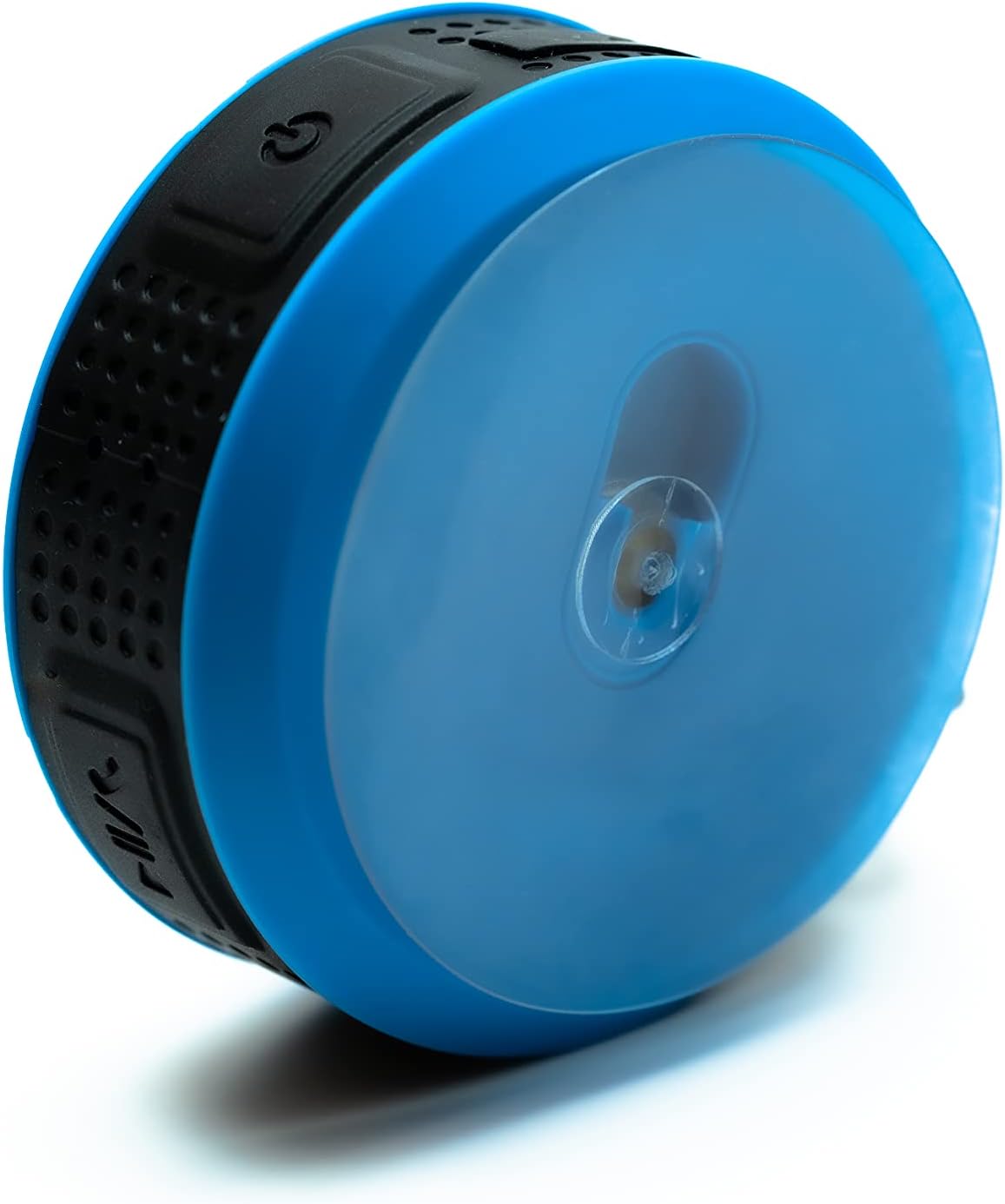
Image 4: The back of the Daewoo DIBT2122 speaker, clearly showing the large, transparent suction cup for mounting on smooth surfaces.
5. Arahan Operasi
5.1 Fungsi Butang
The speaker features several control buttons, typically located on its side:
- Butang Kuasa (Hidup/Mati): Tekan dan tahan untuk menghidupkan/mematikan kuasa.
- Butang Main/Jeda: Tekan sekali untuk memainkan atau menjeda muzik.
- Butang Naikkan Kelantangan / Trek Seterusnya: Press once to increase volume. Press and hold to skip to the next track.
- Butang Kelantangan Kurang / Trek Sebelumnya: Press once to decrease volume. Press and hold to go to the previous track.
- Call Button (Answer/End/Reject): Press once to answer or end a call. Press and hold to reject a call.

Imej 5: Sebelah view of the Daewoo DIBT2122 speaker, highlighting the embossed control buttons for power, play/pause, volume, and track navigation.
5.2 Bluetooth Music Playback
After successfully pairing your device, open your music application and start playback. You can control volume, play/pause, and skip tracks using the speaker's buttons or your connected device.
5.3 Panggilan Bebas Tangan
When a call comes in while connected via Bluetooth, the music will pause. Press the Call button once to answer. Press it again to end the call. Press and hold to reject an incoming call.
5.4 Main Semula Kad SD
Insert a microSD card (not included) with MP3 audio files into the designated SD card slot. The speaker should automatically switch to SD card mode and begin playing music. Use the track control buttons to navigate your music.
6. Penyelenggaraan
- Pembersihan: Lap pembesar suara dengan kain lembut dan kering. Jangan gunakan pembersih atau pelarut yang kasar.
- Storan: Apabila tidak digunakan untuk tempoh yang lama, simpan pembesar suara di tempat yang sejuk dan kering, jauh daripada cahaya matahari langsung.
- Penjagaan Bateri: Untuk memanjangkan hayat bateri, elakkan daripada menyahcas sepenuhnya bateri dengan kerap. Cas pembesar suara dengan kerap, walaupun tidak digunakan.
7. Penyelesaian masalah
| Masalah | Kemungkinan Punca | Penyelesaian |
|---|---|---|
| Speaker tidak dihidupkan. | Bateri lemah. | Cas pembesar suara selama sekurang-kurangnya 30 minit. |
| Tidak boleh berpasangan melalui Bluetooth. | Bluetooth dimatikan pada peranti anda; pembesar suara terlalu jauh; pembesar suara telah dipasangkan dengan peranti lain. | Ensure Bluetooth is enabled on your device. Move speaker closer. Disconnect from other devices or restart speaker. |
| Tiada bunyi. | Volume is too low; device is not playing; speaker is not connected. | Increase volume on both speaker and connected device. Ensure music is playing. Re-pair Bluetooth. |
| Kualiti bunyi yang buruk. | Speaker is too far from the device; interference. | Move speaker closer to the connected device. Avoid obstacles between devices. |
8. Spesifikasi
- model: DIBT2122
- Versi Bluetooth: 5.0
- Kuasa Output: 3W
- Bateri: 300 mAh Li-ion
- Masa Pengecasan: Lebih kurang 2.5 jam
- Masa Main Semula: Lebih kurang 1.5 jam
- Jarak penghantaran: Sehingga 10 meter (33 kaki)
- Ketersambungan: Bluetooth, USB (for charging), SD Card Slot
- Dimensi: 9 x 9 x 3.5 cm
- Berat: 140 gram
- Ciri Khas: Hands-free calling, SD card playback, suction cup mount, metal hanging hook, LED light.
9. Waranti dan Sokongan
Daewoo Electronics products are designed and manufactured to the highest quality standards. For warranty information, technical support, or customer service inquiries, please refer to the warranty card included with your purchase or visit the official Daewoo Electronics website. Please have your model number (DIBT2122) and proof of purchase ready when contacting support.