
1. Pengenalan
Thank you for choosing the AIYIMA A05 TPA3221 Power Amplifier. This compact 2.0 channel stereo amplifier is designed to deliver high-fidelity audio to passive speakers, featuring both Bluetooth and RCA input options. This manual provides detailed instructions for setup, operation, and maintenance to ensure optimal performance and longevity of your device.
2. Arahan Keselamatan
- Bekalan Kuasa: Use only the specified power adapter (DC 12-32V) to prevent damage. Ensure the power outlet voltage serasi.
- Pengudaraan: Letakkan amplifier in a well-ventilated area. Do not block ventilation openings. Avoid placing it on soft surfaces that may obstruct airflow.
- Kelembapan: Keep the device away from water, humidity, and liquids. Do not operate with wet hands.
- haba: Avoid direct sunlight, heat sources, or extreme temperatures.
- Pembersihan: Putuskan kuasa sebelum membersihkan. Gunakan kain lembut dan kering. Jangan gunakan pembersih cecair atau aerosol.
- Servis: Do not attempt to repair or disassemble the unit yourself. Refer all servicing to qualified personnel.
- Kanak-kanak: Jauhkan daripada kanak-kanak.
3. Kandungan Pakej
Sila semak pakej untuk item berikut:
- AIYIMA A05 Bluetooth 5.0 Amppenguat x 1
- Antena Bluetooth x 1
- Manual Pengguna x 1
- Kad Waranti x 1
- Penyesuai Kuasa 32V DC x 1

Imej 3.1: Contents of the AIYIMA A05 amplifier package, including the amplifier unit, Bluetooth antenna, user manual, warranty card, and power adapter.
4. Produk Lebihview
4.1 Kawalan Panel Hadapan
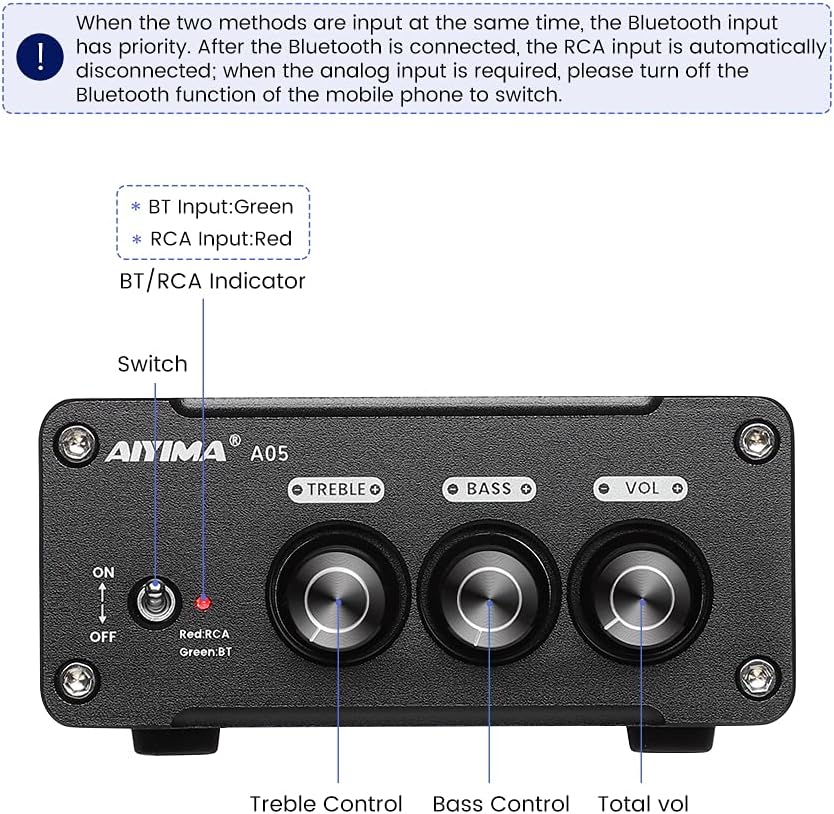
Imej 4.1: Front panel of the AIYIMA A05 amplifier, showing the power switch, input indicator, treble, bass, and volume controls.
- Suis Kuasa (HIDUP/MATI): Togol ampkuasa penguat.
- BT/RCA Indicator: Displays the active input source. Green indicates Bluetooth (BT) input, Red indicates RCA input.
- Kawalan Treble: Melaraskan output audio frekuensi tinggi.
- Kawalan Bes: Melaraskan output audio frekuensi rendah.
- Kawalan Kelantangan: Adjusts the overall audio output level.

Imej 4.2: jarak dekat view of the power switch and the BT/RCA input indicator on the front panel.

Imej 4.3: jarak dekat view of the Treble, Bass, and Volume control knobs.
4.2 Sambungan Panel Belakang

Imej 4.4: Rear panel of the AIYIMA A05 amplifier, showing the Bluetooth antenna port, RCA audio input, speaker outputs, and DC power input.
- ANT (Bluetooth Antenna Port): Connect the included Bluetooth antenna here for wireless audio reception.
- AUDIO IN (RCA Input): Connect audio sources (e.g., CD player, TV, DAC) using RCA cables.
- SPEAKER (Audio Output): Connect passive speakers using speaker wires. Ensure correct polarity (+ to + and - to -).
- DC 24-32V (Power Input): Connect the provided DC power adapter.
5. Arahan Persediaan
Follow these steps to set up your AIYIMA A05 amplebih hidup:
- Connect Bluetooth Antenna: Screw the included Bluetooth antenna into the ANT port on the rear panel.
- Sambungkan Pembesar Suara: Connect your passive speakers to the SPEAKER output terminals on the rear panel. Ensure the positive (+) terminal of the amplifier connects to the positive (+) terminal of the speaker, and the negative (-) terminal connects to the negative (-).
- Connect Audio Source (RCA): If using a wired audio source, connect it to the AUDIO IN (RCA) ports on the rear panel using appropriate RCA cables.
- Sambungkan Kuasa: Connect the DC power adapter to the DC 24-32V input port on the rear panel, then plug the adapter into a wall outlet.
- Hidupkan kuasa: Flip the power switch on the front panel to the "ON" position. The input indicator will light up.

Imej 5.1: Rear panel of the amplifier with Bluetooth antenna, RCA cables, speaker wires, and power adapter connected.
6. Arahan Operasi
6.1 Menghidupkan/Mematikan
Untuk menghidupkan amplifier, flip the front panel switch to the "ON" position. To power off, flip the switch to the "OFF" position.
6.2 Sambungan Bluetooth
- Memastikan amplifier is powered on and the BT/RCA indicator is green, indicating Bluetooth mode. If it's red, ensure no RCA cable is connected or disconnect it.
- On your mobile device (phone, tablet, etc.), enable Bluetooth and search for available devices.
- Select "AIYIMA A05" from the list of devices to pair.
- Once paired, the indicator light will remain green, and you can play audio from your device through the amplebih hidup.
6.3 RCA Input Usage
- Connect your audio source to the RCA input ports on the rear panel.
- Memastikan amplifier is powered on. The BT/RCA indicator should be red, indicating RCA input mode.
- If the indicator is green (Bluetooth mode), ensure Bluetooth is disconnected on any paired device, or turn off Bluetooth on your mobile device to switch to RCA input.
6.4 Adjusting Audio
- Kelantangan: Rotate the "VOL" knob clockwise to increase volume and counter-clockwise to decrease.
- Tiga kali ganda: Rotate the "TREBLE" knob to adjust high-frequency sounds to your preference.
- Bes: Rotate the "BASS" knob to adjust low-frequency sounds to your preference.
7. Penyelenggaraan
- Pembersihan: Disconnect the power adapter before cleaning. Use a soft, dry, lint-free cloth to wipe the surface of the amplifier. Do not use harsh chemicals or abrasive materials.
- Storan: If not in use for an extended period, store the ampliifier di tempat yang sejuk dan kering, jauh dari cahaya matahari langsung dan suhu yang melampau.
- Sambungan: Periksa semua sambungan kabel secara berkala untuk memastikan ia selamat dan bebas daripada kakisan.
8. Penyelesaian masalah
If you encounter issues with your AIYIMA A05 amplifier, sila rujuk masalah dan penyelesaian biasa berikut:
| Masalah | Kemungkinan Punca | Penyelesaian |
|---|---|---|
| Tiada keluaran bunyi |
|
|
| Distorted or buzzing sound |
|
|
| Bluetooth tidak bersambung |
|
|
| Loud noise/ticking on startup |
|
|
If the problem persists after trying these solutions, please contact AIYIMA customer support for further assistance.
9. Spesifikasi

Imej 9.1: Dimensions of the AIYIMA A05 amplifier: 107mm (4.2in) width, 87mm (3.4in) depth, 36mm (1.4in) height.
| Ciri | Spesifikasi |
|---|---|
| Model | A05 |
| Kuasa Keluaran | 105 Watts (at 4 Ω) |
| Bilangan Saluran | 2.0 (Stereo) |
| Versi Bluetooth | QCC3034 APTX Bluetooth 5.0 |
| Chipset | TPA3221 |
| Bekalan Minimum Voltage | 12 Volt (DC) |
| Bekalan Maksimum Voltage | 32 Volt (DC) |
| Berat Barang | 500 Gram |
| Dimensi (Anggaran) | 107mm (W) x 87mm (D) x 36mm (H) |
10. Waranti dan Sokongan
AIYIMA A05 amplifier comes with a warranty. Please refer to the included Warranty Card for specific terms and conditions. For technical support, troubleshooting assistance, or warranty claims, please contact AIYIMA customer service through the retailer where the product was purchased or visit the official AIYIMA webtapak.
Sumber Dalam Talian: For additional information and support, you may visit the AIYIMA store page: AIYIMA Official Store