
Zero Breeze Mark 2
Zero Breeze Mark 2 Portable Air Conditioner User Manual
Model: Mark 2
Brand: Zero Breeze
1. Pengenalan
This manual provides detailed instructions for the safe and efficient operation of your Zero Breeze Mark 2 Portable Air Conditioner. Please read this manual thoroughly before use and retain it for future reference. The Zero Breeze Mark 2 is designed to provide portable cooling for various environments such as RVs, trucks, teardrop trailers, tents, boats, small cabins, or rooms.

Image showing the Zero Breeze Mark 2 Portable Air Conditioner, highlighting its compact and portable design.
2. Ciri-ciri Produk
- Kapasiti Penyejukan: 2,300 BTU (650 Watts) for effective cooling.
- Penyejukan Cepat: Lowers ambient air temperature by up to 30°F in approximately 10 minutes.
- Kelajuan Kipas Boleh Laras: Four fan speed settings for customized airflow.
- Mod Penyejukan: Three distinct cooling modes.
- Aplikasi Serbaguna: Ideal for spaces up to 7 x 7 ft, including trucks, teardrop trailers, small rooms, cars, and tents.
- Pilihan Kuasa: Operates via a 3-prong AC adapter (included) or compatible off-grid power sources like solar generators and battery packs.
- Reka bentuk padat: Weighs only 7.5 kg (16.5 lbs), making it highly portable.
- Dual Exhaust System: Features both cold air output and hot air exhaust for efficient temperature management.
3. Persediaan
- Membongkar: Carefully remove all components from the packaging. Ensure all parts are present: the main unit, exhaust ducts, power adapter, and any optional accessories.
- Kedudukan: Place the Zero Breeze Mark 2 on a stable, flat surface. Ensure there is adequate space around the unit for proper airflow.
- Attaching Exhaust Ducts:
- Identify the cold air output and hot air exhaust ports on the unit.
- Attach the flexible exhaust ducts to the designated ports. Secure them firmly.
- Extend the ducts as needed. The ducts are designed to extend significantly.
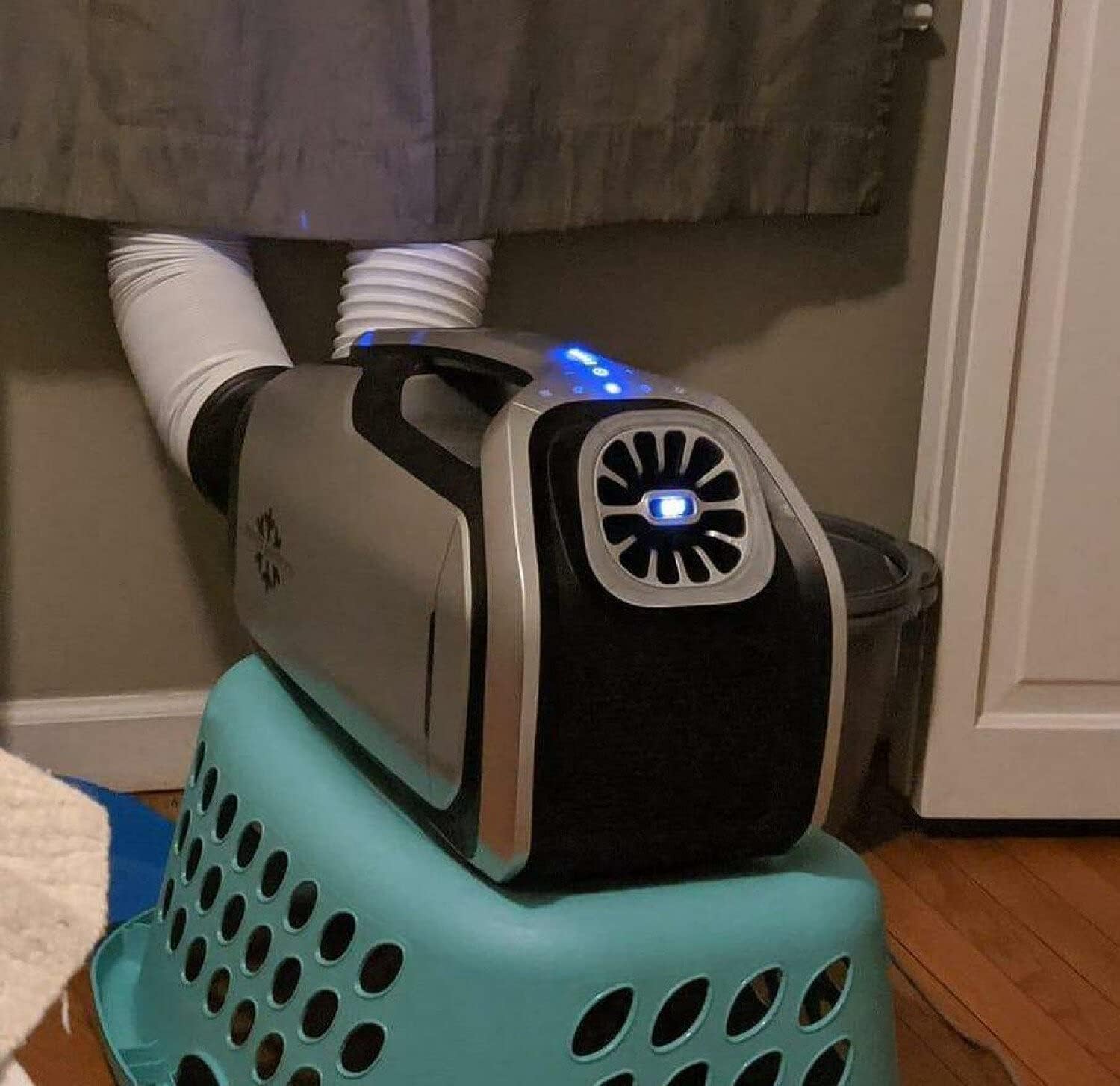
Image showing the Zero Breeze Mark 2 with its flexible exhaust ducts extended, ready for operation. One duct is for cold air output, and the other for hot air exhaust.
- Sambungan Kuasa:
- For AC power, connect the included 3-prong AC adapter to the unit and then to a standard electrical outlet.
- For off-grid power, connect the unit to a compatible solar generator or battery pack using the appropriate cables. (Note: Specific adapters for solar generators or car power may be sold separately).

Image illustrating the Zero Breeze Mark 2 connected to an external power source, demonstrating its off-grid capability.
- Saliran Pemeluwapan: Connect the condensation drainage tube to the designated port if continuous drainage is required. Position the other end of the tube to drain water away from the unit and any electrical components.
4. Arahan Operasi
- Hidupkan/Mati Kuasa: Tekan butang kuasa pada panel kawalan untuk menghidupkan atau mematikan unit.
- Melaraskan Suhu: Use the temperature control buttons to set your desired cooling temperature. The display will show the current output temperature.
- Pemilihan Kelajuan Kipas: Cycle through the four available fan speeds using the fan speed button to adjust airflow intensity.
- Mod Penyejukan: Select from the three cooling modes to optimize performance for your environment.
- Fungsi Tidur: Activate the sleep function for quiet operation and automatic shut-off after a set period.
- Fungsi Cahaya: The unit includes a light function for convenience in low-light conditions.

jarak dekat view of the Zero Breeze Mark 2 control panel, highlighting the digital display and various function buttons for temperature, fan speed, and mode selection.
5. Penyelenggaraan
- Pembersihan Penapis: Regularly check and clean the air filters to ensure optimal performance and airflow. Refer to the user manual for specific filter cleaning instructions.
- Pengurusan Pemeluwapan: Ensure the condensation drainage system is clear and functioning correctly to prevent water buildup.
- Storan: When not in use for extended periods, clean the unit, disconnect power, and store it in a dry, cool place.
6. Penyelesaian masalah
Isu dan Penyelesaian Biasa
| Masalah | Kemungkinan Punca | Penyelesaian |
|---|---|---|
| Unit tidak dihidupkan. | Tiada bekalan kuasa atau sambungan longgar. | Check power cable connection to the unit and outlet/power source. Ensure the power source is active. |
| Penyejukan yang tidak mencukupi. | Blocked air intake/exhaust, dirty filter, or room size too large. | Ensure ducts are clear and extended. Clean air filters. Verify the unit is used within its recommended cooling area (7x7 ft). |
| Kebocoran air. | Condensation drain tube is blocked or improperly connected. | Check the condensation drain tube for kinks or blockages. Ensure it is securely connected and draining properly. |
| Bunyi yang tidak biasa. | Obstruction in fan or loose component. | Turn off the unit and inspect for any foreign objects in the fan area. If noise persists, contact customer support. |
7. Spesifikasi
| Ciri | Perincian |
|---|---|
| Nama Jenama | Zero Breeze |
| Maklumat Model | 2300 BTU Penghawa Dingin Mudah Alih |
| Berat Barang | 16.5 paun (7.5 kg) |
| Dimensi Produk | 1 x 1 x 1 inches (Note: These dimensions may be placeholder data and not reflect actual product size.) |
| Kapasiti Penyejukan | 2300 Unit Terma British (BTU) |
| Wattage | 605 watt |
| Voltage | 24 Volt (DC) |
| Tahap Kebisingan | 52 Desibel |
| Jenis Pemasangan | Mudah alih |
| Ciri Khas | Mudah alih |
| Ideal Cooling Area | 7 x 7 kaki |
8. Waranti dan Sokongan
For warranty information, technical support, or service inquiries, please refer to the official Zero Breeze webtapak atau hubungi perkhidmatan pelanggan mereka secara langsung. Simpan resit pembelian anda sebagai bukti pembelian.
Nota Dasar Pemulangan: Please be aware that return policies may vary by retailer. Some retailers may require customers to cover return shipping costs. Review the specific return policy of your purchase location.
Ask a question about this manual
Ask about setup, troubleshooting, compatibility, parts, safety, or missing instructions. Manuals+ will review the question and use this page’s manual context to help answer it.