
1. Produk Lebihview
The Lexmark MX611DHE is a monochrome laser multifunction device designed for office environments, offering comprehensive capabilities including printing, copying, scanning, and faxing. This robust unit is engineered for high-volume output and efficient document handling.
- Pelbagai fungsi: Integrates print, copy, fax, and scan functions into a single device.
- Prestasi Kelajuan Tinggi: Capable of printing and copying at speeds up to 50 pages per minute (ppm).
- Percetakan Dupleks: Supports automatic two-sided printing to conserve paper.
- Kapasiti Input: Features a standard input capacity of 650 sheets, expandable for larger tasks.
- Ketersambungan: Equipped with USB and Ethernet interfaces for versatile network integration.
- Kawalan Intuitif: Features a touchscreen display for easy navigation and operation.
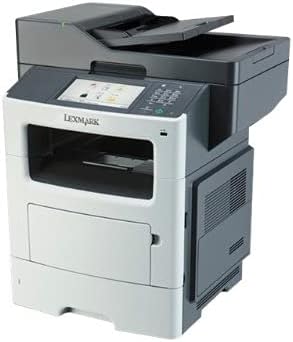
Rajah 1: Depan view of the Lexmark MX611DHE multifunction printer, showcasing its compact design and front-facing paper tray.
2. Panduan Persediaan
Follow these steps to set up your Lexmark MX611DHE printer for initial use.
- Membongkar: Carefully remove the printer from its packaging. Remove all protective tapes and packing materials from the exterior and interior of the device.
- penempatan: Place the printer on a stable, level surface with adequate ventilation. Ensure there is enough space around the printer for proper operation and maintenance.
- Sambungan Kuasa: Connect the power cord to the printer's power input and then to a grounded electrical outlet. Do not connect to a surge protector or extension cord initially.
- Pemuatan Kertas: Open the paper tray and load the appropriate paper size (up to 8.5 x 14 inches). Adjust the paper guides to fit the paper stack snugly.
- Network/USB Connection:
- For Network (Ethernet): Sambungkan kabel Ethernet daripada port Ethernet pencetak ke penghala atau suis rangkaian anda.
- Untuk USB: Sambungkan kabel USB dari port USB pencetak ke komputer anda.
- Kuasa Awal Hidup: Press the power button to turn on the printer. Follow the on-screen prompts on the touchscreen display to select language, region, and perform initial setup configurations.
- Pemasangan Pemandu: Install the necessary printer drivers on your computer. Drivers can typically be found on the Lexmark support website or on an included installation CD (if applicable).
3. Arahan Operasi
This section provides basic instructions for using the Lexmark MX611DHE's primary functions.
3.1. Mencetak
- Ensure the printer is powered on and connected to your computer or network.
- Buka dokumen yang ingin anda cetak pada komputer anda.
- Pilih File > Cetak (or the equivalent command in your application).
- Choose "Lexmark MX611DHE" from the list of available printers.
- Adjust print settings such as number of copies, paper size, and duplex options as needed.
- klik Cetak.
3.2. Menyalin
- Place the document face-down on the scanner glass or face-up in the automatic document feeder (ADF).
- On the printer's touchscreen, select the salin fungsi.
- Adjust settings such as number of copies, lightness/darkness, and paper size.
- Tekan ke Mulakan butang untuk mula menyalin.
3.3. Mengimbas

Figure 2: The Lexmark MX611DHE with its scanner lid open, revealing the flatbed scanner glass and the automatic document feeder mechanism.
- Letakkan dokumen di atas kaca pengimbas atau di dalam ADF.
- On the printer's touchscreen, select the Imbas fungsi.
- Choose your desired scan destination (e.g., Scan to Computer, Scan to Email, Scan to Network Folder).
- Konfigurasikan tetapan imbasan seperti resolusi, mod warna dan file format.
- Tekan ke Mulakan button to initiate the scan.
3.4. Faks
- Ensure the printer is connected to a telephone line.
- Letakkan dokumen di atas kaca pengimbas atau di dalam ADF.
- On the printer's touchscreen, select the Faks fungsi.
- Enter the recipient's fax number using the keypad on the control panel.
- Laraskan sebarang tetapan faks yang diperlukan.
- Tekan ke Mulakan butang untuk menghantar faks.
4. Penyelenggaraan
Regular maintenance ensures optimal performance and extends the lifespan of your Lexmark MX611DHE.
- Membersihkan Bahagian Luar: Gunakan yang lembut, damp, lint-free cloth to wipe the exterior surfaces of the printer. Avoid abrasive cleaners.
- Cleaning the Scanner Glass: For clear scans, regularly clean the scanner glass with a soft, lint-free cloth and a mild glass cleaner.
- Toner Cartridge Replacement: When the toner low message appears, order a new Lexmark toner cartridge. Follow the instructions provided with the new cartridge for proper installation.
- Paper Path Cleaning: If paper jams become frequent, consult the printer's internal guides or the Lexmark support website for instructions on cleaning the paper path rollers.
5. Penyelesaian masalah
This section addresses common issues you might encounter with your Lexmark MX611DHE.
| Masalah | Kemungkinan Punca | Penyelesaian |
|---|---|---|
| Pencetak tidak bertindak balas | Power cable disconnected, network issue, driver problem. | Check power connections. Verify network cable or USB connection. Reinstall printer drivers. |
| Kesesakan kertas | Incorrectly loaded paper, foreign object in paper path. | Open access covers and carefully remove jammed paper. Ensure paper is loaded correctly. |
| Kualiti cetakan buruk | Low toner, dirty print head/rollers, incorrect print settings. | Replace toner cartridge. Clean internal components as per maintenance guide. Adjust print quality settings in driver. |
| Pengimbas tidak berfungsi | Scanner glass dirty, software issue, connectivity problem. | Clean scanner glass. Restart computer and printer. Check USB/network connection. |
6. Spesifikasi
Detailed technical specifications for the Lexmark MX611DHE.
| Ciri | Perincian |
|---|---|
| Jenama | Lexmark |
| Nama Model | MX611DHE |
| Jenis Paparan | LCD (Touchscreen) |
| Teknologi Percetakan | Laser (Monokrom) |
| Kelajuan Cetakan Maks (Monokrom) | 50 ppm |
| Kelajuan Salin Maks (Hitam & Putih) | 50 ppm |
| Resolusi | 1200 x 1200 dpi |
| Kapasiti Penyimpanan Memori | 1024 MB |
| Sokongan Saiz Helaian | Up to 8.5 x 14 Inches |
| Antara Muka Perkakasan | USB-Ethernet |
| Dimensi Produk | 22.6 x 23.5 x 26.5 inci |
| warna | Kelabu/putih |
| UPC | 656942073611 |
7. Waranti dan Sokongan
Your Lexmark MX611DHE (Renewed) product is covered by a limited warranty and support resources.
- Waranti: Produk ini disertakan dengan a Waranti terhad 90 hari. Please refer to your purchase documentation for specific terms and conditions of the Amazon Renewed Guarantee.
- Sokongan Teknikal: For technical assistance, driver downloads, or further troubleshooting, please visit the official Lexmark support webtapak atau hubungi perkhidmatan pelanggan mereka.
- Sumber Dalam Talian: Additional user guides, FAQs, and firmware updates may be available on the Lexmark support portal.