
1. Pengenalan dan Lebihview
This manual provides detailed instructions for the operation and maintenance of your Casio G-Shock GMA-S2100-4A2DR Analog-Digital Watch. Designed for durability and functionality, this watch features a shock-resistant structure and 200-meter water resistance, making it suitable for various activities.
The GMA-S2100-4A2DR model features a compact and slim design, characterized by its octagonal bezel, flat face, and simple bar hour markers. It incorporates a Carbon Core Guard structure for enhanced protection.

Imej 1.1: Depan view of the Casio G-Shock GMA-S2100-4A2DR watch. This image displays the watch's pink analog-digital dial, octagonal bezel, and matching pink resin strap. The digital display shows "6.30" and "36".
2. Ciri-ciri Utama
- Paparan Analog-Digital: Combines traditional analog hands with a digital display for versatile timekeeping.
- Rintangan Kejutan: Built with G-Shock's renowned shock-resistant structure to withstand impacts and vibrations.
- Rintangan Air 200 Meter: Suitable for swimming, snorkeling, and other water sports, but not for deep diving.
- Carbon Core Guard Structure: Enhances durability and protection of the watch module.
- Lampu LED Berganda: Provides illumination for both the analog and digital displays in low-light conditions.
- Masa Dunia: Displays the current time in 31 time zones (48 cities + coordinated universal time).
- Jam randik: Jam randik 1/100 saat dengan kapasiti pengukur sehingga 23:59'59.99''.
- Pemasa undur: Measuring unit: 1 second; Countdown range: 24 hours.
- Penggera Harian: Five daily alarms with one snooze alarm.
- Ciri Anjakan Tangan: Moves the analog hands away from the digital display for easier viewing.
- Kaca Mineral: Durable and scratch-resistant dial glass material.
- Resin Case and Band: Lightweight and comfortable pink resin material.
3. Watch Components and Controls
Familiarize yourself with the main components and buttons of your watch:
- A (Adjust) Button: Digunakan untuk masuk dan keluar dari mod tetapan.
- B (Light) Button: Mengaktifkan lampu latar LED.
- C (Mode) Button: Cycles through different modes (Timekeeping, Stopwatch, Countdown Timer, Alarm, World Time).
- D (Start) Button: Used to start/stop stopwatch, set values, or toggle features.

Imej 3.1: Sebelah kiri view of the watch, highlighting the 'Adjust' and 'Mode' buttons on the left side of the case.
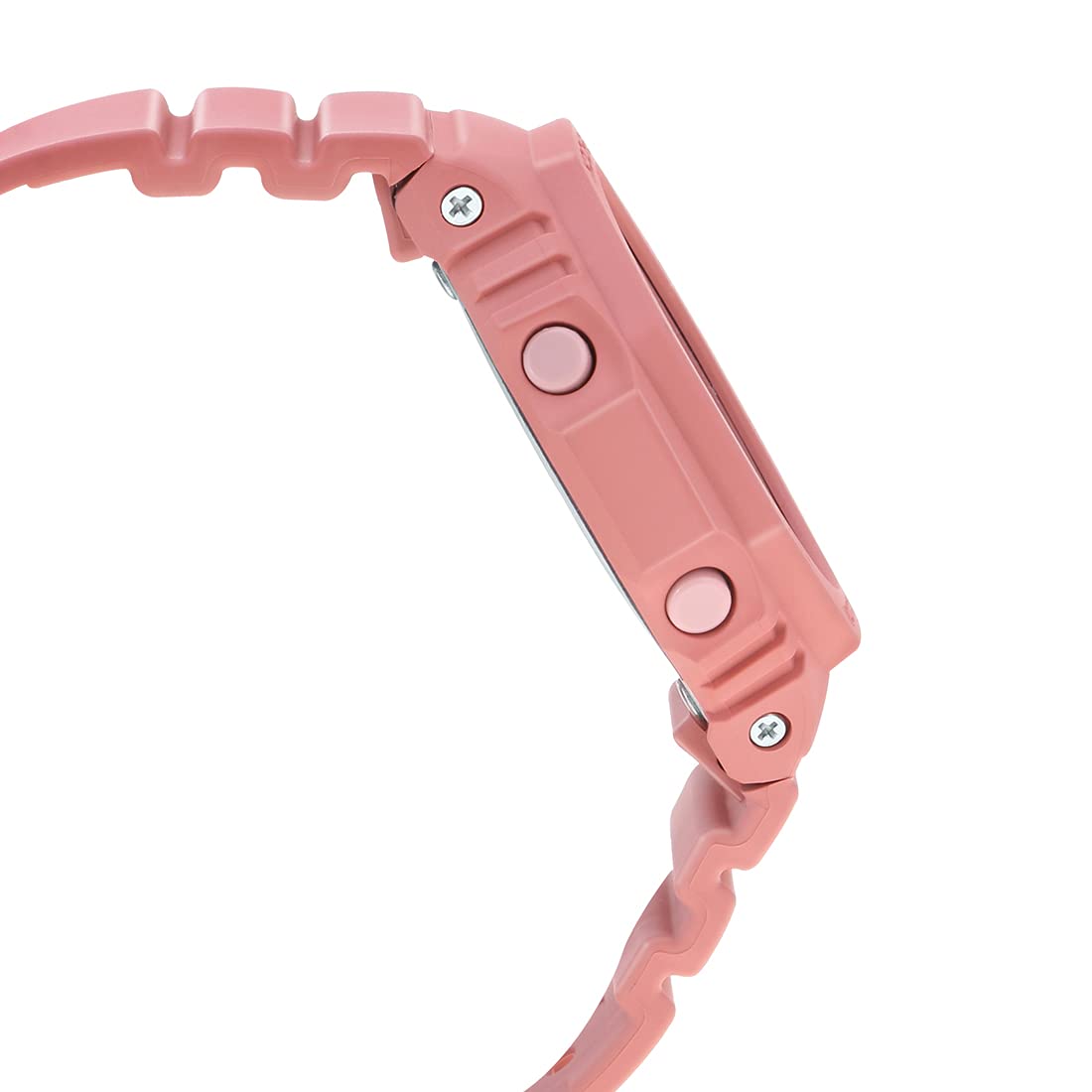
Imej 3.2: Sebelah kanan view of the watch, highlighting the 'Light' and 'Start' buttons on the right side of the case.
4. Persediaan Awal
4.1 Setting the Home City and Time Zone
- Dalam Mod Penjagaan Masa, tahan A (Laraskan) button until the city code starts to flash on the digital display.
- Gunakan D (Start) dan B (Light) butang untuk memilih kod Bandar Rumah yang anda inginkan.
- Tekan ke C (Mod) button to cycle through other settings like DST (Daylight Saving Time) and 12/24-hour format. Adjust these using D (Start) or B (Light).
- To set the digital time, press C (Mod) until the hour or minute digits flash. Use D (Start) dan B (Light) untuk menyesuaikan diri.
- Tekan A (Laraskan) to exit the setting mode. The analog hands will automatically adjust to the digital time.
4.2 Hand Home Position Correction
If the analog hands do not match the digital time, you may need to correct their home position:
- Dalam Mod Penjagaan Masa, tahan A (Laraskan) button for approximately five seconds until "H.SET" appears and the hour hand starts to flash.
- Gunakan D (Start) button to advance the minute hand and the B (Light) button to advance the hour hand until both are aligned at 12 o'clock.
- Tekan A (Laraskan) to confirm and exit. The hands will then move to the current time.
5. Operating the Watch Functions
5.1 Mod Navigasi
Tekan ke C (Mod) button to cycle through the different modes in the following order:
- Mod Penjagaan Masa
- Mod Waktu Dunia
- Mod Penggera
- Mod Pemasa Kiraan Balik
- Mod Jam Randik
5.2 Fungsi Jam randik
- Masuk ke Mod Jam Rangup dengan menekan butang C (Mod) butang.
- Tekan ke D (Start) butang untuk memulakan jam randik.
- Tekan D (Start) sekali lagi untuk berhenti.
- Tekan ke A (Laraskan) butang untuk menetapkan semula jam randik kepada sifar.
5.3 Pemasa Undur
- Masuk ke Mod Pemasa Undur dengan menekan butang C (Mod) butang.
- tahan A (Laraskan) button until the hour setting flashes.
- guna D (Start) dan B (Light) untuk menetapkan masa kira detik yang dikehendaki.
- Tekan A (Laraskan) untuk keluar dari mod tetapan.
- Tekan D (Start) to start the countdown. An alarm will sound when the countdown reaches zero.
5.4 Fungsi Penggera
- Masuk ke Mod Penggera dengan menekan butang C (Mod) butang.
- guna D (Start) to scroll through the five alarms (AL1 to AL5) and the snooze alarm (SNZ).
- To set an alarm, hold down the A (Laraskan) butang sehingga masa penggera berkelip.
- guna D (Start) dan B (Light) untuk menetapkan jam dan minit.
- Tekan A (Laraskan) untuk keluar dari mod tetapan.
- Tekan D (Start) untuk menghidupkan/mematikan penggera.
5.5 Waktu Dunia
- Masuk ke Mod Waktu Dunia dengan menekan butang C (Mod) butang.
- guna D (Start) dan B (Light) untuk menatal melalui kod bandar yang berbeza dan view zaman mereka sekarang.
- To swap your Home City time with the World Time City time, hold down the A (Laraskan) button for approximately three seconds.
5.6 Double LED Light
Tekan ke B (Light) button to illuminate the watch face. The illumination duration can be configured in the Timekeeping Mode settings.
5.7 Ciri Pergeseran Tangan
If the analog hands obstruct the digital display, press the C (Mod) dan D (Start) buttons simultaneously to temporarily move the hands. Press any button to return them to normal timekeeping.
6. Penyelenggaraan dan Penjagaan
6.1 Tahan Air
Your Casio G-Shock GMA-S2100-4A2DR is water-resistant up to 200 meters. This means it is suitable for recreational diving, swimming, snorkeling, and other water sports. However, it is bukan suitable for saturation diving.
- Jangan kendalikan butang semasa jam tangan basah atau tenggelam dalam air.
- Selepas terdedah kepada air masin, bilas jam tangan dengan air tawar dan lap sehingga kering.
- Avoid exposing the watch to hot water or steam, as this can damage seals.
6.2 Pembersihan
Untuk mengekalkan penampilan jam tangan anda:
- Wipe the watch case and band with a soft, dry cloth regularly.
- For stubborn dirt, use a soft brush with mild soap and water, then rinse thoroughly and dry.
- Avoid using chemical cleaners or solvents, as they can damage the resin materials.
6.3 Penggantian Bateri
The watch is powered by a Silver Oxide battery. When the display becomes dim or functions become erratic, it may be time for a battery replacement. It is recommended to have the battery replaced by an authorized Casio service center to ensure proper water resistance and functionality.
7. Penyelesaian masalah
- Masa yang salah: Ensure your Home City and DST settings are correct. Perform a Hand Home Position Correction if analog hands are misaligned.
- Paparan Kosong atau Malap: Bateri mungkin lemah. Pertimbangkan untuk menggantikan bateri secara profesional.
- Butang Tidak Menjawab: Ensure the watch is not in a locked mode (if applicable, though not a feature of this model). If wet, dry thoroughly before use.
- Jam Tangan Air Dalam: Segera bawa jam tangan ke pusat servis yang sah. Jangan cuba mengeringkannya sendiri.
8. Spesifikasi
| Ciri | Perincian |
|---|---|
| Nombor Model | GMA-S2100-4A2DR |
| Jenis Paparan | Analog-Digital |
| Bahan Kes | Resin (Carbon Core Guard Structure) |
| Bahan Band | damar |
| Bahan Kaca Dail | Kaca Mineral |
| Tahan Air | 200 meter |
| Sumber Kuasa | Battery Powered (Silver Oxide) |
| Dimensi (LxWxH) | 20.5 x 1.1 x 4.3 cm |
| Berat Barang | 41 g |
| Negara Asal | Thailand |

Imej 8.1: Watch dimensions illustration. This image provides a visual comparison of the watch's size (46.2 mm length) against a standard credit card (54 mm width).
9. Waranti dan Sokongan
Your Casio G-Shock GMA-S2100-4A2DR watch comes with a manufacturer's warranty. Please refer to the warranty card included with your purchase for specific terms and conditions, including warranty period and coverage details.
For technical support, service, or warranty claims, please contact an authorized Casio service center or visit the official Casio webtapak untuk maklumat hubungan.
10. Video Produk
10.1 Casio G-Shock GMA-S2100-4A2DR Product Overview
Video 10.1: Video ini memberikan gambaran umumview of the Casio G-Shock GMA-S2100-4A2DR watch, showcasing its design, color, and key features such as the resin case and band, round dial, and water resistance. It highlights the watch's suitability for casual wear.
10.2 Casio G-Shock GMA-S2100-4A2DR 360-Degree View
Video 10.2: This video offers a comprehensive 360-degree rotation view of the Casio G-Shock GMA-S2100-4A2DR watch, allowing users to observe its design from all angles, including the dial, case, strap, and buckle clasp.