
1. Pengenalan
The Alonefire SV38 is a powerful 5W 365nm UV LED flashlight designed for various professional and household applications. Its 365nm wavelength, combined with a black filter lens, ensures a pure ultraviolet output, making it effective for tasks such as detecting counterfeit documents, verifying currency, identifying pet urine stains, curing UV resin, and examining fluorescent minerals. This manual provides essential information for the safe and efficient use of your SV38 flashlight.

Figure 1: Alonefire SV38 UV LED Flashlight and USB-C charging cable.
2. Maklumat Keselamatan
AMARAN: Ultraviolet (UV) light can be harmful to eyes and skin. Please read and follow all safety precautions.
- Perlindungan Mata: Always wear UV protective eyewear when operating the flashlight to prevent eye damage. Do not look directly into the UV light source.
- Pendedahan Kulit: Avoid prolonged exposure of skin to UV light.
- Kanak-kanak dan Haiwan Kesayangan: Keep the flashlight out of reach of children and pets. Do not shine the light into their eyes.
- haba: The flashlight may generate heat during extended use. Handle with care.
- Keselamatan Bateri: Use only the specified battery type. Do not attempt to disassemble, short-circuit, or expose the battery to high temperatures.

Figure 2: Components of the SV38 flashlight, including the anodized aluminum alloy shell, power switch/charging indicator, spring contact, and back clip.
3. Persediaan
3.1 Pemasangan Bateri
- Tanggalkan penutup ekor lampu suluh.
- Insert the provided 2000mAh Lithium-ion battery with the positive (+) end facing towards the flashlight head (LED).
- Skru penutup ekor kembali dengan selamat.
3.2 Pengecasan Awal
Sebelum penggunaan pertama, cas sepenuhnya lampu suluh.
- Locate the USB Type-C charging port on the side of the flashlight.
- Connect the provided USB Type-C cable to the flashlight and the other end to a compatible USB power source (e.g., computer, power bank, wall adapter).
- The charging indicator light will illuminate red during charging. It will turn green when fully charged.

Figure 3: Charging indicator status. Red indicates charging or low battery, green indicates fully charged.
4. Operasi
4.1 Hidupkan/Mati Kuasa
- Press the power button located on the side of the flashlight to turn the UV light ON.
- Press the power button again to turn the UV light OFF.
4.2 Black UV Filter Lens
The SV38 is equipped with a hardened black optical filter lens. This lens is designed to filter out ambient visible light, ensuring that the emitted ultraviolet light is purer and more effective for detection tasks.

Figure 4: The black UV filter lens blocks undesired ambient light, making the UV output purer.
4.3 Aplikasi
The Alonefire SV38 UV flashlight can be used for various purposes:
- Pengesanan Palsu: Verify currency, passports, and other official documents with UV security features.
- Pengesanan Noda Haiwan Kesayangan: Locate invisible pet urine stains on carpets, rugs, and furniture.
- Mineral and Gemstone Inspection: Identify fluorescent minerals and authenticate amber.
- Resin Curing: Accelerate the curing process of UV-sensitive resins.
- Pengesanan Kebocoran: Detect leaks in HVAC systems, automotive, and industrial machinery when used with UV dye.
- Scorpion Spotting: Scorpions fluoresce under UV light, making them visible in dark environments.
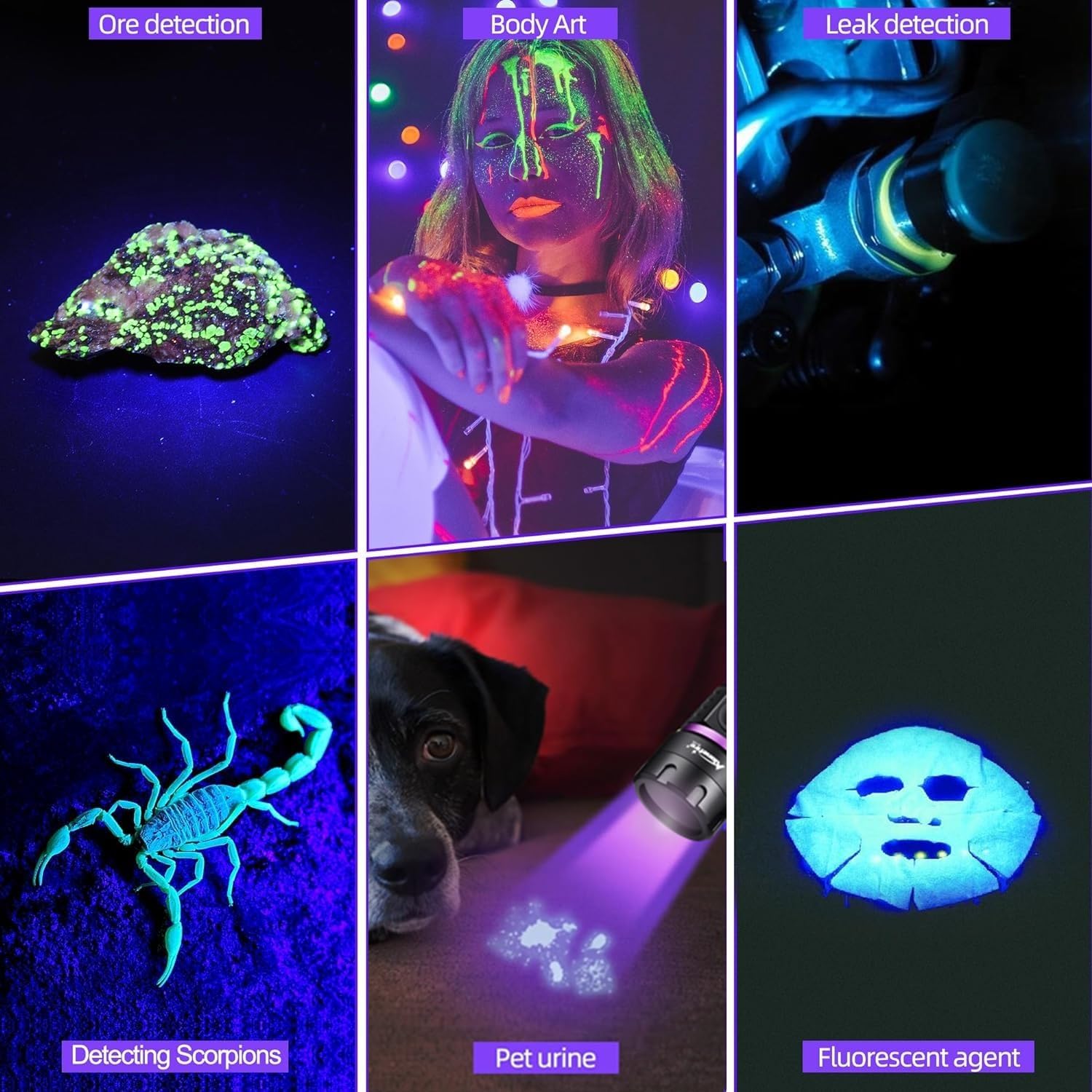
Gambar 5: Cthamples of SV38 UV flashlight applications.

Figure 6: Detecting pet urine stains with the UV flashlight.
5. Penyelenggaraan
- Pembersihan: Lap badan lampu suluh dengan lembut, damp kain. Jangan gunakan pembersih atau pelarut yang melelas.
- Penjagaan Lensa: Gently clean the lens with a lens cleaning cloth to maintain optimal UV output.
- Penjagaan Bateri: Jika lampu suluh tidak akan digunakan untuk tempoh yang lama, tanggalkan bateri untuk mengelakkan kebocoran. Cas semula bateri setiap 3-6 bulan untuk mengekalkan jangka hayatnya.
- Storan: Simpan lampu suluh di tempat yang sejuk dan kering jauh dari cahaya matahari langsung dan suhu yang melampau.
6. Penyelesaian masalah
| Masalah | Kemungkinan Punca | Penyelesaian |
|---|---|---|
| Lampu suluh tidak menyala. | Low battery or battery incorrectly installed. | Charge the battery or ensure it is installed with the correct polarity. |
| UV light appears dim. | Bateri lemah atau kanta kotor. | Cas semula bateri. Bersihkan kanta dengan kain lembut. |
| Penunjuk pengecasan tidak berfungsi. | Kabel USB atau sumber kuasa yang rosak. | Try a different USB cable or power source. Ensure the cable is fully inserted. |
| Lampu suluh menjadi panas semasa digunakan. | Normal operation for high-power LED. | This is normal. If it becomes excessively hot, turn it off and allow it to cool. Avoid prolonged continuous use. |
7. Spesifikasi
| Ciri | Perincian |
|---|---|
| Jenama | SENDIRIAN |
| Nombor Model | SV38 |
| Jenis Sumber Cahaya | UV LED (365nm) |
| Penggunaan Kuasa | 5W |
| bahan | Aloi Aluminium |
| warna | Hitam |
| Jenis Bateri | 1 x 2000mAh Lithium-ion (included) |
| Port Pengecasan | USB Jenis-C |
| Ciri Khas | Durable, Lightweight, Rechargeable, Black Filter Lens |
| Dimensi Produk | Kira-kira 14.5 x 7.3 x 3.3 cm |
| Berat Barang | Kira-kira 105 g |
8. Waranti dan Sokongan
Alonefire products are manufactured to high-quality standards. For warranty information or technical support, please refer to the seller's return policy or contact Alonefire customer service through their official channels. Spare parts availability is guaranteed for 5 years.