
1. Pengenalan
This manual provides essential information for the installation, operation, maintenance, and troubleshooting of your Sophos XGS 107 Next-Gen Firewall. The Sophos XGS 107 is designed to deliver robust network security with advanced threat protection capabilities for small to medium businesses and branch offices.
2. Apa yang ada di dalam Kotak
Verify that all components are present in your Sophos XGS 107 package:
- Sophos XGS 107 Next-Gen Firewall Appliance
- Kord Kuasa AS
- Base License (pre-activated for 1 year)
- Network Protection (1-year subscription)
- Web Protection (1-year subscription)
- Enhanced Support (1-year subscription)
- Xstream TLS and DPI engine
- Security Heartbeat functionality
- SD-RED VPN capabilities
- Reporting features
3. Persediaan
3.1 Pemasangan Fizikal
Place the Sophos XGS 107 on a stable, flat surface in a well-ventilated area. Ensure adequate space around the device for proper airflow. Connect the power cord to the appliance and a suitable power outlet.
3.2 Pengenalan Pelabuhan
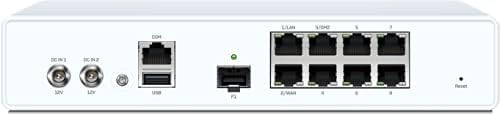
Familiarize yourself with the ports on the rear panel of the Sophos XGS 107:

The front panel includes status LEDs and additional USB ports:
3.3 Sambungan Rangkaian Awal
- Connect your internet service provider's modem or router to the WAN port (typically Port 2) on the Sophos XGS 107.
- Connect a computer to one of the LAN ports (e.g., Port 1) using an Ethernet cable for initial configuration.
- Power on the device. Wait for the system status LED to indicate readiness.
3.4 Akses Konfigurasi Awal
Access the Sophos Firewall web administration interface by opening a web browser on the connected computer and navigating to the default IP address (e.g., https://172.16.16.16). Follow the on-screen wizard for initial setup, including setting up administrator credentials and basic network parameters.
4. Arahan Operasi
The Sophos XGS 107 operates on Sophos proprietary OS, offering a comprehensive suite of security features. The device is designed for ease of management through its webantara muka berasaskan.
4.1 Xstream Protection Bundle
The XGS 107 comes with the Xstream Protection bundle, providing advanced security features. This bundle includes:

- Base Firewall Features: Networking, Wireless, SD-WAN, Application Aware Routing, Traffic Shaping, FastPath, TLS 1.3 Inspection, Deep-Packet Inspection, VPN (IPsec/SSL Site-to-Site and Remote Access VPN), and Reporting.
- Perlindungan Rangkaian: Xstream TLS Inspection, Xstream DPI engine, IPS (Intrusion Prevention System), Advanced Threat Protection, Synchronized Security Heartbeat, SD-RED VPN.
- Web Perlindungan: Xstream TLS Inspection, Web Kawalan, Web Threat Protection, Application Control, Synchronized App Control.
- Zero-Day Protection: Xstream TLS Inspection, Xstream DPI engine, Zero-Day Threat Protection, Powered by SophosLabs Intelix, Cloud Sandbox.
- Sophos Central Management & Orchestration: Group Firewall Management, backup/firmware updates, SD-WAN Orchestration, Cloud Reporting, XDR and MTR Ready.
- Sokongan Dipertingkatkan: 24/7 support, feature updates, advanced replacement hardware warranty.
4.2 Detailed Protection Modules
For a comprehensive understanding of each protection module and its capabilities, refer to the detailed descriptions provided:

This image provides information on Base Firewall, Network Protection, Web Protection, Zero-Day Protection, Central Orchestration, Email Protection, and Web Server Protection, outlining their respective features and benefits.
5. Penyelenggaraan
5.1 Kemas Kini Perisian
Regularly check for and apply firmware updates through the Sophos Firewall web administration interface. Updates provide new features, security patches, and performance improvements. Ensure a stable internet connection during the update process.
5.2 Sandaran dan Pemulihan Konfigurasi
It is recommended to regularly back up your firewall configuration. This allows for quick restoration of settings in case of an issue or during device replacement. Configuration backups can be managed via the web antara muka.
5.3 Pembersihan Fizikal
Periodically clean the exterior of the appliance with a soft, dry cloth. Ensure ventilation openings are free from dust and obstructions to maintain optimal cooling.
6. Penyelesaian masalah
6.1 Penunjuk LED Status
Refer to the front panel LEDs (Figure 2) to diagnose basic operational status:
- LED Status Sistem: Indicates the overall health and operational state of the device.
- LED Pautan/Aktiviti: Show network link status and data activity for each port.
- LED Kelajuan: Indicate the connection speed of each port.
Consult the Sophos documentation for detailed LED behavior and their corresponding meanings.
6.2 Butang Tetapkan Semula
A reset button is located on the rear panel (Figure 1). Pressing this button for a short duration may initiate a soft reboot. Holding it for an extended period (typically 10 seconds or more) may restore the device to factory default settings. Use with caution, as this will erase all configurations.
6.3 Isu Ketersambungan Rangkaian
If you experience network connectivity problems:
- Verify all network cables are securely connected.
- Check the status of your internet service provider's equipment.
- Ensure the Sophos XGS 107 has power and its system status LED is normal.
- Review your firewall rules and network configuration in the web antara muka pentadbiran.
7. Spesifikasi
The following table outlines the technical specifications for the Sophos XGS 107 Next-Gen Firewall:

| Ciri | Perincian |
|---|---|
| Jenama | Sophos |
| Model | XGS 107 |
| Throughput Firewall | 7,000 Mbps |
| Daya pemprosesan VPN | 2,030 Mbps |
| Throughput Perlindungan Ancaman | 330 Mbps |
| Lebar Jalur Pelabuhan LAN | 7 Gbps |
| Bilangan Pelabuhan | 13 (including 8x 2.5GE, 1x SFP, 2x USB, 1x COM) |
| Standard Komunikasi Tanpa Wayar | 802.11n (if applicable for XGS 107w variant) |
| Sistem Operasi | Sophos proprietary OS |
| Berat Barang | 8 paun |
| Komponen yang Disertakan | 1-Year Protection, US Power Cord, Base License, Network Protection, Web Protection, Enhanced Support, Xstream TLS and DPI engine, Security Heartbeat, SD-RED VPN, Reporting |
For a comparison of XGS series appliances and their performance metrics, refer to the product matrix:

8. Waranti dan Sokongan
Your Sophos XGS 107 Next-Gen Firewall includes a 1-year Standard Protection bundle, which provides:
- Lesen Asas
- Perlindungan Rangkaian
- Web Perlindungan
- Sokongan yang Dipertingkatkan
Enhanced Support includes 24/7 technical assistance and an advanced replacement hardware warranty. For detailed terms and conditions of your warranty and support services, please refer to the official Sophos website or contact your Sophos reseller.
8.1 Menghubungi Sokongan
For technical assistance, visit the official Sophos support portal or contact Sophos customer service. Ensure you have your product serial number and license information available when seeking support.