
1. Pengenalan
Thank you for choosing the PROXTEND X502 Full HD Webcam. This manual provides detailed instructions to help you set up, operate, and maintain your webcam for optimal performance. The X502 is designed to deliver clear 1080p video at 30 frames per second, featuring an omni-directional microphone and automatic low light correction for various lighting conditions.
2. Kandungan Pakej
Sila sahkan bahawa semua item terdapat dalam pakej anda:
- PROXTEND X502 HD Penuh Webcam (PX-CAM007)
- Integrated Universal Mounting Clip
- Manual Pengguna (dokumen ini)
3. Persediaan
Follow these steps to set up your PROXTEND X502 Webcam:
- Memasang Webcam:
The webcam features an integrated universal mounting clip. You can place the webcam on top of your computer monitor, laptop screen, or a flat surface. Adjust the clip to securely hold the webcam in position. The webcam also supports mini tripod mounting (tripod not included).
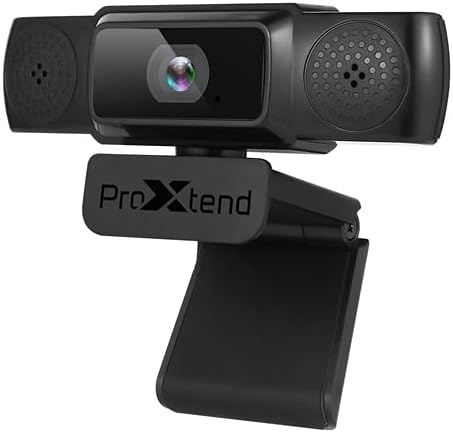
Image: The PROXTEND X502 Full HD Webcam shown with its universal mounting clip, suitable for monitors or flat surfaces.
- Menyambung ke Komputer Anda:
Pasangkan kabel USB daripada webcam ke dalam port USB yang tersedia pada komputer anda. The webcam is plug-and-play, meaning your operating system should automatically detect and install the necessary drivers. No additional software installation is typically required.
- Driver Installation Verification:
After connecting, allow a few moments for your computer to recognize the device. You can verify successful installation in your operating system's Device Manager (Windows) or System Information (macOS) under 'Cameras' or 'Imaging Devices'.
4. Arahan Operasi
Sebaik sahaja webcam is set up, you can begin using it with various applications:
- Memilih Webcam:
Open your preferred video conferencing, streaming, or recording application (e.g., Zoom, Microsoft Teams, Skype, OBS Studio). Navigate to the application's video and audio settings. Select "PROXTEND X502" as your camera and microphone input device.

Imej: Depan view of the PROXTEND X502 Full HD Webcam, highlighting the lens and integrated microphones.
- Kualiti Video:
The webcam automatically adjusts for optimal image quality, including auto-focus and auto low light correction. Ensure adequate lighting for the best video performance. The 1920x1080p resolution at 30fps provides clear and smooth video.
- Kualiti Audio:
The integrated omni-directional microphone captures sound from all directions. Position yourself appropriately to ensure your voice is clearly picked up. Most applications allow you to adjust microphone input levels in their audio settings.
5. Ciri-ciri
Key features of the PROXTEND X502 Full HD Webcam include:
- Sensor gambar CMOS 1 / 2.7 "
- 2 Megapiksel
- Resolution: 1920x1080 at 30 frames per second
- Mikrofon omni-arah
- Klip Pemasangan Universal
- Mini Tripod Support
- Pembetulan cahaya rendah automatik
6. Spesifikasi
Detailed technical specifications for the PROXTEND X502 Full HD Webcam:

Image: A visual representation of the PROXTEND X502 Full HD Webcam's key features and technical specifications.
| Ciri | Spesifikasi |
|---|---|
| Penderia Imej | 1/2.7" CMOS Image Sensor |
| Megapiksel | 2 MP |
| Resolusi Maks | 1920x1080 |
| Resolusi Video | 1920x1080 |
| FPS Maksimum | 30 fps |
| Format Penyahkodan Video | H.264/MJPG |
| Mod Pendedahan | Auto |
| Imbangan Putih | Auto |
| Keuntungan | Auto |
| Pampasan Cahaya Rendah | Auto |
| Viewsudut | 77° |
| Jarak Fokus | 10 cm hingga tak terhingga |
| Jenis Fokus | Auto |
| Mikrofon | Omni-arah |
| Audio SampKadar ling | 1 Saluran 16bit 16K 32K 44.1K 48K |
| Format Audio | PCM, UAC 1.0 yang serasi |
| Antara muka | USB 2.0 |
| Panjang Kabel | 1.5 m |
| OS yang serasi | Windows XP, Windows 7 (32bit/64bit), Windows 8, Windows 10, Android V5.0 or higher OS, MAC OS 10.6 or higher |
| Dimensi Produk | 12.7 x 7.62 x 5.08 cm |
| Berat Produk | 453.59 g |
7. Penyelesaian masalah
If you encounter issues with your PROXTEND X502 Webcam, cuba penyelesaian berikut:
- Tiada Imej/Video:
- Pastikan kabel USB disambungkan dengan selamat ke kedua-dua webcam dan komputer anda.
- Cuba port USB lain pada komputer anda.
- Mulakan semula komputer anda.
- Check your application's settings to ensure the PROXTEND X502 is selected as the video input.
- Verify that no other application is currently using the webcam.
- Tiada Audio/Mikrofon Tidak Berfungsi:
- Ensure the PROXTEND X502 is selected as the microphone input in your application's audio settings.
- Check your computer's sound settings to ensure the microphone is enabled and not muted.
- Adjust the microphone input level in your system or application settings.
- Kualiti Video Lemah:
- Ensure sufficient lighting in your environment.
- Bersihkan webcam lens gently with a soft, lint-free cloth.
- Check your internet connection speed if streaming, as bandwidth can affect video quality.
8. Penyelenggaraan
Untuk memastikan jangka hayat dan prestasi optimum anda webcam:
- Pembersihan: Lap dengan lembut webcam lens with a soft, dry, lint-free cloth. Avoid using harsh chemicals or abrasive materials.
- Storan: Apabila tidak digunakan, simpan websimpan di tempat yang bersih dan kering, jauh daripada suhu ekstrem dan cahaya matahari langsung.
- Pengendalian: Elakkan menjatuhkan webcam or subjecting it to strong impacts.
9. Waranti dan Sokongan
The PROXTEND X502 Full HD Webcam datang dengan a Waranti 7 tahun, ensuring peace of mind regarding your purchase. For warranty claims, technical support, or any inquiries not covered in this manual, please refer to the contact information provided with your product packaging or visit the official PROXTEND webtapak.
10. Maklumat Pematuhan
This device complies with relevant regulatory standards for electronic equipment. For detailed compliance information, please refer to the product packaging or the official PROXTEND webtapak.